
Solved Force Task Manager "Show processes from all users" always enabled.

Manigue

New member
Pro User
Local time
6:04 AM
Messages
189
Location
Pocomoke City, Maryland
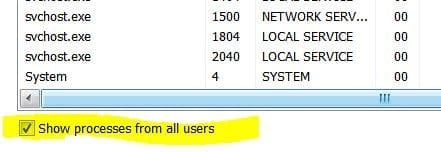
Force Task Manager "Show processes from all users" always enabled.

Is there a way to force Task Manager to open with the "Show processes from all users" option enabled?

I created a shortcut and added "/1" (without quotes) in the property target line but it did not work. (I know, one click will accomplish this but I just like to tweak!)

Disregard.

Found Brink's post of 05-18-2009 on same subject. Followed his directions and worked like a charm.

Thanks Brink !
 

Attachments
  • TaskMgrOpt.JPG
    TaskMgrOpt.JPG
    18.7 KB · Views: 63

My Computer

Computer type
PC/Desktop
Computer Manufacturer/Model Number
DIY Re-built.
OS
Windows 7 Home Premium 64Bits SP1
CPU
Intel i7-920
Motherboard
ASUS P6TD Deluxe
Memory
12 Gb (6x2GB Corsair XMS TR3X3G1600C9 G) Tri Channels
Graphics Card(s)
ASUS GTX-970 Turbo
Sound Card
ASUS On Board SoundMax
Monitor(s) Displays
Samsung UN46D6500 46" TV
Screen Resolution
1920x1080
Hard Drives
1 OCZ SSD Agility Sata III 120Gb
1 Samsung 1Tb
1 Samsung 750Gb
1 Western Digital 500Gb(Mounted in ext eSata case)
PSU
Enermax CUG-950W
Case
Full ATX (Generic)
Cooling
Fans (6) 80mm
Keyboard
Saitek Eclipse II
Mouse
Cyborg R.A.T-5
Internet Speed
Comcast 105.0 MBPS
Antivirus
AVG
Browser
Waterfox v40.02(x64)
Other Info
- Logitech X-530 5.1 Sound speakers.
- APC ES-1300.
- Arris TG862G/CT Modem/Router.
- Samsung BD-083A Blue Ray Player
- Lite On iHBS212 Blue Ray Burner
- Nippon Labs All-In-One Card Reader/Writer W/USB & eSata

My Computer

Computer type
PC/Desktop
Computer Manufacturer/Model Number
Self built custom
OS
64-bit Windows 11 Pro for Workstations
CPU
Intel i7-8700K OC'd to 5 GHz
Motherboard
ASUS ROG Maximus XI Formula Z390
Memory
64 GB (4x16GB) G.SKILL TridentZ RGB DDR4 3600 MHz
Graphics Card(s)
ASUS ROG-STRIX-GTX1080TI-O11G-GAMING
Sound Card
Integrated
Monitor(s) Displays
2 x Samsung Odyssey G7 27"
Screen Resolution
2560x1440
Hard Drives
1TB Samsung 990 PRO M.2,
4TB Samsung 990 PRO PRO M.2,
TerraMaster F8 SSD Plus NAS
PSU
Seasonic Prime Titanium 850W
Case
Thermaltake Core P3
Cooling
Corsair Hydro H115i
Keyboard
Logitech wireless K800
Mouse
Logitech MX Master 4
Internet Speed
2 Gb/s Download and 100 Mb/s Upload
Antivirus
Malwarebyte Anti-Malware Premium
Browser
Google Chrome
Other Info
Logitech Z625 speaker system,
Logitech BRIO 4K Pro webcam,
HP Color LaserJet Pro MFP M477fdn,
APC SMART-UPS RT 1000 XL - SURT1000XLI,
Galaxy S23 Plus phone

My Computer

Computer type
PC/Desktop
Computer Manufacturer/Model Number
DIY Re-built.
OS
Windows 7 Home Premium 64Bits SP1
CPU
Intel i7-920
Motherboard
ASUS P6TD Deluxe
Memory
12 Gb (6x2GB Corsair XMS TR3X3G1600C9 G) Tri Channels
Graphics Card(s)
ASUS GTX-970 Turbo
Sound Card
ASUS On Board SoundMax
Monitor(s) Displays
Samsung UN46D6500 46" TV
Screen Resolution
1920x1080
Hard Drives
1 OCZ SSD Agility Sata III 120Gb
1 Samsung 1Tb
1 Samsung 750Gb
1 Western Digital 500Gb(Mounted in ext eSata case)
PSU
Enermax CUG-950W
Case
Full ATX (Generic)
Cooling
Fans (6) 80mm
Keyboard
Saitek Eclipse II
Mouse
Cyborg R.A.T-5
Internet Speed
Comcast 105.0 MBPS
Antivirus
AVG
Browser
Waterfox v40.02(x64)
Other Info
- Logitech X-530 5.1 Sound speakers.
- APC ES-1300.
- Arris TG862G/CT Modem/Router.
- Samsung BD-083A Blue Ray Player
- Lite On iHBS212 Blue Ray Burner
- Nippon Labs All-In-One Card Reader/Writer W/USB & eSata
You're most welcome. :)
 

My Computer

Computer type
PC/Desktop
Computer Manufacturer/Model Number
Self built custom
OS
64-bit Windows 11 Pro for Workstations
CPU
Intel i7-8700K OC'd to 5 GHz
Motherboard
ASUS ROG Maximus XI Formula Z390
Memory
64 GB (4x16GB) G.SKILL TridentZ RGB DDR4 3600 MHz
Graphics Card(s)
ASUS ROG-STRIX-GTX1080TI-O11G-GAMING
Sound Card
Integrated
Monitor(s) Displays
2 x Samsung Odyssey G7 27"
Screen Resolution
2560x1440
Hard Drives
1TB Samsung 990 PRO M.2,
4TB Samsung 990 PRO PRO M.2,
TerraMaster F8 SSD Plus NAS
PSU
Seasonic Prime Titanium 850W
Case
Thermaltake Core P3
Cooling
Corsair Hydro H115i
Keyboard
Logitech wireless K800
Mouse
Logitech MX Master 4
Internet Speed
2 Gb/s Download and 100 Mb/s Upload
Antivirus
Malwarebyte Anti-Malware Premium
Browser
Google Chrome
Other Info
Logitech Z625 speaker system,
Logitech BRIO 4K Pro webcam,
HP Color LaserJet Pro MFP M477fdn,
APC SMART-UPS RT 1000 XL - SURT1000XLI,
Galaxy S23 Plus phone
Regedit

I found a different way of doing this. My issue was not that I needed it to run automatically, my issue is with the premise of having to click on a button when I needed the task manager. As I see it, the task manager is something you use when your computer is hanging up or not acting properly. Sometimes you are lucky if you get it to come up at all, so the less steps you have to take to see the process overrunning your computer the better.

To this end, I was very disappointed when ctrl-alt-delete no longer directly brought up the task manager, but brought up some frilly screen with non-debugging functions. Anyway, to the point-

I found that if you add a registry key under
HKEY_CURRENT_USER\Software\Microsoft\Windows NT\CurrentVersion\AppCompatFlags\Layers
of
C:\Windows\System32\taskmgr.exe with a value of RUNASADMIN
then the task manager will always run as administrator.

My only issue with this method is that it seemed to have broken the ctrl-shift-esc hotkey of pulling up the task manager. So I am kind of back to square one with trying to access the taskmanager in one step. Does anyone know anything about this?

Brink, you might say this method is not supported, but do you know of a better way? Do you know any troubleshooting I can take to reactivate this hotkey? Or is this just a bug (known or unknown) of adding this registry key?
 
Last edited:

My Computer

Computer type
PC/Desktop
Computer Manufacturer/Model Number
Dell or Custom build, depending on if I'm at work or home
OS
Windows 7 Pro x64
I have tried disabling UAC, but it didn't help.

The weird part is, I think the hotkey is still trying to work; the mouse flashes the loading system for a second. Just nothing comes up.
 

My Computer

Computer type
PC/Desktop
Computer Manufacturer/Model Number
Dell or Custom build, depending on if I'm at work or home
OS
Windows 7 Pro x64
Hello Jack, and welcome to Seven Forums.

Did you already see if the shortcut in the tutorial below may work instead for you?

The shortcut will need to remain on either the taskbar or desktop for the keyboard shortcut you assigned to it to work.

http://www.sevenforums.com/tutorials/10499-task-manager-create-elevated-shortcut.html


If you did, then you might see if running a sfc /scannow command may help. You may need to run it up to 3 times with a restart between each time.

Hope this helps, :)
Shawn
 

My Computer

Computer type
PC/Desktop
Computer Manufacturer/Model Number
Self built custom
OS
64-bit Windows 11 Pro for Workstations
CPU
Intel i7-8700K OC'd to 5 GHz
Motherboard
ASUS ROG Maximus XI Formula Z390
Memory
64 GB (4x16GB) G.SKILL TridentZ RGB DDR4 3600 MHz
Graphics Card(s)
ASUS ROG-STRIX-GTX1080TI-O11G-GAMING
Sound Card
Integrated
Monitor(s) Displays
2 x Samsung Odyssey G7 27"
Screen Resolution
2560x1440
Hard Drives
1TB Samsung 990 PRO M.2,
4TB Samsung 990 PRO PRO M.2,
TerraMaster F8 SSD Plus NAS
PSU
Seasonic Prime Titanium 850W
Case
Thermaltake Core P3
Cooling
Corsair Hydro H115i
Keyboard
Logitech wireless K800
Mouse
Logitech MX Master 4
Internet Speed
2 Gb/s Download and 100 Mb/s Upload
Antivirus
Malwarebyte Anti-Malware Premium
Browser
Google Chrome
Other Info
Logitech Z625 speaker system,
Logitech BRIO 4K Pro webcam,
HP Color LaserJet Pro MFP M477fdn,
APC SMART-UPS RT 1000 XL - SURT1000XLI,
Galaxy S23 Plus phone
Further Question about Windows Task Manager

Hello Manuel,

In addition, you could use the shortcut below to have this. The "Show processes from all users" option just runs Task Manager as elevated (Run as administrator).

http://www.sevenforums.com/tutorials/10499-task-manager-create-elevated-shortcut.html

Hope this helps,
Shawn

Hello Shawn,

Great help. It worked perfectly.

One further question: How can I keep the task bar icon small all the time? What I mean is this. When WTM is minimized, the icon in the task bar is very small (narrow). But when WTM is displayed (Normal or Maximum size), its task bar icon is large (wide). I don't need (or want or have any reason for) it to be large (wide)...small (narrow) is fine all the time whether minimized or not.

Please see attachments.

Thanks for any help on this one.

Fred
 

Attachments

  • Small.JPG
    Small.JPG
    1 KB · Views: 47
  • Large.JPG
    Large.JPG
    3.6 KB · Views: 48

My Computer

Computer type
PC/Desktop
OS
Windows 7 Ultimate x64

My Computer

Computer type
PC/Desktop
Computer Manufacturer/Model Number
Self built custom
OS
64-bit Windows 11 Pro for Workstations
CPU
Intel i7-8700K OC'd to 5 GHz
Motherboard
ASUS ROG Maximus XI Formula Z390
Memory
64 GB (4x16GB) G.SKILL TridentZ RGB DDR4 3600 MHz
Graphics Card(s)
ASUS ROG-STRIX-GTX1080TI-O11G-GAMING
Sound Card
Integrated
Monitor(s) Displays
2 x Samsung Odyssey G7 27"
Screen Resolution
2560x1440
Hard Drives
1TB Samsung 990 PRO M.2,
4TB Samsung 990 PRO PRO M.2,
TerraMaster F8 SSD Plus NAS
PSU
Seasonic Prime Titanium 850W
Case
Thermaltake Core P3
Cooling
Corsair Hydro H115i
Keyboard
Logitech wireless K800
Mouse
Logitech MX Master 4
Internet Speed
2 Gb/s Download and 100 Mb/s Upload
Antivirus
Malwarebyte Anti-Malware Premium
Browser
Google Chrome
Other Info
Logitech Z625 speaker system,
Logitech BRIO 4K Pro webcam,
HP Color LaserJet Pro MFP M477fdn,
APC SMART-UPS RT 1000 XL - SURT1000XLI,
Galaxy S23 Plus phone
Thanks Shawn for the quick reply.

I'd prefer to NOT EVER have the task bar icons combined under any circumstances. I just want this one icon to NEVER show its label (assuming the label is what's causing it to be "Large/Wide." Is this possible?
 

My Computer

Computer type
PC/Desktop
OS
Windows 7 Ultimate x64
Thanks Shawn for the quick reply.

I'd prefer to NOT EVER have the task bar icons combined under any circumstances. I just want this one icon to NEVER show its label (assuming the label is what's causing it to be "Large/Wide." Is this possible?

Fred,

In that case, you could reduce the width of the taskbar buttons to a size you like where it doesn't show the label to show like an icon, but still set to "never combine". You may need to play with different sizes to find the sweet spot though.

http://www.sevenforums.com/tutorials/21233-taskbar-change-icon-button-width-size.html
 
Last edited:

My Computer

Computer type
PC/Desktop
Computer Manufacturer/Model Number
Self built custom
OS
64-bit Windows 11 Pro for Workstations
CPU
Intel i7-8700K OC'd to 5 GHz
Motherboard
ASUS ROG Maximus XI Formula Z390
Memory
64 GB (4x16GB) G.SKILL TridentZ RGB DDR4 3600 MHz
Graphics Card(s)
ASUS ROG-STRIX-GTX1080TI-O11G-GAMING
Sound Card
Integrated
Monitor(s) Displays
2 x Samsung Odyssey G7 27"
Screen Resolution
2560x1440
Hard Drives
1TB Samsung 990 PRO M.2,
4TB Samsung 990 PRO PRO M.2,
TerraMaster F8 SSD Plus NAS
PSU
Seasonic Prime Titanium 850W
Case
Thermaltake Core P3
Cooling
Corsair Hydro H115i
Keyboard
Logitech wireless K800
Mouse
Logitech MX Master 4
Internet Speed
2 Gb/s Download and 100 Mb/s Upload
Antivirus
Malwarebyte Anti-Malware Premium
Browser
Google Chrome
Other Info
Logitech Z625 speaker system,
Logitech BRIO 4K Pro webcam,
HP Color LaserJet Pro MFP M477fdn,
APC SMART-UPS RT 1000 XL - SURT1000XLI,
Galaxy S23 Plus phone
Shawn,

My ideal solution is to just affect this one button, not all task bar buttons. Using the "Change Icon Button Width Size" registry key concept, can the reg key have an argument (or equivalent) that will affect ONLY the button I nominate (in this case, the WTM)? If not, is there any other solution to just affect a single button (to not display its label)?
 

My Computer

Computer type
PC/Desktop
OS
Windows 7 Ultimate x64
I'm afraid not. It's a global setting for all taskbar buttons. :(
 

My Computer

Computer type
PC/Desktop
Computer Manufacturer/Model Number
Self built custom
OS
64-bit Windows 11 Pro for Workstations
CPU
Intel i7-8700K OC'd to 5 GHz
Motherboard
ASUS ROG Maximus XI Formula Z390
Memory
64 GB (4x16GB) G.SKILL TridentZ RGB DDR4 3600 MHz
Graphics Card(s)
ASUS ROG-STRIX-GTX1080TI-O11G-GAMING
Sound Card
Integrated
Monitor(s) Displays
2 x Samsung Odyssey G7 27"
Screen Resolution
2560x1440
Hard Drives
1TB Samsung 990 PRO M.2,
4TB Samsung 990 PRO PRO M.2,
TerraMaster F8 SSD Plus NAS
PSU
Seasonic Prime Titanium 850W
Case
Thermaltake Core P3
Cooling
Corsair Hydro H115i
Keyboard
Logitech wireless K800
Mouse
Logitech MX Master 4
Internet Speed
2 Gb/s Download and 100 Mb/s Upload
Antivirus
Malwarebyte Anti-Malware Premium
Browser
Google Chrome
Other Info
Logitech Z625 speaker system,
Logitech BRIO 4K Pro webcam,
HP Color LaserJet Pro MFP M477fdn,
APC SMART-UPS RT 1000 XL - SURT1000XLI,
Galaxy S23 Plus phone
Shawn,

Kudos to you for answering each of my questions.

I really appreciate the fast replies.

Don't know why I haven't used this forum until now, but I'll definitely use this forum in the future.

Fred :geek:
 

My Computer

Computer type
PC/Desktop
OS
Windows 7 Ultimate x64
You're most welcome Fred. :)
 

My Computer

Computer type
PC/Desktop
Computer Manufacturer/Model Number
Self built custom
OS
64-bit Windows 11 Pro for Workstations
CPU
Intel i7-8700K OC'd to 5 GHz
Motherboard
ASUS ROG Maximus XI Formula Z390
Memory
64 GB (4x16GB) G.SKILL TridentZ RGB DDR4 3600 MHz
Graphics Card(s)
ASUS ROG-STRIX-GTX1080TI-O11G-GAMING
Sound Card
Integrated
Monitor(s) Displays
2 x Samsung Odyssey G7 27"
Screen Resolution
2560x1440
Hard Drives
1TB Samsung 990 PRO M.2,
4TB Samsung 990 PRO PRO M.2,
TerraMaster F8 SSD Plus NAS
PSU
Seasonic Prime Titanium 850W
Case
Thermaltake Core P3
Cooling
Corsair Hydro H115i
Keyboard
Logitech wireless K800
Mouse
Logitech MX Master 4
Internet Speed
2 Gb/s Download and 100 Mb/s Upload
Antivirus
Malwarebyte Anti-Malware Premium
Browser
Google Chrome
Other Info
Logitech Z625 speaker system,
Logitech BRIO 4K Pro webcam,
HP Color LaserJet Pro MFP M477fdn,
APC SMART-UPS RT 1000 XL - SURT1000XLI,
Galaxy S23 Plus phone
I found a different way of doing this. My issue was not that I needed it to run automatically, my issue is with the premise of having to click on a button when I needed the task manager. As I see it, the task manager is something you use when your computer is hanging up or not acting properly. Sometimes you are lucky if you get it to come up at all, so the less steps you have to take to see the process overrunning your computer the better.

To this end, I was very disappointed when ctrl-alt-delete no longer directly brought up the task manager, but brought up some frilly screen with non-debugging functions. Anyway, to the point-

I found that if you add a registry key under
HKEY_CURRENT_USER\Software\Microsoft\Windows NT\CurrentVersion\AppCompatFlags\Layers
of
C:\Windows\System32\taskmgr.exe with a value of RUNASADMIN
then the task manager will always run as administrator.

My only issue with this method is that it seemed to have broken the ctrl-shift-esc hotkey of pulling up the task manager. So I am kind of back to square one with trying to access the taskmanager in one step. Does anyone know anything about this?

Brink, you might say this method is not supported, but do you know of a better way? Do you know any troubleshooting I can take to reactivate this hotkey? Or is this just a bug (known or unknown) of adding this registry key?
This works for me and since I didn't know about ctrl-shift-esc it's not an issue for me
 

My Computer

OS
Windows 7 Professional x64
Regedit

JackF's solution is the only correct answer here. I'm sorry Brink, but when people ask this question they are not looking for a shortcut. They are looking for a way to undo the new feature that only shows processes for your username. All of the forums and search queries are now flooded with "just make a shortcut!" which is not helpful at all.

As it was stated before, we need all options of opening the Task Manager to Run As Admin, not just some shortcut we probably can't get to when you need it.

I did this about a year ago with great success. I have noticed no side effects and opening Task Manager via ctrl+shift+esc, right clicking on the Tool Bar, and even via Alt+Ctrl+Del opens it correctly and shows for all users. This was very important to me because usually when my computer hangs up, it's the anti-virus or some service in the background, not my username, that has the issue.

My issue now is that I am about to wipe my computer to clean it out and am trying to ensure I know how to do this again before I do. I thought I changed the Reg Key like JackF listed, but now when I navigate there, there is no Layers folder under AppCompatFlags. I have search through the registry for RUNASADMIN and for TaskMgr.exe and have not found much. I must be missing something but I'm not sure what. I had UAC disabled, but turning it back on does not lose the Task Manager All Users function.

Does anyone have any thoughts on elsewhere to look? I looked at the TaskMgr.exe itself, but it will not let you set Run As Admin from there; it is greyed out. I am on a domain, but a local admin, is it possible that my domain reset the reg key I set without breaking the functionality? :-/

Please help.
 

My Computer

Computer type
PC/Desktop
OS
Windows 7 Pro / Enterprise
Check group policy settings for UAC regarding admins, there are 3.

https://technet.microsoft.com/en-us/library/dd835564(v=ws.10).aspx

I would guess this one: User Account Control: Run all administrators Admin Approval Mode is disabled.

You can set the same for Pro and Ultimate machines as they have gpedit.msc enabled. And perhaps the registry key settings would work for lesser versions?
 

My Computer

Computer type
PC/Desktop
Computer Manufacturer/Model Number
Custom Build
OS
Windows 7 Ultimate x64 SP1
CPU
AMD Phenom 2 1090T
Motherboard
Gigabyte GA-890FXA-UD5
Memory
2x8GB Kingston HyperX Fury Black 1600Mhz Unganged
Graphics Card(s)
MSI GTX 970 Gaming 4G
Sound Card
Realtek On-Board HD 7.1 Audio / Logitech G35
Monitor(s) Displays
3xAcer GD245HQ
Screen Resolution
1920x1080
Hard Drives
Samsung 850 Pro 512GB SSD - OS /
WD Caviar Black SATA 3 - 1 TBx2 - Dynamic RAID 0 /
WD Caviar Green SATA 2 - 640GBx2 - Dynamic RAID 0 /
WD Caviar Green SATA 2 - 640GB - Internal Backup /
Seagate Barracude SATA 3 - 3TB - External Backup/ Sync
PSU
HighPower 1000W
Case
Cooler Master HAF 932
Cooling
Noctua NH-D14
Keyboard
Logitech G19
Mouse
Logitech G500
Internet Speed
100/4 Mbit Cable (100GB quota)
Antivirus
ZoneAlarm Extreme Security / MBAM Pro / MBAE Free / SAS Free
Browser
IE 11 - Firefox - Chrome
Other Info
Logitech F710/ G27/ G940/ Z5500 // TrackIR 5 // Nvidia 3D Surround Vision
Check group policy settings for UAC regarding admins, there are 3.

https://technet.microsoft.com/en-us/library/dd835564(v=ws.10).aspx

I would guess this one: User Account Control: Run all administrators Admin Approval Mode is disabled.

You can set the same for Pro and Ultimate machines as they have gpedit.msc enabled. And perhaps the registry key settings would work for lesser versions?

Unfortunately that is actually enabled right now. Would a reboot be necessary to have UAC make changes like that?

Approval mode for Built-in Admin is Disabled (I am not the built-in admin)
Elevation prompt for administrators is Prompt
Run all Admin in Admin Approval Mode is Enabled.
 

My Computer

Computer type
PC/Desktop
OS
Windows 7 Pro / Enterprise
Try run in cmd: rsop.msc
It is supposed to show effective Group Policy settings. I don't remember if Local Group Policy shows effective or local machine set policies. (It has been long since I used these) IIRC DC set Group Policy settings should be over-writing Local Policies.

Anyway, run the command and see if you can get a better result. :)
 

My Computer

Computer type
PC/Desktop
Computer Manufacturer/Model Number
Custom Build
OS
Windows 7 Ultimate x64 SP1
CPU
AMD Phenom 2 1090T
Motherboard
Gigabyte GA-890FXA-UD5
Memory
2x8GB Kingston HyperX Fury Black 1600Mhz Unganged
Graphics Card(s)
MSI GTX 970 Gaming 4G
Sound Card
Realtek On-Board HD 7.1 Audio / Logitech G35
Monitor(s) Displays
3xAcer GD245HQ
Screen Resolution
1920x1080
Hard Drives
Samsung 850 Pro 512GB SSD - OS /
WD Caviar Black SATA 3 - 1 TBx2 - Dynamic RAID 0 /
WD Caviar Green SATA 2 - 640GBx2 - Dynamic RAID 0 /
WD Caviar Green SATA 2 - 640GB - Internal Backup /
Seagate Barracude SATA 3 - 3TB - External Backup/ Sync
PSU
HighPower 1000W
Case
Cooler Master HAF 932
Cooling
Noctua NH-D14
Keyboard
Logitech G19
Mouse
Logitech G500
Internet Speed
100/4 Mbit Cable (100GB quota)
Antivirus
ZoneAlarm Extreme Security / MBAM Pro / MBAE Free / SAS Free
Browser
IE 11 - Firefox - Chrome
Other Info
Logitech F710/ G27/ G940/ Z5500 // TrackIR 5 // Nvidia 3D Surround Vision
Back
Top