force turn off monitor automatically

aptx

New member
Local time
11:34 PM
Messages
13
Location
Chiang Rai
Hello,

Is there any way to schedule a monitor to turn itself off automatically, even if there are background processes preventing the usual power management to do that?

Thanks in advance,

aptx
 
Last edited:

My Computer My Computer

At a glance

Windows 7 Ult x64; Windows 7 HP x64Q9400, 2630QM1GBx2(asymm)@800, 2GBx1@800; 4GBx2 ddr3-1333HD4670; GT555M
Computer Manufacturer/Model Number
ASUS N55SF-S1070V
OS
Windows 7 Ult x64; Windows 7 HP x64
CPU
Q9400, 2630QM
Motherboard
P5Q Deluxe
Memory
1GBx2(asymm)@800, 2GBx1@800; 4GBx2 ddr3-1333
Graphics Card(s)
HD4670; GT555M
Monitor(s) Displays
BENQ XL2410T
Screen Resolution
15.6in 1920 x 1080; 23.6in 1920x1080
Hard Drives
SEAGATE Barracuda 7200.11 1.5TB (OS); SEAGATE Momentus 750GB (OS); WD My Book Essential 3.0TB (USB3.0); WD My Book Elite 1.5TB; WD Caviar 2.0TB
Keyboard
Pleomax PKB7000X
Mouse
Buffalo BSMLB04 bluetooth laser mouse
Internet Speed
>80Mbps (Fiber optic)
aptx, Welcome to Seven Forums.

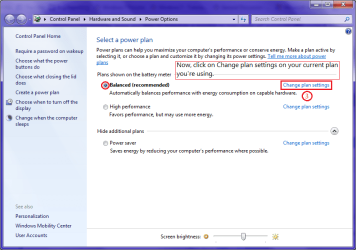
I hope this screenshot can help you.

a.png
b.png
c.png
 

My Computer My Computer

At a glance

Windows 7 Home Premium Service Pack 1 32-bit ...AMD C-50 Processor 1.0 Ghz2 GB DDR3 RAM (1.73 usable in System Properties)AMD Radeon HD 6200 series Graphics
Computer Manufacturer/Model Number
Acer Aspire One 722 (AO722)
OS
Windows 7 Home Premium Service Pack 1 32-bit Build 7601
CPU
AMD C-50 Processor 1.0 Ghz
Memory
2 GB DDR3 RAM (1.73 usable in System Properties)
Graphics Card(s)
AMD Radeon HD 6200 series Graphics
Sound Card
High Definition Audio Device
Monitor(s) Displays
Generic PnP Monitor
Screen Resolution
1366 x 768 (recommended)
Hard Drives
320 GB HDD storage
298.09 GB in Disk Management (REAL)
Keyboard
Built-in on my laptop
Mouse
External mouse
Other Info
Installed Windows 7 Service Pack 1 by 9/9/2012
No, I mean, that particular configuration only work when there's no background processes preventing the screen from being turned off. That config will be utterly useless if, for example, I've left something playing a video in just one of the dozens of windows I've left open and also dozens of apps I have running, and normally I wouldn't be aware of them. Or, there might even be apps that were asking for my attention and somehow they weren't flashing on the taskbar.

I can manually force the monitor to turn off using command line, but that's way too dependent. With a slight movement of a mouse or if somehow an app found itself an excuse to show notifications or something, the monitor would turn itself on again. It wouldn't be good if that happened when I wasn't around to turn it off again.
 
Last edited:

My Computer My Computer

At a glance

Windows 7 Ult x64; Windows 7 HP x64Q9400, 2630QM1GBx2(asymm)@800, 2GBx1@800; 4GBx2 ddr3-1333HD4670; GT555M
Computer Manufacturer/Model Number
ASUS N55SF-S1070V
OS
Windows 7 Ult x64; Windows 7 HP x64
CPU
Q9400, 2630QM
Motherboard
P5Q Deluxe
Memory
1GBx2(asymm)@800, 2GBx1@800; 4GBx2 ddr3-1333
Graphics Card(s)
HD4670; GT555M
Monitor(s) Displays
BENQ XL2410T
Screen Resolution
15.6in 1920 x 1080; 23.6in 1920x1080
Hard Drives
SEAGATE Barracuda 7200.11 1.5TB (OS); SEAGATE Momentus 750GB (OS); WD My Book Essential 3.0TB (USB3.0); WD My Book Elite 1.5TB; WD Caviar 2.0TB
Keyboard
Pleomax PKB7000X
Mouse
Buffalo BSMLB04 bluetooth laser mouse
Internet Speed
>80Mbps (Fiber optic)
Press the power button on the monitor...or close down your applications the prevent the computer from turning the monitor off, or put the whole computer to sleep.
 

My Computer My Computer

At a glance

Windows 10 Pro (x64)Intel Core i7-3930K (3.2GHz - 4.5GHz)4x Samsung 4GB PC3-12800 DDR3 (16GB 1600MHz)Nvidia Geforce GTX 690
Computer type
PC/Desktop
Computer Manufacturer/Model Number
Alienware Aurora ALX R4
OS
Windows 10 Pro (x64)
CPU
Intel Core i7-3930K (3.2GHz - 4.5GHz)
Motherboard
Alienware Aurora-R4 x79
Memory
4x Samsung 4GB PC3-12800 DDR3 (16GB 1600MHz)
Graphics Card(s)
Nvidia Geforce GTX 690
Sound Card
SteelSeries Siberia Elite
Monitor(s) Displays
Dell UltraSharp U3011
Screen Resolution
2560x1600
Hard Drives
Samsung 850 Pro 256 GB, Seagate 1TB Desktop Hybrid HDD, 2x Western Digital 4TB Green HDD
PSU
875W Some Dell PSU <.<
Case
Alienware Aurora ALX
Cooling
Custom Liquid Cooling (EK CPU & GPU blocks) dual EK 480RAD
Keyboard
Logitech G710+ Mechanical
Mouse
Logitech G700s
Internet Speed
Verizon Fios (50 mbps average)
Other Info
Server: Intel NUC D54250WYK: i5-4250U, 16GB, 256 GB mSATA, Windows Server 2012 R2
Well, those methods do work just fine in a conventional sense. However, what I'd like is a way that does not require any manual input, so that the monitor turns off all by itself every single time I haven't been staring at it, as well as in case I happen to forget to turn it off and also in case I am too lazy, since I am an average person, after all.

Besides, that particular PC is a home desktop server, and I need it running 24/7, since it has many connected devices, and booting/resuming is really a pain. Also, I mentioned that there are loads of running apps and opened windows--with tonnes of even more tabs in various browsers, therefore checking them all one by one every time I feel like it is not very practical and is time-consuming. I do appreciate all the suggestions, though. :)
 

My Computer My Computer

At a glance

Windows 7 Ult x64; Windows 7 HP x64Q9400, 2630QM1GBx2(asymm)@800, 2GBx1@800; 4GBx2 ddr3-1333HD4670; GT555M
Computer Manufacturer/Model Number
ASUS N55SF-S1070V
OS
Windows 7 Ult x64; Windows 7 HP x64
CPU
Q9400, 2630QM
Motherboard
P5Q Deluxe
Memory
1GBx2(asymm)@800, 2GBx1@800; 4GBx2 ddr3-1333
Graphics Card(s)
HD4670; GT555M
Monitor(s) Displays
BENQ XL2410T
Screen Resolution
15.6in 1920 x 1080; 23.6in 1920x1080
Hard Drives
SEAGATE Barracuda 7200.11 1.5TB (OS); SEAGATE Momentus 750GB (OS); WD My Book Essential 3.0TB (USB3.0); WD My Book Elite 1.5TB; WD Caviar 2.0TB
Keyboard
Pleomax PKB7000X
Mouse
Buffalo BSMLB04 bluetooth laser mouse
Internet Speed
>80Mbps (Fiber optic)
Manually turn the monitor off...that is your only solution. There is no way to turn the monitor off via software that would not be interfered by the other applications.
 

My Computer My Computer

At a glance

Windows 10 Pro (x64)Intel Core i7-3930K (3.2GHz - 4.5GHz)4x Samsung 4GB PC3-12800 DDR3 (16GB 1600MHz)Nvidia Geforce GTX 690
Computer type
PC/Desktop
Computer Manufacturer/Model Number
Alienware Aurora ALX R4
OS
Windows 10 Pro (x64)
CPU
Intel Core i7-3930K (3.2GHz - 4.5GHz)
Motherboard
Alienware Aurora-R4 x79
Memory
4x Samsung 4GB PC3-12800 DDR3 (16GB 1600MHz)
Graphics Card(s)
Nvidia Geforce GTX 690
Sound Card
SteelSeries Siberia Elite
Monitor(s) Displays
Dell UltraSharp U3011
Screen Resolution
2560x1600
Hard Drives
Samsung 850 Pro 256 GB, Seagate 1TB Desktop Hybrid HDD, 2x Western Digital 4TB Green HDD
PSU
875W Some Dell PSU <.<
Case
Alienware Aurora ALX
Cooling
Custom Liquid Cooling (EK CPU & GPU blocks) dual EK 480RAD
Keyboard
Logitech G710+ Mechanical
Mouse
Logitech G700s
Internet Speed
Verizon Fios (50 mbps average)
Other Info
Server: Intel NUC D54250WYK: i5-4250U, 16GB, 256 GB mSATA, Windows Server 2012 R2
How about we come at this from a different angle. I have the same problem, however I don't know WHICH app it is that won't allow my monitors to go off.

I have four monitors on my computer, one of them very large. I cringe when I come into my office in the morning and see them all on.

Since this thread has indicated there is no software solution to force this issue, is there any way to detect which applications or processes are disallowing the normal Power Settings to turn the monitors off after the selected time of idleness?
 

My Computer My Computer

At a glance

Windows 7 Professional x64
Computer type
PC/Desktop
OS
Windows 7 Professional x64
Low tech solution:

Plug all the monitors into the same power strip.
Turn off the power strip when you leave.
 

My Computer My Computer

At a glance

Windows 10 Pro X64Intel Quad Core i7-4770 @ 3.4Ghz16.0GB PC3-12800 DDR3 SDRAM 1600 MHzIntel Integrated HD Graphics
Computer type
PC/Desktop
Computer Manufacturer/Model Number
Lenovo IdeaCenter 450
OS
Windows 10 Pro X64
CPU
Intel Quad Core i7-4770 @ 3.4Ghz
Memory
16.0GB PC3-12800 DDR3 SDRAM 1600 MHz
Graphics Card(s)
Intel Integrated HD Graphics
Sound Card
Realtek HD Audio
Monitor(s) Displays
HP 22" LCD
Screen Resolution
1680 x 1050
Hard Drives
250GB Samsung EVO SATA-3 SSD
2TB Seagate ST2000DM001 SATA-2
1.5TB Seagate ST3150041AS SATA
Keyboard
Dell USB
Mouse
Lenovo USB
Internet Speed
Cable via Road Runner 3MB Upload, 30MB Download
Antivirus
Windows Defender, MBAM Pro, MBAE
Browser
Seamonkey
Other Info
UEFI/GPT
PLDS DVD-RW DH16AERSH
I'm sure someone who doesn't have this problem might find that solution palatable in theory. But changing ones 30 year habit by remembering to flip switches every time I walk away from my computer for more than 15 minutes to circumvent a rogue application doesn't sound like a solution.

I would much rather uninstall the app that is causing this problem. I just don't know how to detect which process is tricking my computer into thinking I need it to stay on. I have no video apps or tabs open.
 

My Computer My Computer

At a glance

Windows 7 Professional x64
Computer type
PC/Desktop
OS
Windows 7 Professional x64

My Computer My Computer

At a glance

Windows 10 Pro X64Intel Quad Core i7-4770 @ 3.4Ghz16.0GB PC3-12800 DDR3 SDRAM 1600 MHzIntel Integrated HD Graphics
Computer type
PC/Desktop
Computer Manufacturer/Model Number
Lenovo IdeaCenter 450
OS
Windows 10 Pro X64
CPU
Intel Quad Core i7-4770 @ 3.4Ghz
Memory
16.0GB PC3-12800 DDR3 SDRAM 1600 MHz
Graphics Card(s)
Intel Integrated HD Graphics
Sound Card
Realtek HD Audio
Monitor(s) Displays
HP 22" LCD
Screen Resolution
1680 x 1050
Hard Drives
250GB Samsung EVO SATA-3 SSD
2TB Seagate ST2000DM001 SATA-2
1.5TB Seagate ST3150041AS SATA
Keyboard
Dell USB
Mouse
Lenovo USB
Internet Speed
Cable via Road Runner 3MB Upload, 30MB Download
Antivirus
Windows Defender, MBAM Pro, MBAE
Browser
Seamonkey
Other Info
UEFI/GPT
PLDS DVD-RW DH16AERSH
Back
Top