Solved Format C: drive partition

PC Pinky

New member
Local time
2:54 AM
Messages
13
Hi,
Due too several problems on O/S which I cannot repair. I have decided to format my C: drive and start afresh.
I have two partitioned HDs with three partitions on each disk.
Is it possible to format the C: drive without touching the other two partitions on the same drive. If so, how?:sarc:
 

My Computer My Computer

OS
Windows 7 Professional 32bit
You will have the options to select only the partition you want to install Windows to (C: ) and to format that drive during the Windows installation from DVD/USB.

Review and use this tutorial here:
http://www.sevenforums.com/tutorials/1649-clean-install-windows-7-a.html

Notice at Step #7 that you have the option to use "Drive Options (Advanced)". That is where you will find the option to format C:.
 

My Computer My Computer

Computer type
PC/Desktop
Computer Manufacturer/Model Number
Home Built - Jan 2013
OS
Windows 7 64 Bit Home Premium SP1
CPU
i7-3820
Motherboard
Asus P9X79-PRO - Bios 4608
Memory
GSkill F3-14900CL9Q - 16GB
Graphics Card(s)
EVGA GeForce GTX660 - Driver 352.86
Sound Card
On board Realtek ALC898
Monitor(s) Displays
Acer S271HL
Screen Resolution
1920 x 1080
Hard Drives
#1- Samsung 840 Pro Series
#2- Western Digital WD1002FAEX Sata3 Black
#3- Western Digital WD1002FAEX Sata3 Black
PSU
Corsair CMPSU-850TX-V2 - 850 watt (by Seasonic)
Case
Corsair Obsidian 550D
Cooling
Standard 3 120mm case fans, Cooler Master Hyper 212 EVO
Keyboard
MS KC-0405
Mouse
Intellimouse 5-button
Internet Speed
56 Mbits/Sec (on a good day)
Antivirus
Avast & Malwarebytes
Browser
Firefox
Other Info
Asus DVD - DRW-24B1ST 24X
Hi,
Thanks for your prompt reply.
Although the Boot menu is set to boot from the CD/DVD drive, it refuses to give me the option to boot from the CD/DVD when I boot-up. Is there an option to Format the whole of the HD, which includes all three partitions and start again from scratch. I so, How?
 

My Computer My Computer

OS
Windows 7 Professional 32bit

My Computer My Computer

Computer type
PC/Desktop
Computer Manufacturer/Model Number
Built them myself, Science Experiments !
OS
Win7 Enterprise, Win7 x86 (Ult 7600), Win7 x64 Ult 7600, TechNet RTM on AMD x64 (2.8Ghz)
CPU
AMD fx8350 4ghz, AMD-32 2400mhz, AMD-64 3200mhz, AMDx64 2.8G
Motherboard
SIS 755, ECS-K8M890M-M (Ult 7600), GigaByte & others
Memory
2gb, 4gb on the Ult 7600, 4gb on Technet RTM, 32gb on FX8350
Graphics Card(s)
Draw my own Graphics, several nVidia cards
Sound Card
on motherboard
Monitor(s) Displays
19" flat scr, 28" I-Inc widescr,22" Emprex Widescr, 23" Acer
Screen Resolution
1280 x 1024, 1440 x 900, 1920 x 1080
Hard Drives
6 pata Ide HD's & 2 Sata HD's
added 80gb external on Ult 7600 computer,
numerous extra 1tb, 2TB, 3Tb SATA HD's
A collection of ext HD Docks w/ HDs
PSU
430w, 550w, 600w, 700, 800, etc
Case
All Generic Full Towers
Cooling
Open Air & a few fans, some w/ colored LEDs
Keyboard
Compaq & Dell recycled from GoodWill
Mouse
Made in China Optical Wired Mouse
Internet Speed
Fast Cable InterNet
Antivirus
AVG Free on 24 different Desktops, NO Problems!
Browser
IE 8 is preferred, but use FireFox sometimes
Other Info
Linksys Routers, switches, & Hubs
Too Many USB Flash Drives to count, Biggest is 64GB !
Eight computers in my home network.
Sixteen computers at my business network.
Linked via TeamViewer !
Lots of old used spare computer parts everywhere!
I don't see how formatting all the partitions will do anything to help if the problem is that the installation DVD will not boot. And I don't see how it would help solve any other Windows problem either (unless you are dual booting and there are other operating systems installed on those partitions).

In general it is better to just state what the problem you are trying to solve is. Then folks like us can suggest the best ways to solve the problem based upon our experience.

As for the DVD not booting I suggest a few things:

  • First, test the drive to be sure it is working and can read the disk. Try starting the disk from within Windows, but don't do anything more than that.
  • Change the Boot order in the BIOS settings (change it to anything different that what it is), reboot, go back in, and change it again to boot from CD/DVD first. Reboot, go back in, make sure setting stuck, put the DVD in the drive, then reboot again.
  • Second, I have witnessed a phenomenon where the system just blows past the DVD drive/installation disk before the boot can start. This has been on SATA optical drives that are too slow to initiate. On these machines I found that restarting the system, using the case restart button, right after the point where the BIOS screens says it is checking the CD/DVD drive, solves this the second time around.
  • You can also disconnect your HDD and then try to boot from the optical drive. This is just to see if the system will boot from the optical. Obviously you can't proceed with an installation from there.
EDIT: one other important tip: disconnect the 2nd hard drive (the one you are NOT installing W7 on) before you start any install.
There have been lots of posts with all kinds of problems that can happen when both drives are connected.
 

My Computer My Computer

Computer type
PC/Desktop
Computer Manufacturer/Model Number
Home Built - Jan 2013
OS
Windows 7 64 Bit Home Premium SP1
CPU
i7-3820
Motherboard
Asus P9X79-PRO - Bios 4608
Memory
GSkill F3-14900CL9Q - 16GB
Graphics Card(s)
EVGA GeForce GTX660 - Driver 352.86
Sound Card
On board Realtek ALC898
Monitor(s) Displays
Acer S271HL
Screen Resolution
1920 x 1080
Hard Drives
#1- Samsung 840 Pro Series
#2- Western Digital WD1002FAEX Sata3 Black
#3- Western Digital WD1002FAEX Sata3 Black
PSU
Corsair CMPSU-850TX-V2 - 850 watt (by Seasonic)
Case
Corsair Obsidian 550D
Cooling
Standard 3 120mm case fans, Cooler Master Hyper 212 EVO
Keyboard
MS KC-0405
Mouse
Intellimouse 5-button
Internet Speed
56 Mbits/Sec (on a good day)
Antivirus
Avast & Malwarebytes
Browser
Firefox
Other Info
Asus DVD - DRW-24B1ST 24X
Hi,
Thank again. I will follow your advice and check out a few more settings.
All my problems started when Outlook refused to open, both extend.dat and outlook.pst causing problems. I corrected that but then found that when pressing 'Send/Receive' button in Outlook, I was informed "you don't have the appropriate permission to perform this operation".
Other small glitches have also appeared in various programs I use. Plus my 1TB external HD dropped all my back-ups :-(
After two weeks of trying I feel that a 'Format' and a 'Reinstall' would be my best option.
I have ran a McAfee virus scan, a Malwarebytes scan and SuperAntiSpyware scan but to no avail.
What do you think, should I 'Format' and 'Reinstall' as I have again backed up all the files I need?
 

My Computer My Computer

OS
Windows 7 Professional 32bit
I would, and stop using MucAfee.

MSE and MBAM

Ask any questions b4 you start, we`re glad to help.

Have you found the proper key to bring up your boot options during 1st boot ?

As stated, don`t wipe out your other partitions, just format C, make sure you know it`s exact size so you don`t choose the wrong partition.

Here`s another tutorial.

http://www.sevenforums.com/tutorials/1649-clean-install-windows-7-a.html
 

My Computer My Computer

Computer type
PC/Desktop
Computer Manufacturer/Model Number
Skylake Special #666
OS
Windows 10 Pro x64
CPU
Intel Core i7 6700K
Motherboard
Asus Sabertooth Z170 Mark 1
Memory
GSkill TridentZ RGB 16GB 3600 16-16-16-36
Graphics Card(s)
EVGA GTX 980 Ti SC x2
Sound Card
Realtek High Definition
Monitor(s) Displays
AOC G2460PG
Screen Resolution
1920 x 1080 144Hz
Hard Drives
Samsung 860 Pro 256GB, Seagate Barracuda 4TB x2
PSU
EVGA 1000 P2, EVGA White Custom Braided Cables
Case
Corsair Vengeance C70 Gunmetal Black
Cooling
Corsair H100i v2, Corsair ML120 x2, Thermal Grizzly Kryonaut
Keyboard
Logitech G910 Orion Spectrum
Mouse
Logitech G700s
Internet Speed
Verizon Fios Quantum Gateway 75/75
Antivirus
Windows Defender, Malwarebytes Free 3.8.3
Browser
Chrome
Other Info
Corsair SP120 x4, LG Blu-ray Drive, Durabrand HT-395 100 Watt Dolby Digital Amp, Corsair H2100 Wireless 7.1 Headset
I did reset the boot menu to boot from the CD/DVD drive first.
Excuse me ignorance but what are MSE and MBAM.
Thanks again you guys :-)
 

My Computer My Computer

OS
Windows 7 Professional 32bit
Outlook refused to open, and you are scanning with McAfee?
McAfee causes many a problems with your network. Any of the network resources may malfunction due to McAfee's existence.

First try uninstall McAfee Using McAfee Removal Tool. Use Microsoft Security Essentials as your antivirus with windows inbuilt firewall, and free MBAM as the on demand scanner.
Download, install and update those, and then run full system scans with both of them, one by one.

If still the problem remains, reinstall MS office. That may fix the Outlook issue.

If you want to have a clean reinstall , the best policy is to do a http://www.sevenforums.com/tutorials/219487-clean-reinstall-factory-oem-windows-7-a.html, which works similarly good for retail.

While doing a clean reinstall, better you detouch (remove the sata and power) the other HDD which you want to be untouched at all.

In the step #8 0f http://www.sevenforums.com/tutorials/1649-clean-install-windows-7-a.html, all your partitions will be listed. On the top, there will be a 100 MB partition, without any drive letter (system reserved). Select it, and delete it. It will show an unallocated space then. Next, below it, there will be your C partition. Delete it, too. There will be a total unallocated space.
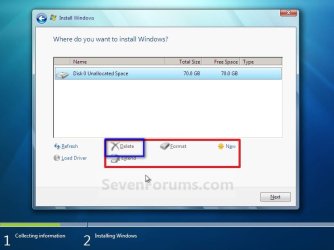
1.jpg

Dont touch the other partitions at all, as you dont want to do anything with them.

Now, select the unallocated space. Click the "new" button and continue.
2.jpg

It will be prompted that windows will make another partition. Accept it. Follow the other steps to complete the installation.

 

My Computer My Computer

Computer type
PC/Desktop
Computer Manufacturer/Model Number
Self Assembled
OS
Microsoft Windows 10 Pro Insider Preview 64-bit
CPU
Intel(R) Core(TM) i3-4130 CPU @ 3.40GHz
Motherboard
Gigabyte Technology Co., Ltd. B85M-D3H
Memory
Corsair Vengence 4GB x2 (8.00GB Dual-Channel DDR3 @ 798MHz)
Graphics Card(s)
2047MB GeForce GTS 450 (ZOTAC International)
Sound Card
Onboard (Realtek High Definition Audio)
Monitor(s) Displays
LG Flatron E2040T
Screen Resolution
1600x900
Hard Drives
Western Digital 1 TB
Seagate 500 GB
PSU
Corsair VS550
Case
Cooler Master K380
Cooling
Cooler Master Seidon 120V Plus
Keyboard
Logitech MK260r
Mouse
Logitech MK260r
Internet Speed
PMPL Broadband
Antivirus
Windows Defender + MBAM
Browser
Firefox
Other Info
Dell Studio 15" Laptop
Thank You Archie ;)
 

My Computer My Computer

Computer type
PC/Desktop
Computer Manufacturer/Model Number
Skylake Special #666
OS
Windows 10 Pro x64
CPU
Intel Core i7 6700K
Motherboard
Asus Sabertooth Z170 Mark 1
Memory
GSkill TridentZ RGB 16GB 3600 16-16-16-36
Graphics Card(s)
EVGA GTX 980 Ti SC x2
Sound Card
Realtek High Definition
Monitor(s) Displays
AOC G2460PG
Screen Resolution
1920 x 1080 144Hz
Hard Drives
Samsung 860 Pro 256GB, Seagate Barracuda 4TB x2
PSU
EVGA 1000 P2, EVGA White Custom Braided Cables
Case
Corsair Vengeance C70 Gunmetal Black
Cooling
Corsair H100i v2, Corsair ML120 x2, Thermal Grizzly Kryonaut
Keyboard
Logitech G910 Orion Spectrum
Mouse
Logitech G700s
Internet Speed
Verizon Fios Quantum Gateway 75/75
Antivirus
Windows Defender, Malwarebytes Free 3.8.3
Browser
Chrome
Other Info
Corsair SP120 x4, LG Blu-ray Drive, Durabrand HT-395 100 Watt Dolby Digital Amp, Corsair H2100 Wireless 7.1 Headset

My Computer My Computer

Computer type
PC/Desktop
Computer Manufacturer/Model Number
Self Assembled
OS
Microsoft Windows 10 Pro Insider Preview 64-bit
CPU
Intel(R) Core(TM) i3-4130 CPU @ 3.40GHz
Motherboard
Gigabyte Technology Co., Ltd. B85M-D3H
Memory
Corsair Vengence 4GB x2 (8.00GB Dual-Channel DDR3 @ 798MHz)
Graphics Card(s)
2047MB GeForce GTS 450 (ZOTAC International)
Sound Card
Onboard (Realtek High Definition Audio)
Monitor(s) Displays
LG Flatron E2040T
Screen Resolution
1600x900
Hard Drives
Western Digital 1 TB
Seagate 500 GB
PSU
Corsair VS550
Case
Cooler Master K380
Cooling
Cooler Master Seidon 120V Plus
Keyboard
Logitech MK260r
Mouse
Logitech MK260r
Internet Speed
PMPL Broadband
Antivirus
Windows Defender + MBAM
Browser
Firefox
Other Info
Dell Studio 15" Laptop
Thanks for all your input and info today. I'll continue my efforts to correct my PCs problems tomorrow, UK time. Cheers folks :-)
 

My Computer My Computer

OS
Windows 7 Professional 32bit
Back
Top