Format disk in drive g pop up

bartnawer

New member
Local time
3:40 AM
Messages
20
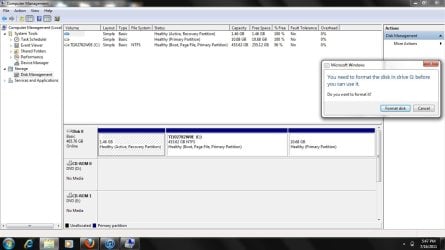
Every 5 minutes or so , a pop up saying "You need to format the disk in drive g before you can use it" comes up. Problem is, I have no disk in drive g, and nothing connected to my usb ports. So i have no idea what this means. Add to this that the device manager keeps refreshing and will not let me click anything. Any help?
 

My Computer My Computer

At a glance

home premium
OS
home premium
Welcome to Windows Seven Forums.

Sounds like your computer may have a virus.

Use Malwarebytes for a full scan in Safe Mode to see if anything shows up.
 

My Computer My Computer

At a glance

Windows 7 Ultimate SP1 64-BitIntel Core i7 870 @ 2.93GHz8Gb Dual-Channel DDR3 @ 664MHznVidia GeForce GTX 460 1024MB dedicated RAM
Computer Manufacturer/Model Number
HP Pavilion Elite 495UK
OS
Windows 7 Ultimate SP1 64-Bit
CPU
Intel Core i7 870 @ 2.93GHz
Motherboard
MSI 2A9C (CPU1)
Memory
8Gb Dual-Channel DDR3 @ 664MHz
Graphics Card(s)
nVidia GeForce GTX 460 1024MB dedicated RAM
Sound Card
Realtek HD Audio
Monitor(s) Displays
HP2310i
Screen Resolution
1920 x 1080
Hard Drives
1x1954GB Hitachi HDS22020ALA 330 (RAID), 1x1954GB Hitachi External for backup and storage
PSU
460W
Case
HP Elite
Cooling
Air cooled
Keyboard
Logitech K750 solar-powered keyboard
Mouse
Logitech Wireless M180 mouse
Internet Speed
2Mb
Other Info
Pure Avanti Flow Internet Radio with iPod Dock, 64Gb iPod, HP USB Speakers, Sony MDR-V500 Headphones, Sony Vaio F-Series Laptop
Thanks for the welcome. It seems like a legit pop up. And if i click format disk, it says that there is no disk in drive g to format? Hmm weird.
 

My Computer My Computer

At a glance

home premium
OS
home premium
Here
 

Attachments

  • Untitled.jpg
    Untitled.jpg
    93.1 KB · Views: 94

My Computer My Computer

At a glance

home premium
OS
home premium
Hello bartnawer, welcome to Seven Forums!


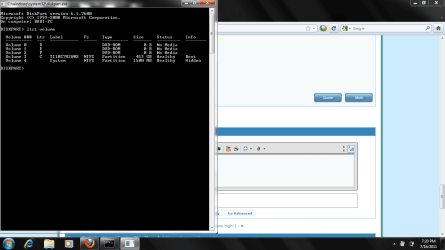
In an elevated command window type diskpart <enter>and then list volume <enter> and post a snip of the outcome here.

Do not click Format.
 

My Computer My Computer

At a glance

W 7 64-bit UltimateIntel Q9550 Yorkfield8GB Dominator 8500C5DATI : XFX 5870
Computer Manufacturer/Model Number
* BFK Customs *
OS
W 7 64-bit Ultimate
CPU
Intel Q9550 Yorkfield
Motherboard
ASUS P5Q Pro
Memory
8GB Dominator 8500C5D
Graphics Card(s)
ATI : XFX 5870
Sound Card
Realtek HD Audio 7-1
Monitor(s) Displays
1x 47" LCD HDMI & 3x 26" LCD HDMI
Screen Resolution
1920x1080P & 1920x1200
Hard Drives
1x 80GB Intel X25-M G2 SSD : 1x 500GB & 1x 640GB WD Caviar Black(s)
PSU
Corsair 620HX
Case
Cooler Master RC-690
Cooling
Tuniq Tower 120, 2x 140mm and 3x 120mm case fans
Keyboard
Microsoft 500
Mouse
Razer Diamondback 3G
Internet Speed
14 Mb/s
Other Info
1x Koutech 3Gb/s SATA HDD Hot Swap Rack
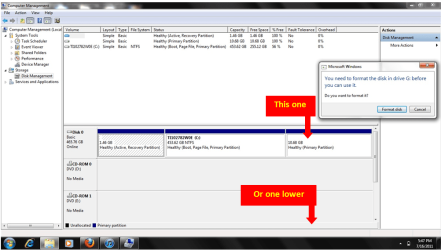
One lower.PNG
 

My Computer My Computer

At a glance

ME/XP/Vista/Win7
OS
ME/XP/Vista/Win7
Theo; what do you mean?

and
 

Attachments

  • 2.png
    2.png
    34.9 KB · Views: 50

My Computer My Computer

At a glance

home premium
OS
home premium
In your first screenshot I could only see
Partition 1 No Drive letter, that OK
Partition 2 C: OS drive.
Partition 3 No drive letter
DVD D:
DVD E:
DVD F: Not showing in your first screenshot

Did partition 3 have a drive letter at some time?
 

My Computer My Computer

At a glance

ME/XP/Vista/Win7
OS
ME/XP/Vista/Win7
Not sure. The only thing that coudlve been G would be my ipod touch, but it's not attached.
 

My Computer My Computer

At a glance

home premium
OS
home premium
That seems to be a Factory Recovery partition and its format/removal may ruin any chances of a restore to factory condition.
 

My Computer My Computer

At a glance

W 7 64-bit UltimateIntel Q9550 Yorkfield8GB Dominator 8500C5DATI : XFX 5870
Computer Manufacturer/Model Number
* BFK Customs *
OS
W 7 64-bit Ultimate
CPU
Intel Q9550 Yorkfield
Motherboard
ASUS P5Q Pro
Memory
8GB Dominator 8500C5D
Graphics Card(s)
ATI : XFX 5870
Sound Card
Realtek HD Audio 7-1
Monitor(s) Displays
1x 47" LCD HDMI & 3x 26" LCD HDMI
Screen Resolution
1920x1080P & 1920x1200
Hard Drives
1x 80GB Intel X25-M G2 SSD : 1x 500GB & 1x 640GB WD Caviar Black(s)
PSU
Corsair 620HX
Case
Cooler Master RC-690
Cooling
Tuniq Tower 120, 2x 140mm and 3x 120mm case fans
Keyboard
Microsoft 500
Mouse
Razer Diamondback 3G
Internet Speed
14 Mb/s
Other Info
1x Koutech 3Gb/s SATA HDD Hot Swap Rack
It won't let me , there is no change the letter path option when i right click =\
 

My Computer My Computer

At a glance

home premium
OS
home premium
Bought with windows 7 installed.

Computer Model: Satellite A505
Computer Manufacturer: TOSHIBA
OS Name: Microsoft Windows 7 Home Premium |C:\windows|\Device\Harddisk0\Partition2
OS Version: 6.1.7600
System Type: x64-based PC
Total Physical Memory: 3964 MB
Windows Directory: C:\windows
BIOS Version: InsydeH2O Version 1.80
CPU: Intel(R) Core(TM)2 Duo CPU T6600 @ 2.20GHz
Video Card: Mobile Intel(R) 4 Series Express Chipset Family
Resolution: 1366 x 768 x 4294967296 colors


*************************************************************
************************** Memory ***************************
*************************************************************

------------------------------------------
Manufacturer: Micron
Model:
Name: Physical Memory
Bank Label: BANK 0
Capacity: 2048 MB
Description: Physical Memory
Tag: Physical Memory 0
------------------------------------------
Manufacturer: Micron
Model:
Name: Physical Memory
Bank Label: BANK 2
Capacity: 2048 MB
Description: Physical Memory
Tag: Physical Memory 1
------------------------------------------


*************************************************************
************************ Video Card *************************
*************************************************************

Brand: Intel Corporation
Model: Mobile Intel(R) 4 Series Express Chipset Family
Adapter DAC Type: Internal
Adapter RAM: 1853.9921875 MB
Current BitsPerPixel: 32
Current Number Of Colors: 4294967296
Current Refresh Rate: 59
Driver Date: 08/27/2009 00:00:00
Driver Version: 8.15.10.1883
MaxRefreshRate: 59
MinRefreshRate: 59
Status: OK
Video Memory Type: 2
Video Mode Description: 1366 x 768 x 4294967296 colors
Video Processor: Mobile Intel(R) 4 Series Express Chipset Family
Brand: Intel Corporation
Model: Mobile Intel(R) 4 Series Express Chipset Family
Adapter DAC Type:
Adapter RAM: 0 MB
Current BitsPerPixel:
Current Number Of Colors:
Current Refresh Rate:
Driver Date: 08/27/2009 00:00:00
Driver Version: 8.15.10.1883
MaxRefreshRate:
MinRefreshRate:
Status: OK
Video Memory Type: 2
Video Mode Description:
Video Processor:
 

My Computer My Computer

At a glance

home premium
OS
home premium

My Computer My Computer

At a glance

W 7 64-bit UltimateIntel Q9550 Yorkfield8GB Dominator 8500C5DATI : XFX 5870
Computer Manufacturer/Model Number
* BFK Customs *
OS
W 7 64-bit Ultimate
CPU
Intel Q9550 Yorkfield
Motherboard
ASUS P5Q Pro
Memory
8GB Dominator 8500C5D
Graphics Card(s)
ATI : XFX 5870
Sound Card
Realtek HD Audio 7-1
Monitor(s) Displays
1x 47" LCD HDMI & 3x 26" LCD HDMI
Screen Resolution
1920x1080P & 1920x1200
Hard Drives
1x 80GB Intel X25-M G2 SSD : 1x 500GB & 1x 640GB WD Caviar Black(s)
PSU
Corsair 620HX
Case
Cooler Master RC-690
Cooling
Tuniq Tower 120, 2x 140mm and 3x 120mm case fans
Keyboard
Microsoft 500
Mouse
Razer Diamondback 3G
Internet Speed
14 Mb/s
Other Info
1x Koutech 3Gb/s SATA HDD Hot Swap Rack
Id rather not do a complete reinstall of windows, its not a huge deal, just annoying.
 

My Computer My Computer

At a glance

home premium
OS
home premium
Back
Top