Solved Formatted External HD as exFat - Windows does not read drive...

darkhorse108

New member
Local time
7:29 AM
Messages
7
Hey folks,

I just reformatted a 350gig external hard drive as exFat so as to be able to use it with both Windows at home as well as Mac's - but now it seems my laptop does not read the drive ie I can't see it in MyComputer - although I can still safely remove for some reason. :confused:

I should possibly add that it seemed to take a seriously long time to format, around 5-6 hours I would say.

Any help at all would be MUCH appreciated! I can't use it for any purpose at the moment...

Many thanks,
Darkhorse Harrison
 

My Computer My Computer

OS
Windows 7 Professional 64bit
You did not say whether you formatted it to exFAT on a Mac or Windows machine. From what I have read ( I do not have a Mac) if you had formatted it on your Mac, you should choose MBR as the partition scheme and not UUID. Windows does not like UUID.

Not sure whether this info helps. :)
 

My Computer My Computer

OS
Windows 7 Home Premium 32 bit
I formatted it on my windows 7 64bit laptop... It simply doesn't even see a drive plugged in! :confused:
 

My Computer My Computer

OS
Windows 7 Professional 64bit
Does it appear in Windows Disk Management? If it does not have a drive letter, give it one.
 

My Computer My Computer

OS
Windows 7 Home Premium 32 bit
I'm not sure how to get to Windows Disk Management... It does appear in "Devices and Printers", but it doesn't seem one can edit anything from there... It seems to indicate things are working fine, but the drive doesn't autorun when plugged in and is not read by My Computer ie I seem unable to read/write onto the drive...
 

My Computer My Computer

OS
Windows 7 Professional 64bit
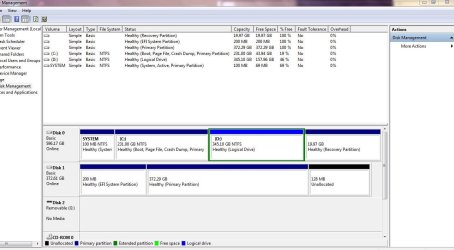
Ok - disk shows in disk management but doesn't seem to want me to give it a name.......
 

Attachments

  • sxreenshot.JPG
    sxreenshot.JPG
    92.9 KB · Views: 18

My Computer My Computer

OS
Windows 7 Professional 64bit
Also doesn't show that it has been formatted as exFat...
 

My Computer My Computer

OS
Windows 7 Professional 64bit
At this point after seeing your external hard drive in Disk Management, I recommend that you do the following.

Download the HDD LLF Low Level Format Tool ver 4.25 ( Windows executable - needs no installation) HDDGURU: HDD LLF Low Level Format Tool

Click (double click) on it and run. Choose your external hard drive and low level format it. ( This may take quite sometime but you can see the progress in the bar)

When done your ext. hard drive would have been initialised to the factory condition and you will be starting with a clean slate.

Now partition/format it to exFat with Disk Management. Assign drive letters when done if necessary.

Keep us posted.
 

My Computer My Computer

OS
Windows 7 Home Premium 32 bit
Many thanks for the help jumanji! Will let you know how this works out :)
 

My Computer My Computer

OS
Windows 7 Professional 64bit
Thank you very much for helping me get this problem sorted - much appreciated!
At this point after seeing your external hard drive in Disk Management, I recommend that you do the following.

Download the HDD LLF Low Level Format Tool ver 4.25 ( Windows executable - needs no installation) HDDGURU: HDD LLF Low Level Format Tool

Click (double click) on it and run. Choose your external hard drive and low level format it. ( This may take quite sometime but you can see the progress in the bar)

When done your ext. hard drive would have been initialised to the factory condition and you will be starting with a clean slate.

Now partition/format it to exFat with Disk Management. Assign drive letters when done if necessary.

Keep us posted.
 

My Computer My Computer

OS
Windows 7 Professional 64bit
Glad to be of help.

Please mark the thread as solved if you have no further queries.
 

My Computer My Computer

OS
Windows 7 Home Premium 32 bit
Back
Top