Solved Formatting Notebook/Netbook.

thatdoggonegirl

New member
Local time
1:45 PM
Messages
79
Location
Pathetic country called Philippines.
Hello everyone. I need help! I want to format my notebook. I'm using Toshiba NB205. My notebook is so slow, like soooooooo veeeeerrryyyy (redundant, I know, but I'm serious here). And it has a lot of problems. So, I think my only solution is to FORMAT it. I just want to ask if there's any chance where once I format it, I can install Windows 7 without any CD because my notebook has no CD you-know-what.

These are my questions:

1. Can I install Windows 7 without any CD?
2. If I format it? Do I have to install again all the crucial things like the "Ethernet" or once I installed Windows 7, it's already included? Please I know y'all know what I'm talking about. If it's not included once I installed Windows 7, is there any way to install it all, the easiest way?

Thank you guys for answering. I'm already thanking y'all for y'all answers. God bless you, guys.

Please respond me to ASAP. :D
 

My Computer

Computer type
Laptop
Computer Manufacturer/Model Number
Toshiba L300
OS
Windows 7 Ultimate
Memory
2GB
Antivirus
Avast!
Browser
Google Chrome
First and foremost: Windows 7 Starter Edition is only made available to OEMs and comes preinstalled on OEM machines. So forget about making a clean install of Windows 7 Starter Edition on your Toshiba Machine.

You may however buy a retail version of Windows 7 Home Basic, make a bootable pen drive with its ISO and install it booting from the pendrive. Using the product key that comes with that retail version, you may activate it.

You can download and keep the Windows 7 drivers from Toshiba Support site beforehand and install those after installing Windows. ( I always recommend this and then allow Windows to update connecting to internet after Windows installation is complete.)

If you want Windows itself to find and install the drivers, you should atleast download the network drivers beforehand and install it to be able to connect to the internet.

mini notebook NB205-N330BL Support | Toshiba

The other option (if you don't want to buy the retail Home Basic version):

Did you not create the Recovery DVDs when you purchased the machine? That is always the recommended first action.

If not, you may do a Factory Restore to bring it to the initial condition. ( Back up all data you may need before doing a Factory Restore.)

Various Recovery Options are indicated in Page 51 of the User Manual.

If you do not have the User Manual, you can download the same from the above support site.
 

My Computer

OS
Windows 7 Home Premium 32 bit

My Computer

Computer type
PC/Desktop
Computer Manufacturer/Model Number
Lenovo IdeaCenter 450
OS
Windows 10 Pro X64
CPU
Intel Quad Core i7-4770 @ 3.4Ghz
Memory
16.0GB PC3-12800 DDR3 SDRAM 1600 MHz
Graphics Card(s)
Intel Integrated HD Graphics
Sound Card
Realtek HD Audio
Monitor(s) Displays
HP 22" LCD
Screen Resolution
1680 x 1050
Hard Drives
250GB Samsung EVO SATA-3 SSD
2TB Seagate ST2000DM001 SATA-2
1.5TB Seagate ST3150041AS SATA
Keyboard
Dell USB
Mouse
Lenovo USB
Internet Speed
Cable via Road Runner 3MB Upload, 30MB Download
Antivirus
Windows Defender, MBAM Pro, MBAE
Browser
Seamonkey
Other Info
UEFI/GPT
PLDS DVD-RW DH16AERSH
First and foremost: Windows 7 Starter Edition is only made available to OEMs and comes preinstalled on OEM machines. So forget about making a clean install of Windows 7 Starter Edition on your Toshiba Machine.

You may however buy a retail version of Windows 7 Home Basic, make a bootable pen drive with its ISO and install it booting from the pendrive. Using the product key that comes with that retail version, you may activate it.

You can download and keep the Windows 7 drivers from Toshiba Support site beforehand and install those after installing Windows. ( I always recommend this and then allow Windows to update connecting to internet after Windows installation is complete.)

If you want Windows itself to find and install the drivers, you should atleast download the network drivers beforehand and install it to be able to connect to the internet.

mini notebook NB205-N330BL Support | Toshiba

The other option (if you don't want to buy the retail Home Basic version):

Did you not create the Recovery DVDs when you purchased the machine? That is always the recommended first action.

If not, you may do a Factory Restore to bring it to the initial condition. ( Back up all data you may need before doing a Factory Restore.)

Various Recovery Options are indicated in Page 51 of the User Manual.

If you do not have the User Manual, you can download the same from the above support site.

Which one was better then? Win 7 Starter or Win 7 Home Basic?

*But I don't have bootable pendrive. :( Is there any torrent of Windows 7 Home Basic? Please give me an easy tutorial to follow.

*When I bought this notebook there's already a Recovery DVDs, I don't even know how to use it tho.
 

My Computer

Computer type
Laptop
Computer Manufacturer/Model Number
Toshiba L300
OS
Windows 7 Ultimate
Memory
2GB
Antivirus
Avast!
Browser
Google Chrome
I have a manual here btw. The title is Instruction Manual for Safety and Comfort.
 

My Computer

Computer type
Laptop
Computer Manufacturer/Model Number
Toshiba L300
OS
Windows 7 Ultimate
Memory
2GB
Antivirus
Avast!
Browser
Google Chrome

My Computer

Computer type
Laptop
Computer Manufacturer/Model Number
Toshiba L300
OS
Windows 7 Ultimate
Memory
2GB
Antivirus
Avast!
Browser
Google Chrome
I have a manual here btw. The title is Instruction Manual for Safety and Comfort.

That is not the User Manual or User Guide.

Found this via a Google search:

See the section Hard Drive Recovery beginning on p. 47 of the User's Guide.

NB200 Series User's Guide

Tells you how to restore to factory new state.

What's it gonna do to my notebook?

Download the manual by clicking on the link NB200 Series User's Guide given by Ztruker , read through page 47. Complete instructions are given on how to restore your machine as it was when you first purchased it "Out of Factory" condition. ( Anyway before restoring it to the out of the box condition, backup any data on the machine that is important to you since all that will be lost when you restore it to the factory condition.)
 

My Computer

OS
Windows 7 Home Premium 32 bit
I have a manual here btw. The title is Instruction Manual for Safety and Comfort.

That is not the User Manual or User Guide.

Found this via a Google search:


Tells you how to restore to factory new state.

What's it gonna do to my notebook?

Download the manual by clicking on the link NB200 Series User's Guide given by Ztruker , read through page 47. Complete instructions are given on how to restore your machine as it was when you first purchased it "Out of Factory" condition. ( Anyway before restoring it to the out of the box condition, backup any data on the machine that is important to you since all that will be lost when you restore it to the factory condition.)

Once I did it. It'll remove all the problems too in my notebook?
 

My Computer

Computer type
Laptop
Computer Manufacturer/Model Number
Toshiba L300
OS
Windows 7 Ultimate
Memory
2GB
Antivirus
Avast!
Browser
Google Chrome
OH MY GOD. IT WORKED! OH MY GOD! IT WORKED! THANK YOU, GUYS. OH MY GOD! OH MY GOD!:cry: :D
 

My Computer

Computer type
Laptop
Computer Manufacturer/Model Number
Toshiba L300
OS
Windows 7 Ultimate
Memory
2GB
Antivirus
Avast!
Browser
Google Chrome
Glad you mustered courage to do it and got your system back into its original shape as when purchased.:). Do install Microsoft Security essentials and also update your Windows.

The slow down of your netbook was most probably due to some virus infliction and since you were prepared for a clean install , restoring it to the factory condition was the best option that could easily be done without much pain.
 

My Computer

OS
Windows 7 Home Premium 32 bit
I have other questions (it's still related to this one):

1. "Preparing setup for first use". This always appears when I turn on my notebook.

2. "The System Customization in Progress Please Standby" always run.. it keeps on running by itself, and I have no idea what's its use. Should I leave it do its thing? It's just frustrates me because it keeps on doing it all over and over again..

3. Even the Toshiba Archive Extractor, what's its purpose/use?

Thank you, folks, yet again. ^w^v
 

My Computer

Computer type
Laptop
Computer Manufacturer/Model Number
Toshiba L300
OS
Windows 7 Ultimate
Memory
2GB
Antivirus
Avast!
Browser
Google Chrome
Normally these things should not happen if the netbook has been setup properly the first time Windows booted after the factory restore. It is also assumed that you have not meddled with the BIOS anytime.

From a distance it is impossible to guess what you did and what you didn't during the setup process.

I would advise you to redo the out-of-the box restoration with some knowledgeable friend by your side during the restoration and setup process, scrupulously following the instructions in the User Guide on the first time setup. What happened to your best friend who helped you to resolve the password problem?

If you can't call him to look into it as you do it, it will save a lot of botheration for you if you can get it done by a professional sitting along with them.

If the same problem still repeats, then it is going to be a long process of checking your internal HDD, replacing it if found to be failing with bad sectors and installing the OS from the Recovery DVDs on a new HDD for which you will require an external optical drive.

In any case wait for some more time to see if other experts come out with any possible resolutions from their experience.
 

My Computer

OS
Windows 7 Home Premium 32 bit
Ok, as I started my research on this problem I could get on to this thread Stuck in a loop - restoring computer to factory settings View it. It also has a screenshot.

Quote :
"This screen does not show you what is happening in the background, installing stuff and configuring. It seemed to be in a loop as there was no progress bar indicating what was being done. It wasn’t until I moved this screen away did I see different icons on the desktop.
Just let the configuration keep doing it’s thing, rebooting and it will be done. It took about maybe 15 restarts for mine to be done." Unquote

So just leave it alone for a considerable amount time and see whether these get out finally.
 

My Computer

OS
Windows 7 Home Premium 32 bit
Ok, as I started my research on this problem I could get on to this thread Stuck in a loop - restoring computer to factory settings View it. It also has a screenshot.

Quote :
"This screen does not show you what is happening in the background, installing stuff and configuring. It seemed to be in a loop as there was no progress bar indicating what was being done. It wasn’t until I moved this screen away did I see different icons on the desktop.
Just let the configuration keep doing it’s thing, rebooting and it will be done. It took about maybe 15 restarts for mine to be done." Unquote

So just leave it alone for a considerable amount time and see whether these get out finally.

I did the same thing now it's okay! Thank you. Thank you! It's no longer running! Yay. God bless you! Everything's doing great. :D :party: :thumbsup:
 

My Computer

Computer type
Laptop
Computer Manufacturer/Model Number
Toshiba L300
OS
Windows 7 Ultimate
Memory
2GB
Antivirus
Avast!
Browser
Google Chrome
Thank you, Thank you for your blessings and blessed I am! :)

And the fact that I had overlooked and had to relearn from your experience: :)

Even during a normal Windows Installation, somewhere down the line, perhaps at the final stage, there will be a screen saying that during the process the computer may restart many times.

Normally on fast computers this configuring and restarts may not take much time and so we never feel it.

It now emerges that on slower netbooks, this configuring and restarts may take much much longer that we get jittery. :)

Thanks to you again We have learnt this lesson.

You may mark this thread as solved.
 

My Computer

OS
Windows 7 Home Premium 32 bit
We have a tutorial here used by over a million consumers to do a perfect http://www.sevenforums.com/tutorials/219487-clean-reinstall-factory-oem-windows-7-a.html#post1839164. I'm sorry you weren't given it.

It shows how to download and unlock Starter version in Step 1, in the third bullet point.

Everything is included to get and keep a perfect install just as long as you stick with the steps, tools and methods. There has not been a single complaint for what was once considered a very cumbersome process.
 
Thank you, Thank you for your blessings and blessed I am! :)

And the fact that I had overlooked and had to relearn from your experience: :)

Even during a normal Windows Installation, somewhere down the line, perhaps at the final stage, there will be a screen saying that during the process the computer may restart many times.

Normally on fast computers this configuring and restarts may not take much time and so we never feel it.

It now emerges that on slower netbooks, this configuring and restarts may take much much longer that we get jittery. :)

Thanks to you again We have learnt this lesson.

You may mark this thread as solved.

How about the "Setup is preparing your computer for first use"? That shit is making me nervous like hell. :shock:
 

My Computer

Computer type
Laptop
Computer Manufacturer/Model Number
Toshiba L300
OS
Windows 7 Ultimate
Memory
2GB
Antivirus
Avast!
Browser
Google Chrome
Please explain the sequence when you shut down your netbook and then boot.

Does it happen everytime you boot the netbook?

How long does it last? And what happens next?

The only suggestion I could give you at this moment is redo the restore again as advised in post #12.

Follow the instructions in the user guide and the Windows prompts as it installs scrupulously. Allow sufficient time for the process that goes on during the setup to complete. As I already said have your best friend - who seems knowledgeable - guide you.

It could be that in the tense moment you didn't wait/do something right. So repeat is the first go.

Note: You may remove the solved entry as I understand your problem/s is still not solved fully.You may put it back only after all your problems are solved.
 
Last edited:

My Computer

OS
Windows 7 Home Premium 32 bit
Does it happen everytime you boot the netbook? Yeah.
How long does it last? And what happens next? It only lasts for 10 seconds, I guess. After that, everything's okay, it'll log in.

We already did it, we just don't know how to get rid of that piece of crap. Lmao.
 

My Computer

Computer type
Laptop
Computer Manufacturer/Model Number
Toshiba L300
OS
Windows 7 Ultimate
Memory
2GB
Antivirus
Avast!
Browser
Google Chrome
Do you mean you did a factory restore again and still you are getting this? I just want to make sure.

Alongwith your answer please post a screenshot of the startups running after you boot.

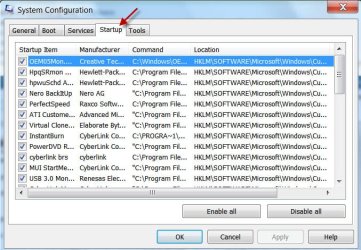
Start > In the search field type msconfig , click on msconfig.exe which appears on top in the Programs Window.

That will open the System Configuration Window. In that click on the Startup tab and post a screenshot.

http://www.vistax64.com/tutorials/148532-how-use-snipping-tool-vista.html

http://www.sevenforums.com/tutorials/9733-screenshots-files-upload-post-seven-forums.html

If for some reason you are unable to post a screenshot just write them down ( there may not be many in your case) and post.

Once you take the screenshot Click on Cancel at the bottom to close the Window.

Let us see whether there is an easy way to kill it.

The screenshot of my startups below just as an example.

02-10-2014 18-12-38.jpg
 

My Computer

OS
Windows 7 Home Premium 32 bit
Back
Top