I have several USB2 thumb drives all purchased in recent months.
All FAT 32
#1 has a defunct ISO file on it (copied from a download)
#2 has mixed media (mostly TXT files
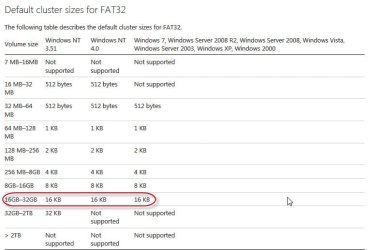
I was about to recycle #1 by reformatting it, when I noticed Allocation Unit size:= 16 kilobytes
But #2 has Allocation Unit size:= 4096 bytes
I have never reformatted either #1 nor #2 ... so it leaves me perplexed
Two other thumb-drives purchased at the same time are also 4096 bytes
How might #1 have been changed from default 4096 bytes (4KB) to 16 KB by merely copying the ISO over. ?
What do range of various capacities represent in Formatting drives ?
What would be the best Allocation size be for mixed file types ? (txt, pdf, xls, doc, dll, exe, ini, mp3 ... etc)
Thank you
All FAT 32
#1 has a defunct ISO file on it (copied from a download)
#2 has mixed media (mostly TXT files
I was about to recycle #1 by reformatting it, when I noticed Allocation Unit size:= 16 kilobytes
But #2 has Allocation Unit size:= 4096 bytes
I have never reformatted either #1 nor #2 ... so it leaves me perplexed
Two other thumb-drives purchased at the same time are also 4096 bytes
How might #1 have been changed from default 4096 bytes (4KB) to 16 KB by merely copying the ISO over. ?
What do range of various capacities represent in Formatting drives ?
What would be the best Allocation size be for mixed file types ? (txt, pdf, xls, doc, dll, exe, ini, mp3 ... etc)
Thank you
My Computer
At a glance
XP Pro (x86) | 7 HP (x86) & (x64) | 7 Pro (x64)
- Computer type
- PC/Desktop
- Computer Manufacturer/Model Number
- Toshiba, Lenovo (laptops) + 4 rigs
- OS
- XP Pro (x86) | 7 HP (x86) & (x64) | 7 Pro (x64)