free agent go with windows 7

steveseven

New member
Local time
3:34 AM
Messages
115
I used my free agent Go all the time on Windows XP, and now I have Windows 7 and when I want to manually transfer my files it says "Backup Complete To: 2GE18CH3 (E: ) All files have been backed up." but in the history folder there is only an empty metadata folder, no files. I used a clean sweep Windows 7 installation, could that be why? how can I fix this? Im assuming I can transfer the files automatically, but Id rather find out whats wrong

I just performed a windows recommended back up, and it took 7 hours, sigh.plus ill prob end up deleting it because it took up 200GB on the free agent, and the windows back up is different compared to the free agent's bc i wont be able to add or remove single files manually, its all or nothing. i hope someone can help me find out how to use the free agent's back up again
 

My Computer

OS
Windows 7
oh, and why if i only have 110GB of free space used on my comp did the back up take 200GB of space on the free agent go?
 

My Computer

OS
Windows 7
I used my free agent Go all the time on Windows XP, and now I have Windows 7 and when I want to manually transfer my files it says "Backup Complete To: 2GE18CH3 (E: ) All files have been backed up." but in the history folder there is only an empty metadata folder, no files. I used a clean sweep Windows 7 installation, could that be why? how can I fix this? Im assuming I can transfer the files automatically, but Id rather find out whats wrong

I just performed a windows recommended back up, and it took 7 hours, sigh.plus ill prob end up deleting it because it took up 200GB on the free agent, and the windows back up is different compared to the free agent's bc i wont be able to add or remove single files manually, its all or nothing. i hope someone can help me find out how to use the free agent's back up again

Hi, so i'm assuming your using the Seagate Manager software install on your Windows 7 ???

If it's the first time you use it on the Win7, you'll have to choose the way you want the files in the "Parameters" tab of the "Seagate Manager". Parameters tab is kind of help to config the backup plan.

Check the boxes, choose the folders you need and after it will create a "Backup Plan" that you can use safely. Allow or not automatic backup using the tab on your right.

Hope this help...

PS:
You have two tab in Seagate Manager...One for "Backing up Now" and one for "Synchronize" if you have run both it might be the clue why it took 200gb instead of 110gb

Synchronize is your personal user, my docs.
 
Last edited:

My Computer

Computer type
PC/Desktop
Computer Manufacturer/Model Number
Custom Build
OS
Windows 7 Professional SP1 - x64 [Non-UEFI Boot]
CPU
Ivy Bridge Core i5 3570K (Delidded)
Motherboard
Asus P8Z77-V LE PLUS
Memory
G.Skill "Ares" DDR3 PC3-12800 - 1600MHz (16Gb)
Graphics Card(s)
Asus Dual-RX480-O4G
Sound Card
Creative Sound Blaster Z w/5.1 sound system
Monitor(s) Displays
Asus IPS 23"
Screen Resolution
16/9
Hard Drives
Internal:
500Go Sata 6Gb/s (x2)
500Go Sata 3Gb/s (x2)
SSD 60Go Sata 6Gb/s
PSU
In Win C 900W Series 80+ Platinum
Case
Thermaltake Chaser A71
Cooling
Custom Water Cooling Loop
Keyboard
Cooler Master QuickFire XTi
Mouse
Razer Imperator 2012 (4G)
Antivirus
MSE
Browser
IE 11.0.xxx Rtm
Other Info
"Raid0" with Intel Smart Response Technology (HDD/SSD)
i set up everything i needed to to back up with the free agent, it is the same format as in Windows XP. its just not backing up any selected files. and the 200GB came from the Windows back up, not the free agent back up. i did not back up and synch it, i cannot perform either on the free agent
 

My Computer

OS
Windows 7
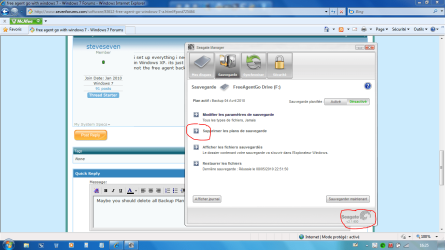
Maybe you should delete all Backup Plan outdated and create a new one..., See if your software is the right version for you, you can have it updated on Seagate site:
 

Attachments

  • Capture.PNG
    Capture.PNG
    78.1 KB · Views: 45

My Computer

Computer type
PC/Desktop
Computer Manufacturer/Model Number
Custom Build
OS
Windows 7 Professional SP1 - x64 [Non-UEFI Boot]
CPU
Ivy Bridge Core i5 3570K (Delidded)
Motherboard
Asus P8Z77-V LE PLUS
Memory
G.Skill "Ares" DDR3 PC3-12800 - 1600MHz (16Gb)
Graphics Card(s)
Asus Dual-RX480-O4G
Sound Card
Creative Sound Blaster Z w/5.1 sound system
Monitor(s) Displays
Asus IPS 23"
Screen Resolution
16/9
Hard Drives
Internal:
500Go Sata 6Gb/s (x2)
500Go Sata 3Gb/s (x2)
SSD 60Go Sata 6Gb/s
PSU
In Win C 900W Series 80+ Platinum
Case
Thermaltake Chaser A71
Cooling
Custom Water Cooling Loop
Keyboard
Cooler Master QuickFire XTi
Mouse
Razer Imperator 2012 (4G)
Antivirus
MSE
Browser
IE 11.0.xxx Rtm
Other Info
"Raid0" with Intel Smart Response Technology (HDD/SSD)
i deleted the back up plan every time I would test it and it didnt work. yesterday I checked the back up log, and when it usually says there have been no backups, there was an entry. so I did a whole comp back up, and I dont know why it decided to work but ill take it.
 

My Computer

OS
Windows 7
Back
Top