FREE Great Programs for Windows 7 [2]

Thanks for explaining this to me, Miles. I formally withdraw my objection :).

Point of Order Mr. Chairman! We must have a quorum before we can bring on the dancing girls. :cool:

Heh heh.
 

My Computer

Computer Manufacturer/Model Number
HP Media Center
OS
Windows 7 32 bit
CPU
AMD 5200+ dual core
Memory
2 GB
Graphics Card(s)
NVidia GeForce 6150SE 128 MB
Monitor(s) Displays
CRT
Screen Resolution
1280x1024
Hard Drives
500 GB Sata internal :

SIIG USB 3.0 docking stations w/WD Caviar Black 6 Gb/s drives
Keyboard
PS/2
Mouse
PS/2 Wheel Mouse
Other Info
SIIG USB 3.0 PCIexpress card.
Thanks MilesAhead
L.

b0212.gif
 

My Computer

Computer Manufacturer/Model Number
HP Media Center
OS
Windows 7 32 bit
CPU
AMD 5200+ dual core
Memory
2 GB
Graphics Card(s)
NVidia GeForce 6150SE 128 MB
Monitor(s) Displays
CRT
Screen Resolution
1280x1024
Hard Drives
500 GB Sata internal :

SIIG USB 3.0 docking stations w/WD Caviar Black 6 Gb/s drives
Keyboard
PS/2
Mouse
PS/2 Wheel Mouse
Other Info
SIIG USB 3.0 PCIexpress card.
I would like to add 3 more freeware programs to this list.

IceCream Media Converter - multiformatted video and audio converter with support of YouTube downloading and conversion.

IceCream PDF Split&Merge - PDF splitter and merger with 4 different splitting modes and ability to work with password-protected files.

IceCream Image Resizer - bulk picture resizing tool that doesn't lower their initial quality.
 

My Computer

Computer type
PC/Desktop
OS
Windows 7 Home
IceCream Image Resizer - bulk picture resizing tool that doesn't lower their initial quality.
What does "their initial quality" mean? Do you mean "image quality"?

Conceptually, I don't see how ANY resizing tool cannot degrade "image quality", since it needs to be re-compressed (e.g. if it is a JPG to start with) and thus introduces automatic quality loss through the re-compression.

Now ROTATION can be lossless, even for JPG. But RESIZE... I don't see how that cannot impact image quality.
 

My Computer

Computer type
PC/Desktop
Computer Manufacturer/Model Number
Home-built, two systems (1) and (2)
OS
Windows 7 Pro x64 (1), Win7 Pro X64 (2)
CPU
i5-3350p 3.1Ghz/6MB-cache (1); E8400 3.0Ghz/6MB-cache (2)
Motherboard
ASUS P8Z77-V Pro (1); ASUS P5Q3 (2)
Memory
8GB PC3-12800 DDR3 (1); 4GB PC3-10600 DDR3 (2)
Graphics Card(s)
ATI HD7750 (1), (see TV cards); ATI R7 250 (2)
Sound Card
Realtek ALC892 HD Audio (1); Realtek ALC1200 HD Audio (2)
Monitor(s) Displays
Eizo HD2441W LCD, Eizo S2433W (1); Eizo 24" S2433W (2)
Screen Resolution
1920x1200, 1920x1200 (1); 1920x1200 (2)
Hard Drives
(1) 1TB SATA-II (7200RPM), 2x2TB SATA-III (7200RPM), 250GB SATA-III (10000RPM) for OS; 2x2TB external USB 3.0

(2) 320GB SATA-II (7200RPM), 750GB SATA-II (7200RPM), 150GB SATA-II (10000RPM) for OS; 2TB external USB 3.0
PSU
Nesteq ECS-6001 600W (1); Nesteq ECS-5001 500W (2)
Case
Acousti-Case 360 (1) and (2)
Cooling
Noctua NH-U12P SE2 for CPU, 2x120mm case fans (1) and (2)
Keyboard
IBM PS/2 (1) and (2)
Mouse
Logitech MX Revolution wireless (1); Microsoft wired (2)
Internet Speed
100mbps down / 10mbps up
Antivirus
Microsoft Security Essentials; Malwarebyte Anti-Malware Pro
Browser
Firefox
Other Info
Ceton InfiniTV 4-tuner cablecard-enabled TV card as well as Hauppauge HVR-2250 OTA/ATSC 2-tuner TV card in (1), running under Win7 WMC
dsperber,
I meant image quality exactly like you stated. Sometimes the quality of an image gets lower when you change it size with image editors, for example it is clearly seen when you use Paint. So with this resizer let's say HD images maintain their quality despite of their new size.
 

My Computer

Computer type
PC/Desktop
OS
Windows 7 Home
IceCream Image Resizer - bulk picture resizing tool that doesn't lower their initial quality.
What does "their initial quality" mean? Do you mean "image quality"?

Conceptually, I don't see how ANY resizing tool cannot degrade "image quality", since it needs to be re-compressed (e.g. if it is a JPG to start with) and thus introduces automatic quality loss through the re-compression.

Now ROTATION can be lossless, even for JPG. But RESIZE... I don't see how that cannot impact image quality.

An image can be resized by changing the DPI. The more pixels per inch a photo has, the smaller it will be displayed. This allows the image resolution (and, thus, quality) to remain unchanged. However, file size will remain unchanged. When enlarging a digital photo, the pixel size gets increased, leading to a jagged look called pixilation. Some enlarging programs reduce the pixilation from enlarging by creating and inserting pixels between existing pixels, based on the pixels that exist adjacent to the inserted pixel. There is a limit to how much this can be done.

Image size reduction and compression are two different animals. Mild image compression reduces file size by removing duplicate pixels and reinserting them when the image is displayed; this will not reduce image quality. More compression can be achieved by removing similar pixels; that will reduce image quality. The more compression after a certain point, the more image quality will be reduced.

I took a quick look at the web page in the link and didn't see exactly what kind of resizing the program does.
 

My Computer

Computer type
PC/Desktop
Computer Manufacturer/Model Number
Custom Build
OS
Win 7 Ultimate 64 bit
CPU
Intel i7-3930K
Motherboard
ASUS P9X79 WS
Memory
Kingston HyperX Genesis 32GB Kit (8x4GB Modules) 1600MHz DDR
Graphics Card(s)
MSI R7850 Twin Frozr 2GD5/OC Radeon HD 7850 2GB 256-bit GDDR
Sound Card
Asus Xonar Essence STX
Monitor(s) Displays
3x Asus VG248QE 24", Vizio 32" TV
Screen Resolution
1920 x 1080, ?
Hard Drives
Samsung 128GB 840 Pro SSD (1),
Samsung 4TB 850 EVO SSDs (4)
Samsung 4TB 850 EVO SSDs (16) external backup drives used in 2.5" hot swap bays in the computer.
PSU
Corsair HX750w
Case
Antec Two Hundred v2 (modified)
Cooling
Cooler Master GeminII S524 120mm (fan replaced with a 140mm)
Keyboard
Logitech G510s
Mouse
Logitech M525 (two in use)
Internet Speed
=< 32Mbps down, 8Mbps up
Antivirus
AVAST!, MBAM, SAS, Spybot S&D (all but MBAM free) Glary Util
Browser
IE11
Other Info
LSI 9211-8i HBA card (8 SATA III ports), 2.5" & 3.5" Hot Swap Bays, HooToo HT-CR001 PCI-E to USB 3.0 Internal Hub + 6 Slot Card Reader, and LG Model CH12LS28 BD-ROM Optical Drive. Also, ScanSnap S1500 ADF duplexing scanner, Canon 9000F flat bed scanner, Corsair SP2500 2.1 speakers, Samsung CLP 415nw laser color printer, Cyberpower PP2200SW UPS
An image can be resized by changing the DPI. The more pixels per inch a photo has, the smaller it will be displayed. This allows the image resolution (and, thus, quality) to remain unchanged. However, file size will remain unchanged.
I'm certain this is not the type of "image resize" the product is doing... i.e. changing the DPI. I'm sure they're talking about resizing such as taking a large 4288x2848 JPG that might come out of a DSLR or phone and resizing it down to 1280x1024 or something, in order to send it out on an email or whatever.

Now JPG is already a "lossy" compression of the underlying "raw" (uncompressed) image to begin with, even at high resolution 4288x2848. You're already losing image information with the video-compression technique called JPG, although it will still look "superb" at 4288x2848.

If you use an image editor like Photoshop, when you "adjust image size" you can play with BOTH the DPI as well as the image dimensions (in pixels). You can change one or the other or both as part of the "adjust image size" function. As you mention, playing with just DPI reduction will have the instant simultaneous effect of also making the outer dimensions of the image reduce, but the new JPG will again have to go through another "lossy JPG re-compression" from the now re-sized original, and on better image handlers like Photoshop this also has a customizable user-set "quality" value in the compression to represent the compromise between true image quality (when displaying it) and file size.

Again, in my opinion there's just seemingly no way you can't do "harm" to original image quality by re-sizing it.


Image size reduction and compression are two different animals.
Certainly. But when you reduce image size and want to create a new JPG from it, you need to do a new JPG re-compression... which itself is defined as a "lossy" compression method with a "quality" variable to define the user-acceptable compromise between "eventual image display quality" vs. file size.

This is all a "compromise", and is just a way of minimizing image quality reduction if possible. But it is NOT the original, especially when you're starting from an already "lossy compressed" JPG instead of the "uncompressed original" RAW (or NEF, or whatever) format from the camera.


I took a quick look at the web page in the link and didn't see exactly what kind of resizing the program does.
I looked at that web page for the product as well, and also saw nothing mentioned about this subject. I suspect OP probably made a subjective comment, meant to imply "does an EXCELLENT job of resizing" (i.e. resulting in "no or very minimal visible reduction in image quality", at least given the size of the original and re-size and the method and quality of display to a monitor, TV, phone screen, etc.).

Again, I believe we're really talking about "subjective reaction to the re-sized result", rather than technical objectivity.

 

My Computer

Computer type
PC/Desktop
Computer Manufacturer/Model Number
Home-built, two systems (1) and (2)
OS
Windows 7 Pro x64 (1), Win7 Pro X64 (2)
CPU
i5-3350p 3.1Ghz/6MB-cache (1); E8400 3.0Ghz/6MB-cache (2)
Motherboard
ASUS P8Z77-V Pro (1); ASUS P5Q3 (2)
Memory
8GB PC3-12800 DDR3 (1); 4GB PC3-10600 DDR3 (2)
Graphics Card(s)
ATI HD7750 (1), (see TV cards); ATI R7 250 (2)
Sound Card
Realtek ALC892 HD Audio (1); Realtek ALC1200 HD Audio (2)
Monitor(s) Displays
Eizo HD2441W LCD, Eizo S2433W (1); Eizo 24" S2433W (2)
Screen Resolution
1920x1200, 1920x1200 (1); 1920x1200 (2)
Hard Drives
(1) 1TB SATA-II (7200RPM), 2x2TB SATA-III (7200RPM), 250GB SATA-III (10000RPM) for OS; 2x2TB external USB 3.0

(2) 320GB SATA-II (7200RPM), 750GB SATA-II (7200RPM), 150GB SATA-II (10000RPM) for OS; 2TB external USB 3.0
PSU
Nesteq ECS-6001 600W (1); Nesteq ECS-5001 500W (2)
Case
Acousti-Case 360 (1) and (2)
Cooling
Noctua NH-U12P SE2 for CPU, 2x120mm case fans (1) and (2)
Keyboard
IBM PS/2 (1) and (2)
Mouse
Logitech MX Revolution wireless (1); Microsoft wired (2)
Internet Speed
100mbps down / 10mbps up
Antivirus
Microsoft Security Essentials; Malwarebyte Anti-Malware Pro
Browser
Firefox
Other Info
Ceton InfiniTV 4-tuner cablecard-enabled TV card as well as Hauppauge HVR-2250 OTA/ATSC 2-tuner TV card in (1), running under Win7 WMC
Actually, reducing DPI will increase the outer dimensions.

Any decent image editing program will allow you to determine the amount of compression when saving an image, including one that is already compressed. I have mine set for zero compression.
 

My Computer

Computer type
PC/Desktop
Computer Manufacturer/Model Number
Custom Build
OS
Win 7 Ultimate 64 bit
CPU
Intel i7-3930K
Motherboard
ASUS P9X79 WS
Memory
Kingston HyperX Genesis 32GB Kit (8x4GB Modules) 1600MHz DDR
Graphics Card(s)
MSI R7850 Twin Frozr 2GD5/OC Radeon HD 7850 2GB 256-bit GDDR
Sound Card
Asus Xonar Essence STX
Monitor(s) Displays
3x Asus VG248QE 24", Vizio 32" TV
Screen Resolution
1920 x 1080, ?
Hard Drives
Samsung 128GB 840 Pro SSD (1),
Samsung 4TB 850 EVO SSDs (4)
Samsung 4TB 850 EVO SSDs (16) external backup drives used in 2.5" hot swap bays in the computer.
PSU
Corsair HX750w
Case
Antec Two Hundred v2 (modified)
Cooling
Cooler Master GeminII S524 120mm (fan replaced with a 140mm)
Keyboard
Logitech G510s
Mouse
Logitech M525 (two in use)
Internet Speed
=< 32Mbps down, 8Mbps up
Antivirus
AVAST!, MBAM, SAS, Spybot S&D (all but MBAM free) Glary Util
Browser
IE11
Other Info
LSI 9211-8i HBA card (8 SATA III ports), 2.5" & 3.5" Hot Swap Bays, HooToo HT-CR001 PCI-E to USB 3.0 Internal Hub + 6 Slot Card Reader, and LG Model CH12LS28 BD-ROM Optical Drive. Also, ScanSnap S1500 ADF duplexing scanner, Canon 9000F flat bed scanner, Corsair SP2500 2.1 speakers, Samsung CLP 415nw laser color printer, Cyberpower PP2200SW UPS
core temp PUP - adware - safeinstall.op... with outdated satificite

warning: core temp is a PUP (potentially unwanted program) that has adware in it using safeinstall.optional.A which even the certificate is out of date. proceed to download with caution.
Yay now i still don't know what my temp of my cpu is! >_>
 
Last edited by a moderator:

My Computer

Computer type
PC/Desktop
Computer Manufacturer/Model Number
(custom built) [mainly] Gigabyte Technology
OS
windows 7 home premium 64 bit
CPU
Intel(R) Core(TM) i3-3220 CPU @ 3.30 GHz 3.30 GHz
Motherboard
B75M-D2V
Memory
8 Gigs (of ram)
Graphics Card(s)
radeon HD7850
Sound Card
NVIDIA High Definitioon Audio
Monitor(s) Displays
Generic PNP Monitor(second mon) T.V.(main)
Screen Resolution
Height: 1080 Width: 1920 (i think)
Hard Drives
Disk Drives
Name WDC WD10EZEX-00KUWA0 ATA Device
Media Type Fixed hard disk media
Capability 931.51 GB
Interface Type IDE
Partiti
PSU
wat?
Cooling
fan/s
Keyboard
USB Input Device (enhanced 101-102 keys) (may be outdated)
Mouse
HID-compliant mouse (may be out dated)
Internet Speed
GODLY SLOW (250 kb max download)
Antivirus
advanced system care 7.0 Pro, IObit mailware fighter,avast -
Browser
firefox only
Other Info
gaming all day long...killed my old laptop.
Geez, I don't know how I missed this thread. Thanks:)
 

My Computer

Computer type
PC/Desktop
Computer Manufacturer/Model Number
Custom Build
OS
Win 10 Pro 64
CPU
Intel Core i7 960 @3.20 GHz
Motherboard
MSI MS7522
Memory
24.0 GB DDR3
Graphics Card(s)
EVGA GTX 750Ti
Monitor(s) Displays
LG E2341 23 Inch
Screen Resolution
1920x1080
Hard Drives
1TB Western Dgital 1002FAEX-00Y9A0
1TB Hitachi HDS721010CLA322
PSU
700 Watt
Case
Haf 912
Cooling
Fans
Keyboard
Logitech MK710
Mouse
Logitech M705
Internet Speed
Cable
Antivirus
AIS 2015 .10.0.2225
Browser
Firefox 49
Other Info
MalwareBytes Anti-Rootkit utility
HitmanPro.Alert

http://www.surfright.nl/en/alert

HitmanPro.Alert is a free tool that checks the browser integrity and alerts users when secure online banking and shopping is no longer guaranteed.

Loki :cool:
 
Last edited:

My Computer

Computer type
PC/Desktop
Computer Manufacturer/Model Number
Custom
OS
Windows 7 Ultimate x64
CPU
AMD A10-7850 Quad Core 3.7 GHz
Motherboard
MSI MS-7900
Memory
16 GB
Graphics Card(s)
MSI Radeon R7 250 OC Crossfired with A10 AMD Radeon R7
Monitor(s) Displays
Samsung SyncMaster XL2370HD, ViewSonic VA1912wb
Screen Resolution
1920*1080, 1440*900
Hard Drives
128 GB SSD
512 GB SSD
500 GB HDD
PSU
Corsair CX500
Case
Rosewill THOR V2 BLACK
Keyboard
Logitech G15
Mouse
CMSTORM MS2K
Internet Speed
ATT U-Verse
Antivirus
Microsoft Security Essentials, MalwareBytes
Browser
Firefox (lastest stable) with NoScript
Other Info
Just a humdrum little system.
Last edited:

My Computer

Computer type
Laptop
Computer Manufacturer/Model Number
Lenovo Z710 #59400485
OS
Windows 8.1.1 64bit
CPU
i7-4700MQ
Memory
8.0GB PC3-12800 DDR3L SDRAM 1600 MHz
Graphics Card(s)
Intel® HD Graphics 4600
Sound Card
on-board
Monitor(s) Displays
17.3"
Screen Resolution
1920x1080
Hard Drives
1TB 5400 RPM;(OS,programs)


Hitachi, 1Tb external,(B'up)
PSU
4 Cell 41 Watt Hour Lithium-Ion
Case
Lenovo
Cooling
Air in, Air out.
Keyboard
Logitech - Y-UY95 - Illuminated
Mouse
M$ - Arc Touch
Internet Speed
59 Mb down / 25 Mb up
Antivirus
Defender
Browser
Firefox (newest)
Other Info
MBAM Pro, SAS Pro, Revo Pro.

Ext. HP 2311 Monitor
My bad... :o
 

My Computer

Computer type
PC/Desktop
Computer Manufacturer/Model Number
Custom
OS
Windows 7 Ultimate x64
CPU
AMD A10-7850 Quad Core 3.7 GHz
Motherboard
MSI MS-7900
Memory
16 GB
Graphics Card(s)
MSI Radeon R7 250 OC Crossfired with A10 AMD Radeon R7
Monitor(s) Displays
Samsung SyncMaster XL2370HD, ViewSonic VA1912wb
Screen Resolution
1920*1080, 1440*900
Hard Drives
128 GB SSD
512 GB SSD
500 GB HDD
PSU
Corsair CX500
Case
Rosewill THOR V2 BLACK
Keyboard
Logitech G15
Mouse
CMSTORM MS2K
Internet Speed
ATT U-Verse
Antivirus
Microsoft Security Essentials, MalwareBytes
Browser
Firefox (lastest stable) with NoScript
Other Info
Just a humdrum little system.
is there any iso and zip/rar extractor that doesn't come with crapware/malware. last time i downloaded poweriso and winrar both of them installed a bunch of malware onto my computer
 

My Computer

Computer type
PC/Desktop
OS
windows 7 home x64
is there any iso and zip/rar extractor that doesn't come with crapware/malware. last time i downloaded poweriso and winrar both of them installed a bunch of malware onto my computer

7-Zip is a good free option. :)
 

My Computer

Computer type
PC/Desktop
Computer Manufacturer/Model Number
Self built custom
OS
64-bit Windows 11 Pro for Workstations
CPU
Intel i7-8700K OC'd to 5 GHz
Motherboard
ASUS ROG Maximus XI Formula Z390
Memory
64 GB (4x16GB) G.SKILL TridentZ RGB DDR4 3600 MHz
Graphics Card(s)
ASUS ROG-STRIX-GTX1080TI-O11G-GAMING
Sound Card
Integrated
Monitor(s) Displays
2 x Samsung Odyssey G7 27"
Screen Resolution
2560x1440
Hard Drives
1TB Samsung 990 PRO M.2,
4TB Samsung 990 PRO PRO M.2,
TerraMaster F8 SSD Plus NAS
PSU
Seasonic Prime Titanium 850W
Case
Thermaltake Core P3
Cooling
Corsair Hydro H115i
Keyboard
Logitech wireless K800
Mouse
Logitech MX Master 4
Internet Speed
2 Gb/s Download and 100 Mb/s Upload
Antivirus
Malwarebyte Anti-Malware Premium
Browser
Google Chrome
Other Info
Logitech Z625 speaker system,
Logitech BRIO 4K Pro webcam,
HP Color LaserJet Pro MFP M477fdn,
APC SMART-UPS RT 1000 XL - SURT1000XLI,
Galaxy S23 Plus phone
Audio Output Switcher.

If you’re using multiple audio playback devices and find yourself having to switch between them fairly frequently, switching between them manually can get old really fast. Audio Output Switcher is a small utility that enable users to easily switch between different audio output devices.

Features:


Easy access to different audio output devices
  • Easy access to different audio output devices
  • Automatically switch to a certain audio output device based on what program is currently running
  • Global Hotkeys allow for fast switching and volume adjustment
System Requirements: Windows 8, Windows 7, Windows Vista

I use MediaMonkey to play music through my sound card and my 2.1 speaker system. I use VLC Player to play movies from my ODD. Whenever VLC is running, Audio Output Switcher will automatically switch the sound to HDMI so the movie audio will play through my TV speakers (DVDs boosts the snot out of bass and is way too heavy when played through my speakers). When I close VLC, the sound reverts to my speakers. Easy peasy.

One can also switch the audio manually. I have Audio Output Switcher set up so I can access by clicking on the arrow in the System Tray to show Audio Output Switcher's icon, right click on the icon then click on which ever output I want. I also have Audio Output Switcher set to startup when ever I boot my computer; that is optional but the program is so light, you will never know it's even there unless it switches your audio output.
 

My Computer

Computer type
PC/Desktop
Computer Manufacturer/Model Number
Custom Build
OS
Win 7 Ultimate 64 bit
CPU
Intel i7-3930K
Motherboard
ASUS P9X79 WS
Memory
Kingston HyperX Genesis 32GB Kit (8x4GB Modules) 1600MHz DDR
Graphics Card(s)
MSI R7850 Twin Frozr 2GD5/OC Radeon HD 7850 2GB 256-bit GDDR
Sound Card
Asus Xonar Essence STX
Monitor(s) Displays
3x Asus VG248QE 24", Vizio 32" TV
Screen Resolution
1920 x 1080, ?
Hard Drives
Samsung 128GB 840 Pro SSD (1),
Samsung 4TB 850 EVO SSDs (4)
Samsung 4TB 850 EVO SSDs (16) external backup drives used in 2.5" hot swap bays in the computer.
PSU
Corsair HX750w
Case
Antec Two Hundred v2 (modified)
Cooling
Cooler Master GeminII S524 120mm (fan replaced with a 140mm)
Keyboard
Logitech G510s
Mouse
Logitech M525 (two in use)
Internet Speed
=< 32Mbps down, 8Mbps up
Antivirus
AVAST!, MBAM, SAS, Spybot S&D (all but MBAM free) Glary Util
Browser
IE11
Other Info
LSI 9211-8i HBA card (8 SATA III ports), 2.5" & 3.5" Hot Swap Bays, HooToo HT-CR001 PCI-E to USB 3.0 Internal Hub + 6 Slot Card Reader, and LG Model CH12LS28 BD-ROM Optical Drive. Also, ScanSnap S1500 ADF duplexing scanner, Canon 9000F flat bed scanner, Corsair SP2500 2.1 speakers, Samsung CLP 415nw laser color printer, Cyberpower PP2200SW UPS
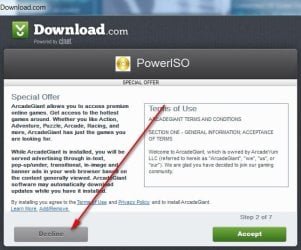
To prevent any crap from coming with the download, just click "custom" and uncheck anything you don't want or "decline" as in pic.

The programs will then download.

is there any iso and zip/rar extractor that doesn't come with crapware/malware. last time i downloaded poweriso and winrar both of them installed a bunch of malware onto my computer
[/QUOTE]
 

Attachments

  • POWER ISO PIC.jpg
    POWER ISO PIC.jpg
    96.1 KB · Views: 54

My Computer

Computer type
PC/Desktop
Computer Manufacturer/Model Number
Self-Built
OS
Windows 7 Professional X64
CPU
Core i7 (2nd gen) i7-2600K / 3.40GHz
Motherboard
ASUS P8Z77-V Intel 7 Series Motherboard
Memory
DDR3 2400MHz (OC) 16gb
Graphics Card(s)
Intel(R) HD Graphics 3000, -1988 Mb
Sound Card
8 ChannelsAudio Chipset Realtek ALC892
Monitor(s) Displays
LG 29UM65 Black 29"
Screen Resolution
2560 x 1080
Hard Drives
840 EVO 250 GB SSD ;2tb (2);Seagate;1tb Seagate; 750 gb Seagate; wd ext (2) 750 gb,WD 2tb X 2;WD 3TB Black
PSU
750 watt
Case
Thermaltake RX -1
Cooling
2120mm Fans Included 1Other Fan Ports 5x 200mm Fan Ports
Keyboard
Microsoft Digital Media Pro
Mouse
Microsoft Wireless 6000
Internet Speed
U-verse 18 mbps
Antivirus
MSE
Browser
Firefox, Chrome and my favorite: Pale Moon
Other Info
HdHomerun Dual Tuner.
SRS Audio Lab,
Pioneer BDR 208-DBK
PS3-What a difference in my Surround Sound Receiver!
HP 4540s - My new Toy.
Epson R280 Printer- To personalize my Dvds.
Canon MP 560 - For scanning.

My Computer

Computer type
PC/Desktop
Computer Manufacturer/Model Number
Self built custom
OS
64-bit Windows 11 Pro for Workstations
CPU
Intel i7-8700K OC'd to 5 GHz
Motherboard
ASUS ROG Maximus XI Formula Z390
Memory
64 GB (4x16GB) G.SKILL TridentZ RGB DDR4 3600 MHz
Graphics Card(s)
ASUS ROG-STRIX-GTX1080TI-O11G-GAMING
Sound Card
Integrated
Monitor(s) Displays
2 x Samsung Odyssey G7 27"
Screen Resolution
2560x1440
Hard Drives
1TB Samsung 990 PRO M.2,
4TB Samsung 990 PRO PRO M.2,
TerraMaster F8 SSD Plus NAS
PSU
Seasonic Prime Titanium 850W
Case
Thermaltake Core P3
Cooling
Corsair Hydro H115i
Keyboard
Logitech wireless K800
Mouse
Logitech MX Master 4
Internet Speed
2 Gb/s Download and 100 Mb/s Upload
Antivirus
Malwarebyte Anti-Malware Premium
Browser
Google Chrome
Other Info
Logitech Z625 speaker system,
Logitech BRIO 4K Pro webcam,
HP Color LaserJet Pro MFP M477fdn,
APC SMART-UPS RT 1000 XL - SURT1000XLI,
Galaxy S23 Plus phone
To prevent any crap from coming with the download, just click "custom" and uncheck anything you don't want or "decline" as in pic.

The programs will then download.

is there any iso and zip/rar extractor that doesn't come with crapware/malware. last time i downloaded poweriso and winrar both of them installed a bunch of malware onto my computer
[/QUOTE]

i do it all the time but it's like a forced install, it still shows even after i clicked decline


thanks mate
 

My Computer

Computer type
PC/Desktop
OS
windows 7 home x64
Back
Top