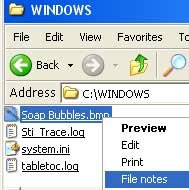
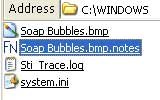
Is it possible to disable the user account control notification for just the FileNotes Windows Tagger and still run this program as an administrator?
If you are the only user on your computer and you know what you are doing, then just turn User Account Control off. If you are not sure, then you shouldn't turn it off.
As far as I know it is not possible to turn it off for one specified program. Bit pointless as well, running as administrator effectively bypasses UAC.
If you set the program to run as an administrator, and you are an administrator, then you don't need to do anything else.
Be careful when allowing programs to run with administrator rights, only do it for programs you know and trust. Don't just give any software you downloaded such rights without carefully checking it. If you bypass security mechanisms without due care then you WILL come to grief, it is merely a matter of time.......
This particular program "Filenotes" manipulates the registry in order to be able to work. Programs that do that can be dangerous.
These are the registry files it loads/changes, you can look at these with a text editor like notepad etc.;
Code:
REGEDIT4

[-HKEY_CLASSES_ROOT\*\shell\filenotes]

[-HKEY_CLASSES_ROOT\.notes]
Code:
REGEDIT4

[HKEY_CLASSES_ROOT\*\shell\filenotes]
@="File notes"

[HKEY_CLASSES_ROOT\*\shell\filenotes\command]
@="C:\\filenotes\\filenotes.exe %1"

[HKEY_CLASSES_ROOT\.notes]
[HKEY_CLASSES_ROOT\.notes\DefaultIcon]
@="C:\\filenotes\\filenotes.ico"
[HKEY_CLASSES_ROOT\.notes\shell]
[HKEY_CLASSES_ROOT\.notes\shell\open]

[HKEY_CLASSES_ROOT\.notes\shell\open\command]
@="\"C:\\filenotes\\filenotes.exe\"  /openassociated \"%1\""

[HKEY_CLASSES_ROOT\.notes\PersistentHandler]
@="{5e941d80-bf96-11cd-b579-08002b30bfeb}"
Code:
REGEDIT4

[HKEY_CLASSES_ROOT\*\shell\filenotes]
@="File notes"

[HKEY_CLASSES_ROOT\*\shell\filenotes\command]
@="C:\\filenotes\\filenotes.exe %1"

[HKEY_CLASSES_ROOT\.notes]

[HKEY_CLASSES_ROOT\.notes\DefaultIcon]
@="C:\\filenotes\\filenotes.ico,0"

[HKEY_CLASSES_ROOT\.notes\shell]

[HKEY_CLASSES_ROOT\.notes\shell\open]

[HKEY_CLASSES_ROOT\.notes\shell\open\command]
@="\"C:\\filenotes\\filenotes.exe\" \"%1\""

[HKEY_CLASSES_ROOT\.notes\PersistentHandler]
@="{5e941d80-bf96-11cd-b579-08002b30bfeb}"
Code:
REGEDIT4

[HKEY_LOCAL_MACHINE\SYSTEM\CurrentControlSet\Control\ContentIndex]
"FilterFilesWithUnknownExtensions"=dword:00000001
The other files in the archive are;

Installation Instructions from;
http://geoland.org/2007/01/filenotes-windows-tagger/
Installing FileNotes
- Download the zip archive
- Unzip the contents in the C drive (alternativelly drag the filenotes dir to the C: drive)
- double click on the notes_open_associated_file.reg file and press confirm the registry addition (press yes on the confirmation box that appears – this confirm that its OK to add the information on the registry)
- that’s it
Unistalling FileNotes
- double click on the clean_registry.reg file and confirm the registry addition
- erase the filenotes folder with all the contents
Known issues
- If windows search does not appear to search within the .notes files you can double click the winXP_fix_Run_if_search_cannot_see_inside_notes.reg file and confirm the registry addition. Look at the microsoft knowledge base for more info.
The relevant files must be in C:\root or t
his wont run at all.
It wont do any damage, it just wont work.
Programs which require you to install to the root and also to manipulate the registry are generally inadvisable, and I am also generally wary of programs which have bad spelling and similar sloppy errors in them. This is not a good recommendation for the programmer.
On no account should you try to alter your default programs!!! To try and make this work.
If you install it correctly it does work.
Regards....Mike Connor