FREE Great Programs for Windows 7

Status
Not open for further replies.
Then that is why it works for Mike and not for polycue

With UAC Enabled, certain parts of the drive are marked as not accessible by standard user, And prompts for raising access level. Root of C:\ and Program Files are not standard user accessible areas for security reasons.

Which is another reason I would not recommend the app discussed here.

Agreed, it is very dangerous to give elevated permissions to programs you don't know anything about.

But you can elevate Notepad permissions without any problems, and Notepad is what writes the file.

Regards....Mike Connor
 

My Computer

OS
Several, including Windows 7 x64 Ultimate
Just to be clear about this, if you are a normal "user" on a network, or a shared machine etc, no sensible admin is going to give you elevated permissions for anything at all.

If you are a single user on a single machine, then there is no problem. You just give yourself the required permissions, ( or the program you want to use).

I would most definitely not give elevated permissions to any unknown program. Also, I assume that a single user who wants to do things like this is not going to go crazy and start editing system files with notepad, ( or whatever else one might use).

In point of fact, many common file managers automatically have elevated permissions when installed. So one might do a very great deal of damage with them. This does occur now and again, but most users are sensible and don't want to ruin their installation.

Some of these things have to be taken as read.

The original App, ( Which I also definitely do not recommend ) manages to circumvent UAC because it has to be run with elevated permissions in order to work in system directories. There is no principal difference between doing that and elevating Notepad.

Also, and finally, there is no good reason to use such an app in system directories. The primary usage would be in documenting downloads and suchlike, and these should not be in system directories.


Regards....Mike Connor
 

My Computer

OS
Several, including Windows 7 x64 Ultimate
For anybody who wants an application like this I have just compiled this source code, and also run it as a script in Autohotkey, and it works perfectly;

Code:
; DownNote
; Version 0.2
; Generated using SmartGUI Creator 3.4
; Author: Maria Seliger
; This program creates textfiles to folders or files with the same name to
; enter description for folders & files.
; It uses for editing the freeware program PSPad, http://www.pspad.com/en/.
; You might use also other editors. In this case you have to change the locations
; in the lines which begin with Run
; Usage:
; 1. Open Folder to which you want add descriptions: Button Folder
; 2. Select Files and Folders from the listview element to which you want to
;    add descriptions. Example:
; Backup | Backup.txt: To the folder Backup a file with name Backup.txt exists.   
; In this case the Backup.txt file is opening for editing.
; Backup | new: No description file to the folder exists. A new file is created
; (empty or by template).
; File1.txt | File1.txt: No source file or folder exists to the text file. The
; text file is opening for editing.
; 3. If you want to use empty file templates you can use the button FileNote.
;    It will create or open text files to the selected files & folders in PsPad
;    Editor. There you can edit / view the content.
; 4. If you want to use templates you can use the button FileNoteTemplate.
;    You have to select a text template and then the template is used for the
;    new text files which are created. Existing files are only opened for editing.
; 5. To modify the view after creating the files use the button Modify.
; 6. You may also use the program FileNote in addition.
;    See http://www.autohotkey.com/forum/viewtopic.php?t=4595
; 7. Button Close: Closes the program.
; 8. Button Delete: Deletes corresponding text files to files / folders.
; 9. What to do next:
;    Add button to combine selected text files.
;    ? Add button to search in text with grep or agrep.
Gui, Add, ListView, x6 y47 w450 h410, File|FileNote
Gui, Add, Button, x476 y67 w150 h30, FileNote
Gui, Add, Button, x476 y107 w150 h30, FileNoteTemplate
Gui, Add, Button, x476 y307 w150 h30, Modify
Gui, Add, Button, x476 y347 w150 h30, Delete
Gui, Add, Button, x476 y387 w150 h30, About
Gui, Add, Button, x476 y427 w150 h30, Close
Gui, Add, Button, x476 y7 w150 h30, Folder
Gui, Add, Edit, x6 y7 w450 h30 r2 vFolderpath
; Gather a list of file names from a folder and put them into the ListView:

Gui, Show, x173 y146 h483 w635, FileNote
return

ButtonFolder:
   FileSelectFolder, OutputVar, , 0, Select Folder
   if OutputVar =
     Gui, Show, x173 y146 h483 w635, FileNote
   else
     GoSub, Browse
   Gui, Show, x173 y146 h483 w635, FileNote
   return

ButtonFileNote:
   RowNumber = 0  ; first loop iteration to start search at the top of the list
   Loop
   {
      RowNumber:= LV_GetNext(RowNumber) ; first selected element
      if not RowNumber  ; zero = no more selected rows
          break
      LV_GetText(Text, RowNumber)
      GoSub, GetFileName
      Sleep 100 ; this is because sometimes PsPad fails to open the files correctly
                 ; if you have problems increase time
       Run, C:\Programme\PSPad\PsPad.exe "%filename%"
    }
    GoSub ButtonModify
    Gui, Show, x173 y146 h483 w635, FileNote
    return

ButtonFileNoteTemplate:
; select template
   FileSelectFile, SelectedFile, , , Open Template for FileNote, Text Documents (*.txt)
; create files or open file if it already exist
  RowNumber = 0  ; first loop iteration to start search at the top of the list
   Loop
   {
      RowNumber:= LV_GetNext(RowNumber) ; first selected element
      if not RowNumber  ; zero = no more selected rows
          break
      LV_GetText(Text, RowNumber)
      GoSub, GetFileName
      IfNotExist, %filename%
        FileCopy, %SelectedFile%, %filename%
      Sleep, 100 ; this is because sometimes PsPad fails to open the files correctly
                 ; if you have problems increase time
      Run, C:\Programme\PSPad\PsPad.exe "%filename%"
   }
   GoSub ButtonModify
   Gui, Show, x173 y146 h483 w635, FileNote
   return

ButtonDelete:
   RowNumber = 0  ; first loop iteration to start search at the top of the list
   Loop
   {
      RowNumber:= LV_GetNext(RowNumber) ; first selected element
      if not RowNumber  ; zero = no more selected rows
          break
      LV_GetText(Text, RowNumber)
      GoSub, GetFileName
      IfExist, %workfolder%%filename%
      {
      Msgbox, 4, Delete File, Do you want to delete the file %workfolder%%filename%?
      IfMsgbox, Yes
      {
         FileDelete, %workfolder%%filename%
         GoSub, ButtonModify
      }
      }
   }
   Gui, Show, x173 y146 h483 w635, FileNote
   return

ButtonModify:
   if OutputVar<>
      GoSub, Browse
   if OutputVar =
      Gui, Show, x173 y146 h483 w635, FileNote
   else
      GoSub, Browse
   Gui, Show, x173 y146 h483 w635, FileNote
   return


ButtonAbout:
   Msgbox DownNote Program created by Maria Seliger, Version 0.1, Usage see SourceCode!
   Gui, Show, x173 y146 h483 w635, FileNote
   return

Browse:
  LV_Delete() ; Delete content of listview
  GuiControl, , Folderpath, %OutputVar%
  SetWorkingDir, %OutputVar%
  Searchstring=
  extension=txt
  workfolder=%A_WorkingDir% ; for later use
  Loop, %A_WorkingDir%\*.*,1,0 ; collects only files and folders which are not
                               ; text files
  {
    nameoffile=%A_LoopFileName%
    if A_LoopFileExt<>%extension%
       Searchstring=%Searchstring% %nameoffile%
  }
  Loop, %A_WorkingDir%\*.*,1,0
  {
        point=.
        nameoffile=%A_LoopFileName%
        IfInString, nameoffile, %point%
        {
          StringTrimRight, filename, nameoffile, 4
          filename=%filename%.txt
          StringTrimRight, filename2, nameoffile, 4
        }
        else
          filename=%nameoffile%.txt
        IfExist, %OutputVar%\%filename%
        {
          IfNotInString, Searchstring, %filename2%
            LV_Add("", nameoffile, filename)
          else
          {
          If nameoffile<>%filename%
            LV_Add("", nameoffile, filename)
          }
        }
        else
          {
            filename=new
             LV_Add("", A_LoopFileName, filename)
         }
      }
     LV_ModifyCol(1)  ; Auto-size first column to fit its contents
      return

GetFileName:
      point=.
      nameoffile=%Text%
      If A_LoopFileSize > 0
      {
        StringTrimRight, filename, nameoffile, 4
        filename=%filename%.txt
      }
      else
        filename=%nameoffile%.txt
      return

ButtonClose:
   GoSub GuiClose

GuiClose:
ExitApp

The code is courtesy of "Maria Seliger";

Downnote - an addition to FileNote

and instructions etc can be found there. I can't load an executable file here, but I can doubtless dump it somewhere on the net and link to it.

This is what the application looks like when run;


An excerpt from the script with general instructions;

; Version 0.2
; Generated using SmartGUI Creator 3.4
; Author: Maria Seliger
; This program creates textfiles to folders or files with the same name to
; enter description for folders & files.
; It uses for editing the freeware program PSPad, http://www.pspad.com/en/.
; You might use also other editors. In this case you have to change the locations
; in the lines which begin with Run
; Usage:
; 1. Open Folder to which you want add descriptions: Button Folder
; 2. Select Files and Folders from the listview element to which you want to
; add descriptions. Example:
; Backup | Backup.txt: To the folder Backup a file with name Backup.txt exists.
; In this case the Backup.txt file is opening for editing.
; Backup | new: No description file to the folder exists. A new file is created
; (empty or by template).
; File1.txt | File1.txt: No source file or folder exists to the text file. The
; text file is opening for editing.
; 3. If you want to use empty file templates you can use the button FileNote.
; It will create or open text files to the selected files & folders in PsPad
; Editor. There you can edit / view the content.
; 4. If you want to use templates you can use the button FileNoteTemplate.
; You have to select a text template and then the template is used for the
; new text files which are created. Existing files are only opened for editing.
; 5. To modify the view after creating the files use the button Modify.
; 6. You may also use the program FileNote in addition.
; See http://www.autohotkey.com/forum/viewtopic.php?t=4595
; 7. Button Close: Closes the program.
; 8. Button Delete: Deletes corresponding text files to files / folders.
; 9. What to do next:
; Add button to combine selected text files.
; ? Add button to search in text with grep or agrep.

The person in question, ( although I doubt it is actually THE Holy Mary ) is obviously a foreign language speaker, but the instructions are clear enough.

Best to get autohotkey and run the script, or compile it yourself.

The application uses PsPad as an editor.

I will see if I can find somewhere to post the Executable for those who are unable or unwilling to use a script or compile it themselves.

OK, here is the compiled executable; http://www.filefactory.com/file/ca3238f/n/Downnote.exe

Regards....Mike Connor
 

My Computer

OS
Several, including Windows 7 x64 Ultimate
But you can elevate Notepad permissions without any problems, and Notepad is what writes the file.

Regards....Mike Connor

How do you elevate Notepad permissions on a permanent basis without disabling UAC?
 

My Computer

OS
Windows 7 Professional x64 x86 VISTA XP 98SE 95 3.x
CPU
Intel(R) Core(TM)2 Quad CPU Q9400 @ 2.66GHz
Memory
8 GB
Screen Resolution
1920 x 1200
PSU
OCZ Fatal1ty OCZ550FTY 550W ATX12V v2.2 25A on each rail
This is the application running on the folder;

C:\Program Files (x86)

It loads the whole folder and you can add, edit, modify or delete file notes to your heart's content.


Regards...Mike Connor
 

My Computer

OS
Several, including Windows 7 x64 Ultimate
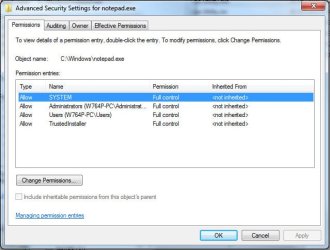
I've elevated Notepad permissions 2011-03-21_155608.jpg but when I use Filenote... in "program files" I am still required to navigate to the relevant folder.

FileNotes Windows Tagger does not have this problem and seems to be the better choice.
 

My Computer

OS
Windows 7 Professional x64 x86 VISTA XP 98SE 95 3.x
CPU
Intel(R) Core(TM)2 Quad CPU Q9400 @ 2.66GHz
Memory
8 GB
Screen Resolution
1920 x 1200
PSU
OCZ Fatal1ty OCZ550FTY 550W ATX12V v2.2 25A on each rail
I've elevated Notepad permissions View attachment 144813 but when I use Filenote... in "program files" I am still required to navigate to the relevant folder.

FileNotes Windows Tagger does not have this problem and seems to be the better choice.

Hmmm...it works for me with elevated permissions on another machine.

Whatever, try the file I just uploaded first. Much more comfortable and less dangerous.

If you don't like it you can still use the other one.

Regards...Mike Connor
 

My Computer

OS
Several, including Windows 7 x64 Ultimate
You can elevate the permissions on "DownnoteNP" quite easily, and as it only works for editing file notes you can't do any harm with it;


Regards....Mike Connor
 

My Computer

OS
Several, including Windows 7 x64 Ultimate
I've elevated Notepad permissions View attachment 144813 but when I use Filenote... in "program files" I am still required to navigate to the relevant folder.

FileNotes Windows Tagger does not have this problem and seems to be the better choice.

Hmmm...it works for me with elevated permissions on another machine.

Whatever, try the file I just uploaded first. Much more comfortable and less dangerous.

If you don't like it you can still use the other one.

Regards...Mike Connor

I may have elevated the wrong notepad.exe (notepad.exe appears in several
location in Window directory) but on further reflection Notepad is more likely to be
highjacked and if microsoft would have deemed it safe it would have given it the
required elevation. In view of this I think that FileNotes Windows Tagger is more
efficient, works in any folder and is safer.
 
Last edited:

My Computer

OS
Windows 7 Professional x64 x86 VISTA XP 98SE 95 3.x
CPU
Intel(R) Core(TM)2 Quad CPU Q9400 @ 2.66GHz
Memory
8 GB
Screen Resolution
1920 x 1200
PSU
OCZ Fatal1ty OCZ550FTY 550W ATX12V v2.2 25A on each rail
Found this awesome software.:D

With storage disk coming in Tera bytes, softwares like this will come handy.;)
Disk Space Fan

Helps a lot in deleting unnecessary/unorganized data.:cool:

YBL
 

My Computer

Computer Manufacturer/Model Number
AMD _(Assembled)_
OS
Dual Booting Windows 7 64-Bit Ultimate Edition and Fedora 16.
CPU
AMD Phenom X4 925
Motherboard
MSI 785g-E53
Memory
4gb DDR3 G.skill RipJaws
Graphics Card(s)
ATI Radeon HD 6770
Sound Card
Realtek
Monitor(s) Displays
Dell IN2020M LED
Screen Resolution
1600*900 20"
Hard Drives
Seagate 500 Gibs
External 320 Gb Western Digital(Got Glitchy)
PSU
Cooler Master
Case
Cooler Master
Cooling
Cooler Master
Keyboard
Logitech K100
Mouse
Razor Death Adder v2 3500 dPi (Razer Goliathus Pad)
Internet Speed
Back to college Internet with Cyberroam X|
7Folder 1.3

Here's another small hotkey utility I wrote. It's called 7Folder.
It's for Windows Seven only.

There's a hotkey in Windows Seven, Control-Shift-n, which creates a New Folder if you press it in an Explorer folder window or on the desktop. I don't like 3 key combos so I wrote this to allow me to just press F7 function key as in FreeCommander.

Here's a link to my hotkey page:

http://www.favessoft.com/hotkeys.html

Just scroll down or search for 7Folder download link.

I don't know if it's an issue with Windows Seven SP1 or something else, but I am getting feedback that the class name for the Desktop is now not guaranteed to be Progman as it has been for years. It's Progman on my machine. The reason it's important is because the 7Folder hotkey is only active when Explorer or the Desktop is the active window. This prevents the function key from being stolen from an editor or other program that uses it. I'm hearing that some instances of Windows Seven have WorkerW as the Desktop class name.

Rather than chase around MS changes I'm including the source code and custom icon in the download. If you wish to change the class name for the Desktop or remove the Desktop altogether from the DesktopGroup in which the hotkey is active, you can change the source and compile it yourself using AutoHotKey free software.

In any case, it works fine as written on my Windows Seven machine.

The Control-Shift-n hotkey only works in Windows Seven. Therefore on program start it checks the Windows Version. Anything less than 6.1 it will produce an error dialog and quit.

It calls _EmptyWorkingSet() to reduce memory usage while sitting in the Task Tray.

7Folder is free for you to use at your own risk. I hope you enjoy pressing a Function key to get a new folder instead of Control-Shift-n. :cool:

See Readme.txt for instructions to change the hotkey.

OTOH if you are a mouse person you probably don't care anyway. :)
 

My Computer

Computer Manufacturer/Model Number
HP Media Center
OS
Windows 7 32 bit
CPU
AMD 5200+ dual core
Memory
2 GB
Graphics Card(s)
NVidia GeForce 6150SE 128 MB
Monitor(s) Displays
CRT
Screen Resolution
1280x1024
Hard Drives
500 GB Sata internal :

SIIG USB 3.0 docking stations w/WD Caviar Black 6 Gb/s drives
Keyboard
PS/2
Mouse
PS/2 Wheel Mouse
Other Info
SIIG USB 3.0 PCIexpress card.
Indeed, "progman" wont work as expected on my machine. (Windows 7 x64 Ultimate SP1 ), and I have to use an older version of Autohotkey for my scripts. Bit of a pain.............

Regards....Mike Connor
 

My Computer

OS
Several, including Windows 7 x64 Ultimate
Indeed, "progman" wont work as expected on my machine. (Windows 7 x64 Ultimate SP1 ), and I have to use an older version of Autohotkey for my scripts. Bit of a pain.............

Regards....Mike Connor

Edit: I uploaded v. 1.4. Instead of looking for Progman class name, it looks for Program Manager window title. Please download and see if it works. It works on my system but I don't have the "WorkerW" class name to test it.
 
Last edited:

My Computer

Computer Manufacturer/Model Number
HP Media Center
OS
Windows 7 32 bit
CPU
AMD 5200+ dual core
Memory
2 GB
Graphics Card(s)
NVidia GeForce 6150SE 128 MB
Monitor(s) Displays
CRT
Screen Resolution
1280x1024
Hard Drives
500 GB Sata internal :

SIIG USB 3.0 docking stations w/WD Caviar Black 6 Gb/s drives
Keyboard
PS/2
Mouse
PS/2 Wheel Mouse
Other Info
SIIG USB 3.0 PCIexpress card.
Last edited by a moderator:

My Computer

Computer Manufacturer/Model Number
Sony Vaio C series VPCCB35FN laptop
OS
MS Windows 7 Home Premium 64-bit SP1
CPU
IntelCore [email protected]; Sandy Bridge 32nm Tech.
Motherboard
Sony Vaio Version:C609NJYJ
Memory
4096Mb RAM; Single ChannelDDR3@665MHz; DRAM Freq:662MHz
Graphics Card(s)
AMD Radeon HD 6630M; GPU:Whistler;BIOS Core&mem Clock:123.36
Sound Card
REALTEK High Definition Audio Device; INTEL Display Card
Monitor(s) Displays
Generic PnP Intel HD;Resolution:1920*1040 Pixels; BPP:32bits
Screen Resolution
Current Resolution:1920*1080 Pixels; Monitor Frequency:60Hz
Hard Drives
Internal HD:TOSHIBA MK5061GSY; Real Size:488 GB;NTFS; 3 Partitions; SATA; HEADS:16

External HDD: WD Elements 1023 PORTABLE; Estimated Size: 1TB; NTFS; 3 Partitions
Cooling
Lateral Exhaust with a Cooling Pad Placed Beneath.
Keyboard
Logitech Bluetooth+ Generic Integrated K-B
Mouse
Logitech Bluetooth
Internet Speed
2MBPS
Other Info
1)Trend Micro Titanium Maximum Security Suite Version:3
2)SAS-PRO

3)MBAM--PRO


4)WATERFOX+IE9 +WOT+LINKEXTEND+ DRWEBCUREIT LINK CHECKER

5)SPYWAREBLASTER

6) WINPATROL PLUS

7) SANDBOXIE and
8) A BIT OF COMMON SENSE.
Indeed, "progman" wont work as expected on my machine. (Windows 7 x64 Ultimate SP1 ), and I have to use an older version of Autohotkey for my scripts. Bit of a pain.............

Regards....Mike Connor

Edit: I uploaded v. 1.4. Instead of looking for Progman class name, it looks for Program Manager window title. Please download and see if it works. It works on my system but I don't have the "WorkerW" class name to test it.

Thanks! It doesn't work on my machine, but there are also other reasons for that, (mainly extensive customisation of Explorer).

Regards....Mike Connor
 

My Computer

OS
Several, including Windows 7 x64 Ultimate
For those using a lot of keyboard shortcuts, Shortcut Key Explorer scans your computer for global keyboard shortcuts (excluding Windows native ones). Double click a shortcut on the resulting list let's you edit it. Very practical for those like me who have a lot of self created key combos for various purposes.

Free download: RJL Software - Software - Utility - Shortcut Key Explorer - Download

Kari
 

My Computer

Computer type
Laptop
Computer Manufacturer/Model Number
HP ENVY 17-1150eg
OS
Windows 10 Pro x64 EN-GB
CPU
1.6 GHz Intel Core i7-720QM Processor
Memory
6 GB
Graphics Card(s)
ATI Mobility Radeon HD 5850 Graphics
Sound Card
Beats sound system with integrated subwoofer
Monitor(s) Displays
17" laptop display, 22" LED and 32" Full HD TV through HDMI
Screen Resolution
1600*900 (1), 1920*1080 (2&3)
Hard Drives
Internal: 2 x 500 GB SATA Hard Disk Drive 7200 rpm
External: 2TB for backups, 3TB USB3 network drive for media
Cooling
As Envy runs a bit warm, I have it on a Cooler Master pad
Keyboard
Logitech diNovo Media Desktop Laser (bluetooth)
Mouse
Logitech Performance Mouse MX
Internet Speed
50/10 Mbps VDSL
Antivirus
Windows Defender 4.3.9431.0
Browser
Maxthon 3.5.2., IE11
Thank you Kari. Shortcut Key Explorer added to the list. :)
 

My Computer

Computer type
PC/Desktop
Computer Manufacturer/Model Number
Self built custom
OS
64-bit Windows 11 Pro for Workstations
CPU
Intel i7-8700K OC'd to 5 GHz
Motherboard
ASUS ROG Maximus XI Formula Z390
Memory
64 GB (4x16GB) G.SKILL TridentZ RGB DDR4 3600 MHz
Graphics Card(s)
ASUS ROG-STRIX-GTX1080TI-O11G-GAMING
Sound Card
Integrated
Monitor(s) Displays
2 x Samsung Odyssey G7 27"
Screen Resolution
2560x1440
Hard Drives
1TB Samsung 990 PRO M.2,
4TB Samsung 990 PRO PRO M.2,
TerraMaster F8 SSD Plus NAS
PSU
Seasonic Prime Titanium 850W
Case
Thermaltake Core P3
Cooling
Corsair Hydro H115i
Keyboard
Logitech wireless K800
Mouse
Logitech MX Master 4
Internet Speed
2 Gb/s Download and 100 Mb/s Upload
Antivirus
Malwarebyte Anti-Malware Premium
Browser
Google Chrome
Other Info
Logitech Z625 speaker system,
Logitech BRIO 4K Pro webcam,
HP Color LaserJet Pro MFP M477fdn,
APC SMART-UPS RT 1000 XL - SURT1000XLI,
Galaxy S23 Plus phone
Status
Not open for further replies.
Back
Top