Solved Free Space won't form New Simple Volumes

NeptuneTech

Banned
Local time
8:02 PM
Messages
9
Location
Kathmandu
Hello friends. I have a Dell Inspiron 1440 laptop with 64-bit windows 7 ultimate installed in it. My Partitions were like this:
c: 40gb(primary partition)
d: 20gb(primary partition)
rest e: , f: and g: were 80 gbs each(approx.).
Understanding the need of more space in c:, i formatted d: and created it as unallocated space, shrunk it with c: to make c: total of 60gb. Up-to that i didn't have a problem.
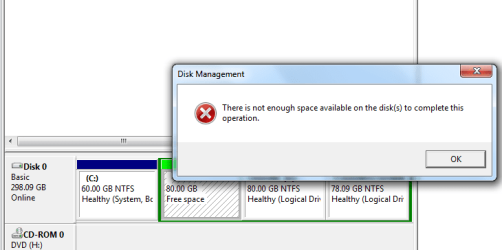
Now my disk partition were:
c: 60gb(primary partition)
d: 80gb(logical drive)
e: 80gb(logical drive)
f: 78.09 gb(logical drive)
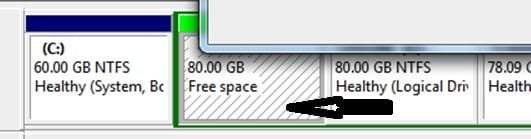
since my d: was empty, i decided to extend my e: with the 80gb available on d: . and so, i formatted the d: and then it changed to free space. Now, i cant reformat d: nor extend e: with the free space generated in d: . Whenever i try to create a new simple volume by right clicking the free space of 80gb in d: ., i get following error(shown in screenshot)...i also have run a chkdsk in prompt but it says "cannot open volume for direct access" . . .any idea where i went wrong my dear frens? please help me. thank you.
 

Attachments
  • Untitled.png
    Untitled.png
    13.5 KB · Views: 47

My Computer My Computer

At a glance

Windows 7 Ultimate x642GB
OS
Windows 7 Ultimate x64
Memory
2GB
Welcome to Windows Seven Forums.

Your problem has occurred because for some reason you are using logical partitions, which are effectively an extension of the C partition. Free space is different to unallocated space in that there is a partition there occupying that space.

Your best bet is leave the C:\ drive as it is and delete the three logical partitions, then create a new primary partition or partitions on the resultant unallocated space.

You can have up to four primary partitions on one hard drive and if you need more partitions you can create logical partitions within the last primary partition.

Make sure you backup everything first before you delete your logical partitions and creating a restore point wouldn't be a bad idea either.

You might want to create a Partition Wizard boot disc for partitioning needs as it is far more versatile than Windows 7's disk management tool.

http://www.partitionwizard.com/index.html
 

My Computer My Computer

At a glance

Windows 7 Ultimate SP1 64-BitIntel Core i7 870 @ 2.93GHz8Gb Dual-Channel DDR3 @ 664MHznVidia GeForce GTX 460 1024MB dedicated RAM
Computer Manufacturer/Model Number
HP Pavilion Elite 495UK
OS
Windows 7 Ultimate SP1 64-Bit
CPU
Intel Core i7 870 @ 2.93GHz
Motherboard
MSI 2A9C (CPU1)
Memory
8Gb Dual-Channel DDR3 @ 664MHz
Graphics Card(s)
nVidia GeForce GTX 460 1024MB dedicated RAM
Sound Card
Realtek HD Audio
Monitor(s) Displays
HP2310i
Screen Resolution
1920 x 1080
Hard Drives
1x1954GB Hitachi HDS22020ALA 330 (RAID), 1x1954GB Hitachi External for backup and storage
PSU
460W
Case
HP Elite
Cooling
Air cooled
Keyboard
Logitech K750 solar-powered keyboard
Mouse
Logitech Wireless M180 mouse
Internet Speed
2Mb
Other Info
Pure Avanti Flow Internet Radio with iPod Dock, 64Gb iPod, HP USB Speakers, Sony MDR-V500 Headphones, Sony Vaio F-Series Laptop
Welcome to Windows Seven Forums.


Your best bet is leave the C:\ drive as it is and delete the three logical partitions, then create a new primary partition or partitions on the resultant unallocated space.
First off all i'd like to thank you heartily for warm welcome in this forum...secondly, thank you for the quick reply..:)
does disk management feature in windows 7 allow a primary partition to be created?i mean i didn't format my laptop when i had first installed windows seven fresh on my computer, a technician did. So i am a bit nervous about this problem on my laptop..so help me once more please
 

My Computer My Computer

At a glance

Windows 7 Ultimate x642GB
OS
Windows 7 Ultimate x64
Memory
2GB
Yes, it does.

What you should have done after the technician installed Windows was shrink the C drive, and then create a new primary partition (s) in the resultant unallocated space.

Just right-click each logical partition in turn and choose delete.

Once you've done that, highlight the unallocated space, then right-click again and follow the wizard's instructions to create a new primary (basic) partition. It'll also offer you the chance to format the new partition. Just choose the Quick Format option or you'll have to wait some time before a full format is completed. You'll also be able allocate a drive letter of your choosing.

Whatever you do, don't highlight your C drive because if you mess with that one you'll have no operating system to boot into.
 

My Computer My Computer

At a glance

Windows 7 Ultimate SP1 64-BitIntel Core i7 870 @ 2.93GHz8Gb Dual-Channel DDR3 @ 664MHznVidia GeForce GTX 460 1024MB dedicated RAM
Computer Manufacturer/Model Number
HP Pavilion Elite 495UK
OS
Windows 7 Ultimate SP1 64-Bit
CPU
Intel Core i7 870 @ 2.93GHz
Motherboard
MSI 2A9C (CPU1)
Memory
8Gb Dual-Channel DDR3 @ 664MHz
Graphics Card(s)
nVidia GeForce GTX 460 1024MB dedicated RAM
Sound Card
Realtek HD Audio
Monitor(s) Displays
HP2310i
Screen Resolution
1920 x 1080
Hard Drives
1x1954GB Hitachi HDS22020ALA 330 (RAID), 1x1954GB Hitachi External for backup and storage
PSU
460W
Case
HP Elite
Cooling
Air cooled
Keyboard
Logitech K750 solar-powered keyboard
Mouse
Logitech Wireless M180 mouse
Internet Speed
2Mb
Other Info
Pure Avanti Flow Internet Radio with iPod Dock, 64Gb iPod, HP USB Speakers, Sony MDR-V500 Headphones, Sony Vaio F-Series Laptop
Free space means free space in a partition. You have to delete the partition to get unallocated space. Then you can extend C.

Why do you want a primary partition. The only partition that needs to be primary is the one that is also "active" - meaning it contains the bootmgr. You are much better off with logical partitions for everything else. Note that you can anyhow only have a maximum of 4 primary patitions or 3 primaries with one extended ( that allows - theoretically - up to 128 logical partitions) per physical drive.
 

My Computer My Computer

At a glance

Vista, Windows7, Mint Mate, Zorin, Windows 8from 1.6GHz Duo to i7
Computer Manufacturer/Model Number
HP, Dell, Gateway, Toshiba - 4 laptops and 2 desktops
OS
Vista, Windows7, Mint Mate, Zorin, Windows 8
CPU
from 1.6GHz Duo to i7
Monitor(s) Displays
2x HP w2207
Hard Drives
5x HDD, 7x SSD, 12x Externals
Keyboard
with trackball - no mices
Mouse
Trackball mice
Internet Speed
DSL 6000
Just right-click each logical partition in turn and choose delete.

Once you've done that, highlight the unallocated space, then right-click again and follow the wizard's instructions to create a new primary (basic) partition. It'll also offer you the chance to format the new partition. Just choose the Quick Format option or you'll have to wait some time before a full format is completed. You'll also be able allocate a drive letter of your choosing.


for a trial, i deleted only a drive e: not all of the logical volume...still it showed free space label...and strange thing is that when i right clicked it, it formatted and enabled itself to a new simple volume without any problem...while still the other free space is unavailable to be formatted and generates the same error...

Now, do i need to format the whole logical volume that has 3 partitions in it?? (please refer previous image)
 

My Computer My Computer

At a glance

Windows 7 Ultimate x642GB
OS
Windows 7 Ultimate x64
Memory
2GB
Just right-click each logical partition in turn and choose delete.

Once you've done that, highlight the unallocated space, then right-click again and follow the wizard's instructions to create a new primary (basic) partition. It'll also offer you the chance to format the new partition. Just choose the Quick Format option or you'll have to wait some time before a full format is completed. You'll also be able allocate a drive letter of your choosing.


for a trial, i deleted only a drive e: not all of the logical volume...still it showed free space label...and strange thing is that when i right clicked it, it formatted and enabled itself to a new simple volume without any problem...while still the other free space is unavailable to be formatted and generates the same error...

Now, do i need to format the whole logical volume that has 3 partitions in it?? (please refer previous image)

Yes, the thinking behind my reasoning was to start afresh with the disk space other than the active partition that has Windows on it.

Once you've got a formatted primary partition, you can then decide what you want to do.

As long as you keep your C drive intact you shouldn't do any damage.
 

My Computer My Computer

At a glance

Windows 7 Ultimate SP1 64-BitIntel Core i7 870 @ 2.93GHz8Gb Dual-Channel DDR3 @ 664MHznVidia GeForce GTX 460 1024MB dedicated RAM
Computer Manufacturer/Model Number
HP Pavilion Elite 495UK
OS
Windows 7 Ultimate SP1 64-Bit
CPU
Intel Core i7 870 @ 2.93GHz
Motherboard
MSI 2A9C (CPU1)
Memory
8Gb Dual-Channel DDR3 @ 664MHz
Graphics Card(s)
nVidia GeForce GTX 460 1024MB dedicated RAM
Sound Card
Realtek HD Audio
Monitor(s) Displays
HP2310i
Screen Resolution
1920 x 1080
Hard Drives
1x1954GB Hitachi HDS22020ALA 330 (RAID), 1x1954GB Hitachi External for backup and storage
PSU
460W
Case
HP Elite
Cooling
Air cooled
Keyboard
Logitech K750 solar-powered keyboard
Mouse
Logitech Wireless M180 mouse
Internet Speed
2Mb
Other Info
Pure Avanti Flow Internet Radio with iPod Dock, 64Gb iPod, HP USB Speakers, Sony MDR-V500 Headphones, Sony Vaio F-Series Laptop
Hello NeptuneTech, welcome to Seven Forums!


If I understand you, you want to add the Free Space from D: to the E: Logical; that is possible using the free Partition Wizard program.

click to enlarge
this.jpg
Start with a look at Step Three (disregard the first 2 steps) for an idea of the process, in this tutorial linked below.


My Computer My Computer

At a glance

W 7 64-bit UltimateIntel Q9550 Yorkfield8GB Dominator 8500C5DATI : XFX 5870
Computer Manufacturer/Model Number
* BFK Customs *
OS
W 7 64-bit Ultimate
CPU
Intel Q9550 Yorkfield
Motherboard
ASUS P5Q Pro
Memory
8GB Dominator 8500C5D
Graphics Card(s)
ATI : XFX 5870
Sound Card
Realtek HD Audio 7-1
Monitor(s) Displays
1x 47" LCD HDMI & 3x 26" LCD HDMI
Screen Resolution
1920x1080P & 1920x1200
Hard Drives
1x 80GB Intel X25-M G2 SSD : 1x 500GB & 1x 640GB WD Caviar Black(s)
PSU
Corsair 620HX
Case
Cooler Master RC-690
Cooling
Tuniq Tower 120, 2x 140mm and 3x 120mm case fans
Keyboard
Microsoft 500
Mouse
Razer Diamondback 3G
Internet Speed
14 Mb/s
Other Info
1x Koutech 3Gb/s SATA HDD Hot Swap Rack
^^^^ thanks alot heartily for the warm welcome Bare Foot Kid...

Well, i used minitool partition wizard home edition and performed something on that my brain suggested. What i did was i somehow managed to make my drive D: unallocated(forgot what i did actually) from unused free space . And then, the wizard said i needed to restart the computer, i did. The wizard ran on startup, succeeded and restarted again. But then i got an error saying startup error or sth lyk that and startup diagnostic needed to be run, i did...error was fixed and computer was restored to an earlier point(according to the fixture) .

Now i have all the drives working fine. But what i dont understand is that does running this software always affects the startup and do i need to run the risk of loosing my OS when i run it ? ?

I clearly want to merge one logical to another logical drive, but now i fear if the software has some cons if i run it.

I'm sorry for my inappropriate explanations but thats all i remember what i did last night...:confused:

And one more thing, i tried to merge two logical drives accordingly as the tutorial Bare Foot Kid suggested, but i dont get "0 Operations Pending" on the left side of the panel.
 
Last edited:

My Computer My Computer

At a glance

Windows 7 Ultimate x642GB
OS
Windows 7 Ultimate x64
Memory
2GB
Partition Wizard always affects your startup procedure when you boot into it in the sense you'll get to the PW user interface rather than your Windows desktop.

There is no risk to your C Drive (your operating system and applications) providing you don't highlight the drive when you are carrying out disc management tasks with Partition Wizard.
 

My Computer My Computer

At a glance

Windows 7 Ultimate SP1 64-BitIntel Core i7 870 @ 2.93GHz8Gb Dual-Channel DDR3 @ 664MHznVidia GeForce GTX 460 1024MB dedicated RAM
Computer Manufacturer/Model Number
HP Pavilion Elite 495UK
OS
Windows 7 Ultimate SP1 64-Bit
CPU
Intel Core i7 870 @ 2.93GHz
Motherboard
MSI 2A9C (CPU1)
Memory
8Gb Dual-Channel DDR3 @ 664MHz
Graphics Card(s)
nVidia GeForce GTX 460 1024MB dedicated RAM
Sound Card
Realtek HD Audio
Monitor(s) Displays
HP2310i
Screen Resolution
1920 x 1080
Hard Drives
1x1954GB Hitachi HDS22020ALA 330 (RAID), 1x1954GB Hitachi External for backup and storage
PSU
460W
Case
HP Elite
Cooling
Air cooled
Keyboard
Logitech K750 solar-powered keyboard
Mouse
Logitech Wireless M180 mouse
Internet Speed
2Mb
Other Info
Pure Avanti Flow Internet Radio with iPod Dock, 64Gb iPod, HP USB Speakers, Sony MDR-V500 Headphones, Sony Vaio F-Series Laptop
Using the PW boot disk won't require a restart, try that.


As good and reliable a program as Partition Wizard is, I would not trust the installed version for the operation you need, use the boot CD as suggested and be sure to post back with any further questions you may have and to keep us informed.

First download the Partition Wizard Bootable Disk (PWBD) ISO file to the desktop, be sure to get the PWBD and not the installed version; scroll down to see the download link for the Bootable CD ISO file at this link below.
Then use ImgBurn to burn the ISO to a CD, at no greater than 4x speed with a verify; it was designed for use and works best from a CD rather than a DVD; then boot the created CD to make the changes, it doesn't take any input from the user to setup, just relax and let it load.
 

My Computer My Computer

At a glance

W 7 64-bit UltimateIntel Q9550 Yorkfield8GB Dominator 8500C5DATI : XFX 5870
Computer Manufacturer/Model Number
* BFK Customs *
OS
W 7 64-bit Ultimate
CPU
Intel Q9550 Yorkfield
Motherboard
ASUS P5Q Pro
Memory
8GB Dominator 8500C5D
Graphics Card(s)
ATI : XFX 5870
Sound Card
Realtek HD Audio 7-1
Monitor(s) Displays
1x 47" LCD HDMI & 3x 26" LCD HDMI
Screen Resolution
1920x1080P & 1920x1200
Hard Drives
1x 80GB Intel X25-M G2 SSD : 1x 500GB & 1x 640GB WD Caviar Black(s)
PSU
Corsair 620HX
Case
Cooler Master RC-690
Cooling
Tuniq Tower 120, 2x 140mm and 3x 120mm case fans
Keyboard
Microsoft 500
Mouse
Razer Diamondback 3G
Internet Speed
14 Mb/s
Other Info
1x Koutech 3Gb/s SATA HDD Hot Swap Rack
Partition Wizard always affects your startup procedure when you boot into it in the sense you'll get to the PW user interface rather than your Windows desktop.

There is no risk to your C Drive (your operating system and applications) providing you don't highlight the drive when you are carrying out disc management tasks with Partition Wizard.


I guess it affected me more than what you said...i had to use startup diagnosis tool to recover my normal startup...i had no other option left...coz had i choosen to start normally, i would have crashed my OS( ??? )further more, what's the use of such software if it keeps on affecting the startup and i have to go to a system restore point to fix my normal startup problem.?
 
Last edited:

My Computer My Computer

At a glance

Windows 7 Ultimate x642GB
OS
Windows 7 Ultimate x64
Memory
2GB
@ Bare Foot Kid.....i didn't have to go through all the pain....like suggested earlier, i formatted my whole logical drive and thus created it as "unallocated"..then i got to create it to a New Simple Volume without any problem...thanks for your help :)
 

My Computer My Computer

At a glance

Windows 7 Ultimate x642GB
OS
Windows 7 Ultimate x64
Memory
2GB
Good to see you found a solution and thanks for the update.
 

My Computer My Computer

At a glance

W 7 64-bit UltimateIntel Q9550 Yorkfield8GB Dominator 8500C5DATI : XFX 5870
Computer Manufacturer/Model Number
* BFK Customs *
OS
W 7 64-bit Ultimate
CPU
Intel Q9550 Yorkfield
Motherboard
ASUS P5Q Pro
Memory
8GB Dominator 8500C5D
Graphics Card(s)
ATI : XFX 5870
Sound Card
Realtek HD Audio 7-1
Monitor(s) Displays
1x 47" LCD HDMI & 3x 26" LCD HDMI
Screen Resolution
1920x1080P & 1920x1200
Hard Drives
1x 80GB Intel X25-M G2 SSD : 1x 500GB & 1x 640GB WD Caviar Black(s)
PSU
Corsair 620HX
Case
Cooler Master RC-690
Cooling
Tuniq Tower 120, 2x 140mm and 3x 120mm case fans
Keyboard
Microsoft 500
Mouse
Razer Diamondback 3G
Internet Speed
14 Mb/s
Other Info
1x Koutech 3Gb/s SATA HDD Hot Swap Rack
Back
Top