
Free tray clock

DriveSoft

New member
Member
Local time
6:40 PM
Messages
13
Hello,

I would like to introduce you to my new free program.
A very easy to use application developed to replace the standard Windows clock with skins.

Home page:
Free Desktop Clock download for Windows
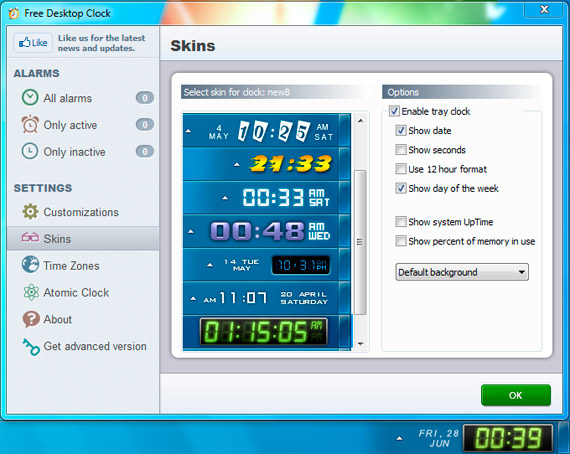
freedesktopclock1.jpg


freedesktopclock2.jpg


I want to hear your opinion :)
 

My Computer

Computer type
PC/Desktop
OS
Windows 7 Ultimate x32
Can the ones with the full date be used when the Taskbar is set to use small icons? I would much rather set it to use small icons, but then I can't display the date with the default clock. Right now, I have the date showing ddd. MMM dd, yyyy.
 

My Computer

Computer type
PC/Desktop
Can the ones with the full date be used when the Taskbar is set to use small icons? I would much rather set it to use small icons, but then I can't display the date with the default clock. Right now, I have the date showing ddd. MMM dd, yyyy.

like this?
k3pjetX.png
 

My Computer

Computer type
PC/Desktop
OS
Windows 7 Ultimate x32
Can the ones with the full date be used when the Taskbar is set to use small icons? I would much rather set it to use small icons, but then I can't display the date with the default clock. Right now, I have the date showing ddd. MMM dd, yyyy.

like this?
k3pjetX.png

For the most part. Is that with small icons?

If so, then are there others like this that show the full date that work with small icons?

(by the way, my date is displayed like this: Sat. June 29, 2013 - I had to manually set it up that way because that's just how I wanted it and it's still how I want it to this day)
 

My Computer

Computer type
PC/Desktop
DriveSoft are you the creator of this clock and or company?
 

My Computer

Computer type
PC/Desktop
Computer Manufacturer/Model Number
Home made Desktop
OS
Windows 10 Pro. 64/ version 1709 Windows 7 Pro/64
CPU
Intel i7-6800K @ 4.3
Motherboard
ASUS X-99 Deluxe II
Memory
Corsair Platinum 16 gig @2400
Graphics Card(s)
EVGA GTX 1070 OC
Monitor(s) Displays
Asus 27" LED LCD/VE278Q
Screen Resolution
1920-1080 or 1280-720 HDMI
Hard Drives
INTEL SSD 730-240 Gb Sata 3.0/
PSU
EVGA Platium 1200W
Case
Phanteks Luxe Tempered Glass 8 fans/ one radiator
Cooling
XSPC/ Water Cooled CPU
Keyboard
Das 4 Professional
Mouse
Logitech M705/MX Anywhere 2-S
Internet Speed
100 mbits
Antivirus
Microsoft Security Essentials/ Malwarebytes Premium 3.0/ SAS
Browser
I.E. 11 default/Firefox/ ISP Time Warner Cable/Spectrum
Other Info
LG BluRay Burner/
Sound system-KLipsch-THX/
Icy Dock ssd Hot Swap bays.
Hi there ... The Alarm Clock version is not free
 

My Computer

Computer Manufacturer/Model Number
W530-3630QM1
OS
windows 7 home 64bit
CPU
INTEL-CORE I7
Memory
16GB
Hard Drives
750GB
Browser
Chrome
For the most part. Is that with small icons?

If so, then are there others like this that show the full date that work with small icons?

(by the way, my date is displayed like this: Sat. June 29, 2013 - I had to manually set it up that way because that's just how I wanted it and it's still how I want it to this day)

Yes, with small icons.
Every skin have own config file "settings.ini"
you can open folder skin 'new3' and change this section

[day]
align=
xAfterTime=1
Format=ddd d mmmm yyyy
cleft=70
top=-9
inmargin_left=-5


preview:
dTNbI20.png
 

My Computer

Computer type
PC/Desktop
OS
Windows 7 Ultimate x32
Hi there ... The Alarm Clock version is not free
yes, Free Desktop Clock is lite version of Atomic Alarm Clock )
 

My Computer

Computer type
PC/Desktop
OS
Windows 7 Ultimate x32
For the most part. Is that with small icons?

If so, then are there others like this that show the full date that work with small icons?

(by the way, my date is displayed like this: Sat. June 29, 2013 - I had to manually set it up that way because that's just how I wanted it and it's still how I want it to this day)

Yes, with small icons.
Every skin have own config file "settings.ini"
you can open folder skin 'new3' and change this section

[day]
align=
xAfterTime=1
Format=ddd d mmmm yyyy
cleft=70
top=-9
inmargin_left=-5


preview:
dTNbI20.png

Wow. I love this. I really do! Thank you!

My only complaint would be that I'd prefer to get the default context menu when right-clicking it. Or, perhaps you could change your context menu so that all of the default Windows 7 options are in there, but of course with Free Desktop Clock's context menu items added to it either on top or on the bottom.
 

My Computer

Computer type
PC/Desktop
Thanks again:

FreeDesktopClock.png


I love being able to customize it using Settings.ini! Thank you for making that possible.
 
Last edited:

My Computer

Computer type
PC/Desktop
Thank you for feedback! :)
 

My Computer

Computer type
PC/Desktop
OS
Windows 7 Ultimate x32
Here's something interesting. It may be a minor bug.

Do you see in the screenshot above I have the clock all the way to the right and the date is perfectly centered? Well, that changes when I enable the leading 0. The clock moves to the left and so the date ends up no longer being centered either.

Here are the settings I have to use with the leading zero enabled:

[clock]
left=10
top=0
width=0
offsetwidth=2
valign=middle

[day]
align=
xAfterTime=0
Format=dddd, MMMM dd, yyyy
cleft=88
top=-5
inmargin_left=-4


With it disabled

[clock]
left=17
top=0
width=0
offsetwidth=11
valign=middle

[day]
align=
xAfterTime=0
Format=dddd, MMMM dd, yyyy
cleft=83
top=-5
inmargin_left=-4


I noticed this when toggling the leading zero on and off and I thought that I should mention it. I compromised for now by leaving it enabled because it satisfies my OCD nature. :) Except, I'd rather have the leading 0 disabled without it moving and causing the date to need to be re-centered. It would be cool if it could remain flush against the Show Desktop button like that with the leading zero disabled because when it becomes 10, 11, and 12, it moves.
 

My Computer

Computer type
PC/Desktop

My Computer

Computer type
Laptop
Computer Manufacturer/Model Number
Sager NP9170
OS
Win 7 Pro x64 / Win 10 Pro
CPU
Intel(R) Core(TM) i7-3630QM CPU @ 2.40GHz
Motherboard
CLEVO P170EM
Memory
12 GB
Graphics Card(s)
(1) Intel(R) HD Graphics 4000 (2) NVIDIA GeForce GTX 675M
Sound Card
(1) Realtek High Definition Audio (2) Intel(R) Display Aud
Monitor(s) Displays
17.3
Screen Resolution
1920x1080
Hard Drives
(1) Samsung 860 EVO 500GB(OS) (1) Samsung 860 EVO 500GB(Data)
Keyboard
Backlite
Antivirus
MSE, Malwarebytes Pro
Browser
Firefox
Other Info
DESKTOP: Custom-built.
OS: Win 10 Pro x64.
CASE: Rosewill R5.
CPU: Intel I5 4670K CPU @ 3.40GHz.
CPU COOLER: Cool Master Hyper 212 EVO.
MOTHERBOARD: Asus Z87-A.
MEMORY: Kingston HyperX 2x4 GB.
GPU: Nvidia Geforce 650 TI.
PSU: Corsair TX750.
DRIVES: (1) Samsung 840 120 GB SSD (2) Western Digital blue 500 GB 7200 RPM.
You're Welcome

I was surprised to see that this morning

Jerry
 

My Computer

Computer type
Laptop
Computer Manufacturer/Model Number
Sager NP9170
OS
Win 7 Pro x64 / Win 10 Pro
CPU
Intel(R) Core(TM) i7-3630QM CPU @ 2.40GHz
Motherboard
CLEVO P170EM
Memory
12 GB
Graphics Card(s)
(1) Intel(R) HD Graphics 4000 (2) NVIDIA GeForce GTX 675M
Sound Card
(1) Realtek High Definition Audio (2) Intel(R) Display Aud
Monitor(s) Displays
17.3
Screen Resolution
1920x1080
Hard Drives
(1) Samsung 860 EVO 500GB(OS) (1) Samsung 860 EVO 500GB(Data)
Keyboard
Backlite
Antivirus
MSE, Malwarebytes Pro
Browser
Firefox
Other Info
DESKTOP: Custom-built.
OS: Win 10 Pro x64.
CASE: Rosewill R5.
CPU: Intel I5 4670K CPU @ 3.40GHz.
CPU COOLER: Cool Master Hyper 212 EVO.
MOTHERBOARD: Asus Z87-A.
MEMORY: Kingston HyperX 2x4 GB.
GPU: Nvidia Geforce 650 TI.
PSU: Corsair TX750.
DRIVES: (1) Samsung 840 120 GB SSD (2) Western Digital blue 500 GB 7200 RPM.
Hello,

I would like to introduce you to my new free program. ...
Interesting - does the display remain visible if the taskbar is hidden?
 

My Computer

Computer type
PC/Desktop
Computer Manufacturer/Model Number
HP (HP-P6212F)
OS
Microsoft Windows 7 Home Premium 64-bit 7601 Multiprocessor Free Service Pack 1
CPU
Pentium(R) Dual-Core CPU E5300 @ 2.60GHz
Motherboard
PEGATRON CORPORATION Benicia
Memory
6.00 GB
Graphics Card(s)
Intel(R) G33/G31 Express Chipset Family
Sound Card
Realtek High Definition Audio
Monitor(s) Displays
24'' HP WS LCD
Screen Resolution
1920 x 1080 x 32 bits (4294967296 colors) @ 60 Hz
Hard Drives
(1) ATA Hitachi HDT72106 SCSI Disk Device (2) Generic- Compact Flash USB Device (3) Generic- MS/MS-Pro USB Device (4) Generic- SD/MMC USB Device (5) Generic- SM/xD-Picture USB Device (6) Verbatim STORE N GO USB Device
Keyboard
Logitech G510s
Mouse
Logitech Trackball M570
Antivirus
Microsoft Security Essentials / Malwarebytes
Browser
IE / Firefox / Chrome
Back
Top

