Free tray clock

I now this is old post but i have this clock,paid version but on win 7 i need to manually click on run as admin every time.
Even with the ticks in the run as admin boxes i still need to do it everyday ??????????

I see the author made a comment in this post so if still around maybe they can comment.
 

My Computer

Computer type
Laptop
Computer Manufacturer/Model Number
Dell Inspiron P07T & Pc Windows 32 / 64 bit
OS
Microsoft Windows 7 Professional 64-bit 7601 Multiprocessor Free Service Pack 1
CPU
AMD Athlon(tm) II Neo K345 Dual-Core Processor
Motherboard
Dell Inc.
Memory
8.00 GB
Graphics Card(s)
ATI Mobility Radeon HD 4200 Series
Sound Card
(1) AMD High Definition Audio Device (2) High Definition A
Monitor(s) Displays
Generic PnP Monitor
Screen Resolution
1366 x 768 x 32 bits (4294967296 colors) @ 59 Hz
Hard Drives
(1) WDC WD3200BEKT-75PVMT0 ATA Device (2) Generic- Multi-Card USB Device
PSU
Dell 65w ac adapter model no LA65NS0-00
Keyboard
Standard Ps2 keyboard
Mouse
Ps2 compatible mouse
Internet Speed
Download 38.9Mbps Upload 18.1Mbps
Antivirus
Avg internet security 19.7.3103 (build 19.7.4674.524)
Browser
Google Chrome Version 76.0.3809.132 (Official Build) (64-bit
I now this is old post but i have this clock,paid version but on win 7 i need to manually click on run as admin every time.
Even with the ticks in the run as admin boxes i still need to do it everyday ??????????

I see the author made a comment in this post so if still around maybe they can comment.

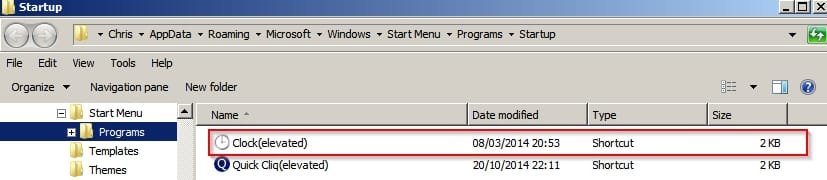
I use a different third party clock. If you create an elevated shortcut in your startup folder it should solve the admin prompt issue.

Startup.jpg
 
Last edited:

My Computer

Computer type
Laptop
Computer Manufacturer/Model Number
ASUS
OS
Microsoft Windows 7 Home Premium 64-bit 7601 Multiprocessor Free Service Pack 1
CPU
AMD C-60 APU with Radeon(tm) HD Graphics
Motherboard
ASUSTeK COMPUTER INC. X501U
Memory
4.00 GB
Graphics Card(s)
AMD Radeon HD 6290 Graphics
Sound Card
(1) AMD High Definition Audio Device (2) Realtek High Defi
Screen Resolution
1366 x 768 x 32 bits (4294967296 colors) @ 60 Hz
Hard Drives
Hitachi HTS545050A7E380 SATA Disk Device
Antivirus
Comodo CIS & FW, SecureAplus App Whitelisting, Threatfire
Browser
Cyberfox 64bit, Opera 64bit, Airfox
Other Info
Spy-The-Spy, HitmanPro.Alert, Norton Connect Safe, MJRegWatcher, BitDefender TrafficLight, Voodoo Shield, Zemana AntiMalware
Newest & 64 Bit Portable As Of 2019

Does anyone have a favorite that you currently use?

I have poor eyesight but love the customized FREE ones.

Thanks

;)
 

My Computer

Computer type
Laptop
Computer Manufacturer/Model Number
Toshiba Qosmio X875-Q7290
OS
Windows 7 64 Bit
CPU
Mobile QuadCore Intel Core i7-3610QM, 3100 MHz (31 x 100)
Motherboard
DMI
Memory
32 GB
Graphics Card(s)
Nvidia GTX 670M 3 Gig Dedicated Ram
Sound Card
Built In Harman Kardon Speaker 3d Setup output to see below.
Monitor(s) Displays
17" @120 Hz With A Pair Of Rechargeable Nvidia 3D Glasses
Screen Resolution
1920 x 1080
Hard Drives
Plextor 128 Gb M3Pro
Mushkin Reactor 1TB SSD
Cooling
Cooler Master NotePal Laptop Cooling Pad with 3 Movable Fans
Keyboard
On-Screen
Mouse
Kensington Optical on 3M Precise Mouse Pad Repositionable
Internet Speed
110 Mbps Wireless
Antivirus
Microsoft Security Essentials x64
Browser
Google Portable x64
Other Info
Harman Kardon Soundsticks III 2.1 Channel Multimedia Speaker System with Subwoofer.
Built in R/W Blu-Ray - DVD & CD Burner
Netgear (R7000-100PAS) Nighthawk AC1900 Dual Band WiFi Router.
Back
Top