Free versions -- Now IMO virtually USELESS

jimbo45

New member
Guru
Gold Member
VIP
Local time
10:50 AM
Messages
5,941
Location
Hafnarfjörður IS
Hi there
seems corporations are really getting STINGY these days

The Free versions of backup utilities seem to be getting more and more hobbled with each release.

EASUS is now so rediculuous that it doesn't even create a bootable version to restore an image -- so what USE is that to anybody --you might just as well use the Windows 7 built in utility bad though it is. -- A decent backup program should ALWAYS have the facility to create a bootable rescue media otherwise it's just NOT FIT FOR PURPOSE.

Paragon Free now no longer lets you re-size the partition on restore -- you have to fiddle around with a separate partition manager and it won't let you boot into the system recovery partition either if you have one.

I know people want to make you buy FULL VERSION programs -- but offering very hobbled restrictive free products IMO doesn't do the companies any good -- especially for IMPORTANT things like backups etc where you want to be 100% sure that your data and OS is SAFE. A MUCH MUCH better business model is to offer a 30 day Free trial which means you can exhaustively test the software and see if it meets your needs.

CLONEZILLA (Linux alternative) still works fine as a free product but I'm not really sure if relying on open source software is a sensible strategy to adopt for a really important part of your system and data. Don't get me wrong - I'm a HUGE believer in open source but sometimes it's not the best choice and Clonezilla is a bit geekish to use so I'd say out for the average user who usually has a problem in understanding why they need backup at all until the lose all the ITunes Music. !!.

Any of you thinking of using these free backup programs --check CAREFULLY what features they have and whether its what you need -- as you'll soon see that in most cases unless you have very simple requirements they aren't much better than the basic Windows backup (which has improved in W8 BTW).

Cheers
jimbo
 
Last edited:

My Computer

Computer type
PC/Desktop
Computer Manufacturer/Model Number
Custom built, several laptops HP/ASUS
OS
Linux CENTOS 7 / various Windows OS'es and servers
CPU
Intel i7 Intel i5
Memory
8GB, 16GB
Graphics Card(s)
On Motherboard
Sound Card
Realtek HD audio
Monitor(s) Displays
Apple Cinema display, Samsung LCD
Screen Resolution
1920 X 1080
Hard Drives
4 X 1TB SATA
Mouse
Toshiba wireless laser
Internet Speed
> 20MB up
I was having a problem with Acronis True Image (that I eventually resolved). I downloaded a trial version of Macrium, to try it out, and it would not allow me to make a backup. Every time I tried it would abort with an error code. Obviously that was the end of Macrium for me.
 

My Computer

Computer type
PC/Desktop
Computer Manufacturer/Model Number
My Own Build
OS
Windows 10 64 bit
CPU
Intel i7 6700K
Motherboard
ASUS ROG Maximus VIII Hero
Memory
16GB Corsair Dominator
Graphics Card(s)
Intel CPU Graphics
Sound Card
RealTek
Monitor(s) Displays
27" Dell S2719dgf
Screen Resolution
2560X1440
Hard Drives
1 TB Samsung 850 EVO SSD for Win 10 Pro
500GB Samsung 850 EVO SSD for Win 10 Insider
2 TB drive for backup
PSU
EVGA Supernova 750G2
Case
BeQuiet Silent Base 600
Cooling
Deepcool Captain 120EX
Keyboard
Microsoft Wireless 2000
Mouse
Microsoft wireless
Internet Speed
100 MB/sec (Cable)
Antivirus
Microsoft Defender and Malwarebytes
Browser
Edge/Firefox
Other Info
Cakewalk (Sonar) by BandLab and Studio One 4.1 Pro recording studio software. MOTU 896Mk3 Hybrid recording interface, Frontier Tranzport wireless control unit, Behringer X-Touch Control Surface.
Five USB connected optical drives for CD Audio production using Nero BurningROM
Macrium reflect has served me well for many years and you can make bootable recovery media with it.
You have to download Win PE (SAIK) but only the once, the program uses it to create rescue media.
 

My Computer

Computer Manufacturer/Model Number
DIY
OS
Windows 7 home premium x64
CPU
AMD FX-4100 AM3+ 3.6GHz 12MB Black Edition
Motherboard
Asus M5A97 Pro
Memory
Crsair vengeance 12Gb DDR3 1600MHz CL9
Graphics Card(s)
Asus GTX 560 1GB
Sound Card
Realtek onboard
Monitor(s) Displays
Hanns G 1680x1050 native
Hard Drives
OCZ 128Gb Petrol ssd
2x500 Gb Samsung
PSU
OCZ StealthXstream II 500W
Internet Speed
8Mb or better
Macrium reflect has served me well for many years and you can make bootable recovery media with it.
You have to download Win PE (SAIK) but only the once, the program uses it to create rescue media.

Hi there

my main issue with Macrium free is that it doesn't work with USB3 ext disks on W8. I didn't actually say Macrium couldn't create bootable restore disks -- that "Distinction" I gave to EASUS!!!

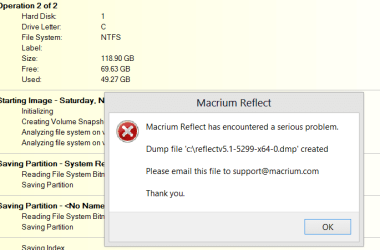
I was testing Macrium Free edition SAVING a W8 SSD image to a USB3 external HDD drive. No GPT or UEFI boot -- 100% Bog standard and simple -- program ABENDS screen shot enc.

(I know this is W7 but I haven't got a W7 machine with USB3 disks to test it on but this is what you get on W8 trying to save an SSD image to a USB3 external HDD. -- screen shot enc)

Note the USB3 disks are USB3 type (not USB2 being used on a USB 3 port) and the port is a genuine USB3 port.

The whole thing did actually work when USB3 disk was attached to a USB2 port although then much much slower -- which is why I got a laptop with a USB3 port in it in the first place. USB3 really is OODLES of times faster than USB2. So laptop with SSD for the OS and external storage with USB3 when you need it is the best combo for me. The small self powered 2 TB (yes 2 TB) passport USB3 drives are brilliant these days.

I don't mind the "Linux" rescue CD's -- the GUI is fine even for Windows users but if the "Normal" product doesn't work why should I invest time in the Stand alone version. Sometimes to restore a disk I don't want to do it stand alone unless I'm restoring the OS.

Cheers
jimbo
 

Attachments

  • macrium.png
    macrium.png
    13.9 KB · Views: 12

My Computer

Computer type
PC/Desktop
Computer Manufacturer/Model Number
Custom built, several laptops HP/ASUS
OS
Linux CENTOS 7 / various Windows OS'es and servers
CPU
Intel i7 Intel i5
Memory
8GB, 16GB
Graphics Card(s)
On Motherboard
Sound Card
Realtek HD audio
Monitor(s) Displays
Apple Cinema display, Samsung LCD
Screen Resolution
1920 X 1080
Hard Drives
4 X 1TB SATA
Mouse
Toshiba wireless laser
Internet Speed
> 20MB up
EASUS is now so rediculuous that it doesn't even create a bootable version to restore an image -- so what USE is that to anybody --you might just as well use the Windows 7 built in utility bad though it is. -- A decent backup program should ALWAYS have the facility to create a bootable rescue media otherwise it's just NOT FIT FOR PURPOSE.
I do not see the problem, make the boot cd or usb stick, and use it when\if needed, works perfect.
Have done 100's of successful Easeus images, backups, restores & hd swaps, personally + doing paid maintenance. Many years of regular use from xp to w8, it's an excellent tool.

(edit: am using both free and paid versions, all will create boot\rescue media)
 

Attachments

  • Capture.PNG
    Capture.PNG
    27.2 KB · Views: 8

My Computer

Computer type
Laptop
Computer Manufacturer/Model Number
Dell \ Lenovo\ HP \ Toshiba
OS
W7, W8.1
Antivirus
MSE, Malwarebytes
Browser
FF
I created a WinPE/Acronis rescue disc, which fixed my problem with Acronis. Because of the problem with Acronis, until I created the WinPE disc, I was trying something else (Macrium). I downloaded the trial version of the full Macrium program, not the free Macrium version. Because of the error I got every time I tried to make a back up with Macrium and that I fixed my Acronis problem, I abandoned any further attempt with Macrium and uninstalled it.
 

My Computer

Computer type
PC/Desktop
Computer Manufacturer/Model Number
My Own Build
OS
Windows 10 64 bit
CPU
Intel i7 6700K
Motherboard
ASUS ROG Maximus VIII Hero
Memory
16GB Corsair Dominator
Graphics Card(s)
Intel CPU Graphics
Sound Card
RealTek
Monitor(s) Displays
27" Dell S2719dgf
Screen Resolution
2560X1440
Hard Drives
1 TB Samsung 850 EVO SSD for Win 10 Pro
500GB Samsung 850 EVO SSD for Win 10 Insider
2 TB drive for backup
PSU
EVGA Supernova 750G2
Case
BeQuiet Silent Base 600
Cooling
Deepcool Captain 120EX
Keyboard
Microsoft Wireless 2000
Mouse
Microsoft wireless
Internet Speed
100 MB/sec (Cable)
Antivirus
Microsoft Defender and Malwarebytes
Browser
Edge/Firefox
Other Info
Cakewalk (Sonar) by BandLab and Studio One 4.1 Pro recording studio software. MOTU 896Mk3 Hybrid recording interface, Frontier Tranzport wireless control unit, Behringer X-Touch Control Surface.
Five USB connected optical drives for CD Audio production using Nero BurningROM
EASUS is now so rediculuous that it doesn't even create a bootable version to restore an image -- so what USE is that to anybody --you might just as well use the Windows 7 built in utility bad though it is. -- A decent backup program should ALWAYS have the facility to create a bootable rescue media otherwise it's just NOT FIT FOR PURPOSE.
I do not see the problem, make the boot cd or usb stick, and use it when\if needed, works perfect.
Have done 100's of successful Easeus images, backups, restores & hd swaps, personally + doing paid maintenance. Many years of regular use from xp to w8, it's an excellent tool.

(edit: am using both free and paid versions, all will create boot\rescue media)


Hi there
Unless you look for the Free version specifically there's no mention on the EASUS website that a Free version even exists. !!!

However google and you arrive at the part of the site where it's mentioned.

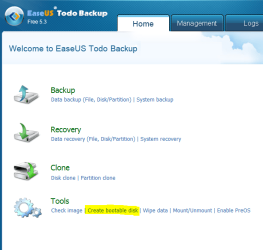
From the FAQ it says the current FREE version -- you have to BUILD yourself a PE disk to create bootable media -- too complex for a lot of people -- we just want a built in utility.

Create bootable disk - EaseUS Todo Backup online help

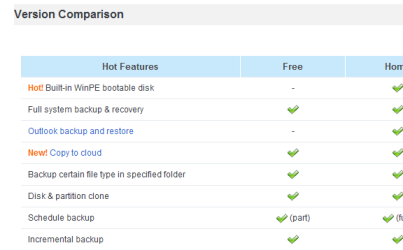
here's the features listed

(However again in tiny to find -- you CAN make a linux bootable CD / USB --that's fine by me --info on website unclear --seems they really don't want people to find out about the Free version any more).

Still looks as though the LINUX bootable media can only do RECOVERY and not BACKUP --better than nothing but I like to do BOTH backup and recovery via stand alone bootable media.


cheers
jimbo
 

Attachments

  • easus.png
    easus.png
    5.9 KB · Views: 3

My Computer

Computer type
PC/Desktop
Computer Manufacturer/Model Number
Custom built, several laptops HP/ASUS
OS
Linux CENTOS 7 / various Windows OS'es and servers
CPU
Intel i7 Intel i5
Memory
8GB, 16GB
Graphics Card(s)
On Motherboard
Sound Card
Realtek HD audio
Monitor(s) Displays
Apple Cinema display, Samsung LCD
Screen Resolution
1920 X 1080
Hard Drives
4 X 1TB SATA
Mouse
Toshiba wireless laser
Internet Speed
> 20MB up
Virtually all free imaging programs only supply the Linux recovery environment. The reason, they say, is a licencing issue with the WinPE environment so its all Microsoft's fault. Macrium get around this by allowing you to build a PE disk using the WAIK, but this does involve a hefty (1.7GB) download from Microsoft.
 

My Computer

Computer type
Laptop
Computer Manufacturer/Model Number
Hewlett-Packard/G62-107SA Notebook
OS
Microsoft Windows 7 Home Premium 64-bit Service Pack 1
CPU
Intel(R) Core(TM) i3 CPU M 330 @ 2.13GHz
Motherboard
Hewlett-Packard 1425
Memory
8 GB DDR3
Graphics Card(s)
Intel(R) HD Graphics
Sound Card
Realtek High Definition Audio
Monitor(s) Displays
Builtin
Screen Resolution
1366 x 768 x 32 bits (4294967296 colors) @ 60 Hz
Hard Drives
250 GB SATA Hard Disk Drive 7200 rpm
2TB Seagate GoFlex USB 2 Drive
1TB Iomega Prestige USB 2 Drive
1.5TB Iomega Prestige USB 2 Drive (Samsung)
2TB WD MyBook Live NAS.
Mouse
Logitech Anywhere MX
Internet Speed
152 Mbs download 10 Mbs upload
Antivirus
Norton 360
Browser
Chrome
The WAIK download and Acronis True Image Plus Pack is required to build the WinPE/Acronis rescue disc. Otherwise its a Linux bootable rescue disc.

I thought the procedure, from what I saw on the Acronis forum, would be complicated but it wasn't that bad.
 

My Computer

Computer type
PC/Desktop
Computer Manufacturer/Model Number
My Own Build
OS
Windows 10 64 bit
CPU
Intel i7 6700K
Motherboard
ASUS ROG Maximus VIII Hero
Memory
16GB Corsair Dominator
Graphics Card(s)
Intel CPU Graphics
Sound Card
RealTek
Monitor(s) Displays
27" Dell S2719dgf
Screen Resolution
2560X1440
Hard Drives
1 TB Samsung 850 EVO SSD for Win 10 Pro
500GB Samsung 850 EVO SSD for Win 10 Insider
2 TB drive for backup
PSU
EVGA Supernova 750G2
Case
BeQuiet Silent Base 600
Cooling
Deepcool Captain 120EX
Keyboard
Microsoft Wireless 2000
Mouse
Microsoft wireless
Internet Speed
100 MB/sec (Cable)
Antivirus
Microsoft Defender and Malwarebytes
Browser
Edge/Firefox
Other Info
Cakewalk (Sonar) by BandLab and Studio One 4.1 Pro recording studio software. MOTU 896Mk3 Hybrid recording interface, Frontier Tranzport wireless control unit, Behringer X-Touch Control Surface.
Five USB connected optical drives for CD Audio production using Nero BurningROM
The WAIK download and Acronis True Image Plus Pack is required to build the WinPE/Acronis rescue disc. Otherwise its a Linux bootable rescue disc.

I thought the procedure, from what I saw on the Acronis forum, would be complicated but it wasn't that bad.

Hi guys
You are missing the point here

Acronis - for all its problems- currently supplies almost the same features on the LINUX BOOT CD / USB - even though it's a Linux one as the MAIN program itself on a Windows PC. -- so you can BACKUP, RESTORE, BACKUP to DIFFERENT SIZE PARTITIONS, RESTORE TO DIFFERENT HARDWARE etc.

The GUI is fine also so even a Windows user won't have any trouble using it.

There is also a WinPE type of method you can use but it's not needed with Acronis. You can build one if you need to.

EASUS FREE from the Linux CD is simply a RESTORE function --won't even re-size the partition. YOU CAN'T BACKUP WITH IT. -- If that's all you want or need --fine -- but I really need the full functionality even if I'm booting from CD / DVD.

Cheers
jimbo
 

My Computer

Computer type
PC/Desktop
Computer Manufacturer/Model Number
Custom built, several laptops HP/ASUS
OS
Linux CENTOS 7 / various Windows OS'es and servers
CPU
Intel i7 Intel i5
Memory
8GB, 16GB
Graphics Card(s)
On Motherboard
Sound Card
Realtek HD audio
Monitor(s) Displays
Apple Cinema display, Samsung LCD
Screen Resolution
1920 X 1080
Hard Drives
4 X 1TB SATA
Mouse
Toshiba wireless laser
Internet Speed
> 20MB up
The Linux CD on Macrium has always been restore only too.
 

My Computer

Computer type
Laptop
Computer Manufacturer/Model Number
Hewlett-Packard/G62-107SA Notebook
OS
Microsoft Windows 7 Home Premium 64-bit Service Pack 1
CPU
Intel(R) Core(TM) i3 CPU M 330 @ 2.13GHz
Motherboard
Hewlett-Packard 1425
Memory
8 GB DDR3
Graphics Card(s)
Intel(R) HD Graphics
Sound Card
Realtek High Definition Audio
Monitor(s) Displays
Builtin
Screen Resolution
1366 x 768 x 32 bits (4294967296 colors) @ 60 Hz
Hard Drives
250 GB SATA Hard Disk Drive 7200 rpm
2TB Seagate GoFlex USB 2 Drive
1TB Iomega Prestige USB 2 Drive
1.5TB Iomega Prestige USB 2 Drive (Samsung)
2TB WD MyBook Live NAS.
Mouse
Logitech Anywhere MX
Internet Speed
152 Mbs download 10 Mbs upload
Antivirus
Norton 360
Browser
Chrome
CLONEZILLA (Linux alternative) still works fine as a free product but I'm not really sure if relying on open source software is a sensible strategy to adopt for a really important part of your system and data. Don't get me wrong - I'm a HUGE believer in open source but sometimes it's not the best choice and Clonezilla is a bit geekish to use so I'd say out for the average user who usually has a problem in understanding why they need backup at all until the lose all the ITunes Music. !!.


Although it does take some time to get used to it, I'll vouch for Clonezilla even though the open source thing might bother some. Dozens of perfect restores from at least a few hundred clones over the years.
 

My Computer

OS
Windows 7 Ultimate x64
Question for Firebird

That could be "Freebird".

What ver of Acronis are you using? Has it replaced you disk drivers?
You can check in device manager to verify your disk drivers. The last ver I used was either 2012 or 2013, don't remember. But what I do remember is when I tried to uninstall I had to take a fire axe to it.
 

My Computer

Computer Manufacturer/Model Number
BGC (Bob's Garage Crew)
OS
win 7 X64 Ultimate SP1
CPU
I3770K
Motherboard
Asus P8Z77-V Deluxe
Memory
G Skill F3-14900CL9-4GBXL x 4
Graphics Card(s)
NVIDIA GeForce GTX670 + Intel 4000
Sound Card
Realtek HD 5.1 (MOB)
Monitor(s) Displays
Asus VW224T (1)
Screen Resolution
1920 x 1080
Hard Drives
SATA Corsair Force GT 2.5" 180GB (System) Sata 3
OCZ Vertex3 120GB
OCZ Vertex 2 120GB 2.5" SATA II
ST31000524AS 1000.2GB
WD15EARS (External)
PSU
CoolerMaster 1000 Watt
Case
CoolerMaster HAF X
Cooling
CPU -- CoolerMaster 520N
Keyboard
MS Wireless 3000 V2
Mouse
MS Wireless 3000 V2
Internet Speed
Cable
Antivirus
Norton Internet Security
Browser
IE9
Other Info
AMI Bios 1805
OC'd 3%
My current installed version is 2013 Plus Pack.

I didn't have any problems with the Linux Rescue disc with my old PC. I built a new PC this past summer with a Gigabyte GAZ77X UD5H motherboard. I had a problem and wanted to rebuild the hard drive from the latest backup. I booted with the 2012 Linux Rescue disc and was able to select the backup I wanted to use to restore from a USB connected hard drive. However, Acronis would never get past the point of selecting the "target" drive (the drive I wanted to restore to). I went on the Acronis forum and was advised there was a known issue with SOME motherboards and that those would require the WinPE/Acronis to restore. To create the WinPE/Acronis disc, the Plus Pack version of Acronis was required. As I had just upgraded to Acronis 2013, I purchased the Plus Pack addon. I went through the procedure with WAIK of downloading, creating the iso DVD, installing and then creating the WinPE/Acronis rescue disc. I then booted with the WinPE/Acronis and was able to select the backup to use and also able to select the target hard drive (which I wasn't able to do with the Linux version).

Before building the WinPE/Acronis disc, I tried Acronis rescue discs (Linux versions) that I had from previous versions and none would allow me to select the target drive.
 

My Computer

Computer type
PC/Desktop
Computer Manufacturer/Model Number
My Own Build
OS
Windows 10 64 bit
CPU
Intel i7 6700K
Motherboard
ASUS ROG Maximus VIII Hero
Memory
16GB Corsair Dominator
Graphics Card(s)
Intel CPU Graphics
Sound Card
RealTek
Monitor(s) Displays
27" Dell S2719dgf
Screen Resolution
2560X1440
Hard Drives
1 TB Samsung 850 EVO SSD for Win 10 Pro
500GB Samsung 850 EVO SSD for Win 10 Insider
2 TB drive for backup
PSU
EVGA Supernova 750G2
Case
BeQuiet Silent Base 600
Cooling
Deepcool Captain 120EX
Keyboard
Microsoft Wireless 2000
Mouse
Microsoft wireless
Internet Speed
100 MB/sec (Cable)
Antivirus
Microsoft Defender and Malwarebytes
Browser
Edge/Firefox
Other Info
Cakewalk (Sonar) by BandLab and Studio One 4.1 Pro recording studio software. MOTU 896Mk3 Hybrid recording interface, Frontier Tranzport wireless control unit, Behringer X-Touch Control Surface.
Five USB connected optical drives for CD Audio production using Nero BurningROM
Yes, But

Did 2013 replace your ms disk drivers in Device Manager?
 

My Computer

Computer Manufacturer/Model Number
BGC (Bob's Garage Crew)
OS
win 7 X64 Ultimate SP1
CPU
I3770K
Motherboard
Asus P8Z77-V Deluxe
Memory
G Skill F3-14900CL9-4GBXL x 4
Graphics Card(s)
NVIDIA GeForce GTX670 + Intel 4000
Sound Card
Realtek HD 5.1 (MOB)
Monitor(s) Displays
Asus VW224T (1)
Screen Resolution
1920 x 1080
Hard Drives
SATA Corsair Force GT 2.5" 180GB (System) Sata 3
OCZ Vertex3 120GB
OCZ Vertex 2 120GB 2.5" SATA II
ST31000524AS 1000.2GB
WD15EARS (External)
PSU
CoolerMaster 1000 Watt
Case
CoolerMaster HAF X
Cooling
CPU -- CoolerMaster 520N
Keyboard
MS Wireless 3000 V2
Mouse
MS Wireless 3000 V2
Internet Speed
Cable
Antivirus
Norton Internet Security
Browser
IE9
Other Info
AMI Bios 1805
OC'd 3%
Oops. After looking at what I have, I have 2012 installed on my Win 7 install and the disc drivers are Microsoft. I'll install 2013 on my Win 8 drive (2013 is required for Win 8).

After going through and rebuilding the hard drive from the Acronis backup it turned out Win 7 was the problem. The problem I had with Win 7, SFC did not detect any problem, but it would lose what was on the hard drives and the OS would hang up trying to search the drive(s). I had to reformat the hard drive (Intel SSD) and start over with Win 7, yesterday. I forgot that I installed the 2012 version when I reinstalled. Reinstalling everything, I lost track of what version I had installed.
 

My Computer

Computer type
PC/Desktop
Computer Manufacturer/Model Number
My Own Build
OS
Windows 10 64 bit
CPU
Intel i7 6700K
Motherboard
ASUS ROG Maximus VIII Hero
Memory
16GB Corsair Dominator
Graphics Card(s)
Intel CPU Graphics
Sound Card
RealTek
Monitor(s) Displays
27" Dell S2719dgf
Screen Resolution
2560X1440
Hard Drives
1 TB Samsung 850 EVO SSD for Win 10 Pro
500GB Samsung 850 EVO SSD for Win 10 Insider
2 TB drive for backup
PSU
EVGA Supernova 750G2
Case
BeQuiet Silent Base 600
Cooling
Deepcool Captain 120EX
Keyboard
Microsoft Wireless 2000
Mouse
Microsoft wireless
Internet Speed
100 MB/sec (Cable)
Antivirus
Microsoft Defender and Malwarebytes
Browser
Edge/Firefox
Other Info
Cakewalk (Sonar) by BandLab and Studio One 4.1 Pro recording studio software. MOTU 896Mk3 Hybrid recording interface, Frontier Tranzport wireless control unit, Behringer X-Touch Control Surface.
Five USB connected optical drives for CD Audio production using Nero BurningROM
Back
Top