FreeFileSync RealTimeSync

My batch jobs are using the Windows recycle bin. Perhaps that's why I don't see a recycle bin on my drives.
 

My Computer

Computer type
PC/Desktop
OS
Windows 7 Ultimate x64
I'm trying this now, and I'm sure I got everything right but it is not working. Very interesting though, and I will keep at it until I get it working.

I don't understand why the tutorial says to point to 'FreeFileSync.exe' instead of 'RealTimeSync.exe' ?

Where does the BatchFile need to be? Right now it is on my Desktop in a Folder called 'RTS BATCH FILE'.

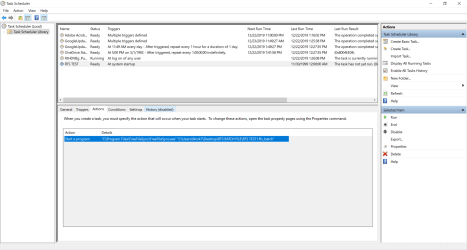
I checked the task in the task scheduler and it is there and active!

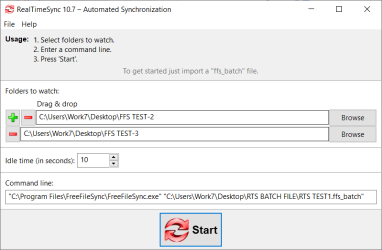
EDIT: I think I got it now, hang on before replying: NOPE, still not working. I'll post some pics so you can see if I'm doing anything wrong.

I was seeing the RealTimeSync Icon in the taskbar but it wasn't working, or it's not working on the 10sec setting I used. I then brought up RTS and clicked the button to make it sync, and it did, but next time I restarted the icon is not seen in the task bar now?

 
Last edited:

My Computer

Computer type
Laptop
Computer Manufacturer/Model Number
HP Pavilion dv7-6c23cl
OS
Windows 7 Home Premium 64bit
CPU
AMD A8-3520M
Motherboard
Hewlett-Packard 180B (Socket FS1)
Memory
6.00GB DDR3 @ 674MHz (9-9-9-24)
Graphics Card(s)
512MB ATI AMD Radeon HD 6620G
Sound Card
IDT High Definition Audio CODEC
Monitor(s) Displays
Generic PnP Monitor
Screen Resolution
(1600x900@60Hz)
Hard Drives
Samsung 850 EVO 250GB SSD
Mouse
Logitec M525
Internet Speed
30-75Mbps
Antivirus
Avast Free, Unfortunately
Browser
Google Chrome, Firefox, IE
Pics of my situation
 

Attachments

  • 2-RTS PATHWAY TASKSCHEDMSC.PNG
    2-RTS PATHWAY TASKSCHEDMSC.PNG
    71.9 KB · Views: 2
  • 1-RTS PATHWAY.PNG
    1-RTS PATHWAY.PNG
    11.8 KB · Views: 0

My Computer

Computer type
Laptop
Computer Manufacturer/Model Number
HP Pavilion dv7-6c23cl
OS
Windows 7 Home Premium 64bit
CPU
AMD A8-3520M
Motherboard
Hewlett-Packard 180B (Socket FS1)
Memory
6.00GB DDR3 @ 674MHz (9-9-9-24)
Graphics Card(s)
512MB ATI AMD Radeon HD 6620G
Sound Card
IDT High Definition Audio CODEC
Monitor(s) Displays
Generic PnP Monitor
Screen Resolution
(1600x900@60Hz)
Hard Drives
Samsung 850 EVO 250GB SSD
Mouse
Logitec M525
Internet Speed
30-75Mbps
Antivirus
Avast Free, Unfortunately
Browser
Google Chrome, Firefox, IE
I give up, I've tried all kinds of things and made sure it all looked like it does in that tutorial to no avail.
 

My Computer

Computer type
Laptop
Computer Manufacturer/Model Number
HP Pavilion dv7-6c23cl
OS
Windows 7 Home Premium 64bit
CPU
AMD A8-3520M
Motherboard
Hewlett-Packard 180B (Socket FS1)
Memory
6.00GB DDR3 @ 674MHz (9-9-9-24)
Graphics Card(s)
512MB ATI AMD Radeon HD 6620G
Sound Card
IDT High Definition Audio CODEC
Monitor(s) Displays
Generic PnP Monitor
Screen Resolution
(1600x900@60Hz)
Hard Drives
Samsung 850 EVO 250GB SSD
Mouse
Logitec M525
Internet Speed
30-75Mbps
Antivirus
Avast Free, Unfortunately
Browser
Google Chrome, Firefox, IE
I think your issue is using RealTimeSync.exe and not FreeFileSync.exe.


Look at the tutorial very closely. It clearly shows FreeFileSync.exe as the program being executed by the Task Scheduler.

If that doesn't work, my batch file idea will, and I am using it now and every time I start my computer it's evoked.
 

My Computer

Computer type
PC/Desktop
OS
Windows 7 Ultimate x64
Forget everything about RealTimeSync.exe. You're not using that. That is a real-time thing and nothing more.

I really don't know what RealTimeSync.exe is because you can just double click a FFS batch file and it will do its thing.
 

My Computer

Computer type
PC/Desktop
OS
Windows 7 Ultimate x64
I think your issue is using RealTimeSync.exe and not FreeFileSync.exe.


Look at the tutorial very closely. It clearly shows FreeFileSync.exe as the program being executed by the Task Scheduler.

If that doesn't work, my batch file idea will, and I am using it now and every time I start my computer it's evoked.
If you look at my first pic of scheduler I am using FreeFileSync.exe

I did nothing with RealTimeSync.exe at first. When you schedule a task you will see it in RealTimeSync.exe as I showed. I know because I changed the folder where the batch file was, and it changed in RealTimeSync.exe also, after a reboot, without me touching it. So somehow RealTimeSync.exe is linked to the Scheduler.

So it does appear RealTimeSync.exe is somehow being used to dictate when the job happens etc.

Your batch file idea, I forget now what that was? I'll look at your replies. I seems simple enough so I don't know what the heck is going on. My entry looks the same as the one in the tutorial. If you're using the same method perhaps you can show me your Scheduler and RealTimeSync.exe Entries?

I wonder if it is because the jobs -Source and Destination- are both on the same drive?
 

My Computer

Computer type
Laptop
Computer Manufacturer/Model Number
HP Pavilion dv7-6c23cl
OS
Windows 7 Home Premium 64bit
CPU
AMD A8-3520M
Motherboard
Hewlett-Packard 180B (Socket FS1)
Memory
6.00GB DDR3 @ 674MHz (9-9-9-24)
Graphics Card(s)
512MB ATI AMD Radeon HD 6620G
Sound Card
IDT High Definition Audio CODEC
Monitor(s) Displays
Generic PnP Monitor
Screen Resolution
(1600x900@60Hz)
Hard Drives
Samsung 850 EVO 250GB SSD
Mouse
Logitec M525
Internet Speed
30-75Mbps
Antivirus
Avast Free, Unfortunately
Browser
Google Chrome, Firefox, IE
I wonder if it is because the jobs -Source and Destination- are both on the same drive?

That may be an issue, but I have my doubts. I'd have to try it myself.

What is the exact path to your FFS batch file and the batch file name?
 

My Computer

Computer type
PC/Desktop
OS
Windows 7 Ultimate x64
I put the batch file in C: just to test things to see what I'm doing wrong. It's in quotes as described in the tutorial. I also reconfigured everything in Task-scheduler so it all reflects what you see below.
"C:\RTS-TEST1.ffs_batch"

Here is the full path that is seen in Scheduler and RealTimeSync.exe
"C:\Program Files\FreeFileSync\FreeFileSync.exe" "C:\RTS-TEST1.ffs_batch"
 

My Computer

Computer type
Laptop
Computer Manufacturer/Model Number
HP Pavilion dv7-6c23cl
OS
Windows 7 Home Premium 64bit
CPU
AMD A8-3520M
Motherboard
Hewlett-Packard 180B (Socket FS1)
Memory
6.00GB DDR3 @ 674MHz (9-9-9-24)
Graphics Card(s)
512MB ATI AMD Radeon HD 6620G
Sound Card
IDT High Definition Audio CODEC
Monitor(s) Displays
Generic PnP Monitor
Screen Resolution
(1600x900@60Hz)
Hard Drives
Samsung 850 EVO 250GB SSD
Mouse
Logitec M525
Internet Speed
30-75Mbps
Antivirus
Avast Free, Unfortunately
Browser
Google Chrome, Firefox, IE
I did get this working in Task Scheduler. With the quotes, those are only used if you have a space in the path name. So if your path is something like C:\test test ffs_batch, then that would have to be in quotes. Since it doesn't look like your paths have any spaces then you don't need quotes.

If you want to avoid the Task Scheduler route you can use the Startup CPL method I talked about earlier. So in your test case you have a path for the batch file of C:\RTS-TEST1.ffs_batch in a text document add this:

Code:
START C:\RTS-TEST1.ffs_batch
Now name the text file test.bat or what ever.

In Startup CPL go to the Startup (user) tab, right click and add the path to this newly created batch file. When you restart the computer the batch file should work.

Ideally you shouldn't have to create a Windows batch file for a FFS batch file. In Startup CPL you should be able to just add the FFS batch file directly to the Startup (user) tab and away you go. Maybe it's a Windows 10 thing, I don't know.

Here's the Windows batch file that will run your FFS batch file. Have a look at it with Notepad or Notepad ++.
 

Attachments

My Computer

Computer type
PC/Desktop
OS
Windows 7 Ultimate x64
Any news on this?
 

My Computer

Computer type
PC/Desktop
OS
Windows 7 Ultimate x64
Any news on this?
Couldn't get it working so took a break on it.

"I did get this working in Task Scheduler. With the quotes, those are only used if you have a space in the path name."
I did have a space in the path name but changed that after it would not work.

I'll take another shot at it later today/tonight.
 

My Computer

Computer type
Laptop
Computer Manufacturer/Model Number
HP Pavilion dv7-6c23cl
OS
Windows 7 Home Premium 64bit
CPU
AMD A8-3520M
Motherboard
Hewlett-Packard 180B (Socket FS1)
Memory
6.00GB DDR3 @ 674MHz (9-9-9-24)
Graphics Card(s)
512MB ATI AMD Radeon HD 6620G
Sound Card
IDT High Definition Audio CODEC
Monitor(s) Displays
Generic PnP Monitor
Screen Resolution
(1600x900@60Hz)
Hard Drives
Samsung 850 EVO 250GB SSD
Mouse
Logitec M525
Internet Speed
30-75Mbps
Antivirus
Avast Free, Unfortunately
Browser
Google Chrome, Firefox, IE
I'm really at a loss here because for me this is as simple as eating a pie stolen from a baby. The only thing I can say is that I can do a Team Viewer season with you, and you chat with me via Wire or Threema and I can show you EXACTLY what to do, and how to do it.

No, I will not use Whatsapp. LOL God help those that use it...
 

My Computer

Computer type
PC/Desktop
OS
Windows 7 Ultimate x64
Back
Top