Freezing when i try to upload anything

Frikster

New member
Member
VIP
Local time
5:38 AM
Messages
135
Location
Macedonia
i am seriously pissed off that i don't even know if this is the correct section to post in.
i have had this problem FOREVER and it is today that i managed to find out what is the EXACT reason for it.
When i try to upload ( picture on steam, speedtest upload test, facebook, ETC ) my pc freezes and there is nothing i can to unfreeze it except a reboot ( the reset button on the front panel )...
it is frustrating and it is on the end of my nerves.
i have tried safe mode, it freezes
services on off, freezes.
that must mean it's a hardware problem, right ? or ?
i don't know...
help?
 

My Computer My Computer

Computer type
PC/Desktop
OS
Windows 7 64bit
CPU
i5 6600 3.3 GHz
Motherboard
ASUS B150M-A
Memory
16gb HyperX Fury 2x8gb
Graphics Card(s)
Gigabyte G1 Gaming 1060
Monitor(s) Displays
Samsung SyncMaster B2330HD
Screen Resolution
1920 x 1080
Hard Drives
1tb Toshiba
PSU
Corsair builder VS550
Case
SAMA Assasin
Cooling
Stock
Keyboard
A4Tech KB-28G
Mouse
X7 X-710BK
Internet Speed
99 Mbps
Antivirus
Malwarebytes
Browser
Chrome
Other Info
Nothing at the moment
What driver are you using for your nic, also does it happen if you try to send a file to someone through something like skype as well?
 

My Computer My Computer

Computer type
PC/Desktop
Computer Manufacturer/Model Number
Custom
OS
10 Pro x64
CPU
Ryzen 9 3900X
Motherboard
Asrock x370 Tachi
Memory
64GB(4x16GB) DDR4
Graphics Card(s)
EVGA 1080ti FTW3
Sound Card
ASUS Xonar Essence STX (V4 Bursons), ODAC rev B, NFB-11, O2
Monitor(s) Displays
3xASUS PB278Q/R, Optoma HD142X
Screen Resolution
3x1440p, 1080p
Hard Drives
512GB 850 EVO(OS, Programs)
4TB (Movies)
3TB (Downloads)
3TB (Programs)
1TB HDD (Games)
2x6TB R1 (videos)
PSU
AX760
Case
Fractal Define R5
Cooling
NH-D15S
Keyboard
Massdrop Ctrl with Box Navy's
Mouse
G903, Alioth XXL Mat
Internet Speed
280/40
Antivirus
MBAM, ESET
Browser
Canary 64 Bit
Other Info
I also own a Thinkpad P50 Xeon 4K, X220T, X1C5
what is NIC ?
no idea, i never sent any files through skype, i assume it will do the same.
sometimes i am not even uploading anything, heck, the pc just finishes rebooting and the thing just freezes after a random amount of time ( doesnt even have to have windows open, or programs or anything special, idling basically... ... )
 

My Computer My Computer

Computer type
PC/Desktop
OS
Windows 7 64bit
CPU
i5 6600 3.3 GHz
Motherboard
ASUS B150M-A
Memory
16gb HyperX Fury 2x8gb
Graphics Card(s)
Gigabyte G1 Gaming 1060
Monitor(s) Displays
Samsung SyncMaster B2330HD
Screen Resolution
1920 x 1080
Hard Drives
1tb Toshiba
PSU
Corsair builder VS550
Case
SAMA Assasin
Cooling
Stock
Keyboard
A4Tech KB-28G
Mouse
X7 X-710BK
Internet Speed
99 Mbps
Antivirus
Malwarebytes
Browser
Chrome
Other Info
Nothing at the moment
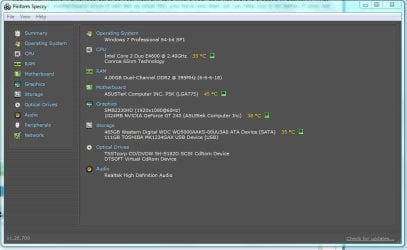
NIC is your Network Interface Card, so your network card where your ethernet cable is plugged in basically. What model is your motherboard since it will tell us what NIC you have and then we can help you a lot better if your not sure whats in your pc use the tool speccy that I link to in my signature.
 

My Computer My Computer

Computer type
PC/Desktop
Computer Manufacturer/Model Number
Custom
OS
10 Pro x64
CPU
Ryzen 9 3900X
Motherboard
Asrock x370 Tachi
Memory
64GB(4x16GB) DDR4
Graphics Card(s)
EVGA 1080ti FTW3
Sound Card
ASUS Xonar Essence STX (V4 Bursons), ODAC rev B, NFB-11, O2
Monitor(s) Displays
3xASUS PB278Q/R, Optoma HD142X
Screen Resolution
3x1440p, 1080p
Hard Drives
512GB 850 EVO(OS, Programs)
4TB (Movies)
3TB (Downloads)
3TB (Programs)
1TB HDD (Games)
2x6TB R1 (videos)
PSU
AX760
Case
Fractal Define R5
Cooling
NH-D15S
Keyboard
Massdrop Ctrl with Box Navy's
Mouse
G903, Alioth XXL Mat
Internet Speed
280/40
Antivirus
MBAM, ESET
Browser
Canary 64 Bit
Other Info
I also own a Thinkpad P50 Xeon 4K, X220T, X1C5
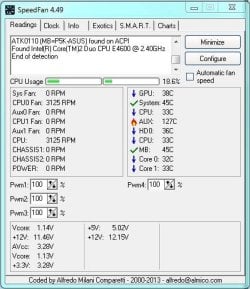
the pc froze two times today while i was playing CS:GO. About 5-10 minutes after starting up the pc, since i started the game right away. and it froze another time while i was installing the program, and another time while trying to write this...

EDIT: checked temperatures, they are all below normal levels . don't mind AUX, its false reading. forgot to mention that reinstalling windows hasn't helped in the past

edit #2: weird. the pc didnt freeze out of nothing, after those 4 times.
 

Attachments

  • Capture.JPG
    Capture.JPG
    60.7 KB · Views: 3
  • Capture1.JPG
    Capture1.JPG
    46.3 KB · Views: 8
Last edited:

My Computer My Computer

Computer type
PC/Desktop
OS
Windows 7 64bit
CPU
i5 6600 3.3 GHz
Motherboard
ASUS B150M-A
Memory
16gb HyperX Fury 2x8gb
Graphics Card(s)
Gigabyte G1 Gaming 1060
Monitor(s) Displays
Samsung SyncMaster B2330HD
Screen Resolution
1920 x 1080
Hard Drives
1tb Toshiba
PSU
Corsair builder VS550
Case
SAMA Assasin
Cooling
Stock
Keyboard
A4Tech KB-28G
Mouse
X7 X-710BK
Internet Speed
99 Mbps
Antivirus
Malwarebytes
Browser
Chrome
Other Info
Nothing at the moment
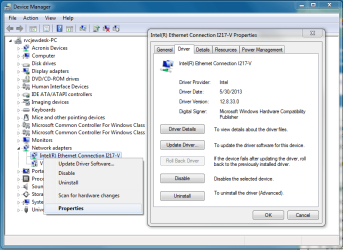
OK, so your NIC and mobo for that matter are very old, so you do not have a driver supported for windows 7 but their is a vista x64 one you could try from here https://www.atheros.cz/atheros-network-drivers.html but reading forums ect, it seems your best bet is buy a new NIC that supports windows 7 and has up to date drivers. Your NIC on that page is the L1. as last resort you can see what windows update has for it. Try this: go to device manager like in my screenshot then right click it and go to the properties window so we can see what driver it is trying to use. Where would you go to purchase a NIC in your area if it comes to that? EDIT: Also the Aux at 127c is a common miss reading so your fine with that. your issue may be unrelated to your NIC as well lets see what it says for this first but if its crashing just sitting there you might want to also check your ram for problems.
 

Attachments

  • nic.png
    nic.png
    37.3 KB · Views: 2

My Computer My Computer

Computer type
PC/Desktop
Computer Manufacturer/Model Number
Custom
OS
10 Pro x64
CPU
Ryzen 9 3900X
Motherboard
Asrock x370 Tachi
Memory
64GB(4x16GB) DDR4
Graphics Card(s)
EVGA 1080ti FTW3
Sound Card
ASUS Xonar Essence STX (V4 Bursons), ODAC rev B, NFB-11, O2
Monitor(s) Displays
3xASUS PB278Q/R, Optoma HD142X
Screen Resolution
3x1440p, 1080p
Hard Drives
512GB 850 EVO(OS, Programs)
4TB (Movies)
3TB (Downloads)
3TB (Programs)
1TB HDD (Games)
2x6TB R1 (videos)
PSU
AX760
Case
Fractal Define R5
Cooling
NH-D15S
Keyboard
Massdrop Ctrl with Box Navy's
Mouse
G903, Alioth XXL Mat
Internet Speed
280/40
Antivirus
MBAM, ESET
Browser
Canary 64 Bit
Other Info
I also own a Thinkpad P50 Xeon 4K, X220T, X1C5
my local pc shop sells everything possible ever for PCs. it's where i got the thing from years ago. i need to get a new pc , i am aware of that but during this current "crysis" i can't even think of spending 500 euro ( at least ) on a brand new pc. attached a pic, is that what you wanted?
also. im not using wireless but i DO have an antenna attached at the back. Can i disable the driver? maybe it's causing issues ?
 

Attachments

  • NIC.JPG
    NIC.JPG
    78.2 KB · Views: 2

My Computer My Computer

Computer type
PC/Desktop
OS
Windows 7 64bit
CPU
i5 6600 3.3 GHz
Motherboard
ASUS B150M-A
Memory
16gb HyperX Fury 2x8gb
Graphics Card(s)
Gigabyte G1 Gaming 1060
Monitor(s) Displays
Samsung SyncMaster B2330HD
Screen Resolution
1920 x 1080
Hard Drives
1tb Toshiba
PSU
Corsair builder VS550
Case
SAMA Assasin
Cooling
Stock
Keyboard
A4Tech KB-28G
Mouse
X7 X-710BK
Internet Speed
99 Mbps
Antivirus
Malwarebytes
Browser
Chrome
Other Info
Nothing at the moment
my local pc shop sells everything possible ever for PCs. it's where i got the thing from years ago. i need to get a new pc , i am aware of that but during this current "crysis" i can't even think of spending 500 euro ( at least ) on a brand new pc. attached a pic, is that what you wanted?
also. im not using wireless but i DO have an antenna attached at the back. Can i disable the driver? maybe it's causing issues ?

I'm in the field atm, so can't you a pic but if you go start button then just type view network connections it will show your two connections. Just right click the WiFi on and choose disable. Might be your issue since device Manger looks like it thinks your driver is out of date for the WiFi and if you are not using it disabling it is good for security to.
 

My Computer My Computer

Computer type
PC/Desktop
Computer Manufacturer/Model Number
Custom
OS
10 Pro x64
CPU
Ryzen 9 3900X
Motherboard
Asrock x370 Tachi
Memory
64GB(4x16GB) DDR4
Graphics Card(s)
EVGA 1080ti FTW3
Sound Card
ASUS Xonar Essence STX (V4 Bursons), ODAC rev B, NFB-11, O2
Monitor(s) Displays
3xASUS PB278Q/R, Optoma HD142X
Screen Resolution
3x1440p, 1080p
Hard Drives
512GB 850 EVO(OS, Programs)
4TB (Movies)
3TB (Downloads)
3TB (Programs)
1TB HDD (Games)
2x6TB R1 (videos)
PSU
AX760
Case
Fractal Define R5
Cooling
NH-D15S
Keyboard
Massdrop Ctrl with Box Navy's
Mouse
G903, Alioth XXL Mat
Internet Speed
280/40
Antivirus
MBAM, ESET
Browser
Canary 64 Bit
Other Info
I also own a Thinkpad P50 Xeon 4K, X220T, X1C5
i just figured out that the driver is actually disabled. when i right click it it gives me an option to Enable it. so, wireless probably isnt the issue. Anything else i can do ?
didn't understand the part "I'm in the field atm, so can't you a pic"
 

My Computer My Computer

Computer type
PC/Desktop
OS
Windows 7 64bit
CPU
i5 6600 3.3 GHz
Motherboard
ASUS B150M-A
Memory
16gb HyperX Fury 2x8gb
Graphics Card(s)
Gigabyte G1 Gaming 1060
Monitor(s) Displays
Samsung SyncMaster B2330HD
Screen Resolution
1920 x 1080
Hard Drives
1tb Toshiba
PSU
Corsair builder VS550
Case
SAMA Assasin
Cooling
Stock
Keyboard
A4Tech KB-28G
Mouse
X7 X-710BK
Internet Speed
99 Mbps
Antivirus
Malwarebytes
Browser
Chrome
Other Info
Nothing at the moment
i just figured out that the driver is actually disabled. when i right click it it gives me an option to Enable it. so, wireless probably isnt the issue. Anything else i can do ?
didn't understand the part "I'm in the field atm, so can't you a pic"

Meant I was on a house call or at a business working. It's an expression like working out on the farm kinda. So could not get you a pic of the thing I was talking about since those pics are just screens shots of my own pc normally, and was to busy to Google search one at the time.

Just wanted to make sure you have no Windows updates that Windows thinks you need correct, in the optional area for either wireless or wired drivers?
 

My Computer My Computer

Computer type
PC/Desktop
Computer Manufacturer/Model Number
Custom
OS
10 Pro x64
CPU
Ryzen 9 3900X
Motherboard
Asrock x370 Tachi
Memory
64GB(4x16GB) DDR4
Graphics Card(s)
EVGA 1080ti FTW3
Sound Card
ASUS Xonar Essence STX (V4 Bursons), ODAC rev B, NFB-11, O2
Monitor(s) Displays
3xASUS PB278Q/R, Optoma HD142X
Screen Resolution
3x1440p, 1080p
Hard Drives
512GB 850 EVO(OS, Programs)
4TB (Movies)
3TB (Downloads)
3TB (Programs)
1TB HDD (Games)
2x6TB R1 (videos)
PSU
AX760
Case
Fractal Define R5
Cooling
NH-D15S
Keyboard
Massdrop Ctrl with Box Navy's
Mouse
G903, Alioth XXL Mat
Internet Speed
280/40
Antivirus
MBAM, ESET
Browser
Canary 64 Bit
Other Info
I also own a Thinkpad P50 Xeon 4K, X220T, X1C5
apparently those two updates were under optional and didn't install.
i installed them now and i attached an image to show what the version is currently
didnt change by much, the year is still 2009
scanned for updates, found none related to internet so i assume that is as far as it can go?
anything else you need ?
 

Attachments

  • internet.JPG
    internet.JPG
    82.5 KB · Views: 2

My Computer My Computer

Computer type
PC/Desktop
OS
Windows 7 64bit
CPU
i5 6600 3.3 GHz
Motherboard
ASUS B150M-A
Memory
16gb HyperX Fury 2x8gb
Graphics Card(s)
Gigabyte G1 Gaming 1060
Monitor(s) Displays
Samsung SyncMaster B2330HD
Screen Resolution
1920 x 1080
Hard Drives
1tb Toshiba
PSU
Corsair builder VS550
Case
SAMA Assasin
Cooling
Stock
Keyboard
A4Tech KB-28G
Mouse
X7 X-710BK
Internet Speed
99 Mbps
Antivirus
Malwarebytes
Browser
Chrome
Other Info
Nothing at the moment
One thing we have not tried yet, make sure your physical ethernet cable out of the pc is not like crushed at the plug into the pc.
 

My Computer My Computer

Computer type
PC/Desktop
Computer Manufacturer/Model Number
Custom
OS
10 Pro x64
CPU
Ryzen 9 3900X
Motherboard
Asrock x370 Tachi
Memory
64GB(4x16GB) DDR4
Graphics Card(s)
EVGA 1080ti FTW3
Sound Card
ASUS Xonar Essence STX (V4 Bursons), ODAC rev B, NFB-11, O2
Monitor(s) Displays
3xASUS PB278Q/R, Optoma HD142X
Screen Resolution
3x1440p, 1080p
Hard Drives
512GB 850 EVO(OS, Programs)
4TB (Movies)
3TB (Downloads)
3TB (Programs)
1TB HDD (Games)
2x6TB R1 (videos)
PSU
AX760
Case
Fractal Define R5
Cooling
NH-D15S
Keyboard
Massdrop Ctrl with Box Navy's
Mouse
G903, Alioth XXL Mat
Internet Speed
280/40
Antivirus
MBAM, ESET
Browser
Canary 64 Bit
Other Info
I also own a Thinkpad P50 Xeon 4K, X220T, X1C5
it's not crashed but i have had problems before with it when even the slightest motion of it (micrometers small) can make the internet not accessible. i changed the cable and it worked fine. But, could the port be broken in any way and cause issues?
 

My Computer My Computer

Computer type
PC/Desktop
OS
Windows 7 64bit
CPU
i5 6600 3.3 GHz
Motherboard
ASUS B150M-A
Memory
16gb HyperX Fury 2x8gb
Graphics Card(s)
Gigabyte G1 Gaming 1060
Monitor(s) Displays
Samsung SyncMaster B2330HD
Screen Resolution
1920 x 1080
Hard Drives
1tb Toshiba
PSU
Corsair builder VS550
Case
SAMA Assasin
Cooling
Stock
Keyboard
A4Tech KB-28G
Mouse
X7 X-710BK
Internet Speed
99 Mbps
Antivirus
Malwarebytes
Browser
Chrome
Other Info
Nothing at the moment
it's not crashed but i have had problems before with it when even the slightest motion of it (micrometers small) can make the internet not accessible. i changed the cable and it worked fine. But, could the port be broken in any way and cause issues?

Very possible. To double check it's not Windows for sure I would burn or make a live USB for Ubuntu or some Linux that has a Web browser and try to upload things while running that disc and see if you get same issues. Can you take a pic showing the inside pins of the Lan port maybe some are crossing each other.
 

My Computer My Computer

Computer type
PC/Desktop
Computer Manufacturer/Model Number
Custom
OS
10 Pro x64
CPU
Ryzen 9 3900X
Motherboard
Asrock x370 Tachi
Memory
64GB(4x16GB) DDR4
Graphics Card(s)
EVGA 1080ti FTW3
Sound Card
ASUS Xonar Essence STX (V4 Bursons), ODAC rev B, NFB-11, O2
Monitor(s) Displays
3xASUS PB278Q/R, Optoma HD142X
Screen Resolution
3x1440p, 1080p
Hard Drives
512GB 850 EVO(OS, Programs)
4TB (Movies)
3TB (Downloads)
3TB (Programs)
1TB HDD (Games)
2x6TB R1 (videos)
PSU
AX760
Case
Fractal Define R5
Cooling
NH-D15S
Keyboard
Massdrop Ctrl with Box Navy's
Mouse
G903, Alioth XXL Mat
Internet Speed
280/40
Antivirus
MBAM, ESET
Browser
Canary 64 Bit
Other Info
I also own a Thinkpad P50 Xeon 4K, X220T, X1C5
Back
Top