Frequent hdd access, horrible performance

Compellor

New member
Local time
1:51 PM
Messages
8
I've been trying to pin down this problem for months now, and I can't tell if it's getting worse or I'm just getting more frustrated with it. Every once in a while, for no apparent reason, my computer will just stop responding, and any audio or video will pause, for 5 to 10 seconds while the hard drive whirs noisily. By not responding, I mean the cursor does not respond to the mouse, and keyboard entries are remembered but not acted on until the 10 seconds are up. It has made watching video files an exercise in waiting for the inevitable. It (or something similar? not sure) happens very often when using Firefox with several tabs open - haven't yet tried other browsers to compare.

Interestingly, while video files (on system hdd or others) simply pause 10 seconds, and continue afterword as if nothing had happened (sometimes with temporary artifacts), a DVD will pause, then spend an additional 10 seconds playing the video first at maybe 2x speed, then switch to 0.5x speed, and finally back to 1x.

Memory usage almost never goes over 50%. Hard drive is less than half full. I have updated everything I can think of, including the hard drive's firmware. The problem persists in safe mode. There are no correlating events in Event Viewer. I've tried to use Performance Monitor and Process Monitor to track down whether there's any particular process that's causing it, but no luck so far. It doesn't appear to be reading or writing anything to disk during this time, but the %Idle in Performance Monitor drops to 0, while the current queue creeps up, and then there's a burst of reading and writing in the last second. I've run the Seagate's SeaTools hard drive tests, and they come up clean. Same for Windows memory test.

I knew when I bought this machine that it wouldn't be blazing fast, but I didn't expect performance like this. Am I running into some kind of hardware problem? Or is there some problem with my Windows 7 installation or settings that is causing this?
 

My Computer

OS
Windows 7 Professional x64
CPU
Athlon II X4 630 2.8 GHz
Motherboard
MSI 785gtm-e45
Memory
4 gb
Graphics Card(s)
XFX Radeon HD 4650
Hard Drives
Seagate Barricuda 7200.12 750gb

My Computer

Computer type
PC/Desktop
Computer Manufacturer/Model Number
Golden Mk. I.4
OS
Windows 10 Pro x64 ; Xubuntu x64
CPU
Intel i7 860 @ 2.80 GHz O/C'ed to 4.0GHz
Motherboard
Gigabyte P55A-UD3R Rev.1. Award BIOS F13
Memory
16GB Corsair Vengance DDR3 @ 661 MHz Dual Channel (9-9-9-24)
Graphics Card(s)
EVGA NVidia GTX 560 1024MB
Sound Card
Realtek Integrated
Monitor(s) Displays
Dual Samsung SyncMaster 2494HS
Screen Resolution
1920*1080 and 1920*1080
Hard Drives
1*Samsung 840 EVO 120GB SSD;
1*OCZ Vertex 2 60GB SSD;
2*Samsung F3 SpinPoint 1TB in RAID0;
1*Samsung F1 SpinPoint 1TB;
2*Western Digital 1TB External USB 3.0
1*Western Digital 500GB External USB 3.0
1*Seagate 500GB External USB 2.0
PSU
Thermaltake ToughPower QFan 750W
Case
Thermaltake Element S VK60001W2Z
Cooling
Corsair H60 Water Cooling, 2*230mm and 2*80mm case fans
Keyboard
Logitech G110
Mouse
Logitech MX518
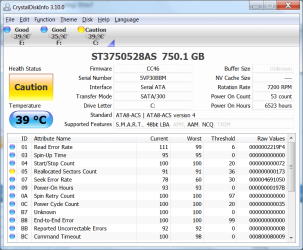
Nifty program. Not quite sure what you mean by 'the resulting image', but here's... something, anyway. Not sure how concerned to be by that reallocated sectors count.
crystaldiskinfo.png
 

My Computer

OS
Windows 7 Professional x64
CPU
Athlon II X4 630 2.8 GHz
Motherboard
MSI 785gtm-e45
Memory
4 gb
Graphics Card(s)
XFX Radeon HD 4650
Hard Drives
Seagate Barricuda 7200.12 750gb
Hi,

Thats the image right there that you posted, but please maxmimise it and post again - there are some items on the bottom that you clipped off.

Regards,
golden
 

My Computer

Computer type
PC/Desktop
Computer Manufacturer/Model Number
Golden Mk. I.4
OS
Windows 10 Pro x64 ; Xubuntu x64
CPU
Intel i7 860 @ 2.80 GHz O/C'ed to 4.0GHz
Motherboard
Gigabyte P55A-UD3R Rev.1. Award BIOS F13
Memory
16GB Corsair Vengance DDR3 @ 661 MHz Dual Channel (9-9-9-24)
Graphics Card(s)
EVGA NVidia GTX 560 1024MB
Sound Card
Realtek Integrated
Monitor(s) Displays
Dual Samsung SyncMaster 2494HS
Screen Resolution
1920*1080 and 1920*1080
Hard Drives
1*Samsung 840 EVO 120GB SSD;
1*OCZ Vertex 2 60GB SSD;
2*Samsung F3 SpinPoint 1TB in RAID0;
1*Samsung F1 SpinPoint 1TB;
2*Western Digital 1TB External USB 3.0
1*Western Digital 500GB External USB 3.0
1*Seagate 500GB External USB 2.0
PSU
Thermaltake ToughPower QFan 750W
Case
Thermaltake Element S VK60001W2Z
Cooling
Corsair H60 Water Cooling, 2*230mm and 2*80mm case fans
Keyboard
Logitech G110
Mouse
Logitech MX518
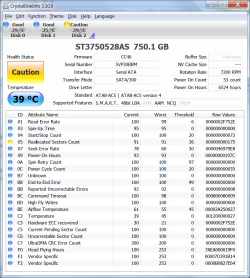
I notice Reallocated Sectors has increased by two in just the past half-hour.

crystaldiskinfo2.png
 

My Computer

OS
Windows 7 Professional x64
CPU
Athlon II X4 630 2.8 GHz
Motherboard
MSI 785gtm-e45
Memory
4 gb
Graphics Card(s)
XFX Radeon HD 4650
Hard Drives
Seagate Barricuda 7200.12 750gb
OK. The reallocated sector counts are a bit of a concern, but lets try a few other things first.

Can you please run the following:

1. Click Start Orb, and in the search box type "cmd"
2. Right-click on cmd and select Run as Administrator
3. Type chkdsk /f

You will be asked if you want to schedule a check disk at next boot, select YES. Now restart the PC, it will immediately run a chkdsk. This will take some time. Its important not to interiupt it until its finished. Take note of any messages close to when it completes.

Once its done, re-run CrystalDiskInfo, and lets see if the image has changed.

Regards,
Golden
 

My Computer

Computer type
PC/Desktop
Computer Manufacturer/Model Number
Golden Mk. I.4
OS
Windows 10 Pro x64 ; Xubuntu x64
CPU
Intel i7 860 @ 2.80 GHz O/C'ed to 4.0GHz
Motherboard
Gigabyte P55A-UD3R Rev.1. Award BIOS F13
Memory
16GB Corsair Vengance DDR3 @ 661 MHz Dual Channel (9-9-9-24)
Graphics Card(s)
EVGA NVidia GTX 560 1024MB
Sound Card
Realtek Integrated
Monitor(s) Displays
Dual Samsung SyncMaster 2494HS
Screen Resolution
1920*1080 and 1920*1080
Hard Drives
1*Samsung 840 EVO 120GB SSD;
1*OCZ Vertex 2 60GB SSD;
2*Samsung F3 SpinPoint 1TB in RAID0;
1*Samsung F1 SpinPoint 1TB;
2*Western Digital 1TB External USB 3.0
1*Western Digital 500GB External USB 3.0
1*Seagate 500GB External USB 2.0
PSU
Thermaltake ToughPower QFan 750W
Case
Thermaltake Element S VK60001W2Z
Cooling
Corsair H60 Water Cooling, 2*230mm and 2*80mm case fans
Keyboard
Logitech G110
Mouse
Logitech MX518
Code:
Checking file system on C:
The type of the file system is NTFS.


A disk check has been scheduled.
Windows will now check the disk.                         

CHKDSK is verifying files (stage 1 of 3)...
  326144 file records processed.                                          File verification completed.
  278 large file records processed.                                      0 bad file records processed.                                        2 EA records processed.                                              60 reparse records processed.                                       CHKDSK is verifying indexes (stage 2 of 3)...
  400370 index entries processed.                                         Index verification completed.
  0 unindexed files scanned.                                           0 unindexed files recovered.                                       CHKDSK is verifying security descriptors (stage 3 of 3)...
  326144 file SDs/SIDs processed.                                         Cleaning up 406 unused index entries from index $SII of file 0x9.
Cleaning up 406 unused index entries from index $SDH of file 0x9.
Cleaning up 406 unused security descriptors.
Security descriptor verification completed.
  37114 data files processed.                                            CHKDSK is verifying Usn Journal...
  37561640 USN bytes processed.                                             Usn Journal verification completed.
CHKDSK discovered free space marked as allocated in the
master file table (MFT) bitmap.
CHKDSK discovered free space marked as allocated in the volume bitmap.
Windows has made corrections to the file system.

 732469247 KB total disk space.
 262182808 KB in 286051 files.
    135376 KB in 37115 indexes.
         0 KB in bad sectors.
    452163 KB in use by the system.
     65536 KB occupied by the log file.
 469698900 KB available on disk.

      4096 bytes in each allocation unit.
 183117311 total allocation units on disk.
 117424725 allocation units available on disk.

Internal Info:
00 fa 04 00 69 ee 04 00 63 c6 08 00 00 00 00 00  ....i...c.......
06 0a 00 00 3c 00 00 00 00 00 00 00 00 00 00 00  ....<...........
00 00 00 00 00 00 00 00 00 00 00 00 00 00 00 00  ................

Windows has finished checking your disk.
Please wait while your computer restarts.
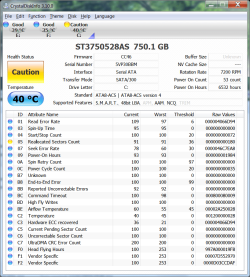
crystaldiskinfo3.png
 

My Computer

OS
Windows 7 Professional x64
CPU
Athlon II X4 630 2.8 GHz
Motherboard
MSI 785gtm-e45
Memory
4 gb
Graphics Card(s)
XFX Radeon HD 4650
Hard Drives
Seagate Barricuda 7200.12 750gb
Mmmm. OK.

Well, Reallocated Sector Counts is above the threshold, but all the other SMART indicators seems OK to me. I think this is definately disk/RAM related.

Couple of questions:
1. How defragmented is the disk?
2. What is the size of your pagefile?

I noticed you have a drive E: and F:. None of the videos/audio etc, you are running are from those are they? All the issues you experience are off the C: drive?

Regards,
Golden
 

My Computer

Computer type
PC/Desktop
Computer Manufacturer/Model Number
Golden Mk. I.4
OS
Windows 10 Pro x64 ; Xubuntu x64
CPU
Intel i7 860 @ 2.80 GHz O/C'ed to 4.0GHz
Motherboard
Gigabyte P55A-UD3R Rev.1. Award BIOS F13
Memory
16GB Corsair Vengance DDR3 @ 661 MHz Dual Channel (9-9-9-24)
Graphics Card(s)
EVGA NVidia GTX 560 1024MB
Sound Card
Realtek Integrated
Monitor(s) Displays
Dual Samsung SyncMaster 2494HS
Screen Resolution
1920*1080 and 1920*1080
Hard Drives
1*Samsung 840 EVO 120GB SSD;
1*OCZ Vertex 2 60GB SSD;
2*Samsung F3 SpinPoint 1TB in RAID0;
1*Samsung F1 SpinPoint 1TB;
2*Western Digital 1TB External USB 3.0
1*Western Digital 500GB External USB 3.0
1*Seagate 500GB External USB 2.0
PSU
Thermaltake ToughPower QFan 750W
Case
Thermaltake Element S VK60001W2Z
Cooling
Corsair H60 Water Cooling, 2*230mm and 2*80mm case fans
Keyboard
Logitech G110
Mouse
Logitech MX518
I have the 1TB version of this disk. Is yours a 7200.11 or 7200.12? 7200.11 firmware was quite bad and needed to be updated.

After checking fragmentation (Windows should be set to do this automatically), you may want to download CrystalDiskMark from the same site as CrystalDiskinfo. This will run a detailed disk speed check.

chkdsk /r will do a complete bad sector scan. You can schedule the test from Windows
Computer>right click disk>properties>tools>check now> tick scan for and attempt recovery of bad sectors.
This is a long test and for your disk could take ~ 2hours. It will give progress readout.
 

My Computer

Computer type
PC/Desktop
Computer Manufacturer/Model Number
Own build
OS
Windows 7x64 Home Premium SP1
CPU
Intel i7 2600k
Motherboard
ASUS P8Z68 Deluxe
Memory
G.Skill Ripjaws (DDR3-1600) 2x4GB
Graphics Card(s)
Nvidia GeForce GTS 450; Intel HD Graphics 3000(GT2+)
Monitor(s) Displays
Dell Ultrasharp IPS panel U2311H, Samsung SyncMaster P2350
Screen Resolution
1920x1080
Hard Drives
Samsung 850 Pro SSD 256GB, Samsung SSD 840 120GB, Seagates 1TB Barracuda ST31000528AS x2
PSU
Seasonic M12II 520W
Case
Lian Li Lancool PC-K60
Cooling
Case: 1x120mm, 3x140mm CPU: Hyper 212+
Keyboard
Logitech MK520 (wireless)
Mouse
Logitech MK520
Internet Speed
6-7 Mbps
Antivirus
Norton Security Premium, Malwarebytes on 2 (MSE on 3rd PC)
Browser
FireFox
Other Info
Audio: Logitech Z523 2.1
Thank you for these extremely prompt replies.

In general, I feel like I run into this problem more when I'm accessing something on the C: drive than when I'm accessing something on the E: or F: drives. One weird thing I ran into lately (should have thought to check it earlier) is that the problem seems to be much worse on my administrator account (generally the one I use) than on the guest account. I haven't actually verified that I can experience the problem on the guest account after a few hours of testing, whereas it is becoming a constant annoyance on my main account. I will continue testing.

It is a 7200.12 (model # st3750528as), and the firmware is up to date.

I have a scheduled defragmentation every Wednesday at 1am. Fragmentation of C: is currently at 3%, so I think we can safely assume that that level of fragmentation has accumulated over the past week.

Total paging file size for all drives: 4095 MB
 

My Computer

OS
Windows 7 Professional x64
CPU
Athlon II X4 630 2.8 GHz
Motherboard
MSI 785gtm-e45
Memory
4 gb
Graphics Card(s)
XFX Radeon HD 4650
Hard Drives
Seagate Barricuda 7200.12 750gb
The rellocated sectors means that sectors on your disk were found to be bad and have been replaced by good sectors that the drive has kept in reserve. This can effect performance significantly and could be the harbinger for complete failure of the disk. I would back it up and replace it immediately.

I would quit defragmenting that drive as well to limit damage. defragmenting can move bad sectors from one file to another corrupting more files.

Gene
 

My Computer

Computer type
PC/Desktop
Computer Manufacturer/Model Number
Home built (GeneO industries)/Model 4
OS
Windows 10 Pro. EFI boot partition, full EFI boot
CPU
i7 4770k 4.4GHz (44-44-43-43 turbo) @ 1.248V
Motherboard
ASUS Maximus VI Hero
Memory
16GB (8GBx2) @2200 MHz G.skill Sniper 10-11-10-30-1, 1.6V
Graphics Card(s)
MSI GTX 970 Gaming 4G
Sound Card
Onboard SupremeFX Audio
Monitor(s) Displays
NEC Spectraview 2490WUXi-SV
Screen Resolution
1920 x 1200
Hard Drives
Samsung 850 Pro 256GB (OS), Samsung 2x 128GB 840 Pro SSD in RAID0, 3x WD Blue 6Gb/s 1TB RAID0, WD 2TB Black external USB 3.0, 2TB WD20EARS Green external USB 3.0, 2x 500GB Seagate and 1 750 GB external USB, 1x 350GB external USB3
PSU
Seasonic X-850 (2012 KM3 model)
Case
Fractal Design Define R4
Cooling
NH-D14, NF-F12, NF-A15; NF-P14, NF-P12,NF-A14, S12A PWM
Keyboard
Cooler Master Storm Quickfire Rapid - Brown
Mouse
Logitech G602
Internet Speed
126.4 Mb/s down, 24.3 Mb/s up
Other Info
USB 3.0 x8 , SATA III x8, eSATA, USB 2.0 x6. Samsung DVD R/W drive.

WEI: CPU 7.8, Memory 7.9, Graphics 7.9, Disk 7.9
Your power on hours suggests your drive may be well within it's warranty period. If so then backup and replace.
 

My Computer

Computer type
PC/Desktop
Computer Manufacturer/Model Number
Own build
OS
Windows 7x64 Home Premium SP1
CPU
Intel i7 2600k
Motherboard
ASUS P8Z68 Deluxe
Memory
G.Skill Ripjaws (DDR3-1600) 2x4GB
Graphics Card(s)
Nvidia GeForce GTS 450; Intel HD Graphics 3000(GT2+)
Monitor(s) Displays
Dell Ultrasharp IPS panel U2311H, Samsung SyncMaster P2350
Screen Resolution
1920x1080
Hard Drives
Samsung 850 Pro SSD 256GB, Samsung SSD 840 120GB, Seagates 1TB Barracuda ST31000528AS x2
PSU
Seasonic M12II 520W
Case
Lian Li Lancool PC-K60
Cooling
Case: 1x120mm, 3x140mm CPU: Hyper 212+
Keyboard
Logitech MK520 (wireless)
Mouse
Logitech MK520
Internet Speed
6-7 Mbps
Antivirus
Norton Security Premium, Malwarebytes on 2 (MSE on 3rd PC)
Browser
FireFox
Other Info
Audio: Logitech Z523 2.1
Chkdsk /r found nothing. I've verified that the problem occurs in the guest account, just much less often. I wonder why that is? Anyway, everyone seems in agreement that this is a HDD problem, so I guess it's replacement time.
Code:
Checking file system on C:
The type of the file system is NTFS.

A disk check has been scheduled.
Windows will now check the disk.                         

CHKDSK is verifying files (stage 1 of 5)...
  326144 file records processed.                                          File verification completed.
  279 large file records processed.                                      0 bad file records processed.                                        2 EA records processed.                                              60 reparse records processed.                                       CHKDSK is verifying indexes (stage 2 of 5)...
  400486 index entries processed.                                         Index verification completed.
  0 unindexed files scanned.                                           0 unindexed files recovered.                                       CHKDSK is verifying security descriptors (stage 3 of 5)...
  326144 file SDs/SIDs processed.                                         Cleaning up 16 unused index entries from index $SII of file 0x9.
Cleaning up 16 unused index entries from index $SDH of file 0x9.
Cleaning up 16 unused security descriptors.
Security descriptor verification completed.
  37172 data files processed.                                            CHKDSK is verifying Usn Journal...
  35668136 USN bytes processed.                                             Usn Journal verification completed.
CHKDSK is verifying file data (stage 4 of 5)...
  326128 files processed.                                                 File data verification completed.
CHKDSK is verifying free space (stage 5 of 5)...
  117454774 free clusters processed.                                         Free space verification is complete.
Windows has checked the file system and found no problems.

 732469247 KB total disk space.
 262064344 KB in 285742 files.
    135432 KB in 37173 indexes.
         0 KB in bad sectors.
    450375 KB in use by the system.
     65536 KB occupied by the log file.
 469819096 KB available on disk.

      4096 bytes in each allocation unit.
 183117311 total allocation units on disk.
 117454774 allocation units available on disk.

Internal Info:
00 fa 04 00 6e ed 04 00 04 c4 08 00 00 00 00 00  ....n...........
0c 0a 00 00 3c 00 00 00 00 00 00 00 00 00 00 00  ....<...........
00 00 00 00 00 00 00 00 00 00 00 00 00 00 00 00  ................

Windows has finished checking your disk.
Please wait while your computer restarts.
 

My Computer

OS
Windows 7 Professional x64
CPU
Athlon II X4 630 2.8 GHz
Motherboard
MSI 785gtm-e45
Memory
4 gb
Graphics Card(s)
XFX Radeon HD 4650
Hard Drives
Seagate Barricuda 7200.12 750gb
Yep, unfortunately it seem that way. Sorry it couldn't turn out better for you Compellor.
 

My Computer

Computer type
PC/Desktop
Computer Manufacturer/Model Number
Golden Mk. I.4
OS
Windows 10 Pro x64 ; Xubuntu x64
CPU
Intel i7 860 @ 2.80 GHz O/C'ed to 4.0GHz
Motherboard
Gigabyte P55A-UD3R Rev.1. Award BIOS F13
Memory
16GB Corsair Vengance DDR3 @ 661 MHz Dual Channel (9-9-9-24)
Graphics Card(s)
EVGA NVidia GTX 560 1024MB
Sound Card
Realtek Integrated
Monitor(s) Displays
Dual Samsung SyncMaster 2494HS
Screen Resolution
1920*1080 and 1920*1080
Hard Drives
1*Samsung 840 EVO 120GB SSD;
1*OCZ Vertex 2 60GB SSD;
2*Samsung F3 SpinPoint 1TB in RAID0;
1*Samsung F1 SpinPoint 1TB;
2*Western Digital 1TB External USB 3.0
1*Western Digital 500GB External USB 3.0
1*Seagate 500GB External USB 2.0
PSU
Thermaltake ToughPower QFan 750W
Case
Thermaltake Element S VK60001W2Z
Cooling
Corsair H60 Water Cooling, 2*230mm and 2*80mm case fans
Keyboard
Logitech G110
Mouse
Logitech MX518
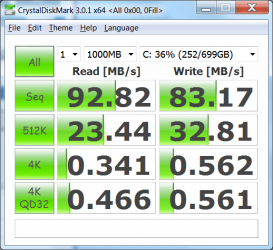
In case you were still interested, mjf:
CrystalDiskMark.png
I noticed your thread here. Is there any reason I should expect such a performance difference normally, or is this the result of the reallocation etc?
 

My Computer

OS
Windows 7 Professional x64
CPU
Athlon II X4 630 2.8 GHz
Motherboard
MSI 785gtm-e45
Memory
4 gb
Graphics Card(s)
XFX Radeon HD 4650
Hard Drives
Seagate Barricuda 7200.12 750gb
did you do chkdsk /f or /r? Looks like /f which only checks t logical consistency in the filesystem not for bad sectors (/r finds and corrects bad sectors).

If it were 1 or two sectors involved, it probably would not be a significant worry. But 373 bad (relocated) sectors is pretty serious.

Good luck!
Gene
 

My Computer

Computer type
PC/Desktop
Computer Manufacturer/Model Number
Home built (GeneO industries)/Model 4
OS
Windows 10 Pro. EFI boot partition, full EFI boot
CPU
i7 4770k 4.4GHz (44-44-43-43 turbo) @ 1.248V
Motherboard
ASUS Maximus VI Hero
Memory
16GB (8GBx2) @2200 MHz G.skill Sniper 10-11-10-30-1, 1.6V
Graphics Card(s)
MSI GTX 970 Gaming 4G
Sound Card
Onboard SupremeFX Audio
Monitor(s) Displays
NEC Spectraview 2490WUXi-SV
Screen Resolution
1920 x 1200
Hard Drives
Samsung 850 Pro 256GB (OS), Samsung 2x 128GB 840 Pro SSD in RAID0, 3x WD Blue 6Gb/s 1TB RAID0, WD 2TB Black external USB 3.0, 2TB WD20EARS Green external USB 3.0, 2x 500GB Seagate and 1 750 GB external USB, 1x 350GB external USB3
PSU
Seasonic X-850 (2012 KM3 model)
Case
Fractal Design Define R4
Cooling
NH-D14, NF-F12, NF-A15; NF-P14, NF-P12,NF-A14, S12A PWM
Keyboard
Cooler Master Storm Quickfire Rapid - Brown
Mouse
Logitech G602
Internet Speed
126.4 Mb/s down, 24.3 Mb/s up
Other Info
USB 3.0 x8 , SATA III x8, eSATA, USB 2.0 x6. Samsung DVD R/W drive.

WEI: CPU 7.8, Memory 7.9, Graphics 7.9, Disk 7.9
I suggested chkdsk /r but if under warranty I'd just get a replacement.
 

My Computer

Computer type
PC/Desktop
Computer Manufacturer/Model Number
Own build
OS
Windows 7x64 Home Premium SP1
CPU
Intel i7 2600k
Motherboard
ASUS P8Z68 Deluxe
Memory
G.Skill Ripjaws (DDR3-1600) 2x4GB
Graphics Card(s)
Nvidia GeForce GTS 450; Intel HD Graphics 3000(GT2+)
Monitor(s) Displays
Dell Ultrasharp IPS panel U2311H, Samsung SyncMaster P2350
Screen Resolution
1920x1080
Hard Drives
Samsung 850 Pro SSD 256GB, Samsung SSD 840 120GB, Seagates 1TB Barracuda ST31000528AS x2
PSU
Seasonic M12II 520W
Case
Lian Li Lancool PC-K60
Cooling
Case: 1x120mm, 3x140mm CPU: Hyper 212+
Keyboard
Logitech MK520 (wireless)
Mouse
Logitech MK520
Internet Speed
6-7 Mbps
Antivirus
Norton Security Premium, Malwarebytes on 2 (MSE on 3rd PC)
Browser
FireFox
Other Info
Audio: Logitech Z523 2.1
I thought I'd run /r. My chkdsk /f results are on the previous page. You can see the two additional stages - verifying files and free space. It appears to report 0 bad sectors. CrystalDiskInfo reports 180 bad sectors (just checked again and it's up to 188). On the other hand, that's raw data, not sure if I'm supposed to somehow interpret it. Where do you get 373 from?
 

My Computer

OS
Windows 7 Professional x64
CPU
Athlon II X4 630 2.8 GHz
Motherboard
MSI 785gtm-e45
Memory
4 gb
Graphics Card(s)
XFX Radeon HD 4650
Hard Drives
Seagate Barricuda 7200.12 750gb
Crystal disk mark is reporting the RAW SMART counts, which are in hexadecimal. 173 hexadecimal (your second post) = 373 decimal.

188 hex = 392 decimal

- Gene
 
Last edited:

My Computer

Computer type
PC/Desktop
Computer Manufacturer/Model Number
Home built (GeneO industries)/Model 4
OS
Windows 10 Pro. EFI boot partition, full EFI boot
CPU
i7 4770k 4.4GHz (44-44-43-43 turbo) @ 1.248V
Motherboard
ASUS Maximus VI Hero
Memory
16GB (8GBx2) @2200 MHz G.skill Sniper 10-11-10-30-1, 1.6V
Graphics Card(s)
MSI GTX 970 Gaming 4G
Sound Card
Onboard SupremeFX Audio
Monitor(s) Displays
NEC Spectraview 2490WUXi-SV
Screen Resolution
1920 x 1200
Hard Drives
Samsung 850 Pro 256GB (OS), Samsung 2x 128GB 840 Pro SSD in RAID0, 3x WD Blue 6Gb/s 1TB RAID0, WD 2TB Black external USB 3.0, 2TB WD20EARS Green external USB 3.0, 2x 500GB Seagate and 1 750 GB external USB, 1x 350GB external USB3
PSU
Seasonic X-850 (2012 KM3 model)
Case
Fractal Design Define R4
Cooling
NH-D14, NF-F12, NF-A15; NF-P14, NF-P12,NF-A14, S12A PWM
Keyboard
Cooler Master Storm Quickfire Rapid - Brown
Mouse
Logitech G602
Internet Speed
126.4 Mb/s down, 24.3 Mb/s up
Other Info
USB 3.0 x8 , SATA III x8, eSATA, USB 2.0 x6. Samsung DVD R/W drive.

WEI: CPU 7.8, Memory 7.9, Graphics 7.9, Disk 7.9
Back
Top