Fresh install of Windows 7 from a recovery image

GusFG

New member
Local time
4:25 PM
Messages
18
I have just done a fresh install of Windows 7 from an image (Samsung branded Recovery disk) I put on to my USB stick since my Samsung 400B2B Notebook does not have a DVD drive. I did the reinstall to get rid of the intensely annoying bloatware.

I am astonished that after the reinstall I am left completely driverless and when I go into device manager there isn't the slightest hint which wireless adapter (broadcom, intel or Atheros) or LAN hardware is installed. I have tried ipconfig again no help. The image taken from the Samsung CD is just under 4GB, so what the hell are they putting on there thats taking up 4GB?

So how on earth am I supposed to ascertain what hardware I've got? I stupidly assumed I would at least be able to get online by plugging in the ethernet, ha!

How on earth can Samsung supply a recovery disk which leaves you up the creek without a paddle so to speak. Yes I know I can use a bit of trial and error but I shouldn't have to.

This really is bare bones!!

But can this be normal practice?

Gus
 

My Computer My Computer

At a glance

Windows 7 Pro x64
OS
Windows 7 Pro x64
I have just done a fresh install of Windows 7 from an image (Samsung branded Recovery disk) I put on to my USB stick since my Samsung 400B2B Notebook does not have a DVD drive. I did the reinstall to get rid of the intensely annoying bloatware.

I am astonished that after the reinstall I am left completely driverless and when I go into device manager there isn't the slightest hint which wireless adapter (broadcom, intel or Atheros) or LAN hardware is installed. I have tried ipconfig again no help. The image taken from the Samsung CD is just under 4GB, so what the hell are they putting on there thats taking up 4GB?

So how on earth am I supposed to ascertain what hardware I've got? I stupidly assumed I would at least be able to get online by plugging in the ethernet, ha!

How on earth can Samsung supply a recovery disk which leaves you up the creek without a paddle so to speak. Yes I know I can use a bit of trial and error but I shouldn't have to.

This really is bare bones!!

But can this be normal practice?

Gus
That's actually a good thing. You don't have all of the factory "bloat" that comes with the pc. This website should help you find the drivers for your Samsung laptop: Samsung
 

My Computer My Computer

At a glance

Windows 7 Professional x64 Service Pack 1AMD Athlon X4 6456GB DDR3 1066Sapphire Radeon HD 5670 512MB GDDR5
Computer type
PC/Desktop
Computer Manufacturer/Model Number
HP Pavilion P7-1010
OS
Windows 7 Professional x64 Service Pack 1
CPU
AMD Athlon X4 645
Motherboard
Foxxcon N-Alvorix RS880
Memory
6GB DDR3 1066
Graphics Card(s)
Sapphire Radeon HD 5670 512MB GDDR5
Sound Card
Realtek Integrated Audio
Monitor(s) Displays
HP 2011x
Screen Resolution
1600x900
Hard Drives
1. Crucial M4 128GB SSD
2. 1TB Seagate Barracuda 7200.12 RPM
3. 1TB Western Digital Caviar Green 5400RPM
PSU
Seasonic S12 II Bronze 380 Watt
Case
HP OEM
Cooling
Coolermaster Heatsink, AVC Case Fan
Keyboard
HP OEM- Made by Chicony
Mouse
HP OEM- Made by Logitech
Internet Speed
20MBit Down/4 Up
Antivirus
Microsoft Security Essentials
Browser
Internet Explorer 10
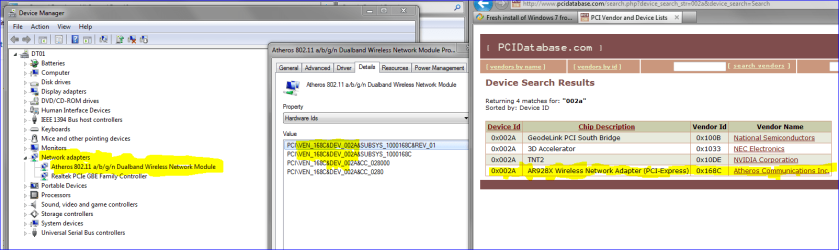
Go to Control Panel then click Device Manager.

Expand Network adapters and then right click on the network device, click Properties. Select Details and scroll to Hardware IDs and find the info in this screenshot. Then enter the appropriate data at PCI Vendor and Device Lists. (Sorry fo the slopiness of the highlighting.)
 

Attachments

  • Capture3.PNG
    Capture3.PNG
    46.8 KB · Views: 57

My Computer My Computer

At a glance

Windows 7 Ultimate x64
OS
Windows 7 Ultimate x64
GusFG,

Welcome to SevenForums.

Question #1. Does the notebook work right now, even if without some of the desired performance?

Your answer determines the next step.
 

My Computer My Computer

At a glance

MS Windows 7 Ultimate SP1 64-bitAMD A10-4600M6.00 GB Dual-Channel DDR3 @ 798MHz (11-11-12-28)AMD Radeon HD 7660G
Computer Manufacturer/Model Number
Toshiba Satellite S875D-S7239 laptop
OS
MS Windows 7 Ultimate SP1 64-bit
CPU
AMD A10-4600M
Motherboard
AMD Pumori (Socket FT1)
Memory
6.00 GB Dual-Channel DDR3 @ 798MHz (11-11-12-28)
Graphics Card(s)
AMD Radeon HD 7660G
Sound Card
High Definition Audio Device
Monitor(s) Displays
Generic PnP Monitor (1600x900@60Hz)
Screen Resolution
1600x900@60Hz
Hard Drives
SSD 119GB Corsair CSSD-V128GB2 ATA Device
Keyboard
Standard PS/2 Keyboard
Mouse
HP Wireless Optical Mobile Mouse Model FHA-3410
Internet Speed
What the local pub, local coffee shop offers.
Other Info
Optical Drive:MATSHITA BD-CMB UJ160B ATA Device


Also have an Asus ha1002xp netbook with Win 7 Ultimate installed.
There may be another way out if you want to go through the reinstall process again. You can download an ISO image of Windows 7 Pro 64-bit (your OS as per your specs) from Official Windows 7 SP1 ISO from Digital River « My Digital Life and put it on your USB stick. Then clean reinstall Windows 7 again.

As Windows 7 Installation DVD comes with almost all the drivers, it should get installed without any bloatware with all your hardware working. For activation you may use the genuine Product Key which came with your Samsung.

In the unlikely event of the drivers not being found on the installation DVD, you might have to download from the Samsung web-site as has been suggested already and you wont be any worse off except for the time taken to do the reinstall.

Kindly also fill up the system specs fully for your Machine.
 

My Computer My Computer

At a glance

Windows 7 Pro with SP1 32bit2 gigs of RAMIntel(R) 82845G/GL/GE/PE/GV Graphics Controller
Computer Manufacturer/Model Number
Custom Built
OS
Windows 7 Pro with SP1 32bit
Motherboard
Intel D845GVS1 X86-based PC
Memory
2 gigs of RAM
Graphics Card(s)
Intel(R) 82845G/GL/GE/PE/GV Graphics Controller
Sound Card
Realtek AC'97 Audio
Monitor(s) Displays
Samsung SyncMaster 931BF Black 19" LCD Monitor
Screen Resolution
1280X960
Hard Drives
1. SAMSUNG SP0822N ATA Device ~ 80 GigaBytes

2. Seagate FreeAgent Go USB Device ~ 500 GigaBytes
Keyboard
COMPAQ Standard PS/2 Keyboard
Mouse
iBall Laser Precise Speedster
Internet Speed
4 mb/sec
:D Welcome GusFG,

You can download System Info for Windows on another computer & put it on a USB flash drive. Then copy it to your computer & run the program. It will give you all the details of your computer, including hardware, etc. Then you will know what driver to get for your wireless lan adapter so you can install it and get on-line to get all the other needed drivers.
 

My Computer My Computer

At a glance

Win7 Enterprise, Win7 x86 (Ult 7600), Win7 x6...AMD fx8350 4ghz, AMD-32 2400mhz, AMD-64 3200m...2gb, 4gb on the Ult 7600, 4gb on Technet RTM,...Draw my own Graphics, several nVidia cards
Computer type
PC/Desktop
Computer Manufacturer/Model Number
Built them myself, Science Experiments !
OS
Win7 Enterprise, Win7 x86 (Ult 7600), Win7 x64 Ult 7600, TechNet RTM on AMD x64 (2.8Ghz)
CPU
AMD fx8350 4ghz, AMD-32 2400mhz, AMD-64 3200mhz, AMDx64 2.8G
Motherboard
SIS 755, ECS-K8M890M-M (Ult 7600), GigaByte & others
Memory
2gb, 4gb on the Ult 7600, 4gb on Technet RTM, 32gb on FX8350
Graphics Card(s)
Draw my own Graphics, several nVidia cards
Sound Card
on motherboard
Monitor(s) Displays
19" flat scr, 28" I-Inc widescr,22" Emprex Widescr, 23" Acer
Screen Resolution
1280 x 1024, 1440 x 900, 1920 x 1080
Hard Drives
6 pata Ide HD's & 2 Sata HD's
added 80gb external on Ult 7600 computer,
numerous extra 1tb, 2TB, 3Tb SATA HD's
A collection of ext HD Docks w/ HDs
PSU
430w, 550w, 600w, 700, 800, etc
Case
All Generic Full Towers
Cooling
Open Air & a few fans, some w/ colored LEDs
Keyboard
Compaq & Dell recycled from GoodWill
Mouse
Made in China Optical Wired Mouse
Internet Speed
Fast Cable InterNet
Antivirus
AVG Free on 24 different Desktops, NO Problems!
Browser
IE 8 is preferred, but use FireFox sometimes
Other Info
Linksys Routers, switches, & Hubs
Too Many USB Flash Drives to count, Biggest is 64GB !
Eight computers in my home network.
Sixteen computers at my business network.
Linked via TeamViewer !
Lots of old used spare computer parts everywhere!
I have just done a fresh install of Windows 7 from an image (Samsung branded Recovery disk) I put on to my USB stick since my Samsung 400B2B Notebook does not have a DVD drive. I did the reinstall to get rid of the intensely annoying bloatware.

I am astonished that after the reinstall I am left completely driverless and when I go into device manager there isn't the slightest hint which wireless adapter (broadcom, intel or Atheros) or LAN hardware is installed. I have tried ipconfig again no help. The image taken from the Samsung CD is just under 4GB, so what the hell are they putting on there thats taking up 4GB?

So how on earth am I supposed to ascertain what hardware I've got? I stupidly assumed I would at least be able to get online by plugging in the ethernet, ha!

How on earth can Samsung supply a recovery disk which leaves you up the creek without a paddle so to speak. Yes I know I can use a bit of trial and error but I shouldn't have to.

This really is bare bones!!

But can this be normal practice?

Gus

Hi there
these Recovery disks are made for a whole series of computers -- it supposedly keeps the costs down. On recovery it determines the model and installs (hopefully) the appropriate image.

I complain nearly every day about the current practice of not supplying a PROPER windows install disk with the machine be it an OEM or a retail copy but the industry seems to have made its mind up.

If I purchase a machine in a store (very rarely these days now) I usually haggle for a retail copy of Windows to be thrown in -- I don't need Norton or all the other junk (extended warranties in particular) that they try and sell you as well.

However your disk *should* install your machine back to factory condition - complete with bloat / crapware . As previous poster says device manager should show you what you've got on your machine

-- or you can use this FREE application --it's quite good but takes a little while --gives you all your product keys as well.


http://www.belarc.com/free_download.html


cheers
jimbo
 

My Computer My Computer

At a glance

Linux CENTOS 7 / various Windows OS'es and se...Intel i7 Intel i58GB, 16GBOn Motherboard
Computer type
PC/Desktop
Computer Manufacturer/Model Number
Custom built, several laptops HP/ASUS
OS
Linux CENTOS 7 / various Windows OS'es and servers
CPU
Intel i7 Intel i5
Memory
8GB, 16GB
Graphics Card(s)
On Motherboard
Sound Card
Realtek HD audio
Monitor(s) Displays
Apple Cinema display, Samsung LCD
Screen Resolution
1920 X 1080
Hard Drives
4 X 1TB SATA
Mouse
Toshiba wireless laser
Internet Speed
> 20MB up
Back
Top