Solved Fresh install win7 home prem 64 bit can not get disk to run !

LearningNinja

New member
Member
Local time
2:49 PM
Messages
54
Location
Sydney Australia
Hey ! I been getting bsod regularly caused by ntoskrnl exe and been unable to fix it ,so I have the windows 7 home premium DVD that includes Service Pack 1 64bit software OEM system Builder Pack and I have all the Product ID and Product Key Info the Product Description reads like this.....win home prem 7 sp1 64-bit english 3pk DSP 3 OEI DVD ( I have 2 of these discs as 2 computers had win 7 home prem installed around the same ) If I am using the DVD disc that was Installed on the other PC and not the original one that was used can this cause any issues ? Because I have gone into the BIOS and set the boot order so it will run from the DVD drive as the first boot option but the screen just shows a message saying invalid format ! I have connected a 2 TB hard drive that is new and not formatted as yet I also noticed when looking at the boot order these options popped up...... UEFI : USB USB Hard Drive .... and ..... UEFI : ATAPI IHAS324 B......and SATA ATAPI .......... not sure if I should have selected one of those as the first boot order? I also tried to use the DVD as a repair disc but I couldn't get it to load even when I had a win7 operating system working on my hard disk ! So my question is why cant I get the original win7 disc to even start so I can do a installation on a new SATA 2 TB hard drive ? I have spent weeks trying to fix the BSOD but no luck ! and now I am going for the fresh install and cant even manage that !!!!!
 

My Computer My Computer

At a glance

Windows 7 home premium 64 bit
Computer type
PC/Desktop
OS
Windows 7 home premium 64 bit
Hard Drives
2.0 TB SATA Western Digital
Antivirus
NIL
Browser
NIL
Other Info
its not working yet that is why i haven't filled in all the info
It does not matter what install dvd you use, they are not tied to any particular pc.

Set the dvd as 1st in the boot order then have your hard drve/ssd 2nd

Use the one time boot menu (it will tell you which key to push when you 1st turn on the PC) to choose a non UEFI device, the dvd drive, then it should read the dvd and you should see the words "Press any key to boot from DVD" just push any key on the keyboard and the install should start.

Clean Install Windows 7 - Windows 7 Help Forums

If the dvd drive does not read the install dvd, then you could have a bad dvd drive.
 

My Computer My Computer

At a glance

Windows 10 Pro x64Intel Core i7 6700KGSkill TridentZ RGB 16GB 3600 16-16-16-36EVGA GTX 980 Ti SC x2
Computer type
PC/Desktop
Computer Manufacturer/Model Number
Skylake Special #666
OS
Windows 10 Pro x64
CPU
Intel Core i7 6700K
Motherboard
Asus Sabertooth Z170 Mark 1
Memory
GSkill TridentZ RGB 16GB 3600 16-16-16-36
Graphics Card(s)
EVGA GTX 980 Ti SC x2
Sound Card
Realtek High Definition
Monitor(s) Displays
AOC G2460PG
Screen Resolution
1920 x 1080 144Hz
Hard Drives
Samsung 860 Pro 256GB, Seagate Barracuda 4TB x2
PSU
EVGA 1000 P2, EVGA White Custom Braided Cables
Case
Corsair Vengeance C70 Gunmetal Black
Cooling
Corsair H100i v2, Corsair ML120 x2, Thermal Grizzly Kryonaut
Keyboard
Logitech G910 Orion Spectrum
Mouse
Logitech G700s
Internet Speed
Verizon Fios Quantum Gateway 75/75
Antivirus
Windows Defender, Malwarebytes Free 3.8.3
Browser
Chrome
Other Info
Corsair SP120 x4, LG Blu-ray Drive, Durabrand HT-395 100 Watt Dolby Digital Amp, Corsair H2100 Wireless 7.1 Headset
Ok thanks ! I can see the boot option at start up its F12 i will use that instead of going into the BIOS .I have read all the clean installs win 7 etc and yes I must be just doing something stupid ! But I am sure I was putting the DVD drive as my fist boot option ! The other thing is I have the PC going to a TV that has a PC option on it and the invalid format message I have been getting is related to the TV ! I was wondering if I should hook it up to a normal PC screen ? I will try that I I continue having the same problems and will let you know what the out come is thanks
 

My Computer My Computer

At a glance

Windows 7 home premium 64 bit
Computer type
PC/Desktop
OS
Windows 7 home premium 64 bit
Hard Drives
2.0 TB SATA Western Digital
Antivirus
NIL
Browser
NIL
Other Info
its not working yet that is why i haven't filled in all the info
OK I switched to a normal PC monitor and the DVD loaded and I could see what to do on the screen but the installation was canceled got message saying .... windows could not install the required files the files may be corrupt or missing make sure all files required for installation are available and restart the installation error code 0x80070570 !!!!! now what ????
 

My Computer My Computer

At a glance

Windows 7 home premium 64 bit
Computer type
PC/Desktop
OS
Windows 7 home premium 64 bit
Hard Drives
2.0 TB SATA Western Digital
Antivirus
NIL
Browser
NIL
Other Info
its not working yet that is why i haven't filled in all the info

My Computer My Computer

At a glance

W7 home premium 32bit/W7HP 64bit/w10 tp insid...E5300 dual core3gbNvidia Geforce 7100 Nforce 630i
Computer type
PC/Desktop
Computer Manufacturer/Model Number
medionl/Aspire 6930G/acer x55a
OS
W7 home premium 32bit/W7HP 64bit/w10 tp insider ring
CPU
E5300 dual core
Motherboard
medion MS7366
Memory
3gb
Graphics Card(s)
Nvidia Geforce 7100 Nforce 630i
Monitor(s) Displays
avixc
Internet Speed
n (isp resticted to 72)
Antivirus
mse/pands
Browser
palemoon
Other Info
Belkin Fd7050 n USB using Railink RT2870 drivers, more upto date

My Computer My Computer

At a glance

Win-7-Pro64bit 7-H-Prem-64biti7-5930K 2nd i9-9940x both water blocked VRM'...Trident-z 3200C14 2nd Trident-z 3600C16EVGA 1080ti ftw3 2nd Titan Xp both water blocked
Computer type
PC/Desktop
Computer Manufacturer/Model Number
Custom assembled by me :}
OS
Win-7-Pro64bit 7-H-Prem-64bit
CPU
i7-5930K 2nd i9-9940x both water blocked VRM's too
Motherboard
ASUS SABERTOOTH X99 2nd ASUS x299 Apex
Memory
Trident-z 3200C14 2nd Trident-z 3600C16
Graphics Card(s)
EVGA 1080ti ftw3 2nd Titan Xp both water blocked
Sound Card
Built-in Realtek
Monitor(s) Displays
1-AOC G2460PG 24"G-Sync 144Hz/ 2nd 1-ASUS VG248QE 24" 144Hz
Screen Resolution
1920 x 1080 144Hz
Hard Drives
2-Samsung M.2 Evo & Evo Plus
2-Samsung 850 EVO 500GB SSD's/ 3-2.5 W.D. Black 1tb-&3-1tb/3-3.5 WD Black 1tb hdd's
PSU
EVGA SuperNOVA 1000-P2 2nd 1200-P2
Case
2-Corsair Obsidian Series 450D Black ATX Mid Tower
Cooling
Custom water loops
Keyboard
Logitech G710+/ 2nd Logitech G910
Mouse
2-RedDragon M901 Perdition 16400 dpi Gaming mouse = wired
Internet Speed
Comcast Ping 19ms 89.31mbps download speed 6.12mbps upload
Antivirus
Malwarebytes Pro/ Superantispyware Pro
Browser
FireFox & Pale moon
Other Info
2nd ASUS X299 Apex/Intel i9-9940x with Custom water loop/7H-Prem-x64/Corsair 450D case/Ram Trident-z 3600C16 4x8gb / Samsung970Evo plus 500gb SSD/Dual ssd EZ swap evo/PSU EVGA SuperNova 1200w-P2 80+Platinum/GPU Titan Xp /8-ML-140 on push-pull on 2-280GTX rads
Yep it's usually a bad install dvd if you get that message, hopefully someone will post a Home Premium Iso download link for you to ceate a new installer.

I don't have the proper key to Download a HP Iso from MS, so hopefully someone comes along and posts the link. Then you just download it and use that Iso to create another installer./
 

My Computer My Computer

At a glance

Windows 10 Pro x64Intel Core i7 6700KGSkill TridentZ RGB 16GB 3600 16-16-16-36EVGA GTX 980 Ti SC x2
Computer type
PC/Desktop
Computer Manufacturer/Model Number
Skylake Special #666
OS
Windows 10 Pro x64
CPU
Intel Core i7 6700K
Motherboard
Asus Sabertooth Z170 Mark 1
Memory
GSkill TridentZ RGB 16GB 3600 16-16-16-36
Graphics Card(s)
EVGA GTX 980 Ti SC x2
Sound Card
Realtek High Definition
Monitor(s) Displays
AOC G2460PG
Screen Resolution
1920 x 1080 144Hz
Hard Drives
Samsung 860 Pro 256GB, Seagate Barracuda 4TB x2
PSU
EVGA 1000 P2, EVGA White Custom Braided Cables
Case
Corsair Vengeance C70 Gunmetal Black
Cooling
Corsair H100i v2, Corsair ML120 x2, Thermal Grizzly Kryonaut
Keyboard
Logitech G910 Orion Spectrum
Mouse
Logitech G700s
Internet Speed
Verizon Fios Quantum Gateway 75/75
Antivirus
Windows Defender, Malwarebytes Free 3.8.3
Browser
Chrome
Other Info
Corsair SP120 x4, LG Blu-ray Drive, Durabrand HT-395 100 Watt Dolby Digital Amp, Corsair H2100 Wireless 7.1 Headset
Question: are you trying to install win 7 on the Dell XPS M1710 or on another computer? If it's not the Dell XPS M1710, what is the computer brand and model?
- Win home prem 7 sp1 64-bit english 3pk DSP 3 OEI DVD is a license that is valid for 3 computers. If you have two of this license, you can install it on 6 computers.
- You can use any disk, as they are exactly the same. But as you said that you installed on one computer using one license and on another using the other license, you should use the same license if you're doing a reinstall or you're going to loose one of the remaining 4 licenses.
- To install Windows is IMPORTANT that you leave attached ONLY the target drive or you may end with the boot loader in one disk and windows in the other.
- Clean install will delete ALL partitions so, if you don't have your data backed up, you should boot from a Linux USB flash disk or even Win installation disk and copy your data to an external disk.
- There are two kind of BIOS: Legacy - MBR and UEFI - GPT. What kind is the BIOS?
- How much memory you have? If 2G then you must install a 32 bits version or it won't work properly.
 

My Computers My Computers

  • At a glance

    Windows 7 HP 64i5 6600K - 800MHz to 4200MHz4+4G GSkill DDR4 3000IG - Intel 530
    Computer type
    PC/Desktop
    Computer Manufacturer/Model Number
    custom build
    OS
    Windows 7 HP 64
    CPU
    i5 6600K - 800MHz to 4200MHz
    Motherboard
    GA-Z170-HD3P
    Memory
    4+4G GSkill DDR4 3000
    Graphics Card(s)
    IG - Intel 530
    Monitor(s) Displays
    Samsung 226BW
    Screen Resolution
    1680x1050
    Hard Drives
    (1) -1 SM951 – 128GB M.2 AHCI PCIe SSD drive for Windows 7 and Lubuntu
    (2) -1 WD SATA 3 - 1T for Data
    (3) -1 WD SATA 3 - 1T for backup
    PSU
    Thermaltake 450W TR2 gold
    Keyboard
    Old and good Chicony mechanical keyboard
    Mouse
    Logitech mX performance - 9 buttons (had to disable some)
    Internet Speed
    500Mb/s
    Browser
    Firefox 64
    Other Info
    TinyWall firewall
  • At a glance

    Windows 7 Proi7-4500U 800MHz to 3.0GHz(4+4)G DDR3 1600IG intel 4400 + NVIDIA GeForce GT 745M
    Computer type
    Laptop
    System Manufacturer/Model Number
    Asus Q550LF
    OS
    Windows 7 Pro
    CPU
    i7-4500U 800MHz to 3.0GHz
    Motherboard
    Asus Q550LF
    Memory
    (4+4)G DDR3 1600
    Graphics Card(s)
    IG intel 4400 + NVIDIA GeForce GT 745M
    Sound Card
    Realtek
    Monitor(s) Displays
    LG Display LP156WF4-SPH1
    Screen Resolution
    1920 x 1080
    Hard Drives
    BX500 120G SSD for Windows and programs +
    1T HDD for data
    Internet Speed
    500 Mb/s
    Browser
    Firefox
    Other Info
    TinyWall firewall
megaherts07

Not trying to install an a Dell XPS But I see you have listed many issues that have been problematic for me Interesting point you mentioned about using up the licences !the PC i am trying to install on is a ACPI x 64 based PC ....... GigaBYTE-UEFI Dual BIOS......... lintel Pentium III XEONA 2590 MHZ
Anyway I picked the first option (unallocated space )were it allocates 100 bytes for recovery and the rest as the primary drive ! instead of selected formatted partition or drive to do the install ! It made the recovery partition and was into the primary partition when installation was canceled ! then after a while I got the boot manager was missing and end of story !!! SO I deleted everything on the hard drive ( which took over 4 hours to do) then I made 3 partitions a Drive C: called it the primary and a D : and a G: partition BUT I STILL get boot manager is missing !!!!! And yes i removed half of my memory because of the BSOD s with memory in the file dumps blah blah So now its trying to be a windows 7 ultimate 32 X bits I have a few other hard drives with everything on them but they are the ones with the BSOD and I made a USB stick with all the drivers on it So I was thinking after I did the fresh install I could migrate programs ETC over to it?
YES I see one i have UEFI BIOS two i removed half my memory and three I dont have a clue WTF i am doing :rolleyes:
 

My Computer My Computer

At a glance

Windows 7 home premium 64 bit
Computer type
PC/Desktop
OS
Windows 7 home premium 64 bit
Hard Drives
2.0 TB SATA Western Digital
Antivirus
NIL
Browser
NIL
Other Info
its not working yet that is why i haven't filled in all the info
You must give us ALL hardware specs.
- What is the Gigabyte MB model?
- How much memory you have?
 

My Computers My Computers

  • At a glance

    Windows 7 HP 64i5 6600K - 800MHz to 4200MHz4+4G GSkill DDR4 3000IG - Intel 530
    Computer type
    PC/Desktop
    Computer Manufacturer/Model Number
    custom build
    OS
    Windows 7 HP 64
    CPU
    i5 6600K - 800MHz to 4200MHz
    Motherboard
    GA-Z170-HD3P
    Memory
    4+4G GSkill DDR4 3000
    Graphics Card(s)
    IG - Intel 530
    Monitor(s) Displays
    Samsung 226BW
    Screen Resolution
    1680x1050
    Hard Drives
    (1) -1 SM951 – 128GB M.2 AHCI PCIe SSD drive for Windows 7 and Lubuntu
    (2) -1 WD SATA 3 - 1T for Data
    (3) -1 WD SATA 3 - 1T for backup
    PSU
    Thermaltake 450W TR2 gold
    Keyboard
    Old and good Chicony mechanical keyboard
    Mouse
    Logitech mX performance - 9 buttons (had to disable some)
    Internet Speed
    500Mb/s
    Browser
    Firefox 64
    Other Info
    TinyWall firewall
  • At a glance

    Windows 7 Proi7-4500U 800MHz to 3.0GHz(4+4)G DDR3 1600IG intel 4400 + NVIDIA GeForce GT 745M
    Computer type
    Laptop
    System Manufacturer/Model Number
    Asus Q550LF
    OS
    Windows 7 Pro
    CPU
    i7-4500U 800MHz to 3.0GHz
    Motherboard
    Asus Q550LF
    Memory
    (4+4)G DDR3 1600
    Graphics Card(s)
    IG intel 4400 + NVIDIA GeForce GT 745M
    Sound Card
    Realtek
    Monitor(s) Displays
    LG Display LP156WF4-SPH1
    Screen Resolution
    1920 x 1080
    Hard Drives
    BX500 120G SSD for Windows and programs +
    1T HDD for data
    Internet Speed
    500 Mb/s
    Browser
    Firefox
    Other Info
    TinyWall firewall

My Computer My Computer

At a glance

Win-7-Pro64bit 7-H-Prem-64biti7-5930K 2nd i9-9940x both water blocked VRM'...Trident-z 3200C14 2nd Trident-z 3600C16EVGA 1080ti ftw3 2nd Titan Xp both water blocked
Computer type
PC/Desktop
Computer Manufacturer/Model Number
Custom assembled by me :}
OS
Win-7-Pro64bit 7-H-Prem-64bit
CPU
i7-5930K 2nd i9-9940x both water blocked VRM's too
Motherboard
ASUS SABERTOOTH X99 2nd ASUS x299 Apex
Memory
Trident-z 3200C14 2nd Trident-z 3600C16
Graphics Card(s)
EVGA 1080ti ftw3 2nd Titan Xp both water blocked
Sound Card
Built-in Realtek
Monitor(s) Displays
1-AOC G2460PG 24"G-Sync 144Hz/ 2nd 1-ASUS VG248QE 24" 144Hz
Screen Resolution
1920 x 1080 144Hz
Hard Drives
2-Samsung M.2 Evo & Evo Plus
2-Samsung 850 EVO 500GB SSD's/ 3-2.5 W.D. Black 1tb-&3-1tb/3-3.5 WD Black 1tb hdd's
PSU
EVGA SuperNOVA 1000-P2 2nd 1200-P2
Case
2-Corsair Obsidian Series 450D Black ATX Mid Tower
Cooling
Custom water loops
Keyboard
Logitech G710+/ 2nd Logitech G910
Mouse
2-RedDragon M901 Perdition 16400 dpi Gaming mouse = wired
Internet Speed
Comcast Ping 19ms 89.31mbps download speed 6.12mbps upload
Antivirus
Malwarebytes Pro/ Superantispyware Pro
Browser
FireFox & Pale moon
Other Info
2nd ASUS X299 Apex/Intel i9-9940x with Custom water loop/7H-Prem-x64/Corsair 450D case/Ram Trident-z 3600C16 4x8gb / Samsung970Evo plus 500gb SSD/Dual ssd EZ swap evo/PSU EVGA SuperNova 1200w-P2 80+Platinum/GPU Titan Xp /8-ML-140 on push-pull on 2-280GTX rads
ok most of the problems that I have been having are related to the fact that I have a UEFI system but was trying to install MBR.and was following the tutorial in relation to that . Because I made 3 partitions on my HD ready for a fresh install I now now to make sure the HD has only unallacated space on it and I will replace the other memory stick back in due to it been 64Xbit and start again I have studied the tutorial on the installation of win 7 with a UEFI system so I will give it a go tonight! I would have never gotten this far without the support that you guys have been kind enough offer , so I thank you all and will post my results later
 

My Computer My Computer

At a glance

Windows 7 home premium 64 bit
Computer type
PC/Desktop
OS
Windows 7 home premium 64 bit
Hard Drives
2.0 TB SATA Western Digital
Antivirus
NIL
Browser
NIL
Other Info
its not working yet that is why i haven't filled in all the info
You must give us ALL hardware specs.
- What is the Gigabyte MB model?
- How much memory you have?

New hardware (MB and CPU) requires drivers that are not on the Win 7 installation disk, that is why we need the hardware specs.
Also, new MB are built to have Win 10 and requires some settings to run win 7.
 

My Computers My Computers

  • At a glance

    Windows 7 HP 64i5 6600K - 800MHz to 4200MHz4+4G GSkill DDR4 3000IG - Intel 530
    Computer type
    PC/Desktop
    Computer Manufacturer/Model Number
    custom build
    OS
    Windows 7 HP 64
    CPU
    i5 6600K - 800MHz to 4200MHz
    Motherboard
    GA-Z170-HD3P
    Memory
    4+4G GSkill DDR4 3000
    Graphics Card(s)
    IG - Intel 530
    Monitor(s) Displays
    Samsung 226BW
    Screen Resolution
    1680x1050
    Hard Drives
    (1) -1 SM951 – 128GB M.2 AHCI PCIe SSD drive for Windows 7 and Lubuntu
    (2) -1 WD SATA 3 - 1T for Data
    (3) -1 WD SATA 3 - 1T for backup
    PSU
    Thermaltake 450W TR2 gold
    Keyboard
    Old and good Chicony mechanical keyboard
    Mouse
    Logitech mX performance - 9 buttons (had to disable some)
    Internet Speed
    500Mb/s
    Browser
    Firefox 64
    Other Info
    TinyWall firewall
  • At a glance

    Windows 7 Proi7-4500U 800MHz to 3.0GHz(4+4)G DDR3 1600IG intel 4400 + NVIDIA GeForce GT 745M
    Computer type
    Laptop
    System Manufacturer/Model Number
    Asus Q550LF
    OS
    Windows 7 Pro
    CPU
    i7-4500U 800MHz to 3.0GHz
    Motherboard
    Asus Q550LF
    Memory
    (4+4)G DDR3 1600
    Graphics Card(s)
    IG intel 4400 + NVIDIA GeForce GT 745M
    Sound Card
    Realtek
    Monitor(s) Displays
    LG Display LP156WF4-SPH1
    Screen Resolution
    1920 x 1080
    Hard Drives
    BX500 120G SSD for Windows and programs +
    1T HDD for data
    Internet Speed
    500 Mb/s
    Browser
    Firefox
    Other Info
    TinyWall firewall
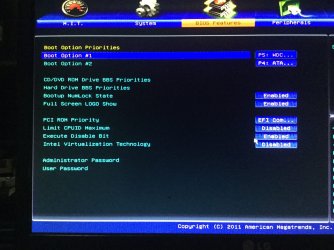
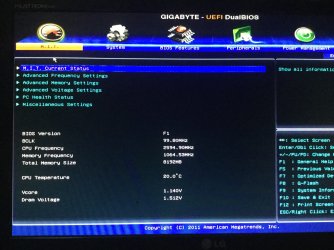
processor: Intel(R) Pentium (R) CPU G620@ 2.60GHZ ....... Prossessor CPUID:206A7h...... clock 100MHZ.... Memory:8192MB .... MODEL NAME :H61MA-D2V..... BIOS VER :F1.... DATE:12/19/2011.... ID 8A01AG03 ... GIGABYTE ULTRA Durable Series Motherboards Dual UEFI BIOS.. Intell Pentium lll XEONA 2590MHZ... Intell HD Graphics ....ACPI x 64 Based PC....

In the BIOS it is set like this..... Boot option..#1 UEFI:A ..... #2 SATA:P...... #3 SATA:S CD/DVD ROM Drives BBS Priorities :SATA P ........ Hard Drive BBS priorities : SATA S.... (both can be disabled )
PCI ROM Priority :EFI Compatable ROM ( or can switch to Legacy ROM) ....... Limit CPUID Maximum :disabled..... Execute Disable Bit :enabled ..... Intel Virtualization Tech :disabled ......Bootup Numlock :enabled ....Full screen LOGO show :enabled .....I cant find any where that says disable secure boot !!!FFS !!!!!!

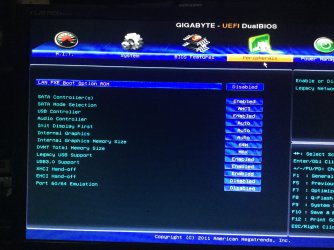
under Peripherals setting go like this .... LAN PXE Option ROM :disabled (for legacy network devices).... SATA controller:enabled ..... SATA mode :IDE ..... USB controller :enabled....... Legacy USB Support :enabled........ USB3.0 Support :enabled...... XHCI Hand -Off :enabled....... EHCI Hand -Off :disabled ..... Port 60/64 Emulation :disabled ....... DNMT total memory size :MAX......... Internal Graphics memory size :64M ...... After I wiped the Hard Drive I tried again to install win 7 but got boot manager was missing message! And now getting message ... boot image is corrupt or missing ...and reboot and select proper boot device or insert boot media in selected boot device and press a key ! I HAVE SPENT WEEKS ON THIS AND HAVE GOTTEN NOWHERE !!!! I AM ABOUT TO SMASH THE PC TO BITS !!!!
 
Last edited:

My Computer My Computer

At a glance

Windows 7 home premium 64 bit
Computer type
PC/Desktop
OS
Windows 7 home premium 64 bit
Hard Drives
2.0 TB SATA Western Digital
Antivirus
NIL
Browser
NIL
Other Info
its not working yet that is why i haven't filled in all the info
Hi,
That chip is in no way of need of being installed as uefi
You may have uefi bios but that is where it stops the chip was issued in 2nd quarter 2011 which is only 2 years after win-7 was released which is not compatible with uefi install.

Reset bios to default sata controller should be at ahci on default
You can disable quick start I doubt it has secure boot.

Clean the disk of all existing partitions.
 

My Computer My Computer

At a glance

Win-7-Pro64bit 7-H-Prem-64biti7-5930K 2nd i9-9940x both water blocked VRM'...Trident-z 3200C14 2nd Trident-z 3600C16EVGA 1080ti ftw3 2nd Titan Xp both water blocked
Computer type
PC/Desktop
Computer Manufacturer/Model Number
Custom assembled by me :}
OS
Win-7-Pro64bit 7-H-Prem-64bit
CPU
i7-5930K 2nd i9-9940x both water blocked VRM's too
Motherboard
ASUS SABERTOOTH X99 2nd ASUS x299 Apex
Memory
Trident-z 3200C14 2nd Trident-z 3600C16
Graphics Card(s)
EVGA 1080ti ftw3 2nd Titan Xp both water blocked
Sound Card
Built-in Realtek
Monitor(s) Displays
1-AOC G2460PG 24"G-Sync 144Hz/ 2nd 1-ASUS VG248QE 24" 144Hz
Screen Resolution
1920 x 1080 144Hz
Hard Drives
2-Samsung M.2 Evo & Evo Plus
2-Samsung 850 EVO 500GB SSD's/ 3-2.5 W.D. Black 1tb-&3-1tb/3-3.5 WD Black 1tb hdd's
PSU
EVGA SuperNOVA 1000-P2 2nd 1200-P2
Case
2-Corsair Obsidian Series 450D Black ATX Mid Tower
Cooling
Custom water loops
Keyboard
Logitech G710+/ 2nd Logitech G910
Mouse
2-RedDragon M901 Perdition 16400 dpi Gaming mouse = wired
Internet Speed
Comcast Ping 19ms 89.31mbps download speed 6.12mbps upload
Antivirus
Malwarebytes Pro/ Superantispyware Pro
Browser
FireFox & Pale moon
Other Info
2nd ASUS X299 Apex/Intel i9-9940x with Custom water loop/7H-Prem-x64/Corsair 450D case/Ram Trident-z 3600C16 4x8gb / Samsung970Evo plus 500gb SSD/Dual ssd EZ swap evo/PSU EVGA SuperNova 1200w-P2 80+Platinum/GPU Titan Xp /8-ML-140 on push-pull on 2-280GTX rads
- What is the Gigabyte MB model?

You can install win 7 64 as UEFI.
As Mike mentioned, SATA must be set as AHCI, HDD boot as EFI.
- Detach all other HDD's or SSD's and leave on only the target disk.
- On BIOS set the HDD as fist boot option.
- Insert the Win 7 64 installation disk on the ODD drive. On boot, launch the boot menu. You will see two options to boot the Win 7 64 installation disk - Legacy or UEFI. Choose UEFI.
- Important: go to install - advanced and delete ALL partitions till you have only an un allocated space. Create a new (partition).
Installation will create 3 partitions (UEFI - GPT)
- 100M Fat32 UEFI partition
- 120M RAW MS reserved partition
- Big NTFS. Install win 7 on this partition.
 
Last edited:

My Computers My Computers

  • At a glance

    Windows 7 HP 64i5 6600K - 800MHz to 4200MHz4+4G GSkill DDR4 3000IG - Intel 530
    Computer type
    PC/Desktop
    Computer Manufacturer/Model Number
    custom build
    OS
    Windows 7 HP 64
    CPU
    i5 6600K - 800MHz to 4200MHz
    Motherboard
    GA-Z170-HD3P
    Memory
    4+4G GSkill DDR4 3000
    Graphics Card(s)
    IG - Intel 530
    Monitor(s) Displays
    Samsung 226BW
    Screen Resolution
    1680x1050
    Hard Drives
    (1) -1 SM951 – 128GB M.2 AHCI PCIe SSD drive for Windows 7 and Lubuntu
    (2) -1 WD SATA 3 - 1T for Data
    (3) -1 WD SATA 3 - 1T for backup
    PSU
    Thermaltake 450W TR2 gold
    Keyboard
    Old and good Chicony mechanical keyboard
    Mouse
    Logitech mX performance - 9 buttons (had to disable some)
    Internet Speed
    500Mb/s
    Browser
    Firefox 64
    Other Info
    TinyWall firewall
  • At a glance

    Windows 7 Proi7-4500U 800MHz to 3.0GHz(4+4)G DDR3 1600IG intel 4400 + NVIDIA GeForce GT 745M
    Computer type
    Laptop
    System Manufacturer/Model Number
    Asus Q550LF
    OS
    Windows 7 Pro
    CPU
    i7-4500U 800MHz to 3.0GHz
    Motherboard
    Asus Q550LF
    Memory
    (4+4)G DDR3 1600
    Graphics Card(s)
    IG intel 4400 + NVIDIA GeForce GT 745M
    Sound Card
    Realtek
    Monitor(s) Displays
    LG Display LP156WF4-SPH1
    Screen Resolution
    1920 x 1080
    Hard Drives
    BX500 120G SSD for Windows and programs +
    1T HDD for data
    Internet Speed
    500 Mb/s
    Browser
    Firefox
    Other Info
    TinyWall firewall
- What is the Gigabyte MB model?

You can install win 7 64 as UEFI.
As Mike mentioned, SATA must be set as AHCI, HDD boot as EFI.
- Detach all other HDD's or SSD's and leave on only the target disk.
- On BIOS set the HDD as fist boot option.
- Insert the Win 7 64 installation disk on the ODD drive. On boot, launch the boot menu. You will see two options to boot the Win 7 64 installation disk - Legacy or UEFI. Choose UEFI.
- Important: go to install - advanced and delete ALL partitions till you have only an un allocated space. Create a new (partition).
Installation will create 3 partitions (UEFI - GPT)
- 100M Fat32 UEFI partition
- 120M RAW MS reserved partition
- Big NTFS. Install win 7 on this partition.
WHAT ! WHERE !?????? OK I set SATA to AHCI BUT there is lots more with SATA options I have no idea !
HDD BOOT as UEFI !!! ????? WOULD THAT COME UNDER COMPATIBLE ROM??? ON BIOS SET HDD AS FIRST BOOT OPTION ????? WTF MAN I AM CONFUSED ! OK TRIED THAT DOSNT WORK !
 

My Computer My Computer

At a glance

Windows 7 home premium 64 bit
Computer type
PC/Desktop
OS
Windows 7 home premium 64 bit
Hard Drives
2.0 TB SATA Western Digital
Antivirus
NIL
Browser
NIL
Other Info
its not working yet that is why i haven't filled in all the info
I've already asked twice, What is the Gigabyte MB model?
Once you give me the Gigabyte MB model I will look for the manual to guide you properly.
 

My Computers My Computers

  • At a glance

    Windows 7 HP 64i5 6600K - 800MHz to 4200MHz4+4G GSkill DDR4 3000IG - Intel 530
    Computer type
    PC/Desktop
    Computer Manufacturer/Model Number
    custom build
    OS
    Windows 7 HP 64
    CPU
    i5 6600K - 800MHz to 4200MHz
    Motherboard
    GA-Z170-HD3P
    Memory
    4+4G GSkill DDR4 3000
    Graphics Card(s)
    IG - Intel 530
    Monitor(s) Displays
    Samsung 226BW
    Screen Resolution
    1680x1050
    Hard Drives
    (1) -1 SM951 – 128GB M.2 AHCI PCIe SSD drive for Windows 7 and Lubuntu
    (2) -1 WD SATA 3 - 1T for Data
    (3) -1 WD SATA 3 - 1T for backup
    PSU
    Thermaltake 450W TR2 gold
    Keyboard
    Old and good Chicony mechanical keyboard
    Mouse
    Logitech mX performance - 9 buttons (had to disable some)
    Internet Speed
    500Mb/s
    Browser
    Firefox 64
    Other Info
    TinyWall firewall
  • At a glance

    Windows 7 Proi7-4500U 800MHz to 3.0GHz(4+4)G DDR3 1600IG intel 4400 + NVIDIA GeForce GT 745M
    Computer type
    Laptop
    System Manufacturer/Model Number
    Asus Q550LF
    OS
    Windows 7 Pro
    CPU
    i7-4500U 800MHz to 3.0GHz
    Motherboard
    Asus Q550LF
    Memory
    (4+4)G DDR3 1600
    Graphics Card(s)
    IG intel 4400 + NVIDIA GeForce GT 745M
    Sound Card
    Realtek
    Monitor(s) Displays
    LG Display LP156WF4-SPH1
    Screen Resolution
    1920 x 1080
    Hard Drives
    BX500 120G SSD for Windows and programs +
    1T HDD for data
    Internet Speed
    500 Mb/s
    Browser
    Firefox
    Other Info
    TinyWall firewall
Gigabyte model .... GA-H61MA-D2V I didnt know where to look for that info so I looked inside the PC. Here is some screen shots that I took
IMG_0335.JPG

IMG_0336.JPG


IMG_0338.JPG

IMG_0337.JPG
 

My Computer My Computer

At a glance

Windows 7 home premium 64 bit
Computer type
PC/Desktop
OS
Windows 7 home premium 64 bit
Hard Drives
2.0 TB SATA Western Digital
Antivirus
NIL
Browser
NIL
Other Info
its not working yet that is why i haven't filled in all the info
Put the HDD on SATA 0 port. ODD may stay on SATA 4
Manual http://download.gigabyte.us/FileList/Manual/mb_manual_ga-h61ma-d2v_v2.0_e.pdf
- Update your BIOS (yours is F1 and last is F6) http://download.gigabyte.us/FileList/BIOS/mb_bios_ga-h61ma-d2v_f6.exe
Use Q-Flash (F8).

BIOS settings

BIOS Features
Boot option 1 - WD HDD
Boot option 2 - ODD

PCI ROM Priority - EFI Compatible ROM
Limit CPUID Maximum - Disabled

Peripherals
LAN PXE Boot Option ROM - Disabled
SATA Controller - Enabled
SATA Mode Selection - AHCI
Init Display First - IGFX (if you use internal graphics)
Internal Graphics - Enabled
Internal Graphics Memory Size - 1024M
DVMT Total Memory Size = Max

To install Win 7 64 follow post #16
Boot Win 7 64 disk as UEFI
 

My Computers My Computers

  • At a glance

    Windows 7 HP 64i5 6600K - 800MHz to 4200MHz4+4G GSkill DDR4 3000IG - Intel 530
    Computer type
    PC/Desktop
    Computer Manufacturer/Model Number
    custom build
    OS
    Windows 7 HP 64
    CPU
    i5 6600K - 800MHz to 4200MHz
    Motherboard
    GA-Z170-HD3P
    Memory
    4+4G GSkill DDR4 3000
    Graphics Card(s)
    IG - Intel 530
    Monitor(s) Displays
    Samsung 226BW
    Screen Resolution
    1680x1050
    Hard Drives
    (1) -1 SM951 – 128GB M.2 AHCI PCIe SSD drive for Windows 7 and Lubuntu
    (2) -1 WD SATA 3 - 1T for Data
    (3) -1 WD SATA 3 - 1T for backup
    PSU
    Thermaltake 450W TR2 gold
    Keyboard
    Old and good Chicony mechanical keyboard
    Mouse
    Logitech mX performance - 9 buttons (had to disable some)
    Internet Speed
    500Mb/s
    Browser
    Firefox 64
    Other Info
    TinyWall firewall
  • At a glance

    Windows 7 Proi7-4500U 800MHz to 3.0GHz(4+4)G DDR3 1600IG intel 4400 + NVIDIA GeForce GT 745M
    Computer type
    Laptop
    System Manufacturer/Model Number
    Asus Q550LF
    OS
    Windows 7 Pro
    CPU
    i7-4500U 800MHz to 3.0GHz
    Motherboard
    Asus Q550LF
    Memory
    (4+4)G DDR3 1600
    Graphics Card(s)
    IG intel 4400 + NVIDIA GeForce GT 745M
    Sound Card
    Realtek
    Monitor(s) Displays
    LG Display LP156WF4-SPH1
    Screen Resolution
    1920 x 1080
    Hard Drives
    BX500 120G SSD for Windows and programs +
    1T HDD for data
    Internet Speed
    500 Mb/s
    Browser
    Firefox
    Other Info
    TinyWall firewall
Back
Top