Fresh OS install on SSD, how to get registries from HDD?

ragnaroks

New member
Local time
6:44 AM
Messages
32
Hi,

I did a fresh OS install on my SSD. When I re-install or move programs from my HDD, the settings are "new". So I assume the settings are left behind on the HDD. Is there a way to transfer them? If so how?

I need all the settings from all programs.
 

My Computer My Computer

At a glance

Windows 7 Ultimate 32 bitQ6600Nvidia 8800GT
OS
Windows 7 Ultimate 32 bit
CPU
Q6600
Graphics Card(s)
Nvidia 8800GT
If you did a clean install, you have a new registry and need to reinstall all programs. Forget about "moving" anything but data from your old HDD.

Windows has something called "Easy Transfer", but it doesn't work well in my experience.
 

My Computer My Computer

At a glance

Windows 7 Home Premium SP1, 64-bitIntel Skylake i5-6600K, not overclocked8 GB HyperX DDR4-2666 (2 x 4 GB)none; graphics are integrated on CPU
Computer type
PC/Desktop
Computer Manufacturer/Model Number
Ignatz Special; 4 speed manual gearbox; factory air conditioning; one of one
OS
Windows 7 Home Premium SP1, 64-bit
CPU
Intel Skylake i5-6600K, not overclocked
Motherboard
AsRock Z170M Extreme 4, micro ATX
Memory
8 GB HyperX DDR4-2666 (2 x 4 GB)
Graphics Card(s)
none; graphics are integrated on CPU
Sound Card
onboard: Realtek ALC1150; external: USB Behringer UF0-202
Monitor(s) Displays
Dell S2340M 23 inch IPS
Screen Resolution
1600 x 900
Hard Drives
System: Crucial MX100 series SSD, 128 GB;
Data: Samsung Spinpoint 103SJ, 1 TB;
Backup: WD Caviar Green WD30EZRX-00D8PB0, 3 TB
PSU
Rosewill SilentNight 500 watt fanless, semi-modular
Case
Antec Solo II
Cooling
Noctua NH-U12S; Noctua F12 intake, Noctua S12A exhaust
Keyboard
Microsoft 200 6JH-00001 USB
Mouse
Dell or Microsoft optical wired; USB
Antivirus
Microsoft Security Essentials and Malwarebytes Premium
Browser
Pale Moon
Other Info
All fans PWM; speeds at idle: CPU circa 500 rpm; intake circa 600 rpm; exhaust circa 600 rpm; CPU temps 27 idle and 47 C load in a warm room (27 C/81 F) when running Intel Extreme Tuning Utility stress test.

My Computer My Computer

At a glance

Windows 7 Ultimate 32 bitQ6600Nvidia 8800GT
OS
Windows 7 Ultimate 32 bit
CPU
Q6600
Graphics Card(s)
Nvidia 8800GT
I thought you had already reinstalled?

Yes, you can transfer your entire installation from the HDD to the SSD. That would NOT be a "fresh install", but would include all programs and the existing registry, complete with any errors it may contain.

You can do that by "cloning" or by "imaging". Imaging is the more common choice.

Both can work. Both can fail.

You just have to decide if the risk of failure is worth taking, compared to your statement that "it will cost me too much time to set everything again". If your cloning/imaging attempt doesn't work out, you may waste more time and be more frustrated than if you just bit the bullet and did a clean install.
 

My Computer My Computer

At a glance

Windows 7 Home Premium SP1, 64-bitIntel Skylake i5-6600K, not overclocked8 GB HyperX DDR4-2666 (2 x 4 GB)none; graphics are integrated on CPU
Computer type
PC/Desktop
Computer Manufacturer/Model Number
Ignatz Special; 4 speed manual gearbox; factory air conditioning; one of one
OS
Windows 7 Home Premium SP1, 64-bit
CPU
Intel Skylake i5-6600K, not overclocked
Motherboard
AsRock Z170M Extreme 4, micro ATX
Memory
8 GB HyperX DDR4-2666 (2 x 4 GB)
Graphics Card(s)
none; graphics are integrated on CPU
Sound Card
onboard: Realtek ALC1150; external: USB Behringer UF0-202
Monitor(s) Displays
Dell S2340M 23 inch IPS
Screen Resolution
1600 x 900
Hard Drives
System: Crucial MX100 series SSD, 128 GB;
Data: Samsung Spinpoint 103SJ, 1 TB;
Backup: WD Caviar Green WD30EZRX-00D8PB0, 3 TB
PSU
Rosewill SilentNight 500 watt fanless, semi-modular
Case
Antec Solo II
Cooling
Noctua NH-U12S; Noctua F12 intake, Noctua S12A exhaust
Keyboard
Microsoft 200 6JH-00001 USB
Mouse
Dell or Microsoft optical wired; USB
Antivirus
Microsoft Security Essentials and Malwarebytes Premium
Browser
Pale Moon
Other Info
All fans PWM; speeds at idle: CPU circa 500 rpm; intake circa 600 rpm; exhaust circa 600 rpm; CPU temps 27 idle and 47 C load in a warm room (27 C/81 F) when running Intel Extreme Tuning Utility stress test.
Thank you for your help! :)

I did a fresh OS install on my SSD but I still have my windows 7 files on my HDD. So basicly I can still boot from my HDD.

My windows on HDD is some errors, so I guess imaging/cloning is not an option. I guess I'll start off by installing the most important programs on my SSD while the rest will be booted from the HDD.

Is there a difference in copying the program files folder on the HDD to the SSD (instead of 'really' installing it with a CD)?

Also I have a 64GB samsung 830 series SSD on a sata2 computer. Is it a problem if I use 50GB space?
 

My Computer My Computer

At a glance

Windows 7 Ultimate 32 bitQ6600Nvidia 8800GT
OS
Windows 7 Ultimate 32 bit
CPU
Q6600
Graphics Card(s)
Nvidia 8800GT
Is there a difference in copying the program files folder on the HDD to the SSD (instead of 'really' installing it with a CD)?

Also I have a 64GB samsung 830 series SSD on a sata2 computer. Is it a problem if I use 50GB space?

You can't simply copy the program folder from the HDD to the SSD and expect programs to work. If you did a "clean install", you will need to reinstall programs to the SSD in the normal manner.

Many in your situation would use the SSD for Windows and all applications---and then use the old HDD for ALL data.

I'm not sure what you mean by the second question. A 64 GB drive is usually big enough for most people. Windows itself will take under 20 GB.

Do you just have a single C partition on the SSD, occupying the entire drive--probably between 59 and 60 GB usable?

I'm not saying you cannot do the clone or image thing, but you should be advised neither is infallible---most people just grit their teeth, do a clean install, and then reinstall all programs.
 

My Computer My Computer

At a glance

Windows 7 Home Premium SP1, 64-bitIntel Skylake i5-6600K, not overclocked8 GB HyperX DDR4-2666 (2 x 4 GB)none; graphics are integrated on CPU
Computer type
PC/Desktop
Computer Manufacturer/Model Number
Ignatz Special; 4 speed manual gearbox; factory air conditioning; one of one
OS
Windows 7 Home Premium SP1, 64-bit
CPU
Intel Skylake i5-6600K, not overclocked
Motherboard
AsRock Z170M Extreme 4, micro ATX
Memory
8 GB HyperX DDR4-2666 (2 x 4 GB)
Graphics Card(s)
none; graphics are integrated on CPU
Sound Card
onboard: Realtek ALC1150; external: USB Behringer UF0-202
Monitor(s) Displays
Dell S2340M 23 inch IPS
Screen Resolution
1600 x 900
Hard Drives
System: Crucial MX100 series SSD, 128 GB;
Data: Samsung Spinpoint 103SJ, 1 TB;
Backup: WD Caviar Green WD30EZRX-00D8PB0, 3 TB
PSU
Rosewill SilentNight 500 watt fanless, semi-modular
Case
Antec Solo II
Cooling
Noctua NH-U12S; Noctua F12 intake, Noctua S12A exhaust
Keyboard
Microsoft 200 6JH-00001 USB
Mouse
Dell or Microsoft optical wired; USB
Antivirus
Microsoft Security Essentials and Malwarebytes Premium
Browser
Pale Moon
Other Info
All fans PWM; speeds at idle: CPU circa 500 rpm; intake circa 600 rpm; exhaust circa 600 rpm; CPU temps 27 idle and 47 C load in a warm room (27 C/81 F) when running Intel Extreme Tuning Utility stress test.
Do you just have a single C partition on the SSD, occupying the entire drive--probably between 59 and 60 GB usable?

Yeah I have a single C partition on the SSD. Is that good or bad? And yes I mean If I occupy about 50GB of the 60GB is good, bad and usable for the SSD.
 

My Computer My Computer

At a glance

Windows 7 Ultimate 32 bitQ6600Nvidia 8800GT
OS
Windows 7 Ultimate 32 bit
CPU
Q6600
Graphics Card(s)
Nvidia 8800GT
A single C on the SSD is good.

I would start to get nervous if my C partition of 60 GB had 50 GB occupied. I'd try to think of ways to reduce that through proper maintenance.

But Windows alone takes under 20 GB. I have 55 applications installed on C and occupy only 28 GB--on a 80 GB SSD. All of my data is on a regular HDD.
 

My Computer My Computer

At a glance

Windows 7 Home Premium SP1, 64-bitIntel Skylake i5-6600K, not overclocked8 GB HyperX DDR4-2666 (2 x 4 GB)none; graphics are integrated on CPU
Computer type
PC/Desktop
Computer Manufacturer/Model Number
Ignatz Special; 4 speed manual gearbox; factory air conditioning; one of one
OS
Windows 7 Home Premium SP1, 64-bit
CPU
Intel Skylake i5-6600K, not overclocked
Motherboard
AsRock Z170M Extreme 4, micro ATX
Memory
8 GB HyperX DDR4-2666 (2 x 4 GB)
Graphics Card(s)
none; graphics are integrated on CPU
Sound Card
onboard: Realtek ALC1150; external: USB Behringer UF0-202
Monitor(s) Displays
Dell S2340M 23 inch IPS
Screen Resolution
1600 x 900
Hard Drives
System: Crucial MX100 series SSD, 128 GB;
Data: Samsung Spinpoint 103SJ, 1 TB;
Backup: WD Caviar Green WD30EZRX-00D8PB0, 3 TB
PSU
Rosewill SilentNight 500 watt fanless, semi-modular
Case
Antec Solo II
Cooling
Noctua NH-U12S; Noctua F12 intake, Noctua S12A exhaust
Keyboard
Microsoft 200 6JH-00001 USB
Mouse
Dell or Microsoft optical wired; USB
Antivirus
Microsoft Security Essentials and Malwarebytes Premium
Browser
Pale Moon
Other Info
All fans PWM; speeds at idle: CPU circa 500 rpm; intake circa 600 rpm; exhaust circa 600 rpm; CPU temps 27 idle and 47 C load in a warm room (27 C/81 F) when running Intel Extreme Tuning Utility stress test.
One last question if you don't mind. It might be abit off topic but its about firefox.

I have optimized firefox to write RAM instead of cache since it reduce the writing on SSD. I don't notice any major difference (startup time). I put my RAM size to 128MB , is that good or too low? My computer runs on a Q6600 with 3GB RAM.

Thanks again!
 

My Computer My Computer

At a glance

Windows 7 Ultimate 32 bitQ6600Nvidia 8800GT
OS
Windows 7 Ultimate 32 bit
CPU
Q6600
Graphics Card(s)
Nvidia 8800GT
I used to direct my Firefox cache to my E drive (HDD), rather than to my SSD, for fear of "too many writes".

I gave up on that idea. I've decided the "too many writes" thing is vastly over-blown for current generation SSDs such as your Samsung (a good choice by the way).

I'm sure you can find web sites that will tell you that your idea is the way to go. I vaguely recall some posts on this site about Firefox writing to RAM, but don't recall the details.

You might investigate a program called SSDLife Free, which tracks your writing and estimates the life of your SSD.

Does your Samsung disk include any utilities? That may also be able to track how many writes, bad sectors, etc.
 

My Computer My Computer

At a glance

Windows 7 Home Premium SP1, 64-bitIntel Skylake i5-6600K, not overclocked8 GB HyperX DDR4-2666 (2 x 4 GB)none; graphics are integrated on CPU
Computer type
PC/Desktop
Computer Manufacturer/Model Number
Ignatz Special; 4 speed manual gearbox; factory air conditioning; one of one
OS
Windows 7 Home Premium SP1, 64-bit
CPU
Intel Skylake i5-6600K, not overclocked
Motherboard
AsRock Z170M Extreme 4, micro ATX
Memory
8 GB HyperX DDR4-2666 (2 x 4 GB)
Graphics Card(s)
none; graphics are integrated on CPU
Sound Card
onboard: Realtek ALC1150; external: USB Behringer UF0-202
Monitor(s) Displays
Dell S2340M 23 inch IPS
Screen Resolution
1600 x 900
Hard Drives
System: Crucial MX100 series SSD, 128 GB;
Data: Samsung Spinpoint 103SJ, 1 TB;
Backup: WD Caviar Green WD30EZRX-00D8PB0, 3 TB
PSU
Rosewill SilentNight 500 watt fanless, semi-modular
Case
Antec Solo II
Cooling
Noctua NH-U12S; Noctua F12 intake, Noctua S12A exhaust
Keyboard
Microsoft 200 6JH-00001 USB
Mouse
Dell or Microsoft optical wired; USB
Antivirus
Microsoft Security Essentials and Malwarebytes Premium
Browser
Pale Moon
Other Info
All fans PWM; speeds at idle: CPU circa 500 rpm; intake circa 600 rpm; exhaust circa 600 rpm; CPU temps 27 idle and 47 C load in a warm room (27 C/81 F) when running Intel Extreme Tuning Utility stress test.
Does your Samsung disk include any utilities? That may also be able to track how many writes, bad sectors, etc.

Yeah it came with norton ghost and its own samsung software (at work so I dont remember the name).

But on the samsung disk it said some utilities including TRIM. So TRIM is not standard installed on the SSD?
 

My Computer My Computer

At a glance

Windows 7 Ultimate 32 bitQ6600Nvidia 8800GT
OS
Windows 7 Ultimate 32 bit
CPU
Q6600
Graphics Card(s)
Nvidia 8800GT
I'd avoid Norton Ghost if possible.

You should use TRIM. There is a way to determine if TRIM is enabled, but I can't recall what it is exactly. Possible a code mentioned somewhere in the SSD specs--or a setting revealed by a particular command issued from a command prompt. I don't recall.

I think most SSDs can and do use TRIM by default---my Intel does.

I just checked: I have written just over 1.5 Terabytes to my SSD in about 11 months. I will be long since dead before I wear out this SSD at that rate.
 

My Computer My Computer

At a glance

Windows 7 Home Premium SP1, 64-bitIntel Skylake i5-6600K, not overclocked8 GB HyperX DDR4-2666 (2 x 4 GB)none; graphics are integrated on CPU
Computer type
PC/Desktop
Computer Manufacturer/Model Number
Ignatz Special; 4 speed manual gearbox; factory air conditioning; one of one
OS
Windows 7 Home Premium SP1, 64-bit
CPU
Intel Skylake i5-6600K, not overclocked
Motherboard
AsRock Z170M Extreme 4, micro ATX
Memory
8 GB HyperX DDR4-2666 (2 x 4 GB)
Graphics Card(s)
none; graphics are integrated on CPU
Sound Card
onboard: Realtek ALC1150; external: USB Behringer UF0-202
Monitor(s) Displays
Dell S2340M 23 inch IPS
Screen Resolution
1600 x 900
Hard Drives
System: Crucial MX100 series SSD, 128 GB;
Data: Samsung Spinpoint 103SJ, 1 TB;
Backup: WD Caviar Green WD30EZRX-00D8PB0, 3 TB
PSU
Rosewill SilentNight 500 watt fanless, semi-modular
Case
Antec Solo II
Cooling
Noctua NH-U12S; Noctua F12 intake, Noctua S12A exhaust
Keyboard
Microsoft 200 6JH-00001 USB
Mouse
Dell or Microsoft optical wired; USB
Antivirus
Microsoft Security Essentials and Malwarebytes Premium
Browser
Pale Moon
Other Info
All fans PWM; speeds at idle: CPU circa 500 rpm; intake circa 600 rpm; exhaust circa 600 rpm; CPU temps 27 idle and 47 C load in a warm room (27 C/81 F) when running Intel Extreme Tuning Utility stress test.
One last question since I'm going to keep going on with my fresh OS install.

What "hurts" the SSD most.
Like 5000 small files, (shortcuts, notepad notes, .doc files, etc etc) basicly files lower than 1N
or
10 big files of 1GB each.

I tried google but couldn't find a good answer.
 

My Computer My Computer

At a glance

Windows 7 Ultimate 32 bitQ6600Nvidia 8800GT
OS
Windows 7 Ultimate 32 bit
CPU
Q6600
Graphics Card(s)
Nvidia 8800GT
I don't have a direct answer to that, but I suspect the distinction between large and small files is largely irrelevant. What matters is how many times a given cell is written to.

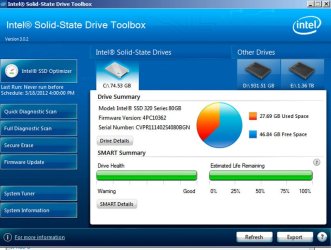
In the last hour, I downloaded the newest version of Intel's SSD Toolbox---it's only for Intel brand drives.

It has an "estimated life remaining" feature, as shown below in the second green bar. Note that mine is still rated at 100% after 11 months of use. The help file says it declines linearly over time to 1 and that even at 1 the drive will still be usable. The 100% figure is based on a wear indicator found among the SMART attributes.

Given that, I just cannot get excited over "wearing out" an SSD--or any distinction between small and large files.

I'm sure you might be able to concoct an SSD usage pattern that might be a cause for concern, but not for anyone who is remotely like a typical user.
 

Attachments

  • Untitled-1.jpg
    Untitled-1.jpg
    87.7 KB · Views: 11

My Computer My Computer

At a glance

Windows 7 Home Premium SP1, 64-bitIntel Skylake i5-6600K, not overclocked8 GB HyperX DDR4-2666 (2 x 4 GB)none; graphics are integrated on CPU
Computer type
PC/Desktop
Computer Manufacturer/Model Number
Ignatz Special; 4 speed manual gearbox; factory air conditioning; one of one
OS
Windows 7 Home Premium SP1, 64-bit
CPU
Intel Skylake i5-6600K, not overclocked
Motherboard
AsRock Z170M Extreme 4, micro ATX
Memory
8 GB HyperX DDR4-2666 (2 x 4 GB)
Graphics Card(s)
none; graphics are integrated on CPU
Sound Card
onboard: Realtek ALC1150; external: USB Behringer UF0-202
Monitor(s) Displays
Dell S2340M 23 inch IPS
Screen Resolution
1600 x 900
Hard Drives
System: Crucial MX100 series SSD, 128 GB;
Data: Samsung Spinpoint 103SJ, 1 TB;
Backup: WD Caviar Green WD30EZRX-00D8PB0, 3 TB
PSU
Rosewill SilentNight 500 watt fanless, semi-modular
Case
Antec Solo II
Cooling
Noctua NH-U12S; Noctua F12 intake, Noctua S12A exhaust
Keyboard
Microsoft 200 6JH-00001 USB
Mouse
Dell or Microsoft optical wired; USB
Antivirus
Microsoft Security Essentials and Malwarebytes Premium
Browser
Pale Moon
Other Info
All fans PWM; speeds at idle: CPU circa 500 rpm; intake circa 600 rpm; exhaust circa 600 rpm; CPU temps 27 idle and 47 C load in a warm room (27 C/81 F) when running Intel Extreme Tuning Utility stress test.
I too am having a similar problem. I did a reinstall of Windows. I am reinstalling the software as we speak of each program. But the data is there more importantly. What is the best backup method, imaging? or backup? What software would you guys recommend hands down? I don't have a SSD. Thanks.
 

My Computer My Computer

At a glance

Win 7 x64
OS
Win 7 x64
I did a reinstall of Windows. I am reinstalling the software as we speak of each program. But the data is there more importantly. What is the best backup method, imaging? or backup? What software would you guys recommend hands down?

How many physical hard drives do you have?

How many partitions on each of those drives?

Which partition contains your data?

The typical method is imaging for the Windows installation and "file by file" for data.
 

My Computer My Computer

At a glance

Windows 7 Home Premium SP1, 64-bitIntel Skylake i5-6600K, not overclocked8 GB HyperX DDR4-2666 (2 x 4 GB)none; graphics are integrated on CPU
Computer type
PC/Desktop
Computer Manufacturer/Model Number
Ignatz Special; 4 speed manual gearbox; factory air conditioning; one of one
OS
Windows 7 Home Premium SP1, 64-bit
CPU
Intel Skylake i5-6600K, not overclocked
Motherboard
AsRock Z170M Extreme 4, micro ATX
Memory
8 GB HyperX DDR4-2666 (2 x 4 GB)
Graphics Card(s)
none; graphics are integrated on CPU
Sound Card
onboard: Realtek ALC1150; external: USB Behringer UF0-202
Monitor(s) Displays
Dell S2340M 23 inch IPS
Screen Resolution
1600 x 900
Hard Drives
System: Crucial MX100 series SSD, 128 GB;
Data: Samsung Spinpoint 103SJ, 1 TB;
Backup: WD Caviar Green WD30EZRX-00D8PB0, 3 TB
PSU
Rosewill SilentNight 500 watt fanless, semi-modular
Case
Antec Solo II
Cooling
Noctua NH-U12S; Noctua F12 intake, Noctua S12A exhaust
Keyboard
Microsoft 200 6JH-00001 USB
Mouse
Dell or Microsoft optical wired; USB
Antivirus
Microsoft Security Essentials and Malwarebytes Premium
Browser
Pale Moon
Other Info
All fans PWM; speeds at idle: CPU circa 500 rpm; intake circa 600 rpm; exhaust circa 600 rpm; CPU temps 27 idle and 47 C load in a warm room (27 C/81 F) when running Intel Extreme Tuning Utility stress test.
Let me add a few things, if I may:

1. If you are not certain whether your SSD controller supports TRIM, there is an easy way to find out.
Open an elevated Command Prompt (run as admin) and paste this command into the Command Prompt window:

fsutil behavior query DisableDeleteNotify

If Command Prompt returns a 0 (zero), your drive supports TRIM and it is enabled.
If it returns 1 (one), the file system has disabled TRIM for your drive. This means your drive's controller does not support TRIM.

2. DO NOT WORRY about the writes to the SSD. My oldest SSD (4 years old) has still a lifetime until 2022. By that time it will have long been in some landfill.

3. The fastest way to backup data is to make an initial copy to another drive and then sync the data periodically. But you can also image the data. The best program I have found in 5 years of imaging (and I used Norton Ghost on Vista) is free Macrium. If you like to try it, here is a tutorial to get you started: http://www.sevenforums.com/tutorials/73828-imaging-free-macrium.html?ltr=I The main use, of course, is to image the system partition.
 

My Computer My Computer

At a glance

Vista, Windows7, Mint Mate, Zorin, Windows 8from 1.6GHz Duo to i7
Computer Manufacturer/Model Number
HP, Dell, Gateway, Toshiba - 4 laptops and 2 desktops
OS
Vista, Windows7, Mint Mate, Zorin, Windows 8
CPU
from 1.6GHz Duo to i7
Monitor(s) Displays
2x HP w2207
Hard Drives
5x HDD, 7x SSD, 12x Externals
Keyboard
with trackball - no mices
Mouse
Trackball mice
Internet Speed
DSL 6000
Back
Top