
mourningstar625
New member
- Local time
- 1:19 PM
- Messages
- 3
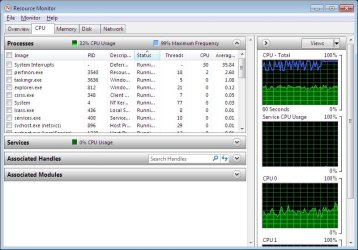
As the title states I am having an issue with CPU utilization on a fresh install of windows 7 professional 32 bit on a Acer aspire D255 netbook. Basically the CPU always uses 30% of the processor even when idle and nothing else is going on for system interrupts. The problem exists with full drivers and windows updates or a fresh install. I am stumped on how to troubleshoot the next steps.
I am a system admin by trade so all the basic troubleshooting has been done. I have even tried several different ISOs of 7 profession on a flash drive via Windows 7 USB tool.
I only notice this strange CPU usage in windows, when I use parted magic via hiren's USB drive the processor does go down to 0-1% when idle. I have ran hardware tests like MRI disk and memtest to rule that out and they run clean with no errors. I believe the problem is strictly in Windows and I would love to find out what it is if someone here can help me.
Attached is a screenshot of resource monitor after a fresh install of 7 and it has been sitting for 15 plus minutes.
I am a system admin by trade so all the basic troubleshooting has been done. I have even tried several different ISOs of 7 profession on a flash drive via Windows 7 USB tool.
I only notice this strange CPU usage in windows, when I use parted magic via hiren's USB drive the processor does go down to 0-1% when idle. I have ran hardware tests like MRI disk and memtest to rule that out and they run clean with no errors. I believe the problem is strictly in Windows and I would love to find out what it is if someone here can help me.
Attached is a screenshot of resource monitor after a fresh install of 7 and it has been sitting for 15 plus minutes.
Attachments
My Computer
At a glance
Mostly x64 some x86
- Computer type
- PC/Desktop
- OS
- Mostly x64 some x86


