Front Panel not reacting to any input

Marinoprpic

New member
Local time
5:13 PM
Messages
96
Location
Europe
My front panel on my case doesn't react to any input..microphone,headphones,speakers...useless..can someone help me??Are there any drivers to download??
 

My Computer My Computer

Computer Manufacturer/Model Number
Super Power
OS
Windows 7 64 bit
CPU
Intel Core 2 quad Q6600 @ stock 2.4
Motherboard
Gigabyte GA-P35-DS3
Memory
4 GB DDR2-800
Graphics Card(s)
MSI GeForce GTX 460 Cyclone OC 768 MB
Monitor(s) Displays
Samsung SyncMaster 753DFX /NEW LG TV 107 cm via hdmi
Hard Drives
Seagate 160Gb
PSU
Chieftec 550W
Case
Super Power
Internet Speed
512 kb down,40kb up
Did you build the system? Are the front panel ports plugged into the motherboard?

Maybe they have come loose.
 

My Computer My Computer

Computer Manufacturer/Model Number
Keeps changing - (Custom)
OS
Windows 7 Professional x64
CPU
Intel Core i7 860
Motherboard
Gigabyte GA-P55-UD4P
Memory
4GB DDR3 Mushkin 1600Mhz @ 7-8-7-20
Graphics Card(s)
MSI GTS250 1GB DDR3 Twin Frozr
Sound Card
Onboard realtek
Monitor(s) Displays
Samsung SyncMaster 24" P2450 + Samsung 20" 2033
Screen Resolution
1920 X 1080 and 1600 X 900 (#2 system 1440 X 900)
Hard Drives
Patriot Inferno 120GB SSD + 3 WD Blue 640GB drives
PSU
Corsair 750 HX Modular
Case
Lancool PC-K62
Cooling
Cooler Master TX3 CPU cooler and 4-140mm and 1-120mm case
Keyboard
Gigabyte USB keyboard
Mouse
Microsoft wireless laser mouse 5000
Internet Speed
7 Mb down 1.5 up
Other Info
System #2: AMD Phenom II X6 1055T (Freezer 7 Pro cooler) - Gigabyte 880GMA-UD2H - WD 500GB Black - 9500GT (1GB) 500W OCZ modular PSU - Antec 200 case. System #3 (LapTop) Core 2 Duo T6670 - 320GB 7200RPM HD - 4GB DDR3 RAM.
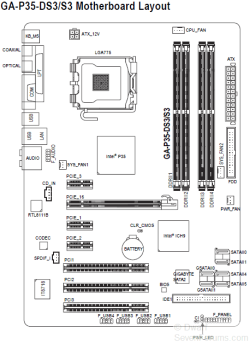
i build it partly,but not all...I have checked and the front panel cable goes into audio and usb..there is one connector that seperates into two cables(i think,it is messy..) and then goes into USB and audio..
 

My Computer My Computer

Computer Manufacturer/Model Number
Super Power
OS
Windows 7 64 bit
CPU
Intel Core 2 quad Q6600 @ stock 2.4
Motherboard
Gigabyte GA-P35-DS3
Memory
4 GB DDR2-800
Graphics Card(s)
MSI GeForce GTX 460 Cyclone OC 768 MB
Monitor(s) Displays
Samsung SyncMaster 753DFX /NEW LG TV 107 cm via hdmi
Hard Drives
Seagate 160Gb
PSU
Chieftec 550W
Case
Super Power
Internet Speed
512 kb down,40kb up
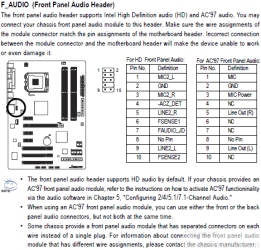
Double check to make sure that you haven't got the connectors mixed up, and that they are wired correctly. Refer to your motherboard manual.
 

My Computer My Computer

Computer type
PC/Desktop
Computer Manufacturer/Model Number
Dwarf Dwf/11/2012 r09/2013
OS
Windows 8.1 Pro RTM x64
CPU
Intel Core-i5-3570K 4-core @ 3.4GHz (Ivy Bridge) (OC 4.4GHz)
Motherboard
ASRock Z77 Extreme4-M
Memory
4 x 4GB DDR3-1600 Corsair Vengeance CMZ8GX3M2A1600C9B (16GB)
Graphics Card(s)
MSI GeForce GTX770 Gaming OC 2GB
Sound Card
Realtek High Definition on board solution (ALC 898)
Monitor(s) Displays
ViewSonic VA1912w Widescreen (VGA)
Screen Resolution
1440x900
Hard Drives
OCZ Agility 3 SSD 120GB SATA III x2 (RAID 0)
Samsung HD501LJ 500GB SATA II x2
Hitachi HDS721010CLA332 1TB SATA II
Iomega 1.5TB Ext USB 2.0
WD 2.0TB Ext USB 3.0
PSU
XFX Pro Series 850W Semi-Modular
Case
Gigabyte IF233
Cooling
1 x 120mm Front Inlet 1 x 120mm Rear Exhaust
Keyboard
Microsoft Comfort Curve Keyboard 3000 (USB)
Mouse
Microsoft Comfort Mouse 3000 for Business (USB)
Internet Speed
NetGear DG834Gv3 ADSL Modem/Router (Ethernet) ~4.0 Mb/s (O2)
Antivirus
Avast! 8.0.1497
Browser
IE 11
Other Info
Optical Drive: HL-DT-ST BD-RE BH10LS30 SATA Bluray
Lexmark S305 Printer/Scanner/Copier (USB)
WEI Score: 8.1/8.1/8.5/8.5/8.25
Asus Eee PC 1011PX Netbook (Windows 7 x86 Starter)
i am just checking it but i just don't get where is the problem..one cable goes from front panel to 3-4 places on to MOBO..and manual is not helpfull
 

My Computer My Computer

Computer Manufacturer/Model Number
Super Power
OS
Windows 7 64 bit
CPU
Intel Core 2 quad Q6600 @ stock 2.4
Motherboard
Gigabyte GA-P35-DS3
Memory
4 GB DDR2-800
Graphics Card(s)
MSI GeForce GTX 460 Cyclone OC 768 MB
Monitor(s) Displays
Samsung SyncMaster 753DFX /NEW LG TV 107 cm via hdmi
Hard Drives
Seagate 160Gb
PSU
Chieftec 550W
Case
Super Power
Internet Speed
512 kb down,40kb up

My Computer My Computer

Computer type
PC/Desktop
Computer Manufacturer/Model Number
Dwarf Dwf/11/2012 r09/2013
OS
Windows 8.1 Pro RTM x64
CPU
Intel Core-i5-3570K 4-core @ 3.4GHz (Ivy Bridge) (OC 4.4GHz)
Motherboard
ASRock Z77 Extreme4-M
Memory
4 x 4GB DDR3-1600 Corsair Vengeance CMZ8GX3M2A1600C9B (16GB)
Graphics Card(s)
MSI GeForce GTX770 Gaming OC 2GB
Sound Card
Realtek High Definition on board solution (ALC 898)
Monitor(s) Displays
ViewSonic VA1912w Widescreen (VGA)
Screen Resolution
1440x900
Hard Drives
OCZ Agility 3 SSD 120GB SATA III x2 (RAID 0)
Samsung HD501LJ 500GB SATA II x2
Hitachi HDS721010CLA332 1TB SATA II
Iomega 1.5TB Ext USB 2.0
WD 2.0TB Ext USB 3.0
PSU
XFX Pro Series 850W Semi-Modular
Case
Gigabyte IF233
Cooling
1 x 120mm Front Inlet 1 x 120mm Rear Exhaust
Keyboard
Microsoft Comfort Curve Keyboard 3000 (USB)
Mouse
Microsoft Comfort Mouse 3000 for Business (USB)
Internet Speed
NetGear DG834Gv3 ADSL Modem/Router (Ethernet) ~4.0 Mb/s (O2)
Antivirus
Avast! 8.0.1497
Browser
IE 11
Other Info
Optical Drive: HL-DT-ST BD-RE BH10LS30 SATA Bluray
Lexmark S305 Printer/Scanner/Copier (USB)
WEI Score: 8.1/8.1/8.5/8.5/8.25
Asus Eee PC 1011PX Netbook (Windows 7 x86 Starter)

My Computer My Computer

Computer Manufacturer/Model Number
Super Power
OS
Windows 7 64 bit
CPU
Intel Core 2 quad Q6600 @ stock 2.4
Motherboard
Gigabyte GA-P35-DS3
Memory
4 GB DDR2-800
Graphics Card(s)
MSI GeForce GTX 460 Cyclone OC 768 MB
Monitor(s) Displays
Samsung SyncMaster 753DFX /NEW LG TV 107 cm via hdmi
Hard Drives
Seagate 160Gb
PSU
Chieftec 550W
Case
Super Power
Internet Speed
512 kb down,40kb up
Do you have the latest Realtek driver installed? See http://www.sevenforums.com/sound-audio/3756-latest-realtek-hd-audio-driver-version.html

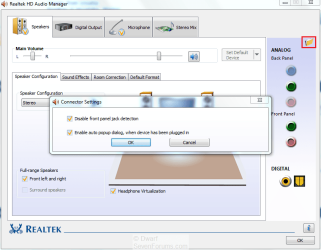
In the System Tray, right-click on the Realtek HD Audio Manager and select Sound Manager from the list of options.

Capture.PNG

Click on the folder icon (highlighted) and then ensure that the two options are set as shown in the Connector Settings dialogue. Click OK to close this dialogue panel and then OK to close the Sound Manager.
 

My Computer My Computer

Computer type
PC/Desktop
Computer Manufacturer/Model Number
Dwarf Dwf/11/2012 r09/2013
OS
Windows 8.1 Pro RTM x64
CPU
Intel Core-i5-3570K 4-core @ 3.4GHz (Ivy Bridge) (OC 4.4GHz)
Motherboard
ASRock Z77 Extreme4-M
Memory
4 x 4GB DDR3-1600 Corsair Vengeance CMZ8GX3M2A1600C9B (16GB)
Graphics Card(s)
MSI GeForce GTX770 Gaming OC 2GB
Sound Card
Realtek High Definition on board solution (ALC 898)
Monitor(s) Displays
ViewSonic VA1912w Widescreen (VGA)
Screen Resolution
1440x900
Hard Drives
OCZ Agility 3 SSD 120GB SATA III x2 (RAID 0)
Samsung HD501LJ 500GB SATA II x2
Hitachi HDS721010CLA332 1TB SATA II
Iomega 1.5TB Ext USB 2.0
WD 2.0TB Ext USB 3.0
PSU
XFX Pro Series 850W Semi-Modular
Case
Gigabyte IF233
Cooling
1 x 120mm Front Inlet 1 x 120mm Rear Exhaust
Keyboard
Microsoft Comfort Curve Keyboard 3000 (USB)
Mouse
Microsoft Comfort Mouse 3000 for Business (USB)
Internet Speed
NetGear DG834Gv3 ADSL Modem/Router (Ethernet) ~4.0 Mb/s (O2)
Antivirus
Avast! 8.0.1497
Browser
IE 11
Other Info
Optical Drive: HL-DT-ST BD-RE BH10LS30 SATA Bluray
Lexmark S305 Printer/Scanner/Copier (USB)
WEI Score: 8.1/8.1/8.5/8.5/8.25
Asus Eee PC 1011PX Netbook (Windows 7 x86 Starter)
Do you have the latest Realtek driver installed? See http://www.sevenforums.com/sound-audio/3756-latest-realtek-hd-audio-driver-version.html

In the System Tray, right-click on the Realtek HD Audio Manager and select Sound Manager from the list of options.

View attachment 64411

Click on the folder icon (highlighted) and then ensure that the two options are set as shown in the Connector Settings dialogue. Click OK to close this dialogue panel and then OK to close the Sound Manager.

it is working..thanks!
 

My Computer My Computer

Computer Manufacturer/Model Number
Super Power
OS
Windows 7 64 bit
CPU
Intel Core 2 quad Q6600 @ stock 2.4
Motherboard
Gigabyte GA-P35-DS3
Memory
4 GB DDR2-800
Graphics Card(s)
MSI GeForce GTX 460 Cyclone OC 768 MB
Monitor(s) Displays
Samsung SyncMaster 753DFX /NEW LG TV 107 cm via hdmi
Hard Drives
Seagate 160Gb
PSU
Chieftec 550W
Case
Super Power
Internet Speed
512 kb down,40kb up
You're welcome. :)
 

My Computer My Computer

Computer type
PC/Desktop
Computer Manufacturer/Model Number
Dwarf Dwf/11/2012 r09/2013
OS
Windows 8.1 Pro RTM x64
CPU
Intel Core-i5-3570K 4-core @ 3.4GHz (Ivy Bridge) (OC 4.4GHz)
Motherboard
ASRock Z77 Extreme4-M
Memory
4 x 4GB DDR3-1600 Corsair Vengeance CMZ8GX3M2A1600C9B (16GB)
Graphics Card(s)
MSI GeForce GTX770 Gaming OC 2GB
Sound Card
Realtek High Definition on board solution (ALC 898)
Monitor(s) Displays
ViewSonic VA1912w Widescreen (VGA)
Screen Resolution
1440x900
Hard Drives
OCZ Agility 3 SSD 120GB SATA III x2 (RAID 0)
Samsung HD501LJ 500GB SATA II x2
Hitachi HDS721010CLA332 1TB SATA II
Iomega 1.5TB Ext USB 2.0
WD 2.0TB Ext USB 3.0
PSU
XFX Pro Series 850W Semi-Modular
Case
Gigabyte IF233
Cooling
1 x 120mm Front Inlet 1 x 120mm Rear Exhaust
Keyboard
Microsoft Comfort Curve Keyboard 3000 (USB)
Mouse
Microsoft Comfort Mouse 3000 for Business (USB)
Internet Speed
NetGear DG834Gv3 ADSL Modem/Router (Ethernet) ~4.0 Mb/s (O2)
Antivirus
Avast! 8.0.1497
Browser
IE 11
Other Info
Optical Drive: HL-DT-ST BD-RE BH10LS30 SATA Bluray
Lexmark S305 Printer/Scanner/Copier (USB)
WEI Score: 8.1/8.1/8.5/8.5/8.25
Asus Eee PC 1011PX Netbook (Windows 7 x86 Starter)
Back
Top