Front Usb Panel Not Working.

arjunonline

New member
Local time
12:33 AM
Messages
6
Sir,
Motherboard - Asus P5g41t-MLX
Last week i changed my cpu cabinet. Done the installation. But, after installation, i have some problem with the cabinet's front usb ports & audio ports.
The motherboard have 4 usb ports & 3 audio ports (rose,green.blue) at the back side. All these are working properly.
The cabinet's front panel consists of 2 usb ports & 2 audio ports (rose,green). Here is the major problem.
1) When i connect pendrives to both usb ports, they work 100%.
But
When i connect a usb modem (Huawei which i use for internet), the system detects the device (shows in Device Manager), but when i try to connect to internet (Mobile Partner), the error shows as "The device has been disconnected or is unavailable".
Also, when i connect usb DVD drive, the system detects it (it shows in Device Manager & the indicator light in the dvd drive blinks). But, i can't eject the dvd drive.

2) Both audio ports not working.

I checked all these without connecting anything to the back expect a usb keyboard.

I'm feeling so bad that i cant use the front panels of a brand new cabinet. I searched alot in google & i can't get a final solution. I guess that the probelm won't be of the cabinet bcoz usb pendrives are working properly & the problem is only with usb modems & usb DVD drive. & i also done a fresh OS intall. So, it must be some other hardware problem.
I will be really greatful if someone can solve this. Waiting ...........
 

My Computer

Computer type
PC/Desktop
OS
Windows 7 Professional x32
Motherboard
Asus p5G41T-MLX
Memory
Adata 2gb
Hard Drives
Western Digital
by "changed my cpu Cabinet" I presume you mean you got a new case for your computer. Make sure you connected the cables from your front panel correctly to the USB and Audio headers on your MB. Some cases have cables with one plug for the USB and one for the Audio but others have individual connectors so you need to consult your motherboard manual to suss out which is which. If you only used one of the USB headers on your motherboard try to move it to the 2nd one
 

My Computer

Computer type
PC/Desktop
Computer Manufacturer/Model Number
Home Made
OS
Windows 7 Ultimate x64
CPU
Q6600 3.1ghz
Motherboard
Gigabyte GA-P35-DS3L
Memory
Kingston DDR2 6400 8GB
Graphics Card(s)
Gigabyte Radeon HD 6850 1GB 256-Bit
Sound Card
On board
Monitor(s) Displays
Acer X243H
Screen Resolution
1920x1080
Hard Drives
Intel 330 120GB SSD
WD 2TB 7200
PSU
Thermaltake Toughpower 750W Semi Modular
Case
Modified Alienware
Keyboard
A4Tech
Mouse
Gigabyte ECO600
Antivirus
Comodo
Browser
Cyberfox
by "changed my cpu Cabinet" I presume you mean you got a new case for your computer. Make sure you connected the cables from your front panel correctly to the USB and Audio headers on your MB. Some cases have cables with one plug for the USB and one for the Audio but others have individual connectors so you need to consult your motherboard manual to suss out which is which. If you only used one of the USB headers on your motherboard try to move it to the 2nd one


Sir,
The cables from the front side are all attached to a connector (one connector for usb & another for audio) which makes an easy install into the motherboard. So, i think there is no fault in connections.
You said "Some cases have cables with one plug for the USB and one for the Audio but others have individual connectors so you need to consult your motherboard manual to suss out which is which".
Yes, one plug for usb & another for audio. But, the rest of the individual connections are for 1)power button 2)power led 3)hdd led 4)reset. I guess these individual connectors have no connection with the non-working of usb modem or usb dvd drive. bcoz, my power switch,power led, hdd led are working fine.
There are 2 connections for usb in the motherboard. I checked by connecting each at a time. But, no success.
So, wht to do next ?
 

My Computer

Computer type
PC/Desktop
OS
Windows 7 Professional x32
Motherboard
Asus p5G41T-MLX
Memory
Adata 2gb
Hard Drives
Western Digital
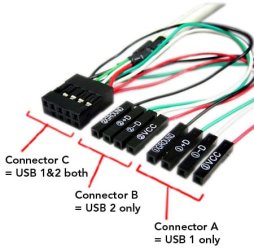
I meant to say the USB and Audio front panel headers sometimes have individual connectors as per the pic below but obviously it's not the case for you

front_usb.jpg

Is it possible you connected the USB to the Firewire header instead by accident
 

My Computer

Computer type
PC/Desktop
Computer Manufacturer/Model Number
Home Made
OS
Windows 7 Ultimate x64
CPU
Q6600 3.1ghz
Motherboard
Gigabyte GA-P35-DS3L
Memory
Kingston DDR2 6400 8GB
Graphics Card(s)
Gigabyte Radeon HD 6850 1GB 256-Bit
Sound Card
On board
Monitor(s) Displays
Acer X243H
Screen Resolution
1920x1080
Hard Drives
Intel 330 120GB SSD
WD 2TB 7200
PSU
Thermaltake Toughpower 750W Semi Modular
Case
Modified Alienware
Keyboard
A4Tech
Mouse
Gigabyte ECO600
Antivirus
Comodo
Browser
Cyberfox
I meant to say the USB and Audio front panel headers sometimes have individual connectors as per the pic below but obviously it's not the case for you

View attachment 336757

Is it possible you connected the USB to the Firewire header instead by accident


Sir,
My cabinet have only Connector C. Don't have A & B. & what are the use of those individual connectors? If that used to supply extra power ?
I think my connections are ok bcoz usb pen drives are working perfect & usb modem & usb dvd drive are detected by the system. [but i can't connect to the net & i cant open the dvd drive].
 

My Computer

Computer type
PC/Desktop
OS
Windows 7 Professional x32
Motherboard
Asus p5G41T-MLX
Memory
Adata 2gb
Hard Drives
Western Digital
As I said different cases have different connections and you don't need to worry about it as yours as you said is connector C in the pic. What sort of power supply do you have as sometimes if it doesn't supply enough you'll have the problems you mentioned so try to disconnect whatever you can from the computer that requires power and see if that helps
 

My Computer

Computer type
PC/Desktop
Computer Manufacturer/Model Number
Home Made
OS
Windows 7 Ultimate x64
CPU
Q6600 3.1ghz
Motherboard
Gigabyte GA-P35-DS3L
Memory
Kingston DDR2 6400 8GB
Graphics Card(s)
Gigabyte Radeon HD 6850 1GB 256-Bit
Sound Card
On board
Monitor(s) Displays
Acer X243H
Screen Resolution
1920x1080
Hard Drives
Intel 330 120GB SSD
WD 2TB 7200
PSU
Thermaltake Toughpower 750W Semi Modular
Case
Modified Alienware
Keyboard
A4Tech
Mouse
Gigabyte ECO600
Antivirus
Comodo
Browser
Cyberfox
As I said different cases have different connections and you don't need to worry about it as yours as you said is connector C in the pic. What sort of power supply do you have as sometimes if it doesn't supply enough you'll have the problems you mentioned so try to disconnect whatever you can from the computer that requires power and see if that helps

Sir,
i Haven't connected any devices extra. Just connected my hard drive. No dvd-rom,no floppy. Just a hard disk.
 

My Computer

Computer type
PC/Desktop
OS
Windows 7 Professional x32
Motherboard
Asus p5G41T-MLX
Memory
Adata 2gb
Hard Drives
Western Digital
Well what kind of power supply do you have
 

My Computer

Computer type
PC/Desktop
Computer Manufacturer/Model Number
Home Made
OS
Windows 7 Ultimate x64
CPU
Q6600 3.1ghz
Motherboard
Gigabyte GA-P35-DS3L
Memory
Kingston DDR2 6400 8GB
Graphics Card(s)
Gigabyte Radeon HD 6850 1GB 256-Bit
Sound Card
On board
Monitor(s) Displays
Acer X243H
Screen Resolution
1920x1080
Hard Drives
Intel 330 120GB SSD
WD 2TB 7200
PSU
Thermaltake Toughpower 750W Semi Modular
Case
Modified Alienware
Keyboard
A4Tech
Mouse
Gigabyte ECO600
Antivirus
Comodo
Browser
Cyberfox
Back
Top