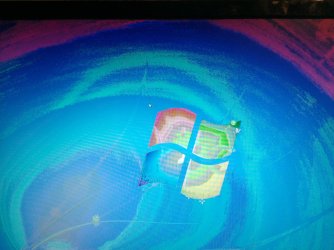
Fujitsu 26" SL3260W monitor display problem

IU1340

New member
Local time
4:23 PM
Messages
1
the monitors display is messed up, the gpu is fine as i have tried another monitor and it worked just fine.i tried connecting the monitor to the xbox and its still has the problem. at first it was just a small part of it but after few minutes its all over the screen.
Can someone help me fix this or is the monitor dead?
 

Attachments
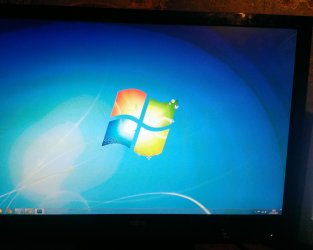
  • WP_20131213_003.jpg
    WP_20131213_003.jpg
    621.1 KB · Views: 2
  • WP_20131213_005.jpg
    WP_20131213_005.jpg
    877.7 KB · Views: 1

My Computer My Computer

At a glance

Windows 7 Ultimate x64coire i5 2380p8 gb ddr3Vtx hd 7870xt
Computer type
PC/Desktop
OS
Windows 7 Ultimate x64
CPU
coire i5 2380p
Memory
8 gb ddr3
Graphics Card(s)
Vtx hd 7870xt
Hi IU1340, Welcome to Sevenfoums.

If you have tested other monitor with your GPU, then in my opinion monitor has gone bad. Still, you can try to update the drivers of the monitor.
 

My Computer My Computer

At a glance

Windows 11 x64i5 2500K @ 3.3 GHz16 GB DDR 3 @ 1600MhzMSI 1050TI 4GB OC version
Computer type
PC/Desktop
Computer Manufacturer/Model Number
Custom Bulid/Self made
OS
Windows 11 x64
CPU
i5 2500K @ 3.3 GHz
Motherboard
ASUS P8 Z77 V pro
Memory
16 GB DDR 3 @ 1600Mhz
Graphics Card(s)
MSI 1050TI 4GB OC version
Sound Card
On Board (Realtek HD audio)
Monitor(s) Displays
Samsung 22" LCD
Screen Resolution
1920*1080
Hard Drives
Seagate 1 TB, WD 1TB, Seagate 2 TB ( I use a lot of space)
PSU
coolermaster 750 W
Case
Coolermaster HAF912
Cooling
Coolermaster hyper 212 EVO
Keyboard
Samsung
Mouse
Dell Wireless
Internet Speed
Wireless 50 Mbps
Antivirus
AVG 2016 Internet Security
Browser
Google Chrome
Back
Top