Full format log location (event viewer)

Valmighty

New member
Local time
10:39 AM
Messages
47
Hi, i did a full format (not quick format) for my 3TB HD, which took so long, so i went to sleep. When i got up it had no report whatsoever. I need to see the log/report (for bad sector etc), so i check the event viewer. There's no event for that.

I already checked http://www.sevenforums.com/tutorials/96938-check-disk-chkdsk-read-event-viewer-log.html

I rarely do full format, but when i do i expect to see the result :( I know i should've done quick format and chkdsk instead

But now that i did it, can you help me where is the report for full format i just did?
 

My Computer

Computer type
PC/Desktop
OS
Windows 7 Professional x64
CPU
Intel i5 2500k @4.6GHz
Motherboard
Asus P6P67 Pro (B3 revision)
Memory
2x4GB Corsair Vengeance 8C
Graphics Card(s)
MSI GTX 760 TF
Sound Card
X-Fi Fatal1ty
Monitor(s) Displays
Viewsonic XV-2245
Screen Resolution
1680 x 1050
Hard Drives
Primary: WDC 320GB
PSU
Corsair AX750
Case
Thermaltake Element-S VK6000
Cooling
Hydro H60
Keyboard
MX3200
Mouse
Performance MX
Antivirus
Microsoft Security Essentials
Help please?
 

My Computer

Computer type
PC/Desktop
OS
Windows 7 Professional x64
CPU
Intel i5 2500k @4.6GHz
Motherboard
Asus P6P67 Pro (B3 revision)
Memory
2x4GB Corsair Vengeance 8C
Graphics Card(s)
MSI GTX 760 TF
Sound Card
X-Fi Fatal1ty
Monitor(s) Displays
Viewsonic XV-2245
Screen Resolution
1680 x 1050
Hard Drives
Primary: WDC 320GB
PSU
Corsair AX750
Case
Thermaltake Element-S VK6000
Cooling
Hydro H60
Keyboard
MX3200
Mouse
Performance MX
Antivirus
Microsoft Security Essentials

My Computer

Computer type
PC/Desktop
Computer Manufacturer/Model Number
home built
OS
Multi-Boot W7_Pro_x64 W8.1_Pro_x64 W10_Pro_x64 +Linux_VMs +Chromium_VM
CPU
AMD Athlon II x4 620
Motherboard
Gigabyte GA-MA785G-UD3H
Memory
6GB GSkill DDR2 800
Graphics Card(s)
AMD 4670 GPU + AMD 4200 IGP
Sound Card
on board Realtek ALC889A
Monitor(s) Displays
RCA 40" LCD TV, Insignia 32" LCD TV, HP 15" LCD monitor
Screen Resolution
1680 x 1050
Hard Drives
OCZ Vertex 3 120GB,
Samsung F3 1TB (3),
Several others - WD, Seagate, Hitachi, ...
PSU
Corsair 500 W
Case
Rosewill mid tower
Cooling
CM 90mm rifle
Keyboard
Gyration wireless, Logitech wireless, Dell USB wired
Mouse
Gyration wireless, Logitech wireless, V7 USB wired
Internet Speed
Spectrum - 100Mbps D / 10Mbps U
Antivirus
Avast, MBAM3, EMET, WinPatrol
Browser
Pale Moon, Firefox, IE
Other Info
2 multi-boot PC's
Mainly HTPC/Office/Gen purpose (no gaming).
Trendnet USB KVM.
LG DVD burner/Blue Ray Player.
Tray system for removable SATA backup drives.

Not currently OCd, under-volted.
I use Hybrid sleep, rarely re-boot or shutdown.

Hauppauge HD-PVR, Avermedia PCIe TV Tuner, Hauppauge PCI TV Tuner.
I did not run chkdsk after formatting because in my understanding (Microsoft article) full format means formatting and scanning and fixing for bad sector. So basically full format is quick format + chkdsk.

I can do check disk later and have a report from it, but it will take long and defeat my purpose of asking. Windows provide the mean of full format so logically there's a report for that :) and i plan to do the same method in the future

If this feature indeed doesn't have any report/log whatsoever, then i will not do full format in the future.

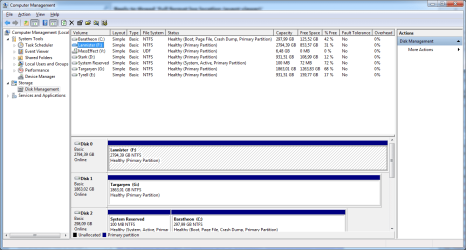
PS: the HD i formatted is the F (Lannister)
 

Attachments

  • DiskMgmt.png
    DiskMgmt.png
    38.2 KB · Views: 4

My Computer

Computer type
PC/Desktop
OS
Windows 7 Professional x64
CPU
Intel i5 2500k @4.6GHz
Motherboard
Asus P6P67 Pro (B3 revision)
Memory
2x4GB Corsair Vengeance 8C
Graphics Card(s)
MSI GTX 760 TF
Sound Card
X-Fi Fatal1ty
Monitor(s) Displays
Viewsonic XV-2245
Screen Resolution
1680 x 1050
Hard Drives
Primary: WDC 320GB
PSU
Corsair AX750
Case
Thermaltake Element-S VK6000
Cooling
Hydro H60
Keyboard
MX3200
Mouse
Performance MX
Antivirus
Microsoft Security Essentials
Back
Top