Solved FX 8350 - Inaccurate Core Temperature

Question what is your HT speed with that chip 2600 or 2400 ?
It's at its default of 2200. I never change it until I've set my main clock speed/multiplier. There's a sweet spot/ratio that you have to follow, according to some guides that I read.

I knew it that isn't the default HT for that chip it's 2600 the mother board is the issue Proper Default NB and HT link speed
That motherboard has lowered the real value of that chip and may be overvolting it as well i only stuck with the boards that were made with the chips the other one's don't control them well
Thanks for the link. Maybe I will have to get another mobo. I'll try setting this one up "Non-auto" and see what happens. It's a bit sluggish and needs a tuning anyway. lol
 

My Computer My Computer

Computer type
PC/Desktop
Computer Manufacturer/Model Number
Mellon Labs (custom build)
OS
Win 7 Pro x64/Win 10 Pro x64 dual boot
CPU
AMD FX 8350 Vishera @ 4200
Motherboard
ASUS M5A97 R2.0
Memory
16 GB Mushkin Blackline DDR3-2400 @ 1866 (9-10-10-10-31)
Graphics Card(s)
XFX Radeon R9 280 Double D Black Edition
Sound Card
Realtek HD Audio on MB. Sounds great.
Monitor(s) Displays
Acer 24", Acer 22"
Screen Resolution
3840 x 1080
Hard Drives
1 x Mushkin Chronos 120 GB SSD (Win 10)
1 x Samsung 850 EVO 250 GB SSD (Win 7)
1 x WD 1TB SATA Blue
1 x WD 1TB SATA Green
PSU
Corsair TX-750
Case
CoolerMaster HAF 912+
Cooling
Coolermaster Seidon 240M Liquid AIO. 6 case fans
Keyboard
Logitech G710+
Mouse
Logitech G500s
Internet Speed
Much better since I got fiber, but still way overpriced.
Antivirus
MSE, Malware Bytes for scanning
Browser
Firefox
Other Info
Corsair VOID USB headphones.

A Mellon Labs X-1 - LCD Smartie driven system status display.

Brought to you by the letter E
I think it's the mobo because the 970 and 980 are two generations back and i notice when people use a older board for a FX chip the voltages are just way higher
 

My Computer My Computer

Computer type
PC/Desktop
Computer Manufacturer/Model Number
CoreI7-6700K MrFingerIII Special Builds
OS
Windows 10 Home Premium 64bit sp1
CPU
Intel I7-6700K @ 4.6 Ghz 1.344 volts everyday OC
Motherboard
Asrock Fatality K6 Z170 Socket 1151
Memory
32GB G-Skill TridentZ 3200mhz 16-18-18-38 DDR4
Graphics Card(s)
Sli Gigabyte Windforce GTX 980 G1
Sound Card
AC97 Creative Rage Tactic 3D Headphones Bluetooth
Monitor(s) Displays
27" Asus ROG Swift PG278Q G-Sync 48" Vizio Smart HD TV
Screen Resolution
2560x1440p 27"- 48" Currently Gaming at 2560x1440p Res 2K
Hard Drives
250GB Samsung Evo840SSD Seagate baracuda 500 GB WD Mybook 500Gb 1TB Seagate Barracuda
PSU
HX1050w Corsair Silver 80plus certified crosfire/sli
Case
Enthod Pro Full Tower
Cooling
Corsair H110i GT 280 mm High Performance WaterBlock
Keyboard
Logitech wireless keyboard
Mouse
Logitech wireless mouse
Internet Speed
Cox Cable 100+ mb
Antivirus
WebRoot Spysweeper with Antivirus
Browser
IE-10, Chrome, Opera
Other Info
My Other Rig is a AMD FX8320E @4.6Ghz 16GB Ballistic Sport Ram
Mobo Asrock Fatality 990FX 120GB OCZ SSD 1TB Seagate Barracuda Corsair H75 Cooling PSU Corsair CX750
GPU GTX Gigabyte 970G1
I should try dialing the voltage back and seeing what happens at stock.
 

My Computer My Computer

Computer type
PC/Desktop
Computer Manufacturer/Model Number
Mellon Labs (custom build)
OS
Win 7 Pro x64/Win 10 Pro x64 dual boot
CPU
AMD FX 8350 Vishera @ 4200
Motherboard
ASUS M5A97 R2.0
Memory
16 GB Mushkin Blackline DDR3-2400 @ 1866 (9-10-10-10-31)
Graphics Card(s)
XFX Radeon R9 280 Double D Black Edition
Sound Card
Realtek HD Audio on MB. Sounds great.
Monitor(s) Displays
Acer 24", Acer 22"
Screen Resolution
3840 x 1080
Hard Drives
1 x Mushkin Chronos 120 GB SSD (Win 10)
1 x Samsung 850 EVO 250 GB SSD (Win 7)
1 x WD 1TB SATA Blue
1 x WD 1TB SATA Green
PSU
Corsair TX-750
Case
CoolerMaster HAF 912+
Cooling
Coolermaster Seidon 240M Liquid AIO. 6 case fans
Keyboard
Logitech G710+
Mouse
Logitech G500s
Internet Speed
Much better since I got fiber, but still way overpriced.
Antivirus
MSE, Malware Bytes for scanning
Browser
Firefox
Other Info
Corsair VOID USB headphones.

A Mellon Labs X-1 - LCD Smartie driven system status display.

Brought to you by the letter E

My Computer My Computer

Computer type
PC/Desktop
Computer Manufacturer/Model Number
Mellon Labs (custom build)
OS
Win 7 Pro x64/Win 10 Pro x64 dual boot
CPU
AMD FX 8350 Vishera @ 4200
Motherboard
ASUS M5A97 R2.0
Memory
16 GB Mushkin Blackline DDR3-2400 @ 1866 (9-10-10-10-31)
Graphics Card(s)
XFX Radeon R9 280 Double D Black Edition
Sound Card
Realtek HD Audio on MB. Sounds great.
Monitor(s) Displays
Acer 24", Acer 22"
Screen Resolution
3840 x 1080
Hard Drives
1 x Mushkin Chronos 120 GB SSD (Win 10)
1 x Samsung 850 EVO 250 GB SSD (Win 7)
1 x WD 1TB SATA Blue
1 x WD 1TB SATA Green
PSU
Corsair TX-750
Case
CoolerMaster HAF 912+
Cooling
Coolermaster Seidon 240M Liquid AIO. 6 case fans
Keyboard
Logitech G710+
Mouse
Logitech G500s
Internet Speed
Much better since I got fiber, but still way overpriced.
Antivirus
MSE, Malware Bytes for scanning
Browser
Firefox
Other Info
Corsair VOID USB headphones.

A Mellon Labs X-1 - LCD Smartie driven system status display.

Brought to you by the letter E
Well reading it you should be well in spec
but still way off
 

My Computer My Computer

Computer type
PC/Desktop
Computer Manufacturer/Model Number
CoreI7-6700K MrFingerIII Special Builds
OS
Windows 10 Home Premium 64bit sp1
CPU
Intel I7-6700K @ 4.6 Ghz 1.344 volts everyday OC
Motherboard
Asrock Fatality K6 Z170 Socket 1151
Memory
32GB G-Skill TridentZ 3200mhz 16-18-18-38 DDR4
Graphics Card(s)
Sli Gigabyte Windforce GTX 980 G1
Sound Card
AC97 Creative Rage Tactic 3D Headphones Bluetooth
Monitor(s) Displays
27" Asus ROG Swift PG278Q G-Sync 48" Vizio Smart HD TV
Screen Resolution
2560x1440p 27"- 48" Currently Gaming at 2560x1440p Res 2K
Hard Drives
250GB Samsung Evo840SSD Seagate baracuda 500 GB WD Mybook 500Gb 1TB Seagate Barracuda
PSU
HX1050w Corsair Silver 80plus certified crosfire/sli
Case
Enthod Pro Full Tower
Cooling
Corsair H110i GT 280 mm High Performance WaterBlock
Keyboard
Logitech wireless keyboard
Mouse
Logitech wireless mouse
Internet Speed
Cox Cable 100+ mb
Antivirus
WebRoot Spysweeper with Antivirus
Browser
IE-10, Chrome, Opera
Other Info
My Other Rig is a AMD FX8320E @4.6Ghz 16GB Ballistic Sport Ram
Mobo Asrock Fatality 990FX 120GB OCZ SSD 1TB Seagate Barracuda Corsair H75 Cooling PSU Corsair CX750
GPU GTX Gigabyte 970G1
If I enable Load Line Calibration then it reads like it should. The CPU gets real hot though - into the 60's and the socket temp is in the 70's. I shut it down real quick.

Looks like I'd better invest in some water cooling if I want to OC this thing.
 

My Computer My Computer

Computer type
PC/Desktop
Computer Manufacturer/Model Number
Mellon Labs (custom build)
OS
Win 7 Pro x64/Win 10 Pro x64 dual boot
CPU
AMD FX 8350 Vishera @ 4200
Motherboard
ASUS M5A97 R2.0
Memory
16 GB Mushkin Blackline DDR3-2400 @ 1866 (9-10-10-10-31)
Graphics Card(s)
XFX Radeon R9 280 Double D Black Edition
Sound Card
Realtek HD Audio on MB. Sounds great.
Monitor(s) Displays
Acer 24", Acer 22"
Screen Resolution
3840 x 1080
Hard Drives
1 x Mushkin Chronos 120 GB SSD (Win 10)
1 x Samsung 850 EVO 250 GB SSD (Win 7)
1 x WD 1TB SATA Blue
1 x WD 1TB SATA Green
PSU
Corsair TX-750
Case
CoolerMaster HAF 912+
Cooling
Coolermaster Seidon 240M Liquid AIO. 6 case fans
Keyboard
Logitech G710+
Mouse
Logitech G500s
Internet Speed
Much better since I got fiber, but still way overpriced.
Antivirus
MSE, Malware Bytes for scanning
Browser
Firefox
Other Info
Corsair VOID USB headphones.

A Mellon Labs X-1 - LCD Smartie driven system status display.

Brought to you by the letter E
If I enable Load Line Calibration then it reads like it should. The CPU gets real hot though - into the 60's and the socket temp is in the 70's. I shut it down real quick.

Looks like I'd better invest in some water cooling if I want to OC this thing.


Yes i highly recommend water i got my 8350 stable at 4.8 Ghz on water full load never went above 55c
Look at Thermaltake water 2.0 professional or antec 920 khuler very good even the 620 khuler is awesome
 

My Computer My Computer

Computer type
PC/Desktop
Computer Manufacturer/Model Number
CoreI7-6700K MrFingerIII Special Builds
OS
Windows 10 Home Premium 64bit sp1
CPU
Intel I7-6700K @ 4.6 Ghz 1.344 volts everyday OC
Motherboard
Asrock Fatality K6 Z170 Socket 1151
Memory
32GB G-Skill TridentZ 3200mhz 16-18-18-38 DDR4
Graphics Card(s)
Sli Gigabyte Windforce GTX 980 G1
Sound Card
AC97 Creative Rage Tactic 3D Headphones Bluetooth
Monitor(s) Displays
27" Asus ROG Swift PG278Q G-Sync 48" Vizio Smart HD TV
Screen Resolution
2560x1440p 27"- 48" Currently Gaming at 2560x1440p Res 2K
Hard Drives
250GB Samsung Evo840SSD Seagate baracuda 500 GB WD Mybook 500Gb 1TB Seagate Barracuda
PSU
HX1050w Corsair Silver 80plus certified crosfire/sli
Case
Enthod Pro Full Tower
Cooling
Corsair H110i GT 280 mm High Performance WaterBlock
Keyboard
Logitech wireless keyboard
Mouse
Logitech wireless mouse
Internet Speed
Cox Cable 100+ mb
Antivirus
WebRoot Spysweeper with Antivirus
Browser
IE-10, Chrome, Opera
Other Info
My Other Rig is a AMD FX8320E @4.6Ghz 16GB Ballistic Sport Ram
Mobo Asrock Fatality 990FX 120GB OCZ SSD 1TB Seagate Barracuda Corsair H75 Cooling PSU Corsair CX750
GPU GTX Gigabyte 970G1
The Corsair Hydro H80i is on sale at Newegg right now. $30 off. Know if it's any good?
 

My Computer My Computer

Computer type
PC/Desktop
Computer Manufacturer/Model Number
Mellon Labs (custom build)
OS
Win 7 Pro x64/Win 10 Pro x64 dual boot
CPU
AMD FX 8350 Vishera @ 4200
Motherboard
ASUS M5A97 R2.0
Memory
16 GB Mushkin Blackline DDR3-2400 @ 1866 (9-10-10-10-31)
Graphics Card(s)
XFX Radeon R9 280 Double D Black Edition
Sound Card
Realtek HD Audio on MB. Sounds great.
Monitor(s) Displays
Acer 24", Acer 22"
Screen Resolution
3840 x 1080
Hard Drives
1 x Mushkin Chronos 120 GB SSD (Win 10)
1 x Samsung 850 EVO 250 GB SSD (Win 7)
1 x WD 1TB SATA Blue
1 x WD 1TB SATA Green
PSU
Corsair TX-750
Case
CoolerMaster HAF 912+
Cooling
Coolermaster Seidon 240M Liquid AIO. 6 case fans
Keyboard
Logitech G710+
Mouse
Logitech G500s
Internet Speed
Much better since I got fiber, but still way overpriced.
Antivirus
MSE, Malware Bytes for scanning
Browser
Firefox
Other Info
Corsair VOID USB headphones.

A Mellon Labs X-1 - LCD Smartie driven system status display.

Brought to you by the letter E
Check the CM Glacer 240L. What ever you get I would highly recommend it be of all brass and copper construction. A lot of the aio's have aluminum rads. Before buying anything do some reading here. This site is 100% BS free.
 

My Computer My Computer

Computer type
PC/Desktop
Computer Manufacturer/Model Number
Custom, Dell and Lenono LT's
OS
Win8/8.1,Win7-U64, Vista U64, uncounted Linux distor's
CPU
AMD and Intell, 9590, 8350, i5 3570k
Motherboard
CFVFZ, GA990FXA, Z77e-itx
Memory
Corsair G Skill
Graphics Card(s)
Crossfired Sapphire HD 7950 Vapor-X, ASUS R9 280X TOP
Sound Card
Realtek ALC889
Monitor(s) Displays
ViewSonic VX2770SMH 27" / ViewSonic VX2433 LCD 24"
Screen Resolution
1080i HD
Hard Drives
Samsung SSD 840 Pro
OCZ Agility 3's
OCZ Vector's
WD's Blue, red, green, Velociraptors
Seagate USB3 & Hybrid's
ASUS Blu-Ray
ASUS DVD
PSU
Corsair AX1200i, Seasonice 850 Gold
Case
Cooler Master HAF 922 & HAF 932, Lian Li Train case.
Cooling
Air, Glacer 240L expanded, custom EK loop with duel D5's
Keyboard
Microsoft SideWinder X4 USB Keyboard / Logitech 250 PS2
Mouse
Logitech G500 / MS wireless 5000
Internet Speed
Best of 5ms / 75+ dn / 12+ up More or less.
Antivirus
MS esentials-MalwareBytes
Browser
Firefox Chromebook
Thanks for the link. Good review of the H100i.

Edit:

I can't use the 240L. I can't use a dual fan setup in my case as I don't have a large enough exhaust hole. The best I can do is a 120mm or 140mm push-pull setup. That's why I was considering the H80i. I'm not really considering a new case, because it was a bear to get all of this gear that I have into this one and I don't really want to repeat the experience. lol
 
Last edited:

My Computer My Computer

Computer type
PC/Desktop
Computer Manufacturer/Model Number
Mellon Labs (custom build)
OS
Win 7 Pro x64/Win 10 Pro x64 dual boot
CPU
AMD FX 8350 Vishera @ 4200
Motherboard
ASUS M5A97 R2.0
Memory
16 GB Mushkin Blackline DDR3-2400 @ 1866 (9-10-10-10-31)
Graphics Card(s)
XFX Radeon R9 280 Double D Black Edition
Sound Card
Realtek HD Audio on MB. Sounds great.
Monitor(s) Displays
Acer 24", Acer 22"
Screen Resolution
3840 x 1080
Hard Drives
1 x Mushkin Chronos 120 GB SSD (Win 10)
1 x Samsung 850 EVO 250 GB SSD (Win 7)
1 x WD 1TB SATA Blue
1 x WD 1TB SATA Green
PSU
Corsair TX-750
Case
CoolerMaster HAF 912+
Cooling
Coolermaster Seidon 240M Liquid AIO. 6 case fans
Keyboard
Logitech G710+
Mouse
Logitech G500s
Internet Speed
Much better since I got fiber, but still way overpriced.
Antivirus
MSE, Malware Bytes for scanning
Browser
Firefox
Other Info
Corsair VOID USB headphones.

A Mellon Labs X-1 - LCD Smartie driven system status display.

Brought to you by the letter E
I've run the 80i with a [email protected], normal everyday work fans run under 1200 rpm, when you stress test they go up to max and are loud but only when pushing the system to the max.

I tried a few different rad arrangements on the back of the case. Rad mounted inside in push/pull, rad mounted outside in push/pull, temps within margin of error. I settled for rad and push fan inside case and the pull fan on the outside. That gave me a little more room inside for air circulation around my xfired gpu's.

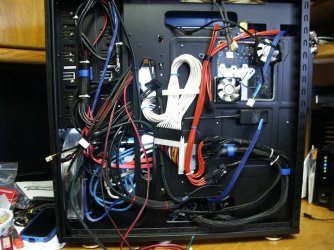
I hear you about stuffing gear inside the case, I'm about half done with the wiring.
PICT0003 (Medium).JPG

It's a little cleaner on the other side.
PICT0002 (Medium).JPG
 

My Computer My Computer

Computer type
PC/Desktop
Computer Manufacturer/Model Number
Custom, Dell and Lenono LT's
OS
Win8/8.1,Win7-U64, Vista U64, uncounted Linux distor's
CPU
AMD and Intell, 9590, 8350, i5 3570k
Motherboard
CFVFZ, GA990FXA, Z77e-itx
Memory
Corsair G Skill
Graphics Card(s)
Crossfired Sapphire HD 7950 Vapor-X, ASUS R9 280X TOP
Sound Card
Realtek ALC889
Monitor(s) Displays
ViewSonic VX2770SMH 27" / ViewSonic VX2433 LCD 24"
Screen Resolution
1080i HD
Hard Drives
Samsung SSD 840 Pro
OCZ Agility 3's
OCZ Vector's
WD's Blue, red, green, Velociraptors
Seagate USB3 & Hybrid's
ASUS Blu-Ray
ASUS DVD
PSU
Corsair AX1200i, Seasonice 850 Gold
Case
Cooler Master HAF 922 & HAF 932, Lian Li Train case.
Cooling
Air, Glacer 240L expanded, custom EK loop with duel D5's
Keyboard
Microsoft SideWinder X4 USB Keyboard / Logitech 250 PS2
Mouse
Logitech G500 / MS wireless 5000
Internet Speed
Best of 5ms / 75+ dn / 12+ up More or less.
Antivirus
MS esentials-MalwareBytes
Browser
Firefox Chromebook
I've run the 80i with a [email protected], normal everyday work fans run under 1200 rpm, when you stress test they go up to max and are loud but only when pushing the system to the max.

I tried a few different rad arrangements on the back of the case. Rad mounted inside in push/pull, rad mounted outside in push/pull, temps within margin of error. I settled for rad and push fan inside case and the pull fan on the outside. That gave me a little more room inside for air circulation around my xfired gpu's.

I hear you about stuffing gear inside the case, I'm about half done with the wiring.
View attachment 304690

It's a little cleaner on the other side.
View attachment 304691
Very nice rig :cool:, stupid question of the day, what is the purpose of the 2 small fans to the rear of the CPU socket?
 

My Computer My Computer

Computer type
PC/Desktop
Computer Manufacturer/Model Number
Bluethunder II
OS
Windows 7 x64 Ultimate and numerous virtual machines
CPU
AMD FX-8350 Vishera 32nm Technology @ 4.2 GHz default
Motherboard
ASUSTeK COMPUTER INC. SABERTOOTH 990FX R2.0 (Socket 942)
Memory
G Skill 32.0GB Dual-Channel DDR3 @ 1204MHz (11-13-13-31)
Graphics Card(s)
EVGA GeForce GTX 960 4GB Super SC ACX 2.0+ with Back Plate
Sound Card
Creative X-Fi Titanium HD Audiophile PCIe
Monitor(s) Displays
LG L227WTG x 3
Screen Resolution
1680 x 1050 16:10
Hard Drives
238GB Samsung850 PRO SATA Disk Device (SSD)
1863GB Seagate ST2000DM 001-1CH164 (SATA)
1397GB Seagate ST1500DL 003-9VT16L(SATA)
466GB Western Digital WDC WD50 03AZEX-00K1GA0 (SATA) x 2
932GB Seagate ST310005 28AS SATA Disk Device (SATA)
PSU
Enermax Revolution87+ 1000 Watts Gold Certified Power Supply
Case
Rocketfish Full Tower
Cooling
Cooler Master Hyper 212 EVO Push Pull 120mm Fans
Keyboard
Logitech K740
Mouse
Logitech G100S Laser LED + Logitech Gamepad F310
Internet Speed
500 mbs down and 30mbs up
Antivirus
Malwarebytes Pro & Avast and MSE on certain Virtual Machines
Browser
Firefox (Main) Chrome, Internet Explorer (Back Up)
Other Info
Logitech X 230 2.1 Stereo System and 5.1 Yamaha RX V2090
B&W DM6 Monitor Speakers + Center and Surround Speakers
Using Mouse Without Borders (Google it)
Nice looking rig Madcratebuilder, good job mate :thumbsup:

@Indianatone, The Crosshair v Formula can get a pretty toastie Northbridge when overclocking so I'd imagine those fan's are too help cool that. I know of people that hit cpu oc's of 7Ghz + on that board with North bridge temps of 100c without additional cooling for the north bridge without issue though.
 

My Computer My Computer

Computer type
PC/Desktop
Computer Manufacturer/Model Number
Custom build
OS
Win7 Home Premium x64 SP1
CPU
i7 4770k
Motherboard
Asus maximus VI Hero
Memory
8Gb Kingston HyperX Beast 2400MHz @2133MHz 11-12-11-30
Graphics Card(s)
MSI GTX 780ti Gaming Oc x2
Sound Card
Onboard ROG SupremeFX
Monitor(s) Displays
Asus VG248QE
Screen Resolution
3840X1080 144Hz
Hard Drives
Samung Evo 256Gb, OCZ Agility4 128Gb
1x1TB hitachi storage
PSU
EVGA Supernova 1000w Platinum
Case
Corsair Air 540
Cooling
Corsair H100i
Keyboard
Coolermaster Quickfire Pro
Mouse
Corsair M65 RGB
Internet Speed
74mb dwn/16up
Antivirus
MSE,Malwarebytes
Browser
Chrome
Nice rig, madcratebuilder.
 

My Computer My Computer

Computer type
PC/Desktop
Computer Manufacturer/Model Number
Mellon Labs (custom build)
OS
Win 7 Pro x64/Win 10 Pro x64 dual boot
CPU
AMD FX 8350 Vishera @ 4200
Motherboard
ASUS M5A97 R2.0
Memory
16 GB Mushkin Blackline DDR3-2400 @ 1866 (9-10-10-10-31)
Graphics Card(s)
XFX Radeon R9 280 Double D Black Edition
Sound Card
Realtek HD Audio on MB. Sounds great.
Monitor(s) Displays
Acer 24", Acer 22"
Screen Resolution
3840 x 1080
Hard Drives
1 x Mushkin Chronos 120 GB SSD (Win 10)
1 x Samsung 850 EVO 250 GB SSD (Win 7)
1 x WD 1TB SATA Blue
1 x WD 1TB SATA Green
PSU
Corsair TX-750
Case
CoolerMaster HAF 912+
Cooling
Coolermaster Seidon 240M Liquid AIO. 6 case fans
Keyboard
Logitech G710+
Mouse
Logitech G500s
Internet Speed
Much better since I got fiber, but still way overpriced.
Antivirus
MSE, Malware Bytes for scanning
Browser
Firefox
Other Info
Corsair VOID USB headphones.

A Mellon Labs X-1 - LCD Smartie driven system status display.

Brought to you by the letter E
I've run the 80i with a [email protected], normal everyday work fans run under 1200 rpm, when you stress test they go up to max and are loud but only when pushing the system to the max.

I tried a few different rad arrangements on the back of the case. Rad mounted inside in push/pull, rad mounted outside in push/pull, temps within margin of error. I settled for rad and push fan inside case and the pull fan on the outside. That gave me a little more room inside for air circulation around my xfired gpu's.

I hear you about stuffing gear inside the case, I'm about half done with the wiring.
View attachment 304690

It's a little cleaner on the other side.
View attachment 304691
Very nice rig :cool:, stupid question of the day, what is the purpose of the 2 small fans to the rear of the CPU socket?

Like ganjiry said, added air cooling. When you have the cpu on water you no longer have a fan moving any air around the cpu socket or the vrm/nb array. Those two 50mm fans cool the socket (lower left) and the upper right fan cooling a row of chips on the back side of the vrm's.

There's been some discussions on the OC boards if this is worthwhile or not. On some boards it is more effective and it's not a lot of temp difference, 2-6C is what most report. A pair of $5 silent fans is a minor investment, adding more wires to the rats nest:cry:. I'll use a Y connecter and run off the board for BIOS control of these fans initially. This board has a two pin temp probe connection, I think I can feed that to my cooling control center (Aquacomputer AT6) and ramp the fan rpm based on mother board temps.
 

My Computer My Computer

Computer type
PC/Desktop
Computer Manufacturer/Model Number
Custom, Dell and Lenono LT's
OS
Win8/8.1,Win7-U64, Vista U64, uncounted Linux distor's
CPU
AMD and Intell, 9590, 8350, i5 3570k
Motherboard
CFVFZ, GA990FXA, Z77e-itx
Memory
Corsair G Skill
Graphics Card(s)
Crossfired Sapphire HD 7950 Vapor-X, ASUS R9 280X TOP
Sound Card
Realtek ALC889
Monitor(s) Displays
ViewSonic VX2770SMH 27" / ViewSonic VX2433 LCD 24"
Screen Resolution
1080i HD
Hard Drives
Samsung SSD 840 Pro
OCZ Agility 3's
OCZ Vector's
WD's Blue, red, green, Velociraptors
Seagate USB3 & Hybrid's
ASUS Blu-Ray
ASUS DVD
PSU
Corsair AX1200i, Seasonice 850 Gold
Case
Cooler Master HAF 922 & HAF 932, Lian Li Train case.
Cooling
Air, Glacer 240L expanded, custom EK loop with duel D5's
Keyboard
Microsoft SideWinder X4 USB Keyboard / Logitech 250 PS2
Mouse
Logitech G500 / MS wireless 5000
Internet Speed
Best of 5ms / 75+ dn / 12+ up More or less.
Antivirus
MS esentials-MalwareBytes
Browser
Firefox Chromebook
I think it's the mobo because the 970 and 980 are two generations back and i notice when people use a older board for a FX chip the voltages are just way higher
Bingo.

The main problem with the M5A97 R2.0 paired with the FX-8320/50 rests with the fact that that board only has a 4+2 VRM (voltage regulator module) power phase whereas the M5A97 Evo R2.0 has a VRM 6+2 power phase and also the M5A99FX Evo/Pro R2.0 has a 6+2+2 VRM power phase.

The VRM is responsible for dampening down the 12V supplied by the PSU and is therefore in turn actually feeding the CPU its-converted-voltage directly... it literally keeps the CPU from frying. Essentially the rule of thumb is the more powerful the CPU the more VRM power phases are necessary to adequately feed the CPU the proper voltage, being neither too much nor too little. Ideally, these chips wouldn’t be paired with any board with less than an 8 VRM power phase (which would include the three aforementioned because technically, they are at 6+2 and 6+2+2 respectively).

In other words, that board (actually all 4+2 VRM power phase boards in general) simply was not designed with the FX 8-core chips in mind, the 4+2 VRM power phase boards really shouldn’t be paired with anything more than an FX 6-core and that in fact is the FX series available at the time of their design and release in the first place.

Asus should never have revised this to be “compatible” with the FX 8-cores because it really isn’t, not in its actual, physical design. The only reason it ‘works’ is the technicality of fact that it is still AM3+ socket but that is truly where the “compatibility” ends here. That boards VRM is just not good enough for that chip at stock, let alone compounding the problem further with overclocking. Yikes.
 

My Computer My Computer

Computer type
PC/Desktop
Computer Manufacturer/Model Number
Custom [03/21/2014]
OS
7 Ultimate SP1 x64
CPU
AMD FX-8350 4.0GHz
Motherboard
Asus M5A99FX Pro R2.0
Memory
8GB Corsair Vengeance LP DDR3 1600
Graphics Card(s)
EVGA GTX760 SC 2GB GDDR5
Sound Card
Realtek ALC892
Monitor(s) Displays
23" Syncmaster P2370HD
Screen Resolution
1920 x 1080
Hard Drives
Scorpio Black WD1003FZEX 1TB
PSU
Corsair RM 750W
Case
Gigabyte Sumo Omega
Cooling
Noctua NH-D14 | 6 120mm case.
Keyboard
Tt eSPORTS Poesidon Z - Blue Switch
Mouse
Logitech M510
Internet Speed
FiOS 100/100
Antivirus
MBAM
Browser
WaterFox & Chrome
Other Info
NETWORKING:
FiOS G1100 (v1.03)
Netgear WNDR37AV
Actiontec MI424WR (Rev. I)
PRINTER:
Canon MX340
Bingo.

The main problem with the M5A97 R2.0 paired with the FX-8320/50 rests with the fact that that board only has a 4+2 VRM (voltage regulator module) power phase whereas the M5A97 Evo R2.0 has a VRM 6+2 power phase and also the M5A99FX Evo/Pro R2.0 has a 6+2+2 VRM power phase.

The VRM is responsible for dampening down the 12V supplied by the PSU and is therefore in turn actually feeding the CPU its-converted-voltage directly... it literally keeps the CPU from frying. Essentially the rule of thumb is the more powerful the CPU the more VRM power phases are necessary to adequately feed the CPU the proper voltage, being neither too much nor too little. Ideally, these chips wouldn’t be paired with any board with less than an 8 VRM power phase (which would include the three aforementioned because technically, they are at 6+2 and 6+2+2 respectively).

In other words, that board (actually all 4+2 VRM power phase boards in general) simply was not designed with the FX 8-core chips in mind, the 4+2 VRM power phase boards really shouldn’t be paired with anything more than an FX 6-core and that in fact is the FX series available at the time of their design and release in the first place.

Asus should never have revised this to be “compatible” with the FX 8-cores because it really isn’t, not in its actual, physical design. The only reason it ‘works’ is the technicality of fact that it is still AM3+ socket but that is truly where the “compatibility” ends here. That boards VRM is just not good enough for that chip at stock, let alone compounding the problem further with overclocking. Yikes.
Thanks for the good information. I came to the conclusion that my motherboard wasn't up to it and I ended my quest at overclocking a while ago. At least until I can get a better motherboard. Something like a Sabertooth if it's in my wife's budget. lol.
 

My Computer My Computer

Computer type
PC/Desktop
Computer Manufacturer/Model Number
Mellon Labs (custom build)
OS
Win 7 Pro x64/Win 10 Pro x64 dual boot
CPU
AMD FX 8350 Vishera @ 4200
Motherboard
ASUS M5A97 R2.0
Memory
16 GB Mushkin Blackline DDR3-2400 @ 1866 (9-10-10-10-31)
Graphics Card(s)
XFX Radeon R9 280 Double D Black Edition
Sound Card
Realtek HD Audio on MB. Sounds great.
Monitor(s) Displays
Acer 24", Acer 22"
Screen Resolution
3840 x 1080
Hard Drives
1 x Mushkin Chronos 120 GB SSD (Win 10)
1 x Samsung 850 EVO 250 GB SSD (Win 7)
1 x WD 1TB SATA Blue
1 x WD 1TB SATA Green
PSU
Corsair TX-750
Case
CoolerMaster HAF 912+
Cooling
Coolermaster Seidon 240M Liquid AIO. 6 case fans
Keyboard
Logitech G710+
Mouse
Logitech G500s
Internet Speed
Much better since I got fiber, but still way overpriced.
Antivirus
MSE, Malware Bytes for scanning
Browser
Firefox
Other Info
Corsair VOID USB headphones.

A Mellon Labs X-1 - LCD Smartie driven system status display.

Brought to you by the letter E
VRM-Design …

I know necrophilism has become a hot topic of debate these days (pun intended), but if i may just add some of my findings in here - as i was searching for a friend of mine as he got also heat-issues using the FX-8320 …

I think it's the mobo because the 970 and 980 are two generations back and i notice when people use a older board for a FX chip the voltages are just way higher

[…]
The main problem with the M5A97 R2.0 paired with the FX-8320/50 rests with the fact that that board only has a 4+2 VRM (voltage regulator module) power phase whereas the M5A97 Evo R2.0 has a VRM 6+2 power phase and also the M5A99FX Evo/Pro R2.0 has a 6+2+2 VRM power phase.
[…]
Ideally, these chips wouldn’t be paired with any board with less than an 8 VRM power phase […].

In other words, that board (actually all 4+2 VRM power phase boards in general) simply was not designed with the FX 8-core chips in mind, the 4+2 VRM power phase boards really shouldn’t be paired with anything more than an FX 6-core and that in fact is the FX series available at the time of their design and release in the first place.

Asus should never have revised this to be “compatible” with the FX 8-cores because it really isn’t, not in its actual, physical design. The only reason it ‘works’ is the technicality of fact that it is still AM3+ socket but that is truly where the “compatibility” ends here. That boards VRM is just not good enough for that chip at stock, let alone compounding the problem further with overclocking. Yikes.

I just wanna drop in that a FX-8350 without any difficulty can be used on boards which may only featuring a 4+2 VRM power phase design. This isn't to proof anyone wrong but to confirm that the board‘s manufacturer ain't that wrong as they releases or flag given boards to be compatible with the highest Bulldozer‘s FX-8xxx series.

As far as i'm concerned and where the message comes in here … I bought a rig a few years ago, custom build which featured the following parts:
  • CPU: AMD FX-8350
  • CPU-Cooler: be quiet! Dark Rock Advanced C1
  • MB: AsRock 970 Extreme3 R2.0
  • Mem: Crucial Ballistix Tactical, 16 GByte, 1866 MHz, CL9
  • GPU: AMD Radeon HD 7850 Black Edition, 2 GByte GDDR5
  • PSU: be quiet! Straight Power E9 580W-CM
  • Case: CoolerMaster HAF 912+

The 970 Extreme3 R2.0 has only a 4+1 VRM design. But despite lacking any good VRM design (read: ±4+2 phases) i never ever ran into any trouble at all. No throttling, no drop-out or something similar.

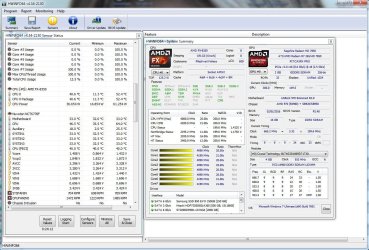
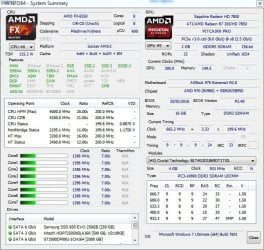
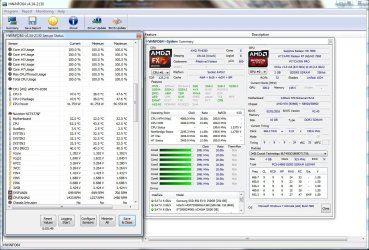
Remarkably though, the whole system stayed and stays pretty cool - barely reaching any temperatures above 55°C (package or core) even under heavy load (Prime 24hrs). The GPU idling down at 23°-25 or 27°-29°C (depending on ambient temperature) reaching a maximum at ~45°C under heavy load with games/applications and ~50°C on FurMark (24hrs).

I was quite surprised and set my bet on false read-outs as i even bought some infrared thermometers (Voltcraft IR-2200-50D & FLUKE 62 MAX+, Infrared Pyrometers) and tried every monitoring software around - knew about AMD‘s changed measuring scheme though - to just be eventually proven wrong.

The system in fact is just amazing cool!
It turned out that the VRM reaching ~25°-30° C when idling and come close to 45° C under load.
I guess it's just a nearly perfect mix of the heavy weight CPU-cooler, the really nice case (it isn't branded as HAF; → reads „High Air Flow“ for no reason …) and the quality PSU which ensures some reliability.
It's even capable to boost given cores via Turbo-Core™

For storage my own rig got some 500GB, 1.5TB & 2TB HDD and a 256GB SSD i used before.
The whole system taxed 750,50 € back then including the 2TB HDD and a Cherry™ CyMotion Expert Combo beyboard.

As a matter of fact i bought this identical setup seven times to date, to configure and assemble it for other guys around - as some came by and kept wondering how surprisingly cool and freaking quite it run. No-one ever complained about anything and all of them are still in service - some where upgraded with better GPUs over time but didn't struggle to maintain silence and temperature after all. Mine got a R 290X a while ago too. Just one of them had serious heat-issues and therefore throttling as he tenaciously insisted to use his own case and CPU-fan he salvaged from an older rig.

So, a minor amount of phases on a VRM design doesn't necessarily mean it couldn't fire a high-performance setup … ;)


In this sense

Smartcom
 

Attachments

  • Boost.jpg
    Boost.jpg
    194.9 KB · Views: 3
  • idle_proc.jpg
    idle_proc.jpg
    96.4 KB · Views: 18
  • prime_load.jpg
    prime_load.jpg
    198.8 KB · Views: 2
  • prime_load_turbo_core.jpg
    prime_load_turbo_core.jpg
    196.7 KB · Views: 4

My Computer My Computer

Computer type
PC/Desktop
OS
Windows 7 Ultimate ³² Bit/x64
Back
Top