Is it really overheating, bad sensor, or another problem?

LeonDroid

New member
Local time
11:15 PM
Messages
17
I received an iBUYPOWER NE690FX for Christmas of 2013 which has had the following modifications...

Stock 300 Watt PSU replaced with a Lepa N500
8GB OEM RAM (ADATA) upgraded to 16GB Kingston HyperX (4GB x 4)
Replaced NZXT case with Thermaltake V4 Black
Added Rosewill internal card reader & USB 2.0/3.0 Hub
120mm intake fans 1 front, 1 bottom, & 1 side
120mm exhaust 1 top, 1 rear

Other Specs:

Gigabyte GA-78LMT-USB3
AMD FX-4130 w/OEM Thermaltake H/S Fan
eVGA GeForce GT610
W/D 1TB HDD
DVD Burner

F/F to January this year I wiped the drive with DBAN, repartitioned the drive & reinstalled Win7 HP. While reinstalling some of my other software there was an awful noise which turned out to be the CPU overheating (I had to hold the power button to shut it down).
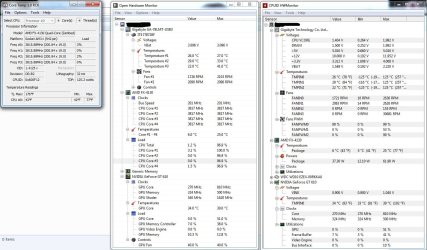
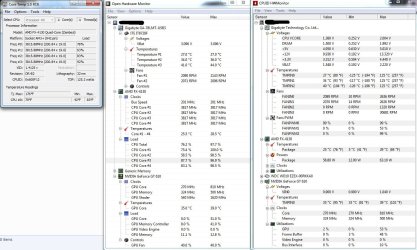
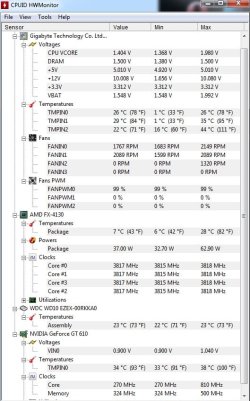
I replaced the OEM H/S Fan with the stock H/S Fan that came with an AMD FX-8350 using Arctic MX-4 thermal paste. Then used OpenHardwareMonitor & an earlier version of Core Temp to monitor temps. I began getting overheat alerts from Core Temp and it was putting the computer to sleep. So, I bought an Arctic Freezer 13 and installed it. For over 3 weeks it ran almost constantly never shut down for more than a couple of minutes while I used it to run everything it would ever need to do except internet (I actually tried to overwork it). Then one morning I noticed it had been put to sleep by Core Temp for overheating again. There was a notification in the taskbar telling me that core 3 was at 256 C (493 F), Core Temp had crashed ("stopped working and needs to close"). Since then it has happened several more times like that. The 2 times it happened while I was in the room, there was no audible warning. There's no discoloration indicating temps that high, the back of the motherboard was only warm to the touch yet it reported core 3 running at 256 C. That was with an earlier version of CoreTemp (v. 0.99.*). That computer now has the following: Core Temp 1.0 RC6, Open Hardware Monitor, Speccy & CPUID HWMonitor. I took several screenshots of 3 of these at bootup, while working, (compressing video files) and when finished.

Could the sensor have been damaged the only time I know for sure it overheated? Is there an issue with that early version of CoreTemp? Should I try another AM3+ motherboard (I have an ASUS M5A78L-M LX Plus). I'm out of ideas. I can give you just about any additional information that doesn't require me to go on the internet with that PC. Both side panels have been off since I replaced the OEM H/S Fan.

Final question...where do I go for help with a Windows XP problem?
 

My Computer

Computer type
PC/Desktop
Computer Manufacturer/Model Number
Custom Build
OS
Windows 7 Ultimate x64
CPU
AMD FX-4130
Motherboard
ASUS M5A78L-M LX Plus
Memory
8GB G-Skill DDR3-1600
Graphics Card(s)
eVGA GT 520
Hard Drives
Hitachi HDS721010CLA332 1TB
Antivirus
Vipre
Browser
Nightly, Opera
Then one morning I noticed it had been put to sleep by Core Temp for overheating again.........................Could the sensor have been damaged the only time I know for sure it overheated....................Is there an issue with that early version of CoreTemp?

I have very little experience with Core Temp.

Can it, on its own, shut down a PC that it thinks is too hot, even if it isn't true?

In normal operation, when things are "OK", do the temps reported by Core Temp match the temps reported by at least one other temp monitoring application?

If you disable or uninstall Core Temp completely, do you still have issues?

The temps of plus 400 Fahrenheit surely must be wrong if you see no sign of damage.

You describe "an awful noise which turned out to be the CPU overheating". I don't know that overheating by itself would necessarily make any particular noise. I'm wondering if there was some as yet undetected hardware failure at that time, which resulted in overheating.

I wouldn't expect the cooler swapping to make any significant difference, assuming they were properly mounted and the fan was spinning, as long as the PC is under a reasonable load.

Does your motherboard look perfectly normal, including capacitors?

Can you swap in another power supply?
 

My Computer

Computer type
PC/Desktop
Computer Manufacturer/Model Number
Ignatz Special; 4 speed manual gearbox; factory air conditioning; one of one
OS
Windows 7 Home Premium SP1, 64-bit
CPU
Intel Skylake i5-6600K, not overclocked
Motherboard
AsRock Z170M Extreme 4, micro ATX
Memory
8 GB HyperX DDR4-2666 (2 x 4 GB)
Graphics Card(s)
none; graphics are integrated on CPU
Sound Card
onboard: Realtek ALC1150; external: USB Behringer UF0-202
Monitor(s) Displays
Dell S2340M 23 inch IPS
Screen Resolution
1600 x 900
Hard Drives
System: Crucial MX100 series SSD, 128 GB;
Data: Samsung Spinpoint 103SJ, 1 TB;
Backup: WD Caviar Green WD30EZRX-00D8PB0, 3 TB
PSU
Rosewill SilentNight 500 watt fanless, semi-modular
Case
Antec Solo II
Cooling
Noctua NH-U12S; Noctua F12 intake, Noctua S12A exhaust
Keyboard
Microsoft 200 6JH-00001 USB
Mouse
Dell or Microsoft optical wired; USB
Antivirus
Microsoft Security Essentials and Malwarebytes Premium
Browser
Pale Moon
Other Info
All fans PWM; speeds at idle: CPU circa 500 rpm; intake circa 600 rpm; exhaust circa 600 rpm; CPU temps 27 idle and 47 C load in a warm room (27 C/81 F) when running Intel Extreme Tuning Utility stress test.
First, in the options menu of Core Temp, there are overheat protection settings which can be set to put the computer to sleep, hibernate, or shut down at a specified temp but it has to be enabled.

I forgot to post screenshots of the 3 system monitoring programs earlier. I'll do that now. They are all within a degree or two of each other.

Core Temp is the only one that shuts everything down in case of overheating so I hate to uninstall it. However, I removed the earlier version and then installed the newest release in case that was the issue.

I'm sure the noise I heard was an alert from the motherboard. The motherboard looks normal. However the capacitors to the left of the CPU are mostly obstructed by some kind of passive cooler and the Arctic Freezer fins. I gave it a once over when I swapped out the cooler because I needed to replace the brass standoffs with non conductive alternatives.
That actually reminds me that there was an issue with ESD. The computer would freeze or restart any time there was a shock when I touched it. Gigabyte tech support suggested using non conductive standoffs, fiber washers, and/or grounding the case directly to an outlet.

Swapping out the PSU at this time is not possible because I don't have a spare one that will work yet.
 

Attachments

  • Bootup.jpg
    Bootup.jpg
    166.4 KB · Views: 14
  • Working.jpg
    Working.jpg
    163.5 KB · Views: 5

My Computer

Computer type
PC/Desktop
Computer Manufacturer/Model Number
Custom Build
OS
Windows 7 Ultimate x64
CPU
AMD FX-4130
Motherboard
ASUS M5A78L-M LX Plus
Memory
8GB G-Skill DDR3-1600
Graphics Card(s)
eVGA GT 520
Hard Drives
Hitachi HDS721010CLA332 1TB
Antivirus
Vipre
Browser
Nightly, Opera
Well for one.......
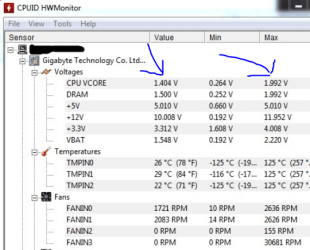
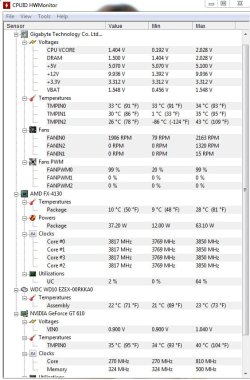
Why is your CPU Vcore so high ?
 

Attachments

  • Vcore.PNG
    Vcore.PNG
    67 KB · Views: 63

My Computer

Computer type
PC/Desktop
Computer Manufacturer/Model Number
CoreI7-6700K MrFingerIII Special Builds
OS
Windows 10 Home Premium 64bit sp1
CPU
Intel I7-6700K @ 4.6 Ghz 1.344 volts everyday OC
Motherboard
Asrock Fatality K6 Z170 Socket 1151
Memory
32GB G-Skill TridentZ 3200mhz 16-18-18-38 DDR4
Graphics Card(s)
Sli Gigabyte Windforce GTX 980 G1
Sound Card
AC97 Creative Rage Tactic 3D Headphones Bluetooth
Monitor(s) Displays
27" Asus ROG Swift PG278Q G-Sync 48" Vizio Smart HD TV
Screen Resolution
2560x1440p 27"- 48" Currently Gaming at 2560x1440p Res 2K
Hard Drives
250GB Samsung Evo840SSD Seagate baracuda 500 GB WD Mybook 500Gb 1TB Seagate Barracuda
PSU
HX1050w Corsair Silver 80plus certified crosfire/sli
Case
Enthod Pro Full Tower
Cooling
Corsair H110i GT 280 mm High Performance WaterBlock
Keyboard
Logitech wireless keyboard
Mouse
Logitech wireless mouse
Internet Speed
Cox Cable 100+ mb
Antivirus
WebRoot Spysweeper with Antivirus
Browser
IE-10, Chrome, Opera
Other Info
My Other Rig is a AMD FX8320E @4.6Ghz 16GB Ballistic Sport Ram
Mobo Asrock Fatality 990FX 120GB OCZ SSD 1TB Seagate Barracuda Corsair H75 Cooling PSU Corsair CX750
GPU GTX Gigabyte 970G1
Also why is th 12V+ so low along with the VBat being very low.

Please put what power supply your system is using in your specs.
 

My Computer

Computer type
PC/Desktop
Computer Manufacturer/Model Number
Home made Desktop
OS
Windows 10 Pro. 64/ version 1709 Windows 7 Pro/64
CPU
Intel i7-6800K @ 4.3
Motherboard
ASUS X-99 Deluxe II
Memory
Corsair Platinum 16 gig @2400
Graphics Card(s)
EVGA GTX 1070 OC
Monitor(s) Displays
Asus 27" LED LCD/VE278Q
Screen Resolution
1920-1080 or 1280-720 HDMI
Hard Drives
INTEL SSD 730-240 Gb Sata 3.0/
PSU
EVGA Platium 1200W
Case
Phanteks Luxe Tempered Glass 8 fans/ one radiator
Cooling
XSPC/ Water Cooled CPU
Keyboard
Das 4 Professional
Mouse
Logitech M705/MX Anywhere 2-S
Internet Speed
100 mbits
Antivirus
Microsoft Security Essentials/ Malwarebytes Premium 3.0/ SAS
Browser
I.E. 11 default/Firefox/ ISP Time Warner Cable/Spectrum
Other Info
LG BluRay Burner/
Sound system-KLipsch-THX/
Icy Dock ssd Hot Swap bays.
Honestly, I've had tunnel vision on the temperature problem, and never thought to check the voltages, so I never even noticed.

Layback Bear: The power supply is the first on my list of upgrades...Lepa N500.
This one: http://www.newegg.com/Product/Produ...ET7180&cm_re=lepa_n500-_-17-494-002-_-Product
It's still under warranty if I need to replace it.

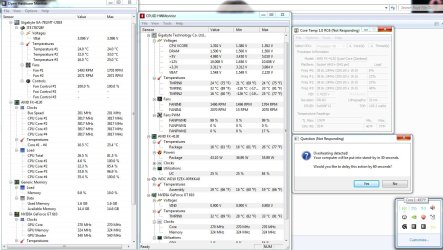
The computer was asleep again when I got up this morning. Attaching 2 more screenshots.
 

Attachments

  • Awake.jpg
    Awake.jpg
    176.2 KB · Views: 12
  • Not Responding.jpg
    Not Responding.jpg
    48.5 KB · Views: 3

My Computer

Computer type
PC/Desktop
Computer Manufacturer/Model Number
Custom Build
OS
Windows 7 Ultimate x64
CPU
AMD FX-4130
Motherboard
ASUS M5A78L-M LX Plus
Memory
8GB G-Skill DDR3-1600
Graphics Card(s)
eVGA GT 520
Hard Drives
Hitachi HDS721010CLA332 1TB
Antivirus
Vipre
Browser
Nightly, Opera
Using more than one temp program at the same time can cause misreadings.
A poor power supply can cause all kinds of goofy things.

I'm not a AMD user so I really can't tell which temp program is best for you.

My personal choice for power supply is Corsair AX but they do cost a little more.
 

My Computer

Computer type
PC/Desktop
Computer Manufacturer/Model Number
Home made Desktop
OS
Windows 10 Pro. 64/ version 1709 Windows 7 Pro/64
CPU
Intel i7-6800K @ 4.3
Motherboard
ASUS X-99 Deluxe II
Memory
Corsair Platinum 16 gig @2400
Graphics Card(s)
EVGA GTX 1070 OC
Monitor(s) Displays
Asus 27" LED LCD/VE278Q
Screen Resolution
1920-1080 or 1280-720 HDMI
Hard Drives
INTEL SSD 730-240 Gb Sata 3.0/
PSU
EVGA Platium 1200W
Case
Phanteks Luxe Tempered Glass 8 fans/ one radiator
Cooling
XSPC/ Water Cooled CPU
Keyboard
Das 4 Professional
Mouse
Logitech M705/MX Anywhere 2-S
Internet Speed
100 mbits
Antivirus
Microsoft Security Essentials/ Malwarebytes Premium 3.0/ SAS
Browser
I.E. 11 default/Firefox/ ISP Time Warner Cable/Spectrum
Other Info
LG BluRay Burner/
Sound system-KLipsch-THX/
Icy Dock ssd Hot Swap bays.
The multiple hardware monitoring programs are suggested in this and other threads. They only vary by a degree or 2 and I attribute that to differing sample rates and times. Core Temp is the only one I usually run & the one that puts my computer to sleep. The only noticeable difference now is that it reports core 1 as the one overheating instead of core 3.

To be clear, are you suggesting I try a new power supply?
Newegg has this one on sale with a $20 rebate: CORSAIR CX series CX500 500W ATX12V v2.3 80 PLUS BRONZE Certified Active PFC Power Supply - Newegg.com

Or, I can save $10 with this one: CORSAIR CX series CX430 430W ATX12V v2.3 80 PLUS BRONZE Certified Active PFC Power Supply - Newegg.com I don't think the 5 Amps on 3.3V or the 6 Amps on the +12 will make much difference on this build.

I can't afford the AX series. A little more is ok, but they're 4x more.
 

My Computer

Computer type
PC/Desktop
Computer Manufacturer/Model Number
Custom Build
OS
Windows 7 Ultimate x64
CPU
AMD FX-4130
Motherboard
ASUS M5A78L-M LX Plus
Memory
8GB G-Skill DDR3-1600
Graphics Card(s)
eVGA GT 520
Hard Drives
Hitachi HDS721010CLA332 1TB
Antivirus
Vipre
Browser
Nightly, Opera
First ditch CoreTemp, there is no way that any CPU should be throttling at 77°F: 77°C yes (actually a few degrees lower than that). That or only run it by itself with no other monitoring programs running.

I would also seriously look at replacing that power supply if that 12V reading is in anyway accurate. Better to check with a voltmeter to be sure.
 

My Computer

Computer type
PC/Desktop
Computer Manufacturer/Model Number
Me
OS
Win 7 Ultimate x64
CPU
FX-8350 @ 4.6 GHz so far
Motherboard
Asus M5A97 EVO
Memory
ADATA XPG V1 Series Black 8GB DDR3 1600
Graphics Card(s)
Sapphire R9 270x Dual-X
Sound Card
Xonar DGX w/ Corsair Vengence 1300
Monitor(s) Displays
Acer S232HL Abid
Screen Resolution
1920x1080
Hard Drives
120 GB OCZ Vertex 3
500 GB Seagate 7200.12
PSU
Antec Earthwatts 650W Green
Case
Antec Three Hundred
Cooling
Cooler Master 212 EVO
Keyboard
Logitech G510
Mouse
Logitech G500s
Internet Speed
35000/3000
Normally Core Temp is the only monitoring program I run, but I'll uninstall it and run just one of the other 2. there should be something for me to put a load on the CPU with tomorrow. I don't do any gaming except the downloadable casual games from sites like BigFish. Plus, a little audio/video conversion and/or compression so I'm not putting that much of a load on the processor at any time. The highest temp I've ever seen while doing that was 29 C (85 F).

I bought a new power supply. I should have it here, installed and tested by this time next week. I'll post then with the results.
The other will be RMA'd and the replacement saved for a spare.
 

My Computer

Computer type
PC/Desktop
Computer Manufacturer/Model Number
Custom Build
OS
Windows 7 Ultimate x64
CPU
AMD FX-4130
Motherboard
ASUS M5A78L-M LX Plus
Memory
8GB G-Skill DDR3-1600
Graphics Card(s)
eVGA GT 520
Hard Drives
Hitachi HDS721010CLA332 1TB
Antivirus
Vipre
Browser
Nightly, Opera
Great news. Let us know when you get your new power supply installed.

Just a reminder; always post your temps in (C).
 

My Computer

Computer type
PC/Desktop
Computer Manufacturer/Model Number
Home made Desktop
OS
Windows 10 Pro. 64/ version 1709 Windows 7 Pro/64
CPU
Intel i7-6800K @ 4.3
Motherboard
ASUS X-99 Deluxe II
Memory
Corsair Platinum 16 gig @2400
Graphics Card(s)
EVGA GTX 1070 OC
Monitor(s) Displays
Asus 27" LED LCD/VE278Q
Screen Resolution
1920-1080 or 1280-720 HDMI
Hard Drives
INTEL SSD 730-240 Gb Sata 3.0/
PSU
EVGA Platium 1200W
Case
Phanteks Luxe Tempered Glass 8 fans/ one radiator
Cooling
XSPC/ Water Cooled CPU
Keyboard
Das 4 Professional
Mouse
Logitech M705/MX Anywhere 2-S
Internet Speed
100 mbits
Antivirus
Microsoft Security Essentials/ Malwarebytes Premium 3.0/ SAS
Browser
I.E. 11 default/Firefox/ ISP Time Warner Cable/Spectrum
Other Info
LG BluRay Burner/
Sound system-KLipsch-THX/
Icy Dock ssd Hot Swap bays.
The best way to see true temps and voltages is in the bios.
 

My Computer

Computer type
PC/Desktop
Computer Manufacturer/Model Number
Skylake Special #666
OS
Windows 10 Pro x64
CPU
Intel Core i7 6700K
Motherboard
Asus Sabertooth Z170 Mark 1
Memory
GSkill TridentZ RGB 16GB 3600 16-16-16-36
Graphics Card(s)
EVGA GTX 980 Ti SC x2
Sound Card
Realtek High Definition
Monitor(s) Displays
AOC G2460PG
Screen Resolution
1920 x 1080 144Hz
Hard Drives
Samsung 860 Pro 256GB, Seagate Barracuda 4TB x2
PSU
EVGA 1000 P2, EVGA White Custom Braided Cables
Case
Corsair Vengeance C70 Gunmetal Black
Cooling
Corsair H100i v2, Corsair ML120 x2, Thermal Grizzly Kryonaut
Keyboard
Logitech G910 Orion Spectrum
Mouse
Logitech G700s
Internet Speed
Verizon Fios Quantum Gateway 75/75
Antivirus
Windows Defender, Malwarebytes Free 3.8.3
Browser
Chrome
Other Info
Corsair SP120 x4, LG Blu-ray Drive, Durabrand HT-395 100 Watt Dolby Digital Amp, Corsair H2100 Wireless 7.1 Headset
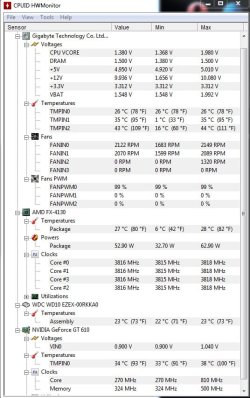
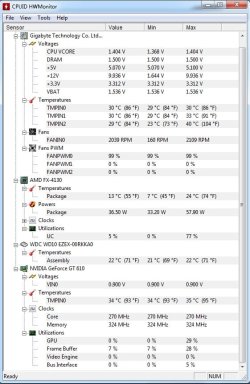
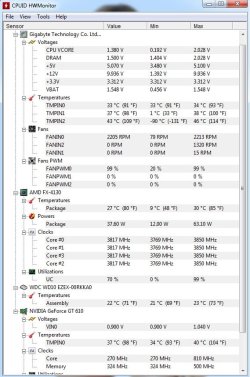
It's been suggested that I pick one monitoring program instead of 3. So here are the results.
The first one is the computer working on video compression.
The second is after it finished.
The third is only included because of the huge jump in temperature that I don't understand because it was idling.
A few minutes later, while erasing the files I had just done, the cat jumped on the table, there was a static discharge when he touched the computer case and the computer went down. I'm thinking the power supply is not properly grounded. I wont be using it again until the new power supply is installed.
I welcome any other ideas.

I know there's a way to line these up horizontally, but I don't know how to do it...
 

Attachments

  • Idle 3.jpg
    Idle 3.jpg
    76.7 KB · Views: 3
  • Idle 2.jpg
    Idle 2.jpg
    74.7 KB · Views: 3
  • Under Load.jpg
    Under Load.jpg
    76.2 KB · Views: 3

My Computer

Computer type
PC/Desktop
Computer Manufacturer/Model Number
Custom Build
OS
Windows 7 Ultimate x64
CPU
AMD FX-4130
Motherboard
ASUS M5A78L-M LX Plus
Memory
8GB G-Skill DDR3-1600
Graphics Card(s)
eVGA GT 520
Hard Drives
Hitachi HDS721010CLA332 1TB
Antivirus
Vipre
Browser
Nightly, Opera
Temps look okay but the voltages are just horrible.
Do as AddRAM has suggested in post #12 and compare.
That will give you some idea if HWMonitor is working properly with you system.
 

My Computer

Computer type
PC/Desktop
Computer Manufacturer/Model Number
Home made Desktop
OS
Windows 10 Pro. 64/ version 1709 Windows 7 Pro/64
CPU
Intel i7-6800K @ 4.3
Motherboard
ASUS X-99 Deluxe II
Memory
Corsair Platinum 16 gig @2400
Graphics Card(s)
EVGA GTX 1070 OC
Monitor(s) Displays
Asus 27" LED LCD/VE278Q
Screen Resolution
1920-1080 or 1280-720 HDMI
Hard Drives
INTEL SSD 730-240 Gb Sata 3.0/
PSU
EVGA Platium 1200W
Case
Phanteks Luxe Tempered Glass 8 fans/ one radiator
Cooling
XSPC/ Water Cooled CPU
Keyboard
Das 4 Professional
Mouse
Logitech M705/MX Anywhere 2-S
Internet Speed
100 mbits
Antivirus
Microsoft Security Essentials/ Malwarebytes Premium 3.0/ SAS
Browser
I.E. 11 default/Firefox/ ISP Time Warner Cable/Spectrum
Other Info
LG BluRay Burner/
Sound system-KLipsch-THX/
Icy Dock ssd Hot Swap bays.
Temps look okay but the voltages are just horrible.
Do as AddRAM has suggested in post #12 and compare.
That will give you some idea if HWMonitor is working properly with you system.


I think the main issue here is the PSU is underpowering everything 12+ is way below 10+volts no way should you be exceeding almost 2.volts on Vcore the PSU is a situation for you because it might burn everything up you keep using it
 

My Computer

Computer type
PC/Desktop
Computer Manufacturer/Model Number
CoreI7-6700K MrFingerIII Special Builds
OS
Windows 10 Home Premium 64bit sp1
CPU
Intel I7-6700K @ 4.6 Ghz 1.344 volts everyday OC
Motherboard
Asrock Fatality K6 Z170 Socket 1151
Memory
32GB G-Skill TridentZ 3200mhz 16-18-18-38 DDR4
Graphics Card(s)
Sli Gigabyte Windforce GTX 980 G1
Sound Card
AC97 Creative Rage Tactic 3D Headphones Bluetooth
Monitor(s) Displays
27" Asus ROG Swift PG278Q G-Sync 48" Vizio Smart HD TV
Screen Resolution
2560x1440p 27"- 48" Currently Gaming at 2560x1440p Res 2K
Hard Drives
250GB Samsung Evo840SSD Seagate baracuda 500 GB WD Mybook 500Gb 1TB Seagate Barracuda
PSU
HX1050w Corsair Silver 80plus certified crosfire/sli
Case
Enthod Pro Full Tower
Cooling
Corsair H110i GT 280 mm High Performance WaterBlock
Keyboard
Logitech wireless keyboard
Mouse
Logitech wireless mouse
Internet Speed
Cox Cable 100+ mb
Antivirus
WebRoot Spysweeper with Antivirus
Browser
IE-10, Chrome, Opera
Other Info
My Other Rig is a AMD FX8320E @4.6Ghz 16GB Ballistic Sport Ram
Mobo Asrock Fatality 990FX 120GB OCZ SSD 1TB Seagate Barracuda Corsair H75 Cooling PSU Corsair CX750
GPU GTX Gigabyte 970G1
I agree I would not use the computer with that power supply.

LeonDroid wait for the new power supply. Then get back to us.
Were open 24/7/365.

I would also install a new motherboard battery. (Cmos)
Vbat should be 3.0 volts or very very close.
 

My Computer

Computer type
PC/Desktop
Computer Manufacturer/Model Number
Home made Desktop
OS
Windows 10 Pro. 64/ version 1709 Windows 7 Pro/64
CPU
Intel i7-6800K @ 4.3
Motherboard
ASUS X-99 Deluxe II
Memory
Corsair Platinum 16 gig @2400
Graphics Card(s)
EVGA GTX 1070 OC
Monitor(s) Displays
Asus 27" LED LCD/VE278Q
Screen Resolution
1920-1080 or 1280-720 HDMI
Hard Drives
INTEL SSD 730-240 Gb Sata 3.0/
PSU
EVGA Platium 1200W
Case
Phanteks Luxe Tempered Glass 8 fans/ one radiator
Cooling
XSPC/ Water Cooled CPU
Keyboard
Das 4 Professional
Mouse
Logitech M705/MX Anywhere 2-S
Internet Speed
100 mbits
Antivirus
Microsoft Security Essentials/ Malwarebytes Premium 3.0/ SAS
Browser
I.E. 11 default/Firefox/ ISP Time Warner Cable/Spectrum
Other Info
LG BluRay Burner/
Sound system-KLipsch-THX/
Icy Dock ssd Hot Swap bays.
Temps look okay but the voltages are just horrible.
Do as AddRAM has suggested in post #12 and compare.
That will give you some idea if HWMonitor is working properly with you system.

The temp that concerned me was "TMPIN2 @ 117 C, or maybe that doesn't mean what I think it does. The computer idled from about 11:30 PM to 1:00 AM, so I wonder what caused the sudden temp spike.

I think the main issue here is the PSU is underpowering everything 12+ is way below 10+volts no way should you be exceeding almost 2.volts on Vcore the PSU is a situation for you because it might burn everything up you keep using it

I agree. I now believe the PSU is improperly grounded, which can cause all kinds of problems. These are not even the worst. I'm wondering if I should check this by running a wire from the chassis to the ground screw on an outlet. A replacement will be here next week.
 

My Computer

Computer type
PC/Desktop
Computer Manufacturer/Model Number
Custom Build
OS
Windows 7 Ultimate x64
CPU
AMD FX-4130
Motherboard
ASUS M5A78L-M LX Plus
Memory
8GB G-Skill DDR3-1600
Graphics Card(s)
eVGA GT 520
Hard Drives
Hitachi HDS721010CLA332 1TB
Antivirus
Vipre
Browser
Nightly, Opera
I will say again. I do not recommend turning on your computer until you replace the power supply.

With a bad power supply and a weak Vbat I would not trust any reading your are getting.
Replace the power supply and the motherboard battery and let us know when that is done and we can start again with any problems you might have.
 

My Computer

Computer type
PC/Desktop
Computer Manufacturer/Model Number
Home made Desktop
OS
Windows 10 Pro. 64/ version 1709 Windows 7 Pro/64
CPU
Intel i7-6800K @ 4.3
Motherboard
ASUS X-99 Deluxe II
Memory
Corsair Platinum 16 gig @2400
Graphics Card(s)
EVGA GTX 1070 OC
Monitor(s) Displays
Asus 27" LED LCD/VE278Q
Screen Resolution
1920-1080 or 1280-720 HDMI
Hard Drives
INTEL SSD 730-240 Gb Sata 3.0/
PSU
EVGA Platium 1200W
Case
Phanteks Luxe Tempered Glass 8 fans/ one radiator
Cooling
XSPC/ Water Cooled CPU
Keyboard
Das 4 Professional
Mouse
Logitech M705/MX Anywhere 2-S
Internet Speed
100 mbits
Antivirus
Microsoft Security Essentials/ Malwarebytes Premium 3.0/ SAS
Browser
I.E. 11 default/Firefox/ ISP Time Warner Cable/Spectrum
Other Info
LG BluRay Burner/
Sound system-KLipsch-THX/
Icy Dock ssd Hot Swap bays.
Agreed, it`s not worth risking your hardware if you have a dodgy PSU :)
 

My Computer

Computer type
PC/Desktop
Computer Manufacturer/Model Number
Skylake Special #666
OS
Windows 10 Pro x64
CPU
Intel Core i7 6700K
Motherboard
Asus Sabertooth Z170 Mark 1
Memory
GSkill TridentZ RGB 16GB 3600 16-16-16-36
Graphics Card(s)
EVGA GTX 980 Ti SC x2
Sound Card
Realtek High Definition
Monitor(s) Displays
AOC G2460PG
Screen Resolution
1920 x 1080 144Hz
Hard Drives
Samsung 860 Pro 256GB, Seagate Barracuda 4TB x2
PSU
EVGA 1000 P2, EVGA White Custom Braided Cables
Case
Corsair Vengeance C70 Gunmetal Black
Cooling
Corsair H100i v2, Corsair ML120 x2, Thermal Grizzly Kryonaut
Keyboard
Logitech G910 Orion Spectrum
Mouse
Logitech G700s
Internet Speed
Verizon Fios Quantum Gateway 75/75
Antivirus
Windows Defender, Malwarebytes Free 3.8.3
Browser
Chrome
Other Info
Corsair SP120 x4, LG Blu-ray Drive, Durabrand HT-395 100 Watt Dolby Digital Amp, Corsair H2100 Wireless 7.1 Headset
Sorry it took an extra week to get this done. I had some unexpected things come up.
I got the new PSU, installed it, and put the computer to work doing what it will be used for most often. Here are 3 screenshots of HWMonitor at boot up, while idling, and working. It's the best I can do unless there is a program that can used to stress test the PC. The new batteries should be here in a day or two.
 

Attachments

  • New PSU Boot.jpg
    New PSU Boot.jpg
    73.9 KB · Views: 3
  • New PSU Idle3.jpg
    New PSU Idle3.jpg
    75.3 KB · Views: 3
  • New PSU Work 3.jpg
    New PSU Work 3.jpg
    77.3 KB · Views: 3

My Computer

Computer type
PC/Desktop
Computer Manufacturer/Model Number
Custom Build
OS
Windows 7 Ultimate x64
CPU
AMD FX-4130
Motherboard
ASUS M5A78L-M LX Plus
Memory
8GB G-Skill DDR3-1600
Graphics Card(s)
eVGA GT 520
Hard Drives
Hitachi HDS721010CLA332 1TB
Antivirus
Vipre
Browser
Nightly, Opera
Back
Top