Is it really overheating, bad sensor, or another problem?

Your +12 V still only says 9.9 I`m not sure exactly what that is supposed to say using hardware monitor.

My 1000 watt EVGA only says 7.08 Volts there, so who knows if that`s suppose to fluctuate or not, the only true way to test that is with a volt meter.

But I really don`t see any difference in your screenshots.

Use the bios to check the voltages and temps, I just went in and my +12 volts is fine, so I wouldn`t trust Hardware Monitor too much.

What power supply did you get ?

Post a link please.
 

My Computer My Computer

Computer type
PC/Desktop
Computer Manufacturer/Model Number
Skylake Special #666
OS
Windows 10 Pro x64
CPU
Intel Core i7 6700K
Motherboard
Asus Sabertooth Z170 Mark 1
Memory
GSkill TridentZ RGB 16GB 3600 16-16-16-36
Graphics Card(s)
EVGA GTX 980 Ti SC x2
Sound Card
Realtek High Definition
Monitor(s) Displays
AOC G2460PG
Screen Resolution
1920 x 1080 144Hz
Hard Drives
Samsung 860 Pro 256GB, Seagate Barracuda 4TB x2
PSU
EVGA 1000 P2, EVGA White Custom Braided Cables
Case
Corsair Vengeance C70 Gunmetal Black
Cooling
Corsair H100i v2, Corsair ML120 x2, Thermal Grizzly Kryonaut
Keyboard
Logitech G910 Orion Spectrum
Mouse
Logitech G700s
Internet Speed
Verizon Fios Quantum Gateway 75/75
Antivirus
Windows Defender, Malwarebytes Free 3.8.3
Browser
Chrome
Other Info
Corsair SP120 x4, LG Blu-ray Drive, Durabrand HT-395 100 Watt Dolby Digital Amp, Corsair H2100 Wireless 7.1 Headset
:ditto:Hardware Monitor reads low voltage for a lot of users. Check the BIOS
 

My Computer My Computer

Computer type
PC/Desktop
Computer Manufacturer/Model Number
Dude Build
OS
Windows 10 Pro X64
CPU
Intel(R) Core(TM) i5-3570K CPU OC@ 4.5GHZ Turbo
Motherboard
MSI Z77A-G45 Gaming
Memory
8.00 GB DDR3 1600Mhz
Graphics Card(s)
MSI Gaming X GTX 1070
Sound Card
Realtek High Definition
Monitor(s) Displays
Dell S23O9W, HP L1710
Screen Resolution
DELL-1920 x 1080 HP-1280 x1024
Hard Drives
Crucial m4 256 SSD, WD 7200RPM 500GB WD 1TB
PSU
Seasonic X650 GOLD
Case
Zalman Z12
Cooling
Antec Kuhler 920
Keyboard
Logitech
Mouse
MSI DS100 Interceptor
Internet Speed
50 down and 5 up
Antivirus
MSE
Browser
Chrome, IE 11
Other Info
Logitech X-620 Speakers
Correct.

Hardware Monitor has not been working correctly for many in the last couple of weeks.
Hopefully Hardware Monitor people will get it fixed soon. It has been a good program for a long time is the past.
 

My Computer My Computer

Computer type
PC/Desktop
Computer Manufacturer/Model Number
Home made Desktop
OS
Windows 10 Pro. 64/ version 1709 Windows 7 Pro/64
CPU
Intel i7-6800K @ 4.3
Motherboard
ASUS X-99 Deluxe II
Memory
Corsair Platinum 16 gig @2400
Graphics Card(s)
EVGA GTX 1070 OC
Monitor(s) Displays
Asus 27" LED LCD/VE278Q
Screen Resolution
1920-1080 or 1280-720 HDMI
Hard Drives
INTEL SSD 730-240 Gb Sata 3.0/
PSU
EVGA Platium 1200W
Case
Phanteks Luxe Tempered Glass 8 fans/ one radiator
Cooling
XSPC/ Water Cooled CPU
Keyboard
Das 4 Professional
Mouse
Logitech M705/MX Anywhere 2-S
Internet Speed
100 mbits
Antivirus
Microsoft Security Essentials/ Malwarebytes Premium 3.0/ SAS
Browser
I.E. 11 default/Firefox/ ISP Time Warner Cable/Spectrum
Other Info
LG BluRay Burner/
Sound system-KLipsch-THX/
Icy Dock ssd Hot Swap bays.

My Computer My Computer

Computer type
PC/Desktop
Computer Manufacturer/Model Number
Skylake Special #666
OS
Windows 10 Pro x64
CPU
Intel Core i7 6700K
Motherboard
Asus Sabertooth Z170 Mark 1
Memory
GSkill TridentZ RGB 16GB 3600 16-16-16-36
Graphics Card(s)
EVGA GTX 980 Ti SC x2
Sound Card
Realtek High Definition
Monitor(s) Displays
AOC G2460PG
Screen Resolution
1920 x 1080 144Hz
Hard Drives
Samsung 860 Pro 256GB, Seagate Barracuda 4TB x2
PSU
EVGA 1000 P2, EVGA White Custom Braided Cables
Case
Corsair Vengeance C70 Gunmetal Black
Cooling
Corsair H100i v2, Corsair ML120 x2, Thermal Grizzly Kryonaut
Keyboard
Logitech G910 Orion Spectrum
Mouse
Logitech G700s
Internet Speed
Verizon Fios Quantum Gateway 75/75
Antivirus
Windows Defender, Malwarebytes Free 3.8.3
Browser
Chrome
Other Info
Corsair SP120 x4, LG Blu-ray Drive, Durabrand HT-395 100 Watt Dolby Digital Amp, Corsair H2100 Wireless 7.1 Headset
Your +12 V still only says 9.9 I`m not sure exactly what that is supposed to say using hardware monitor.

My 1000 watt EVGA only says 7.08 Volts there, so who knows if that`s suppose to fluctuate or not, the only true way to test that is with a volt meter.

But I really don`t see any difference in your screenshots.

Use the bios to check the voltages and temps, I just went in and my +12 volts is fine, so I wouldn`t trust Hardware Monitor too much.

What power supply did you get ?

Post a link please.

I'm concerned with the 1.9 & 2.02 V readings for the CPU and the 117 C & 115 C temp spikes in TMPIN1 & TMPIN2 (or should my only concern be the temperatures listed under AMD FX-4130?).

This is the PSU I bought: CORSAIR CX series CX500 500W ATX12V v2.3 80 PLUS BRONZE Certified Active PFC Power Supply - Newegg.com

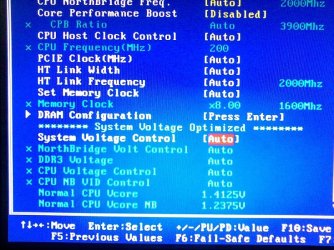
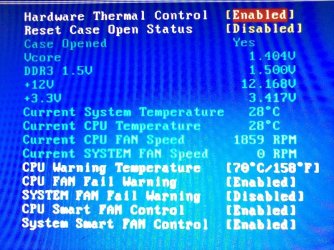
Posting pictures of the BIOS screens...

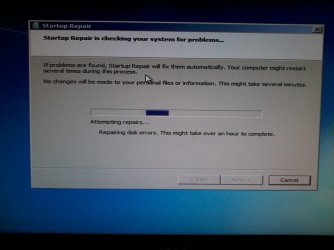
And a picture of the message I got when I booted the computer. It's been running over 4 hours as of this posting.
 

Attachments

  • BIOS-01.jpg
    BIOS-01.jpg
    125.1 KB · Views: 2
  • BIOS-02.jpg
    BIOS-02.jpg
    123.2 KB · Views: 2
  • Error-01.jpg
    Error-01.jpg
    39.3 KB · Views: 2

My Computer My Computer

Computer type
PC/Desktop
Computer Manufacturer/Model Number
Custom Build
OS
Windows 7 Ultimate x64
CPU
AMD FX-4130
Motherboard
ASUS M5A78L-M LX Plus
Memory
8GB G-Skill DDR3-1600
Graphics Card(s)
eVGA GT 520
Hard Drives
Hitachi HDS721010CLA332 1TB
Antivirus
Vipre
Browser
Nightly, Opera
Everything in the bios looks fine.

Hardware monitor is garbage, it`s not reading temps right, uninstall it. :)

Why is it running startup repair ?

Get your data off (if you have anything important) you shouldn`t, and reinstall windows.
 

My Computer My Computer

Computer type
PC/Desktop
Computer Manufacturer/Model Number
Skylake Special #666
OS
Windows 10 Pro x64
CPU
Intel Core i7 6700K
Motherboard
Asus Sabertooth Z170 Mark 1
Memory
GSkill TridentZ RGB 16GB 3600 16-16-16-36
Graphics Card(s)
EVGA GTX 980 Ti SC x2
Sound Card
Realtek High Definition
Monitor(s) Displays
AOC G2460PG
Screen Resolution
1920 x 1080 144Hz
Hard Drives
Samsung 860 Pro 256GB, Seagate Barracuda 4TB x2
PSU
EVGA 1000 P2, EVGA White Custom Braided Cables
Case
Corsair Vengeance C70 Gunmetal Black
Cooling
Corsair H100i v2, Corsair ML120 x2, Thermal Grizzly Kryonaut
Keyboard
Logitech G910 Orion Spectrum
Mouse
Logitech G700s
Internet Speed
Verizon Fios Quantum Gateway 75/75
Antivirus
Windows Defender, Malwarebytes Free 3.8.3
Browser
Chrome
Other Info
Corsair SP120 x4, LG Blu-ray Drive, Durabrand HT-395 100 Watt Dolby Digital Amp, Corsair H2100 Wireless 7.1 Headset
Are you actually able to feel the heat off the computer? 100+ in celcius will def be noticable around the case.

Your processor shoumd be ok up to around the 70's in terms of celsius, it wont be so good for you but the chip can take it. Its performance would be lowered though as its conductivity will be down
 

My Computer My Computer

Computer type
PC/Desktop
Computer Manufacturer/Model Number
custom build
OS
Windows Ultimate x64
CPU
AMD FX-8350 Eight-Core
Motherboard
Gigabyte 990FXA-UD3
Memory
G.SKILL Ripjaws X Series 16GB (2x8GB) DDR3 1600MHz
Graphics Card(s)
AMD Radeon R7 200
Sound Card
ASUS Xonar DG Audio
Monitor(s) Displays
Samsung SME2020
Screen Resolution
1600x900 64Hz
Hard Drives
Samsung HD501LJ ATA 500GB
ST3500413AS ATA 500GB
PSU
Corsair CX750M Bronze Plus
Case
Thermaltake CoreX9
Cooling
Corsair H100i
Keyboard
Merc Stealth
Mouse
Logitech G9
Antivirus
AVAST ESSENTIAL
Browser
Firefox
Everything in the bios looks fine.

Hardware monitor is garbage, it`s not reading temps right, uninstall it. :)

Why is it running startup repair ?

Get your data off (if you have anything important) you shouldn`t, and reinstall windows.

I have no idea why it was running startup repair. It finished shortly after I posted that and when I logged in there was an error on the desktop telling me that it couldn't start because a dll file was missing. Some of the icons are gone as well as entire programs missing from their program files folders. Browsers, email client, BigFish game is manager gone but the games are still in their folders....Oh, and no need to uninstall Hardware Monitor...it disappeared too. For future reference is there one that does work well?

Which brings me to this question...Do I need to reinstall windows or buy a new hard drive then reinstall? The reason I ask is because my hard drive has 3 partitions (250 GB, 32GB, & 650 GB). The OS is on the 250GB partition and the 650GB partition is where I store everything I want to keep in case windows crashes. Also, I'm a big fan of redundancy & having multiple copies of everything important.


link238: I only actually felt heat the first time it overheated. At that time I removed the HS/Fan that came with it and replaced it with the HS/Fan from an AMD FX-8350. Hardware Monitor and Core Temp still gave me temp spikes of 117 C & 256 C respectively despite the fact that there is no evidence that there was ever a temperature that high (the back of the motherboard would be discolored).
 

My Computer My Computer

Computer type
PC/Desktop
Computer Manufacturer/Model Number
Custom Build
OS
Windows 7 Ultimate x64
CPU
AMD FX-4130
Motherboard
ASUS M5A78L-M LX Plus
Memory
8GB G-Skill DDR3-1600
Graphics Card(s)
eVGA GT 520
Hard Drives
Hitachi HDS721010CLA332 1TB
Antivirus
Vipre
Browser
Nightly, Opera
no need to uninstall Hardware Monitor...it disappeared too. For future reference is there one that does work well?

Which brings me to this question...Do I need to reinstall windows or buy a new hard drive then reinstall? The reason I ask is because my hard drive has 3 partitions (250 GB, 32GB, & 650 GB). The OS is on the 250GB partition and the 650GB partition is where I store everything I want to keep in case windows crashes. Also, I'm a big fan of redundancy & having multiple copies of everything important.

You can look at Speccy, a free download from Piriform. It's generally well thought of but I won't say it's flawless. Here's a sample screen shot.

If you want to stress test the PC, you can run something like Prime95.

Re 3 partitions: Good idea to have data separate from OS, but do you have the data backed up onto another discrete drive? What's on the 32 GB partition?
 

Attachments

  • Untitled-1.jpg
    Untitled-1.jpg
    86.1 KB · Views: 2

My Computer My Computer

Computer type
PC/Desktop
Computer Manufacturer/Model Number
Ignatz Special; 4 speed manual gearbox; factory air conditioning; one of one
OS
Windows 7 Home Premium SP1, 64-bit
CPU
Intel Skylake i5-6600K, not overclocked
Motherboard
AsRock Z170M Extreme 4, micro ATX
Memory
8 GB HyperX DDR4-2666 (2 x 4 GB)
Graphics Card(s)
none; graphics are integrated on CPU
Sound Card
onboard: Realtek ALC1150; external: USB Behringer UF0-202
Monitor(s) Displays
Dell S2340M 23 inch IPS
Screen Resolution
1600 x 900
Hard Drives
System: Crucial MX100 series SSD, 128 GB;
Data: Samsung Spinpoint 103SJ, 1 TB;
Backup: WD Caviar Green WD30EZRX-00D8PB0, 3 TB
PSU
Rosewill SilentNight 500 watt fanless, semi-modular
Case
Antec Solo II
Cooling
Noctua NH-U12S; Noctua F12 intake, Noctua S12A exhaust
Keyboard
Microsoft 200 6JH-00001 USB
Mouse
Dell or Microsoft optical wired; USB
Antivirus
Microsoft Security Essentials and Malwarebytes Premium
Browser
Pale Moon
Other Info
All fans PWM; speeds at idle: CPU circa 500 rpm; intake circa 600 rpm; exhaust circa 600 rpm; CPU temps 27 idle and 47 C load in a warm room (27 C/81 F) when running Intel Extreme Tuning Utility stress test.
Was thinking of asking about the other partition.

The h/s fan on a 8350 isnt any better. These things generate a ton of heat. I run a 8350 and recently switched over to liquid cooling. If you can support it i would def suggest it. Corsair or cooler master are cheap but good. I would regularly get temps around 40c around my processor. Had a house fan blowing on the sob constantly and still wasnt good. But i do have to say, never went up to 60 let alone 70 or 100. As for new install, not sure.

One thing i'd suggest is something like an external temp monitoring addon. For example i'm going to be getting an NZXT Sentry 3, its a mix fan control and temp sensors
 

My Computer My Computer

Computer type
PC/Desktop
Computer Manufacturer/Model Number
custom build
OS
Windows Ultimate x64
CPU
AMD FX-8350 Eight-Core
Motherboard
Gigabyte 990FXA-UD3
Memory
G.SKILL Ripjaws X Series 16GB (2x8GB) DDR3 1600MHz
Graphics Card(s)
AMD Radeon R7 200
Sound Card
ASUS Xonar DG Audio
Monitor(s) Displays
Samsung SME2020
Screen Resolution
1600x900 64Hz
Hard Drives
Samsung HD501LJ ATA 500GB
ST3500413AS ATA 500GB
PSU
Corsair CX750M Bronze Plus
Case
Thermaltake CoreX9
Cooling
Corsair H100i
Keyboard
Merc Stealth
Mouse
Logitech G9
Antivirus
AVAST ESSENTIAL
Browser
Firefox
With all those issues, I would definitely reinstall windows.

Once again, the bios is the only place to check true temp readings.
 

My Computer My Computer

Computer type
PC/Desktop
Computer Manufacturer/Model Number
Skylake Special #666
OS
Windows 10 Pro x64
CPU
Intel Core i7 6700K
Motherboard
Asus Sabertooth Z170 Mark 1
Memory
GSkill TridentZ RGB 16GB 3600 16-16-16-36
Graphics Card(s)
EVGA GTX 980 Ti SC x2
Sound Card
Realtek High Definition
Monitor(s) Displays
AOC G2460PG
Screen Resolution
1920 x 1080 144Hz
Hard Drives
Samsung 860 Pro 256GB, Seagate Barracuda 4TB x2
PSU
EVGA 1000 P2, EVGA White Custom Braided Cables
Case
Corsair Vengeance C70 Gunmetal Black
Cooling
Corsair H100i v2, Corsair ML120 x2, Thermal Grizzly Kryonaut
Keyboard
Logitech G910 Orion Spectrum
Mouse
Logitech G700s
Internet Speed
Verizon Fios Quantum Gateway 75/75
Antivirus
Windows Defender, Malwarebytes Free 3.8.3
Browser
Chrome
Other Info
Corsair SP120 x4, LG Blu-ray Drive, Durabrand HT-395 100 Watt Dolby Digital Amp, Corsair H2100 Wireless 7.1 Headset
With all those issues, I would definitely reinstall windows.

Once again, the bios is the only place to check true temp readings.
Agreed Bios will actually give you a top CPU temp as well

If you are going for water cooling getting one with Monitoring Software is a real way to go but only Top Tier Models offer that so if you're looking for good cooling you will be looking at at least $100+

Everything else looks good though :geek:
 

My Computer My Computer

Computer type
PC/Desktop
Computer Manufacturer/Model Number
CoreI7-6700K MrFingerIII Special Builds
OS
Windows 10 Home Premium 64bit sp1
CPU
Intel I7-6700K @ 4.6 Ghz 1.344 volts everyday OC
Motherboard
Asrock Fatality K6 Z170 Socket 1151
Memory
32GB G-Skill TridentZ 3200mhz 16-18-18-38 DDR4
Graphics Card(s)
Sli Gigabyte Windforce GTX 980 G1
Sound Card
AC97 Creative Rage Tactic 3D Headphones Bluetooth
Monitor(s) Displays
27" Asus ROG Swift PG278Q G-Sync 48" Vizio Smart HD TV
Screen Resolution
2560x1440p 27"- 48" Currently Gaming at 2560x1440p Res 2K
Hard Drives
250GB Samsung Evo840SSD Seagate baracuda 500 GB WD Mybook 500Gb 1TB Seagate Barracuda
PSU
HX1050w Corsair Silver 80plus certified crosfire/sli
Case
Enthod Pro Full Tower
Cooling
Corsair H110i GT 280 mm High Performance WaterBlock
Keyboard
Logitech wireless keyboard
Mouse
Logitech wireless mouse
Internet Speed
Cox Cable 100+ mb
Antivirus
WebRoot Spysweeper with Antivirus
Browser
IE-10, Chrome, Opera
Other Info
My Other Rig is a AMD FX8320E @4.6Ghz 16GB Ballistic Sport Ram
Mobo Asrock Fatality 990FX 120GB OCZ SSD 1TB Seagate Barracuda Corsair H75 Cooling PSU Corsair CX750
GPU GTX Gigabyte 970G1
If you can support it, corsair h100i works wonders and has temp monitoring software for the pc and the pump. It uses a twin 120mm radiator (uses two 120mm fans) so if you have two top of case 120s that are joined up or 2 side/back fan spaces available you can use that. What kind of case do you use? Sorry if its in your sys specs, im on my phone
 

My Computer My Computer

Computer type
PC/Desktop
Computer Manufacturer/Model Number
custom build
OS
Windows Ultimate x64
CPU
AMD FX-8350 Eight-Core
Motherboard
Gigabyte 990FXA-UD3
Memory
G.SKILL Ripjaws X Series 16GB (2x8GB) DDR3 1600MHz
Graphics Card(s)
AMD Radeon R7 200
Sound Card
ASUS Xonar DG Audio
Monitor(s) Displays
Samsung SME2020
Screen Resolution
1600x900 64Hz
Hard Drives
Samsung HD501LJ ATA 500GB
ST3500413AS ATA 500GB
PSU
Corsair CX750M Bronze Plus
Case
Thermaltake CoreX9
Cooling
Corsair H100i
Keyboard
Merc Stealth
Mouse
Logitech G9
Antivirus
AVAST ESSENTIAL
Browser
Firefox
You can look at Speccy, a free download from Piriform. It's generally well thought of but I won't say it's flawless. Here's a sample screen shot.

If you want to stress test the PC, you can run something like Prime95.

Re 3 partitions: Good idea to have data separate from OS, but do you have the data backed up onto another discrete drive? What's on the 32 GB partition?

1: Already have Speccy. It pretty much agrees with the readings of the other programs.
2: I thought Prime95 was for Intel based systems. I can't afford them top shelf processors. I use the AMDs...on sale (e.g. my AMD FX-8350 only cost me $130 from TD).
3: The 32GB partition was intended for PageFile.sys, but ended up being used for a Staging Area, PC Purgatory, PC Paddock...whatever you want to call it? Its a redundant storage place for files from other computers, Program settings backups, files being moved into or out of the computer (like the screenshots I've posted). My most important files are double & triple backed up excluding the external hard drives.

link238: When I continued to get overheating warnings, I took the FX-8350 HS/Fan out and replaced it with an Arctic Freezer 13: ARCTIC Freezer 13 with 92mm PWM Fan - Newegg.com
The case is a Thermaltake V4 Black Ed: Thermaltake V4 Black Edition Gaming Chassis Mid Tower Steel Computer Case Fully Black Powdered Interior VM30001W2Z - Newegg.com It says it supports 2 120mm top fans, but the memory retainer clips block the forward most one.

My FX-8350 is Liquid Cooled by a Zalman LQ-310, but that's in a different computer than the one this thread is focused on, and way more computer than I'll ever need.
 
Last edited:

My Computer My Computer

Computer type
PC/Desktop
Computer Manufacturer/Model Number
Custom Build
OS
Windows 7 Ultimate x64
CPU
AMD FX-4130
Motherboard
ASUS M5A78L-M LX Plus
Memory
8GB G-Skill DDR3-1600
Graphics Card(s)
eVGA GT 520
Hard Drives
Hitachi HDS721010CLA332 1TB
Antivirus
Vipre
Browser
Nightly, Opera
not a bad case or cooler. Try an os reinstall and get back to us.
 

My Computer My Computer

Computer type
PC/Desktop
Computer Manufacturer/Model Number
custom build
OS
Windows Ultimate x64
CPU
AMD FX-8350 Eight-Core
Motherboard
Gigabyte 990FXA-UD3
Memory
G.SKILL Ripjaws X Series 16GB (2x8GB) DDR3 1600MHz
Graphics Card(s)
AMD Radeon R7 200
Sound Card
ASUS Xonar DG Audio
Monitor(s) Displays
Samsung SME2020
Screen Resolution
1600x900 64Hz
Hard Drives
Samsung HD501LJ ATA 500GB
ST3500413AS ATA 500GB
PSU
Corsair CX750M Bronze Plus
Case
Thermaltake CoreX9
Cooling
Corsair H100i
Keyboard
Merc Stealth
Mouse
Logitech G9
Antivirus
AVAST ESSENTIAL
Browser
Firefox
Which brings up the final question...
Is there any way, short of using an Ubuntu disk or different PC to reformat the OS partition, to reinstall W7 w/o it creating the Windows.old folder?
 

My Computer My Computer

Computer type
PC/Desktop
Computer Manufacturer/Model Number
Custom Build
OS
Windows 7 Ultimate x64
CPU
AMD FX-4130
Motherboard
ASUS M5A78L-M LX Plus
Memory
8GB G-Skill DDR3-1600
Graphics Card(s)
eVGA GT 520
Hard Drives
Hitachi HDS721010CLA332 1TB
Antivirus
Vipre
Browser
Nightly, Opera

My Computer My Computer

Computer type
PC/Desktop
Computer Manufacturer/Model Number
Dude Build
OS
Windows 10 Pro X64
CPU
Intel(R) Core(TM) i5-3570K CPU OC@ 4.5GHZ Turbo
Motherboard
MSI Z77A-G45 Gaming
Memory
8.00 GB DDR3 1600Mhz
Graphics Card(s)
MSI Gaming X GTX 1070
Sound Card
Realtek High Definition
Monitor(s) Displays
Dell S23O9W, HP L1710
Screen Resolution
DELL-1920 x 1080 HP-1280 x1024
Hard Drives
Crucial m4 256 SSD, WD 7200RPM 500GB WD 1TB
PSU
Seasonic X650 GOLD
Case
Zalman Z12
Cooling
Antec Kuhler 920
Keyboard
Logitech
Mouse
MSI DS100 Interceptor
Internet Speed
50 down and 5 up
Antivirus
MSE
Browser
Chrome, IE 11
Other Info
Logitech X-620 Speakers
Make sure you are booting from the dvd and not trying to re install from within windows.

It`s all explained in the link above.
 

My Computer My Computer

Computer type
PC/Desktop
Computer Manufacturer/Model Number
Skylake Special #666
OS
Windows 10 Pro x64
CPU
Intel Core i7 6700K
Motherboard
Asus Sabertooth Z170 Mark 1
Memory
GSkill TridentZ RGB 16GB 3600 16-16-16-36
Graphics Card(s)
EVGA GTX 980 Ti SC x2
Sound Card
Realtek High Definition
Monitor(s) Displays
AOC G2460PG
Screen Resolution
1920 x 1080 144Hz
Hard Drives
Samsung 860 Pro 256GB, Seagate Barracuda 4TB x2
PSU
EVGA 1000 P2, EVGA White Custom Braided Cables
Case
Corsair Vengeance C70 Gunmetal Black
Cooling
Corsair H100i v2, Corsair ML120 x2, Thermal Grizzly Kryonaut
Keyboard
Logitech G910 Orion Spectrum
Mouse
Logitech G700s
Internet Speed
Verizon Fios Quantum Gateway 75/75
Antivirus
Windows Defender, Malwarebytes Free 3.8.3
Browser
Chrome
Other Info
Corsair SP120 x4, LG Blu-ray Drive, Durabrand HT-395 100 Watt Dolby Digital Amp, Corsair H2100 Wireless 7.1 Headset
A clean install will not have a windows.old folder. Look at step 6 here

http://www.sevenforums.com/tutorials/1649-clean-install-windows-7-a.html?ltr=C

Actually, the most helpful steps were 7 & 8. Although neither were specific to my request, I was able to use the information. Now I know what I should have been doing. I am no stranger to reinstalling windows. It's something I try to avoid because it's such a pain. What's most confusing, I was using the Virtual System component of Returnil System Safe (Poor man's Deep Freeze) when this happened.

Back to the temperature issue, is there any way to check the BIOS temps from within windows? I'm guessing not or someone would have already mentioned it.
When I finished doing the reinstall, including the drivers, I restarted the computer to check BIOS temps. The readings were: System: 32 (89.6) & CPU: 33 (91.4). That cannot possibly be the highest temp the CPU reached.
I'm going to give it a workout tomorrow and try out a few more monitoring programs (EasyTune6, AMD OverDrive and SpeedFan) to compare against Speccy & BIOS readings.
 

My Computer My Computer

Computer type
PC/Desktop
Computer Manufacturer/Model Number
Custom Build
OS
Windows 7 Ultimate x64
CPU
AMD FX-4130
Motherboard
ASUS M5A78L-M LX Plus
Memory
8GB G-Skill DDR3-1600
Graphics Card(s)
eVGA GT 520
Hard Drives
Hitachi HDS721010CLA332 1TB
Antivirus
Vipre
Browser
Nightly, Opera
Be careful that they dont interact bad. Its like antivirus, the more you have doesn't mean the better you are off.
 

My Computer My Computer

Computer type
PC/Desktop
Computer Manufacturer/Model Number
custom build
OS
Windows Ultimate x64
CPU
AMD FX-8350 Eight-Core
Motherboard
Gigabyte 990FXA-UD3
Memory
G.SKILL Ripjaws X Series 16GB (2x8GB) DDR3 1600MHz
Graphics Card(s)
AMD Radeon R7 200
Sound Card
ASUS Xonar DG Audio
Monitor(s) Displays
Samsung SME2020
Screen Resolution
1600x900 64Hz
Hard Drives
Samsung HD501LJ ATA 500GB
ST3500413AS ATA 500GB
PSU
Corsair CX750M Bronze Plus
Case
Thermaltake CoreX9
Cooling
Corsair H100i
Keyboard
Merc Stealth
Mouse
Logitech G9
Antivirus
AVAST ESSENTIAL
Browser
Firefox
Back
Top