Gadget issue in Win 7 Ulimate 64 bit

p23185

New member
Member
Local time
1:49 PM
Messages
46
This is a very frustrating topic that I have read on dozens of forum postings.

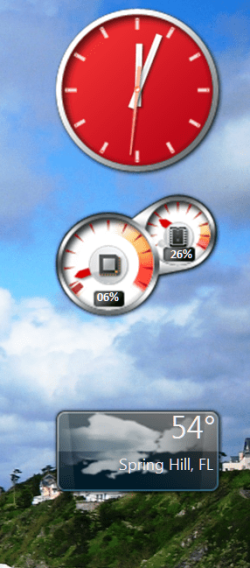
I use two Win Gadgets (clock and weather) and two personal ones (CPU and Network meter). The appear whenever they feel like it after a boot up - e.g. boot up this morning they were all there. Bootup this even trying two times and they are not there. When they refuse to show up I go to control panel and click on "desktop gadgets" and nothing happens. Then I go to start ball and type in windows gadgets and three options come up "Restore desktop gadgets installed with Windows", "Add gadgets to the desktop", and "Get more gadgets". The first two do not work, but the third one takes you to this site Gadgets have been discontinued - Microsoft Windows which contains the following note

Gadgets have been discontinued


Gadgets are no longer available on our website because the Windows Sidebar platform in Windows 7 and Windows Vista has serious vulnerabilities. Microsoft has retired the feature in newer releases of Windows. Gadgets could be exploited to harm your computer, access your computer's files, show you objectionable content, or change their behavior at any time. An attacker could even use a gadget to take complete control of your PC. If you're concerned about the safety of gadgets you’ve downloaded, find out more about gadgets and steps you can take to protect your PC.

Does anyone know when this occurred. A couple of days ago I was troubleshooting this cranky issue and never found anything about gadgets no longer being offered. Does this mean somehow MS has gone into my Win 7 Ultimate and disabled them?
 

My Computer My Computer

At a glance

Windows 7 Ultimate x64i7-26008GbBFGgts250
Computer Manufacturer/Model Number
me/na
OS
Windows 7 Ultimate x64
CPU
i7-2600
Motherboard
Asus P8P67eluxe_i7-2600
Memory
8Gb
Graphics Card(s)
BFGgts250
Sound Card
mobo
Monitor(s) Displays
Acer P236H
Hard Drives
500Gb system Hitachi
1000Gb video Seagate 6.0 Gp/s SATA
1000Gb special project Seagate 3.0Gb/s SATA
PSU
thermaltake_600w
Case
Antec_900
Cooling
fans
Nah, In Windows 7 your gadgets should still work - mine work and I can even install new ones. Have a look into this folder: C:\Program Files\Windows Sidebar\Gadgets - they should all be there. If nothing else, put them into the startup folder and they should start at boot.
 

My Computer My Computer

At a glance

Vista, Windows7, Mint Mate, Zorin, Windows 8from 1.6GHz Duo to i7
Computer Manufacturer/Model Number
HP, Dell, Gateway, Toshiba - 4 laptops and 2 desktops
OS
Vista, Windows7, Mint Mate, Zorin, Windows 8
CPU
from 1.6GHz Duo to i7
Monitor(s) Displays
2x HP w2207
Hard Drives
5x HDD, 7x SSD, 12x Externals
Keyboard
with trackball - no mices
Mouse
Trackball mice
Internet Speed
DSL 6000
The gadgets have not been globally disabled.

Have you installed Internet Explorer 11?

If so, and you have also set the display text size to other than 100%, problems with gadgets will occur.
 

My Computer My Computer

At a glance

Windows 10 Pro x64, Windows 8.1 Pro x64, Wind...INTEL i9-7920X LGA 206664 GB (4 X 16 GB) G-Skill V Series DDR4 3200 ...EVGA GTX 1060 SC 3 GB
Computer type
PC/Desktop
Computer Manufacturer/Model Number
Custom Built
OS
Windows 10 Pro x64, Windows 8.1 Pro x64, Windows 7 Ultimate x64 SP1,
CPU
INTEL i9-7920X LGA 2066
Motherboard
Gigabyte X299-WU8 F3
Memory
64 GB (4 X 16 GB) G-Skill V Series DDR4 3200 Quad Channel
Graphics Card(s)
EVGA GTX 1060 SC 3 GB
Sound Card
Realtek Onboard ALC1220
Monitor(s) Displays
2 x Samsung S27E310
Screen Resolution
1920x1080
Hard Drives
Samsung 2 x 970 EVO Plus 500 GB NVMe
1 x 6TB WD 6003FZBX SATA
1 x 6TB WD 60EFRX SATA
12 x 3TB WD 30EFRX SATA
PSU
Seasonic X-1050
Case
Thermaltake Armor+
Cooling
Corsair H80i V2 Liquid AOI Cooler
Keyboard
Logitech G510s
Mouse
Logitech MX Master 2S
Internet Speed
200 Mb/s
Antivirus
ESET NOD32 13.1
Browser
EDGE (Dev, Canary, Beta), Chrome
Other Info
ASUS RT-AC68U router
Malwarebytes 4.0.4
If so, and you have also set the display text size to other than 100%, problems with gadgets will occur.
I don't think that is a problem. Mine is set to 150% and the gadgets show perfectly.
 

Attachments

  • 2014-02-09_0003.png
    2014-02-09_0003.png
    82.2 KB · Views: 33

My Computer My Computer

At a glance

Vista, Windows7, Mint Mate, Zorin, Windows 8from 1.6GHz Duo to i7
Computer Manufacturer/Model Number
HP, Dell, Gateway, Toshiba - 4 laptops and 2 desktops
OS
Vista, Windows7, Mint Mate, Zorin, Windows 8
CPU
from 1.6GHz Duo to i7
Monitor(s) Displays
2x HP w2207
Hard Drives
5x HDD, 7x SSD, 12x Externals
Keyboard
with trackball - no mices
Mouse
Trackball mice
Internet Speed
DSL 6000
Yes, Gadgets have been discontinued & the security bulletin concerning this was updated on 3 July 2013, according to the information you posted that I read through.
It does seem that disabling Gadgets is the safest policy.
No, MS has not gone into your computer & disabled them, they don't enter anyone's computer. But as you mention Gadgets are unstable so your problems are likely related to that.
 

My Computer My Computer

At a glance

Windows 7 Home Premium 64 bit sp1Intel i5 3570 3.4Ghz Ivy Bridge SKT 1155 quad...G-Skill Rip Jaws 16Gb (8x2) DDR3 -1600 PC3 12...Gigabyte NVIDIA GT610 1Gb DDR3 810/1200 PCI-E...
Computer type
PC/Desktop
Computer Manufacturer/Model Number
Self built using existing case
OS
Windows 7 Home Premium 64 bit sp1
CPU
Intel i5 3570 3.4Ghz Ivy Bridge SKT 1155 quad core
Motherboard
Gigabyte Z77-HD3 SKT 1155 2xSata 3, 4x USB 3.0
Memory
G-Skill Rip Jaws 16Gb (8x2) DDR3 -1600 PC3 12800 CL 10 red
Graphics Card(s)
Gigabyte NVIDIA GT610 1Gb DDR3 810/1200 PCI-E 2.0 Silent
Sound Card
NVIDIA High Definition & Realtech High Definition Audio
Monitor(s) Displays
2 x Philips 226V4L 16:9 aspect ratio
Screen Resolution
1920 x 1080 HD
Hard Drives
Samsung 840 Pro 256gb SSD, SATA 3.
Hitachi Touro Portable 1tb, USB 3.0 HDD used for image b/ups.
PSU
Corsair VS450
Case
Codeng
Cooling
PSU fan & CPU fan
Keyboard
Logitech
Mouse
Logitech Wireless trackball M570
Internet Speed
Wireless 3G. 3mg down & 550kb up.
Antivirus
Bitdefender Internet Security 2020
Browser
Opera (Current Version) & Firefox
Other Info
MS Office 2013 Pro. Davis weather station software. MGE Nova 600 avr UPS.
Two easy things to try. Turn the Windows Gadget Platform off, reboot, then re enable (not every time, just once to see if this fixes the problem

http://www.sevenforums.com/tutorials/5023-windows-features-turn-off.html

Delete the sidebar Settings.ini (it will be recreated automatically). Navigate to

C:\users\(User name)\AppData\Local\Microsoft\Windows Sidebar\Settings.ini

Delete it and reboot.

A Guy
 

My Computer My Computer

At a glance

Windows 10 Home x64INTEL Core i5-750 Quad-Core 3.37GHzHyperX Fury Black Series 8GB (2 x 4GB) 1866MhzEVGA GeForce GTX 750 Superclocked 1GB 128-Bit...
Computer type
PC/Desktop
OS
Windows 10 Home x64
CPU
INTEL Core i5-750 Quad-Core 3.37GHz
Motherboard
ASUS P7P55D
Memory
HyperX Fury Black Series 8GB (2 x 4GB) 1866Mhz
Graphics Card(s)
EVGA GeForce GTX 750 Superclocked 1GB 128-Bit GDDR5
Monitor(s) Displays
LG 32MA68HY 32" IPS
Screen Resolution
1920 x 1080
Hard Drives
Samsung 840 Evo 120GB, SEAGATE 500GB Barracuda® 7200.12, SATA 3 Gb/s, 7200 RPM, 16MB cache
PSU
ANTEC TruePower New TP-550, 80 PLUS, 550W
Case
ANTEC Three Hundred Illusion
Cooling
COOLER MASTER Hyper 212 Plus, 4 x 120mm 1 x 140mm Noctua's
Internet Speed
85 + Mbps
Antivirus
Avast
Browser
Vivaldi

My Computer My Computer

At a glance

Windows 10 Pro x64, Windows 8.1 Pro x64, Wind...INTEL i9-7920X LGA 206664 GB (4 X 16 GB) G-Skill V Series DDR4 3200 ...EVGA GTX 1060 SC 3 GB
Computer type
PC/Desktop
Computer Manufacturer/Model Number
Custom Built
OS
Windows 10 Pro x64, Windows 8.1 Pro x64, Windows 7 Ultimate x64 SP1,
CPU
INTEL i9-7920X LGA 2066
Motherboard
Gigabyte X299-WU8 F3
Memory
64 GB (4 X 16 GB) G-Skill V Series DDR4 3200 Quad Channel
Graphics Card(s)
EVGA GTX 1060 SC 3 GB
Sound Card
Realtek Onboard ALC1220
Monitor(s) Displays
2 x Samsung S27E310
Screen Resolution
1920x1080
Hard Drives
Samsung 2 x 970 EVO Plus 500 GB NVMe
1 x 6TB WD 6003FZBX SATA
1 x 6TB WD 60EFRX SATA
12 x 3TB WD 30EFRX SATA
PSU
Seasonic X-1050
Case
Thermaltake Armor+
Cooling
Corsair H80i V2 Liquid AOI Cooler
Keyboard
Logitech G510s
Mouse
Logitech MX Master 2S
Internet Speed
200 Mb/s
Antivirus
ESET NOD32 13.1
Browser
EDGE (Dev, Canary, Beta), Chrome
Other Info
ASUS RT-AC68U router
Malwarebytes 4.0.4
I have tried everything suggested on this site, putting s shortcut into the app\roaming\start folder, putting my IE11 back to 100%, deleting the .ini file and rebooting and allowing the OS to rebuild it, GADGETS HAS A MIND OF IT'S OWN, and it doesn't appear to matter if it is a stock Win gadget or a person gadget downloaded off the internet. My gadgets loaded just fine this morning but when I returned tonight and booted up they are all missing.

They worked just find on a Win 7 Ultimate 64 bit that I just gave to my son-in-law. Different Asus Mobo but same operating system, same IE 11, different make of SSD as C drive, but all that shouldn't make any difference. All the Win updates are in place. Some things MS just doesn't seem to master very well. There should be some simple solution like changing a piece of code in some location, but apparently no one has been able to find it yet, and now MS has discontinued gadgets so I guess they will not expend any effort on finding the bug.
 

My Computer My Computer

At a glance

Windows 7 Ultimate x64i7-26008GbBFGgts250
Computer Manufacturer/Model Number
me/na
OS
Windows 7 Ultimate x64
CPU
i7-2600
Motherboard
Asus P8P67eluxe_i7-2600
Memory
8Gb
Graphics Card(s)
BFGgts250
Sound Card
mobo
Monitor(s) Displays
Acer P236H
Hard Drives
500Gb system Hitachi
1000Gb video Seagate 6.0 Gp/s SATA
1000Gb special project Seagate 3.0Gb/s SATA
PSU
thermaltake_600w
Case
Antec_900
Cooling
fans

My Computer My Computer

At a glance

Windows 10 Home x64INTEL Core i5-750 Quad-Core 3.37GHzHyperX Fury Black Series 8GB (2 x 4GB) 1866MhzEVGA GeForce GTX 750 Superclocked 1GB 128-Bit...
Computer type
PC/Desktop
OS
Windows 10 Home x64
CPU
INTEL Core i5-750 Quad-Core 3.37GHz
Motherboard
ASUS P7P55D
Memory
HyperX Fury Black Series 8GB (2 x 4GB) 1866Mhz
Graphics Card(s)
EVGA GeForce GTX 750 Superclocked 1GB 128-Bit GDDR5
Monitor(s) Displays
LG 32MA68HY 32" IPS
Screen Resolution
1920 x 1080
Hard Drives
Samsung 840 Evo 120GB, SEAGATE 500GB Barracuda® 7200.12, SATA 3 Gb/s, 7200 RPM, 16MB cache
PSU
ANTEC TruePower New TP-550, 80 PLUS, 550W
Case
ANTEC Three Hundred Illusion
Cooling
COOLER MASTER Hyper 212 Plus, 4 x 120mm 1 x 140mm Noctua's
Internet Speed
85 + Mbps
Antivirus
Avast
Browser
Vivaldi

My Computer My Computer

At a glance

Windows 7 Ultimate x64i7-26008GbBFGgts250
Computer Manufacturer/Model Number
me/na
OS
Windows 7 Ultimate x64
CPU
i7-2600
Motherboard
Asus P8P67eluxe_i7-2600
Memory
8Gb
Graphics Card(s)
BFGgts250
Sound Card
mobo
Monitor(s) Displays
Acer P236H
Hard Drives
500Gb system Hitachi
1000Gb video Seagate 6.0 Gp/s SATA
1000Gb special project Seagate 3.0Gb/s SATA
PSU
thermaltake_600w
Case
Antec_900
Cooling
fans
The IE11 fix has to do with size, might be worthwhile

http://www.sevenforums.com/gadgets/...-gadgets-what-alternatives-4.html#post2595906

If you know exactly when this started, a system restore point may work, but if it's been a while, probably no help for you. A Guy

I have my fingers crossed but I rolled back to IE10 (and have had it set at 125%) and have had three good bootups in a row with gadgets appearing each time.

OK I have had 3 more days of solid gadgets showing on every bootup. So for me, it worked to roll back to IE10 and then it makes no difference if I am at 100%, 110% or 125% zoom on the view size.
 

My Computer My Computer

At a glance

Windows 7 Ultimate x64i7-26008GbBFGgts250
Computer Manufacturer/Model Number
me/na
OS
Windows 7 Ultimate x64
CPU
i7-2600
Motherboard
Asus P8P67eluxe_i7-2600
Memory
8Gb
Graphics Card(s)
BFGgts250
Sound Card
mobo
Monitor(s) Displays
Acer P236H
Hard Drives
500Gb system Hitachi
1000Gb video Seagate 6.0 Gp/s SATA
1000Gb special project Seagate 3.0Gb/s SATA
PSU
thermaltake_600w
Case
Antec_900
Cooling
fans
Good, I am not planning on updating to IE11 unless I see less issues here. Never any odd effects from IE10 for me. A Guy
 

My Computer My Computer

At a glance

Windows 10 Home x64INTEL Core i5-750 Quad-Core 3.37GHzHyperX Fury Black Series 8GB (2 x 4GB) 1866MhzEVGA GeForce GTX 750 Superclocked 1GB 128-Bit...
Computer type
PC/Desktop
OS
Windows 10 Home x64
CPU
INTEL Core i5-750 Quad-Core 3.37GHz
Motherboard
ASUS P7P55D
Memory
HyperX Fury Black Series 8GB (2 x 4GB) 1866Mhz
Graphics Card(s)
EVGA GeForce GTX 750 Superclocked 1GB 128-Bit GDDR5
Monitor(s) Displays
LG 32MA68HY 32" IPS
Screen Resolution
1920 x 1080
Hard Drives
Samsung 840 Evo 120GB, SEAGATE 500GB Barracuda® 7200.12, SATA 3 Gb/s, 7200 RPM, 16MB cache
PSU
ANTEC TruePower New TP-550, 80 PLUS, 550W
Case
ANTEC Three Hundred Illusion
Cooling
COOLER MASTER Hyper 212 Plus, 4 x 120mm 1 x 140mm Noctua's
Internet Speed
85 + Mbps
Antivirus
Avast
Browser
Vivaldi
Back
Top