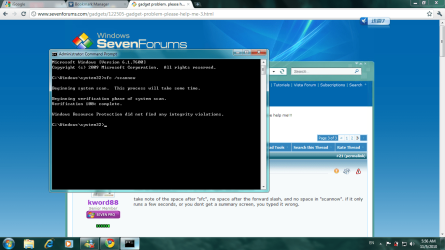
run sfc. it must be typed correctly in order to run.
from an elevated command prompt, type: sfc /scannow
take note of the space after "sfc", no space after the forward slash, and no space in "scannow". if it only runs a few seconds, or you dont get a summary screen, you typed it wrong.
from an elevated command prompt, type: sfc /scannow
take note of the space after "sfc", no space after the forward slash, and no space in "scannow". if it only runs a few seconds, or you dont get a summary screen, you typed it wrong.
My Computer
- Computer Manufacturer/Model Number
- Alienware AREA-51 M17x
- OS
- windows 7 ultimate 64bit
- CPU
- Intel Core2 Extreme x9000 2.8GHZ
- Motherboard
- Asus P965 Intel chipset
- Memory
- 4Gig
- Graphics Card(s)
- 2 NVidia GeForce 8800M GTX (SLi)
- Sound Card
- onboard
- Monitor(s) Displays
- 17in. built-in, 47in JVC LCD
- Screen Resolution
- 1080p
- Hard Drives
- 2 250Gig Hitachi (RAID 0) @ 7200RPM
- Case
- 17in. laptop
- Mouse
- touchpad, Logitech Anywhere Mouse cordless laser
- Internet Speed
- cable