
Game Crashes caused by kernelbase.dll?

christantoan

New member
Member
Local time
6:45 PM
Messages
55
Location
Sragen, Jawa Tengah
Two of my favorite game crash randomly some minutes after gameplay.
I've searched around the net (it seems random), tried sfc and chkdsk (nothing found), and reinstallng the game
As I check system viewer I noticed that all crashes originated from kernelbase.dll (at least I think so)

Some of them:
Code:
Faulting application name: cnc3game.dat, version: 1.9.2801.21826, time stamp: 0x00000000
Faulting module name: KERNELBASE.dll, version: 6.1.7601.17651, time stamp: 0x4e211319
Exception code: 0x04560123
Fault offset: 0x0000b9bc
Faulting process id: 0xb78
Faulting application start time: 0x01ccc57181f64ccd
Faulting application path: D:\Games\Command & Conquer 3\RetailExe\1.9\cnc3game.dat
Faulting module path: C:\Windows\syswow64\[COLOR="Red"]KERNELBASE.dll[/COLOR]
Report Id: b1253ad8-3166-11e1-a0c3-1c4bd60c856d
Code:
Faulting application name: cnc3ep1.dat, version: 1.2.0.0, time stamp: 0x49418bfa
Faulting module name: KERNELBASE.dll, version: 6.1.7601.17651, time stamp: 0x4e211319
Exception code: 0x04560123
Fault offset: 0x0000b9bc
Faulting process id: 0x18c4
Faulting application start time: 0x01ccc580d7c1eb5d
Faulting application path: D:\Games\Command & Conquer 3 Kane's Wrath\RetailExe\1.2\cnc3ep1.dat
Faulting module path: C:\Windows\syswow64\[COLOR="red"]KERNELBASE.dll[/COLOR]
Report Id: f3525637-3179-11e1-a0c3-1c4bd60c856d

For the record the games are Command & Conquer 3, Command & Conquer 3 Kane's Wrath (both are updated to latest version)

Thanks

Screenshot in attachment
 

Attachments
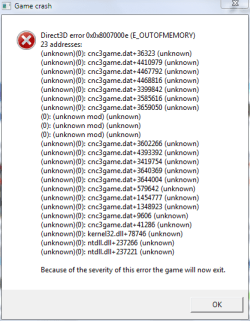
  • GError.PNG
    GError.PNG
    11.2 KB · Views: 28
Last edited:

My Computer

Computer type
Laptop
Computer Manufacturer/Model Number
ASUS N56VB
OS
Windows 7 Ultimate x64 SP1
CPU
Intel Core i7 3630QM
Motherboard
ASUS N56VB
Memory
8GB
Graphics Card(s)
NVIDIA GeForce 740M 2GB
Sound Card
Realtek
Screen Resolution
1920*1080
Hard Drives
1 Drive 1TB 5400RPM:
C Drive : 149GB
D Drive : 781GB
Mouse
Logitech M325
A windows crash from a windows kernel file can be a lot of things.

Have you updated your gpu drivers to the latest version?

Also try ram and stress tests just to rule out hardware faults.

Mem test and prime95 should be ok, as well as a video card test. Also monitor temperatures.

Sent from my BlackBerry 9900 using Tapatalk
 

My Computer

Computer type
PC/Desktop
Computer Manufacturer/Model Number
Built by badgers!!!
OS
Windows 7 Ultimate x64, & Mac OS X 10.9.2
CPU
Intel Core i5 2500k
Motherboard
Asus P8z68 LE
Memory
Corsair Vengence 8gb 1866mhz
Graphics Card(s)
Nvidia GTX 770 OC
Monitor(s) Displays
2x ASUS LED 22" IPS
Screen Resolution
3840x1080
Hard Drives
240GB Crucial M500 SSD
120gb Corsair Force 3 SSD
1TB Western Digital
PSU
Corsair HX650w Modular
Case
Corsair Air 540
Cooling
Corsair H60 Push/Pull
Keyboard
Corsair K70/ Logitech G27 wheel
Mouse
Saitek R.A.T 9
Internet Speed
Too slow!
Other Info
AMD fusion E350N Home server-Windows Home Server 2011 (also made by badgers!)
2011 Macbook 2.4ghz Core2Duo, 4gb ddr3, 120gb Ocz Vertex SSD
Yes, my gpu driver is latest version
Now trying stress test (btw, it doesn't have to run 24 hours, right?)
 

My Computer

Computer type
Laptop
Computer Manufacturer/Model Number
ASUS N56VB
OS
Windows 7 Ultimate x64 SP1
CPU
Intel Core i7 3630QM
Motherboard
ASUS N56VB
Memory
8GB
Graphics Card(s)
NVIDIA GeForce 740M 2GB
Sound Card
Realtek
Screen Resolution
1920*1080
Hard Drives
1 Drive 1TB 5400RPM:
C Drive : 149GB
D Drive : 781GB
Mouse
Logitech M325
Oh no lol, if its a fault it will show up in a similar space off time to your games.

Out of interest what games are they? As say its cod mw2 and mw3 then you can narrow it down to an engine fault, but if its two completely different games then its something else.

Sent from my BlackBerry 9900 using Tapatalk
 

My Computer

Computer type
PC/Desktop
Computer Manufacturer/Model Number
Built by badgers!!!
OS
Windows 7 Ultimate x64, & Mac OS X 10.9.2
CPU
Intel Core i5 2500k
Motherboard
Asus P8z68 LE
Memory
Corsair Vengence 8gb 1866mhz
Graphics Card(s)
Nvidia GTX 770 OC
Monitor(s) Displays
2x ASUS LED 22" IPS
Screen Resolution
3840x1080
Hard Drives
240GB Crucial M500 SSD
120gb Corsair Force 3 SSD
1TB Western Digital
PSU
Corsair HX650w Modular
Case
Corsair Air 540
Cooling
Corsair H60 Push/Pull
Keyboard
Corsair K70/ Logitech G27 wheel
Mouse
Saitek R.A.T 9
Internet Speed
Too slow!
Other Info
AMD fusion E350N Home server-Windows Home Server 2011 (also made by badgers!)
2011 Macbook 2.4ghz Core2Duo, 4gb ddr3, 120gb Ocz Vertex SSD
Well just run stress test from night to morning. All normal with temp around 80C.
The games are Command & Conquer 3 and Command & Conquer 3 Kane's Wrath.

Out of interest what games are they? As say its cod mw2 and mw3 then you can narrow it down to an engine fault, but if its two completely different games then its something else.

Then I think it's engine fault then.
If this true then nothing I can do then. I'm lazy to contact customer support (usually they are just circling around)
 

My Computer

Computer type
Laptop
Computer Manufacturer/Model Number
ASUS N56VB
OS
Windows 7 Ultimate x64 SP1
CPU
Intel Core i7 3630QM
Motherboard
ASUS N56VB
Memory
8GB
Graphics Card(s)
NVIDIA GeForce 740M 2GB
Sound Card
Realtek
Screen Resolution
1920*1080
Hard Drives
1 Drive 1TB 5400RPM:
C Drive : 149GB
D Drive : 781GB
Mouse
Logitech M325
try compatibility mode, as both are fairly old games
 

My Computer

Computer type
PC/Desktop
Computer Manufacturer/Model Number
Built by badgers!!!
OS
Windows 7 Ultimate x64, & Mac OS X 10.9.2
CPU
Intel Core i5 2500k
Motherboard
Asus P8z68 LE
Memory
Corsair Vengence 8gb 1866mhz
Graphics Card(s)
Nvidia GTX 770 OC
Monitor(s) Displays
2x ASUS LED 22" IPS
Screen Resolution
3840x1080
Hard Drives
240GB Crucial M500 SSD
120gb Corsair Force 3 SSD
1TB Western Digital
PSU
Corsair HX650w Modular
Case
Corsair Air 540
Cooling
Corsair H60 Push/Pull
Keyboard
Corsair K70/ Logitech G27 wheel
Mouse
Saitek R.A.T 9
Internet Speed
Too slow!
Other Info
AMD fusion E350N Home server-Windows Home Server 2011 (also made by badgers!)
2011 Macbook 2.4ghz Core2Duo, 4gb ddr3, 120gb Ocz Vertex SSD
Having a silmilar problem with SWTOR crashing. It happen 2-3 times a night. Here is the error that it gives me.

APPCRASH
Application Name: swtor.exe
Application Version: 1.0.0.0
Application Timestamp: 50c2907b
Fault Module Name: KERNELBASE.dll
Fault Module Version: 6.1.7601.17965
Fault Module Timestamp: 506dbd3f
Exception Code: c0000005
Exception Offset: 0000c6e3
OS Version: 6.1.7601.2.1.0.256.1
Locale ID: 1033
Additional Information 1: 0a9e
Additional Information 2: 0a9e372d3b4ad19135b953a78882e789
Additional Information 3: 0a9e
Additional Information 4: 0a9e372d3b4ad19135b953a78882e789
Any ideas as what can fix this?

I have reloaded game, ran SFC, Mem test, updated all drivers and windows updates. I tried to write over the file from windows disk but it says it cant find it on the disk. (<--- did this through cmd)

Help please.
 

My Computer

Computer Manufacturer/Model Number
Custom
OS
Win 7 ultimate 32 bit
CPU
i5 3.2 quad
Motherboard
Biostar
Memory
4G ddr3
Graphics Card(s)
ATI 4850 HD
Sound Card
Blaster X-Fi xtreme
Monitor(s) Displays
HP LA2405wg
Hard Drives
Western 250G
Case
Generic
Cooling
4 fans
Back
Top