Games and rundll32 issue

datsevenkid

New member
Local time
11:15 PM
Messages
3
Hey guys

I'm new around here. I recently installed win 7 ultimate (I had vista previously) and had some considerable issues (bsod, driver issues etc.) I managed to resolve the bsod by installing a new 56k modem (no adsl in my area)

So after about 3 re-installs of 7, I thought I had everything sorted. However I noticed after connecting online one time, from the reboot afterwards, none of my games would work. My games would open with about 1000kb of ram and 0% cpu but a rundll32 process would start up and use 50% cpu... doing nothing.

I re-installed 7 but after connecting online once again, from then onwards the same issue arose. It's as if 7 is downloading something that messes up my system. I've turned off all updates (windows update, games explorer, windows media player etc)
I don't have an anti-virus installed. I think other software is doing the same thing (third party software eg. video editing software) Any ideas?

Thanks,
datsevenkid
 

My Computer

OS
7
CPU
Intel E6750
Motherboard
Intel DG33FB
Memory
2GB DDR2-667
Graphics Card(s)
nVidia 8600GT
I don't have an anti-virus installed.
That and having windows update turned off is just waiting for trouble. If you look over in the security section you will see an article stating that Microsoft Security Essentials, which is free to everyone, is one of the best AVs out there and worth installing.

Now the main issue. What games are we talking about here? For some of my games I have to use XP mode, but its mostly just Doom 1&2 and other old as dirt games. It definitely seems like a compatibility issue to me. But I can't find out unless I know specially which games you're using.
 
Last edited:

My Computer

Computer type
Laptop
Computer Manufacturer/Model Number
Toshiba P775-S7100
OS
Windows 7 Professional SP1 64-bit
CPU
Intel Core i5-2450M @2.5 GHz
Memory
6 GB DDR3 1333MHz
Graphics Card(s)
Intel HD 3000
Monitor(s) Displays
Built-in 17.3" LED; 22" Insignia NS-L22Q-10A
Screen Resolution
1600x900; 1360x768
Hard Drives
750 GB Hitachi
1TB Seagate FreeAgent External
Internet Speed
Verizon DSL Speed(Down/Up): 3360 Kbps / 800 Kbps
Antivirus
MSE and MBAM Pro
Browser
IE10
EA games (Needforspeed Underground 2, Carbon)
Portal
Quake II
Halo

I can manage to get Q2, Halo and Portal working sometimes If I open the .exe a few times and run-as-admin after killing rundll32.exe

What's weird is that all my games were working perfectly fine before I connected online (about a week after installing 7) so it's not so much compatibility but rather 7 doing something on its own accord. I've tried running everything in compatibility mode (Xp and Vista)

I'll try installing some newer games (Fallout 3, Fear etc.) however I have already tried Halo 2 (which installs but hangs when I try to load a level)
 

My Computer

OS
7
CPU
Intel E6750
Motherboard
Intel DG33FB
Memory
2GB DDR2-667
Graphics Card(s)
nVidia 8600GT
Based on my experience with playing Halo and The Sims 2 (an EA game) with no issue, I would say you have a virus of some sort. I also just saw what you wrote about 7 trying to install something. Reactivate Windows updates and update your machine (this might actually solve the problem by itself if a patch from Microsoft is all that is needed). Then download and install MSE if you are able to do so. If some weird error occurs, it is probably a virus preventing you from installing it. I know it sounds weird, having a virus after going online one time, but it is not unheard of and I've seen it myself. After installing MSE, let it run a scan. Please write back whether it solves the problem or not. We like to know the results of what we recommend.
 

My Computer

Computer type
Laptop
Computer Manufacturer/Model Number
Toshiba P775-S7100
OS
Windows 7 Professional SP1 64-bit
CPU
Intel Core i5-2450M @2.5 GHz
Memory
6 GB DDR3 1333MHz
Graphics Card(s)
Intel HD 3000
Monitor(s) Displays
Built-in 17.3" LED; 22" Insignia NS-L22Q-10A
Screen Resolution
1600x900; 1360x768
Hard Drives
750 GB Hitachi
1TB Seagate FreeAgent External
Internet Speed
Verizon DSL Speed(Down/Up): 3360 Kbps / 800 Kbps
Antivirus
MSE and MBAM Pro
Browser
IE10
Okay, think I found a way to fix this. I won't go into too many details about what causes it. Go to the start menu. Click all programs, games, games explorer. If a pop up does not happen, click options. Set it to not check online for updates, and uncheck the two boxes about collecting info for your games. It seems that when the a certain dll tries to collect the info from the internet it starts an infinite loop of sorts. This should solve your problem. Please write back with the results of doing this.
 

My Computer

Computer type
Laptop
Computer Manufacturer/Model Number
Toshiba P775-S7100
OS
Windows 7 Professional SP1 64-bit
CPU
Intel Core i5-2450M @2.5 GHz
Memory
6 GB DDR3 1333MHz
Graphics Card(s)
Intel HD 3000
Monitor(s) Displays
Built-in 17.3" LED; 22" Insignia NS-L22Q-10A
Screen Resolution
1600x900; 1360x768
Hard Drives
750 GB Hitachi
1TB Seagate FreeAgent External
Internet Speed
Verizon DSL Speed(Down/Up): 3360 Kbps / 800 Kbps
Antivirus
MSE and MBAM Pro
Browser
IE10
you have a virus of some sort
I only have access to dial-up so I was unable to download MSE, however I was able to not only install but run ESET, avast and AVG (which I had access to). All returned with a zero virus result (they picked up some self-modded files which aren't harmful) So I think it isn't a virus.

think I found a way to fix this
This was the very first thing I did prior to first posting on sevenforums. Infact it was the first thing I did after installing 7 the second time. It did not resolve the issue, and when I connected online- the same issue arose.

Since I'm on dial-up (there's no adsl in my area and I only live 10 minutes from the city centre in a first world country lol) windows updates are a sort of no-go-zone for me. The only workaround I've discovered is this:

1.Run the game
2.Terminate the game using task manager
3.Run the game as admin
*Game opens
4.Alt tab and terminate rundll32
*Resume game which plays with proper cpu usage

Running the game as admin first off does not resolve the issue.

Thanks Petey for your interest mate. I'm really stumped on this one; it's more of a nuisance than a life-or-death situation but I have no idea what's causing this.
 

My Computer

OS
7
CPU
Intel E6750
Motherboard
Intel DG33FB
Memory
2GB DDR2-667
Graphics Card(s)
nVidia 8600GT
Only problem is because Windows Game Explorer recognize it as Windows game, and cannot open it !!! See in Game explorer or type: shell:games in the Start Menu, and if there are non Microsoft games delete it (explained in: http://www.sevenforums.com/tutorials/42496-games-explorer-folder-delete-game.html) but it ain't easy at all and windows will place them again there !!! (and you have same problem without end !!! -Easiest way (If game allow) to rename same game (.exe), game in install location, not shortcut ! as example: SPEED2.exe (what is NFSU2) to any XXX.exe file (Tested on most problematic games as EA NFSU2 and more !) and periodically check did the game explorer "catch" it and put it again in own list, if is so, rename it again !!!
 

My Computer

Computer type
PC/Desktop
Computer Manufacturer/Model Number
HP
OS
Windows 7 Ultimate x64
Well, here it is 7 years later and I am having (almost word for word) the same issues. While I still have not found a remedy to this problem, I would like to point out something Petey7 mentioned in the reply; in today's "Microsoft" universe, having Windows Update turned off isn't such a scary proposition after all. Just like datsevenkid, I went through three agonizing installs of Windows 7. Naturally, because of the considerable time since the release of 7 and my particular install date, I was faced with over 190 updates that Microsoft deemed necessary. The easiest way to accomplish this is to have updates turned on and automatic - and I did. I knew it would take awhile to complete, so off I went to do more important tasks; you know, like just kill time. I was not about to sit and watch this long process unfold. I came back to it about 4 hours later, but it seemed to still be at it (not exact on this, but I want to say 109 of 193 completed...) so I decided another hour and a half would probably do it, and I went back to the TV.

Upon returning, the numbers hadn't changed. It was dead. I know this, because I went to bed after that, only to wake up to the same numbers. Long story short, I went the "reset" route. Although my only option at the time, I knew it would (possibly) introduce more problems. After much drilling-down with online troubleshooting and research (on an old iPod4) I eventually was met with a BSOD: PAGED_FILE_IN_NON_PAGED_AREA. Got that to go away, but now "Bad Patch" replaced it. Okay, so my point of this - very long post, is that Microsoft simply cannot be trusted to know what your computer does, or does not need! Moreover, they could care less if you suddenly come home, some Tuesday and find your computer won't boot! You've done what they say (or, rather, recommended) and yet, there you are. Who knows how much down-time, until it's back up and running? I'll tell you who doesn't know: Microsoft.

Now, I'm not saying updates should be ignored. No, no, no! (Well, afaic - it's appalling to think they would release a product, that's going to require literally hundreds of security updates, in just a few short years!) I will try and find the link to the update solution, that worked for me and edit this post to include it. It's from a Microsoft Tech Net forum. Updates are a way of life, for anyone who uses their software and/or OS's; so, really, most of the world. It boils down to that very thing - Microsoft knows that they are the only game in town, so they absolutely are not interested in pleasing their customer base with a product that works right out of the box. Sure, there are a lot of kooks out there, who live only to make Microsoft users miserable. I get that. But with the resources they already have, along with the right people... I know. Stockholders typically don't want to concern themselves with the end-user. Yes. In a perfect world... Again, this is just my opinion. Anyway, once I was able to manually download and install all of the 193 updates I needed, things began to look up. Thing was, I was on my third "Delete OS Partition->Format->Re-install" marathon. If I was to get through this and (theoretically) eliminate the update(s) that were responsible, well I would have to do them one-at-a-time! Microsoft has gone out of their way, however, to make this as unpleasant as humanly possible; not to mention, time consuming.

So, I no longer have Windows (or Microsoft) Updates set to automatically download and install. In fact, I have them turned off completely. When I check for updates, I then turn back on Windows Updates; only I select the "I'll do this myself, thank you" option. Then I disable it, once I'm done. It's a pain, I know, but I'm all caught up - update wise, albeit months after I set out to transition from Vista to 7! The caveat here is to be vigilant, where Updates are concerned. You will need to check for them manually, on Tuesdays, and decide from there. If there is more than one - and there usually is - then do them one at a time; so as to isolate the update that would cause a catastrophic problem on your machine. Oh, and of course, this all becomes moot if you have no malware protection in place - some sort of internet security, complemented with Malwarebytes, is a good idea. Pete7's suggestion is also not bad. Microsoft has done a pretty good job, with Security Essentials. It's FREE - go figure! It's up to you.

Finally, as to the rundll32.exe thing; I tried the GamesExplorer method, but it did nothing to stop this mega-frustrating problem. Although, once I read between the lines as to what GE does, and why - I'm glad to be rid of it! On my machine, it runs amuck in games (although, not nearly as often sans GE) programs and even when sitting idle. As a matter of fact, while I was typing this reply, it struck. I couldn't type or do anything, except move my mouse cursor, and that was extremely laggy! I've used Sysinternals' ProcessMonitor program, to try and pinpoint the app that is setting this off, with no luck. Each time, though, I've seen THOUSANDS of rundll32.exe opening up dll's. Both my RAM and CPU are maxed, as well as the Pagefile.sys; so my system is brought to its knees. When it is back to normal, what would usually be about 26% RAM usage, now drops to around 13 or 14%. Odd. I'm still trying to find a way to be rid of this, once and for all. Maybe there is no cure, I don't know.

I think that's about it. Petey7, I meant no disrespect, as you were on the right track with this. Thanks, to all, for this great community, and for reading this far!
Sean.

 

My Computer

Computer type
PC/Desktop
Computer Manufacturer/Model Number
Custom Build
OS
Windows 7 Professional x64 build: 7601
CPU
Intel Core2 Quad Q9450 2.66MHz
Motherboard
MSI G31TM-P21 (MS-7529) Socket LGA775
Memory
4GB Patriot PC2-5300 (333 MHz)
Graphics Card(s)
Asus Radeon R9 270X
Hard Drives
One (1) ST3750640NA PATA Device
Two (2) Western Digital WDC WD10EZEX SATA Device

One (1) LG HL-DT-ST DVDRAM GH24NSB0 Optical SATA Device
Antivirus
Norton Security
Browser
Mozilla Firefox
Okay, think I found a way to fix this. I won't go into too many details about what causes it. Go to the start menu. Click all programs, games, games explorer. If a pop up does not happen, click options. Set it to not check online for updates, and uncheck the two boxes about collecting info for your games. It seems that when the a certain dll tries to collect the info from the internet it starts an infinite loop of sorts. This should solve your problem. Please write back with the results of doing this.

Sorry for the bump.
I just wanna say thank you, this worked for my nfs underground 2, it does start a "rundll32.exe *32" thread, but closes and the game boots. :geek:
 

My Computer

Computer type
Laptop
Computer Manufacturer/Model Number
Acer Aspire 5349
OS
Windows 7 Ultimate x64
CPU
Intel Celeron B815 1.60ghz
Memory
4 GB RAM
Graphics Card(s)
Intel HD Graphics
Sound Card
Realtek HD Audio
Monitor(s) Displays
PnP Generic Monitor
Screen Resolution
1366x768
Hard Drives
Seagate 500 GB HDD
Cooling
USB Notebook Coolpad
Keyboard
Standard PS/2 Keyboard
Mouse
Synaptics Pointing Device and PS/2 Mouse
Internet Speed
100 mbps
Antivirus
Microsoft Security Essentials
Browser
Mozilla Firefox
Other Info
Media Player: MPC-HC x64 Edition
Well, here it is 7 years later and I am having (almost word for word) the same issues. While I still have not found a remedy to this problem, I would like to point out something Petey7 mentioned in the reply; in today's "Microsoft" universe, having Windows Update turned off isn't such a scary proposition after all. Just like datsevenkid, I went through three agonizing installs of Windows 7. Naturally, because of the considerable time since the release of 7 and my particular install date, I was faced with over 190 updates that Microsoft deemed necessary. The easiest way to accomplish this is to have updates turned on and automatic - and I did. I knew it would take awhile to complete, so off I went to do more important tasks; you know, like just kill time. I was not about to sit and watch this long process unfold. I came back to it about 4 hours later, but it seemed to still be at it (not exact on this, but I want to say 109 of 193 completed...) so I decided another hour and a half would probably do it, and I went back to the TV.

Upon returning, the numbers hadn't changed. It was dead. I know this, because I went to bed after that, only to wake up to the same numbers. Long story short, I went the "reset" route. Although my only option at the time, I knew it would (possibly) introduce more problems. After much drilling-down with online troubleshooting and research (on an old iPod4) I eventually was met with a BSOD: PAGED_FILE_IN_NON_PAGED_AREA. Got that to go away, but now "Bad Patch" replaced it. Okay, so my point of this - very long post, is that Microsoft simply cannot be trusted to know what your computer does, or does not need! Moreover, they could care less if you suddenly come home, some Tuesday and find your computer won't boot! You've done what they say (or, rather, recommended) and yet, there you are. Who knows how much down-time, until it's back up and running? I'll tell you who doesn't know: Microsoft.

Now, I'm not saying updates should be ignored. No, no, no! (Well, afaic - it's appalling to think they would release a product, that's going to require literally hundreds of security updates, in just a few short years!) I will try and find the link to the update solution, that worked for me and edit this post to include it. It's from a Microsoft Tech Net forum. Updates are a way of life, for anyone who uses their software and/or OS's; so, really, most of the world. It boils down to that very thing - Microsoft knows that they are the only game in town, so they absolutely are not interested in pleasing their customer base with a product that works right out of the box. Sure, there are a lot of kooks out there, who live only to make Microsoft users miserable. I get that. But with the resources they already have, along with the right people... I know. Stockholders typically don't want to concern themselves with the end-user. Yes. In a perfect world... Again, this is just my opinion. Anyway, once I was able to manually download and install all of the 193 updates I needed, things began to look up. Thing was, I was on my third "Delete OS Partition->Format->Re-install" marathon. If I was to get through this and (theoretically) eliminate the update(s) that were responsible, well I would have to do them one-at-a-time! Microsoft has gone out of their way, however, to make this as unpleasant as humanly possible; not to mention, time consuming.

So, I no longer have Windows (or Microsoft) Updates set to automatically download and install. In fact, I have them turned off completely. When I check for updates, I then turn back on Windows Updates; only I select the "I'll do this myself, thank you" option. Then I disable it, once I'm done. It's a pain, I know, but I'm all caught up - update wise, albeit months after I set out to transition from Vista to 7! The caveat here is to be vigilant, where Updates are concerned. You will need to check for them manually, on Tuesdays, and decide from there. If there is more than one - and there usually is - then do them one at a time; so as to isolate the update that would cause a catastrophic problem on your machine. Oh, and of course, this all becomes moot if you have no malware protection in place - some sort of internet security, complemented with Malwarebytes, is a good idea. Pete7's suggestion is also not bad. Microsoft has done a pretty good job, with Security Essentials. It's FREE - go figure! It's up to you.

Finally, as to the rundll32.exe thing; I tried the GamesExplorer method, but it did nothing to stop this mega-frustrating problem. Although, once I read between the lines as to what GE does, and why - I'm glad to be rid of it! On my machine, it runs amuck in games (although, not nearly as often sans GE) programs and even when sitting idle. As a matter of fact, while I was typing this reply, it struck. I couldn't type or do anything, except move my mouse cursor, and that was extremely laggy! I've used Sysinternals' ProcessMonitor program, to try and pinpoint the app that is setting this off, with no luck. Each time, though, I've seen THOUSANDS of rundll32.exe opening up dll's. Both my RAM and CPU are maxed, as well as the Pagefile.sys; so my system is brought to its knees. When it is back to normal, what would usually be about 26% RAM usage, now drops to around 13 or 14%. Odd. I'm still trying to find a way to be rid of this, once and for all. Maybe there is no cure, I don't know.

I think that's about it. Petey7, I meant no disrespect, as you were on the right track with this. Thanks, to all, for this great community, and for reading this far!
Sean.

It's better to use Windows 7 at its stock condition, some updates tend to slow down the system.
 

My Computer

Computer type
Laptop
Computer Manufacturer/Model Number
Acer Aspire 5349
OS
Windows 7 Ultimate x64
CPU
Intel Celeron B815 1.60ghz
Memory
4 GB RAM
Graphics Card(s)
Intel HD Graphics
Sound Card
Realtek HD Audio
Monitor(s) Displays
PnP Generic Monitor
Screen Resolution
1366x768
Hard Drives
Seagate 500 GB HDD
Cooling
USB Notebook Coolpad
Keyboard
Standard PS/2 Keyboard
Mouse
Synaptics Pointing Device and PS/2 Mouse
Internet Speed
100 mbps
Antivirus
Microsoft Security Essentials
Browser
Mozilla Firefox
Other Info
Media Player: MPC-HC x64 Edition
I had this problem, too. Older games, like NOLF, NOLF2, Painkiller, Deus Ex suddenly wouldn't start. The game would hang and when I checked the task manager, the game would be in the list, along with a Rundll32.exe child process that was hogging up CPU resources. I recommend using Process Explorer, instead of the default task manager. It shows the relationships between the game and any child processes a lot better. One of the libraries that RunDLL32.exe was loading was gameux.dll This file turned out to be what was causing the hang. Because it's a system file, the trick was finding a way to take ownership of the file, so I could disable it.

This worked for me on Windows 7 64bit.
First, Create a Restore Point, in case you mess something up.
Start the computer in Safe Mode.
Use Windows Explorer to navigate to your C:\Windows\SysWOW64 directory.
Look for gameux.dll. Right-click on it and bring up the Property sheet.
Click the 'Security' tab. Take ownership of the file by copying its permission from whatever account had full access originally. On my computer, that Owner was called "TrustedInstaller" You need to transfer ownership to whatever your default Administrator account is called.
Now you can rename the gameux.dll file to something like gameuxBAK.dll (It's good practice not to delete possibly-critical files in case you need to restore them, later)
(There is also a copy of gameux.dll in the C:\Windows\System32 directory. You may need to rename that one, too.
Reboot normally. The games should launch now.

My theory for why this works is that when the older games were installed, they were registered with the Windows Game folder, which tries to download updates and game icons whenever you launch the game. Microsoft is phasing out support of Windows 7 next year and in typical Microsoft fashion, they started removing the online support early. I think the RunDLL32.exe is trying and failing to contact the online resources for game updates. When it fails, instead of handing off control back to the game, it tries to endlessly contact Microsoft for resources that no longer exist.
 

My Computer

Computer type
PC/Desktop
Computer Manufacturer/Model Number
Custom Build
OS
Windows 7 Ultimate 64 bit
CPU
i7 3.07 Ghz Quad core
Motherboard
Asus P6T Deluxe V2
Memory
12 Gigs Triple-channel Ram, PC10666 DDR3
Graphics Card(s)
2 ATI 5870's in Crossfire mode
Hard Drives
2 Internal SATA
2 External USB
Antivirus
Spybot Search and Destroy and Microsoft Security Essentials
Browser
Firefox + NoScript + AdBlock Plus + Ghostery
Thank you so much

:D:cry:

Hey man I registered to this forum just for saying THANK YOU for your great post.

You can't imagine how much I worked on this problem.

One day my windows 7 decided that half of the old games I have an that is a tons:

Postal 1-2
Half life 1 and all expansions
Unreal tournaments all old versions
NOLF 1 2
etc etc

just stopped working. Looking at process hacker they loaded in rundll32 exe which was just hanging and hanging and hanging.

Your solution worked great and now I got all my old games back!

I had windows update disabled from the start because I don't need updates, I need a working system so no idea how did this just broke at one point. One of my theory since I install remove lots of games, one must have done this.

And for those who run into the same problem here is something additional.

I had tons of different versions of this gameux.dll under the winSXS folder, you have to take ownership of all of them in safe mode and delete them one by one, otherwise as long as there is 1 available windows will copy it back and your games are going to break.

Man I backing up on the DOUBLE now, thank you so much!
 

My Computer

Computer type
PC/Desktop
OS
Windows 7 64 bit
The now notorius file known as gameux.dll. Good News

Ok!!! I changed permissions in safe mode to rename gameux.dll entries which btw was a pain; but the only one I was able to rename was in the windows 7 ultimate 32 bit (no service pk) location:
C:\windows\system32... But luckily this fixed the problem at least for my game which was the God game "Black & White".:cool: Keep in mind I tried every other method including a work around: Suspend or remove the rundll32.exe entry using the resource monitor which worked; but this method is better with renaming the gameux.dll file as it only needs to be done ONCE. Kudo's to the one above who found this file which is used to update windows games...My game was in the list of games of the games explorer. Go figure, it was listed as a Microsoft game which it isn't. If windows recreates the file then I guess this doesn't fix the problem. However so far No problem...I shall reboot to be sure...I rebooted and the problem is gone for sure!!! I hope this helps everyone with this very obscure difficulty. Ta daaaaaa! ;). BTW now I cannot open solitaire unless I reverse the process: rename back to gameux.dll from OLDgameux.dll. Also all this might not be necessary if you are online as the rundll32.exe is being used to update Microsoft games and may finish. Please post replies....thx.
 
Last edited:

My Computer

Computer Manufacturer/Model Number
custom made
OS
windows 7 ultimate x64
CPU
i7 860
Motherboard
evga p55
Memory
corsair 8 GB
Graphics Card(s)
xfx
Sound Card
on board sound (realtek)
Monitor(s) Displays
samsung widescreen syncmaster226BW
Hard Drives
seagate
PSU
corsair TX 750W
Case
zyan
Cooling
coolermaster
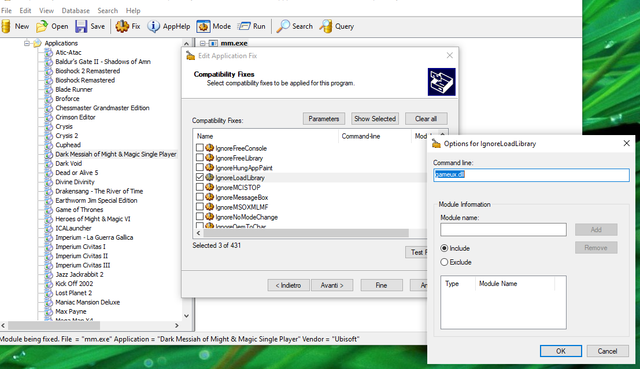
Since someone raised the question once again for good old games like Dark Messiah of Might & Magic...
and since it seems the problem was caused by 'gameux.dll' on Windows 7 I wondered if the hack solution suggested above messing with registry/system files can be replaced by a MS Application Compatibility Toolkit solution, using shims like IgnoreLoadLibrary (and setting 'gameux.dll' as Parameters) :sarc:
Don't have Win7 to test but could be a cleaner solution in these cases...
 

My Computer

Computer type
Laptop
Computer Manufacturer/Model Number
MSI GX660-262it
OS
Windows 7 Home Premium x64 SP1
CPU
Intel Core i7 840QM
Memory
8GB DDR3 1333MHz
Graphics Card(s)
ATI Mobility HD 7970M 2GB DDR5
Screen Resolution
1920x1080
Hard Drives
Intel SSDSA2CT040G3
Hybrid ST750LX0ST750LX003
Antivirus
360 Internet Security
Browser
IE10
Back
Top