Solved games in virtual box

marthijn99

New member
Local time
8:52 AM
Messages
50
Location
Rijssen
when i try to play lego island extreme stunts in oracle virtual box i get the error mesage no compatible 3d hardware found
 

My Computer

Computer type
PC/Desktop
Computer Manufacturer/Model Number
unknown
OS
Windows 8.1 x64
CPU
Intel(R) Core(TM) I3-3220 3.30GHZ
Motherboard
unknown
Memory
4 gb ram
Graphics Card(s)
AMD Radeon 6570
Screen Resolution
1280 x1024
Hard Drives
500 gb
Keyboard
Logitec k120
Mouse
MaxXrer
Internet Speed
30 MB p/s
Antivirus
avira,avg (both free)
Browser
google chrome
You may try to install the guest additions in VirtualBox, and enable the experimental Direct3D support when asked. This among other things, lets use Aero Glass in Windows and might help with your game too. However, as it says, it's only experimental, and may have serious problem or performance issues.

As a general rule, virtual machines are poor when it comes to graphic-intensive things like most games. Using the host system is most times preferable is possible.
 

My Computer

Computer type
Laptop
Computer Manufacturer/Model Number
Toshiba Sattelite A665-S6092
OS
Windows 7 Ultimate x64
CPU
Intel Core i7-740QM
Memory
8 GB DDR3
Graphics Card(s)
NVIDIA GeForce 330GT
Screen Resolution
1366x768
Hard Drives
Samsung 840 SSD 500GB
1TB USB3 external HD
Cooling
Coolermaster Notepal U3 notebook cooling pad
Internet Speed
3mbps ASDL
Antivirus
ClamWin 0.98.7
Browser
Opera 12.17 x86 (main), Firefox 38 (sec), IE11 (last resort)
Playing game in a VM isn't something i would recommend, i wouldn't expect the performance to be great but don't have any experience playing games in a VM.

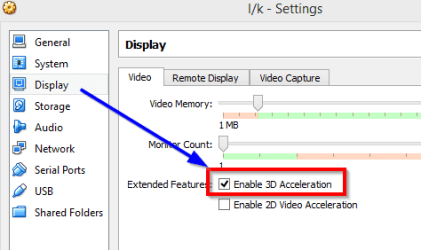
With regards to that error have you tired enabling "3D Acceleration" ?

Right click the Virtual Machine >> Click Settings >> Select Display
Now tick 'Enable 3D Acceleration'

2014-08-18 18_58_57-l_k - Settings.png

Does that help?

Regards,
Jamie
 

My Computer

Computer type
PC/Desktop
Computer Manufacturer/Model Number
Self Built
OS
Windows 8.1 Pro x64
CPU
Intel Core i5-2500K @ 3.30GHz - S1155
Motherboard
Asus P8P67 LE Rev3, Intel P67, S115
Memory
8GB Corsair DDR3 XMS3, PC3-12800
Graphics Card(s)
NVIDIA GeForce GTX 650
Sound Card
On-Board
Monitor(s) Displays
3 x 24" {Extended Display}
Screen Resolution
1920 x 1080
Hard Drives
300GB Seagate Barracuda 7200
PSU
550W Coolermaster GX550
Case
Silverstone Precision PS04B
Cooling
Stock
Keyboard
Logitech K120
Mouse
World of Warcraft Cataclysm MMO Gaming Mouse
Internet Speed
80 MB
Antivirus
MSE / Windows Defender
Browser
Chrome
yes sorry for the late reaction yes it worked but like you said it would me slow (and slow it is very very very very slow)
 

My Computer

Computer type
PC/Desktop
Computer Manufacturer/Model Number
unknown
OS
Windows 8.1 x64
CPU
Intel(R) Core(TM) I3-3220 3.30GHZ
Motherboard
unknown
Memory
4 gb ram
Graphics Card(s)
AMD Radeon 6570
Screen Resolution
1280 x1024
Hard Drives
500 gb
Keyboard
Logitec k120
Mouse
MaxXrer
Internet Speed
30 MB p/s
Antivirus
avira,avg (both free)
Browser
google chrome
oh and one more thing thanks for the help you are awesome !!!
 

My Computer

Computer type
PC/Desktop
Computer Manufacturer/Model Number
unknown
OS
Windows 8.1 x64
CPU
Intel(R) Core(TM) I3-3220 3.30GHZ
Motherboard
unknown
Memory
4 gb ram
Graphics Card(s)
AMD Radeon 6570
Screen Resolution
1280 x1024
Hard Drives
500 gb
Keyboard
Logitec k120
Mouse
MaxXrer
Internet Speed
30 MB p/s
Antivirus
avira,avg (both free)
Browser
google chrome
Glad that resolved your issue :thumbsup:
 

My Computer

Computer type
PC/Desktop
Computer Manufacturer/Model Number
Self Built
OS
Windows 8.1 Pro x64
CPU
Intel Core i5-2500K @ 3.30GHz - S1155
Motherboard
Asus P8P67 LE Rev3, Intel P67, S115
Memory
8GB Corsair DDR3 XMS3, PC3-12800
Graphics Card(s)
NVIDIA GeForce GTX 650
Sound Card
On-Board
Monitor(s) Displays
3 x 24" {Extended Display}
Screen Resolution
1920 x 1080
Hard Drives
300GB Seagate Barracuda 7200
PSU
550W Coolermaster GX550
Case
Silverstone Precision PS04B
Cooling
Stock
Keyboard
Logitech K120
Mouse
World of Warcraft Cataclysm MMO Gaming Mouse
Internet Speed
80 MB
Antivirus
MSE / Windows Defender
Browser
Chrome
Hi there

Glad you solved it - but this is definitely worth a try : Performance on games etc seems much better with VMware player - latest release is 6.X

IMO the best solution is to use VMWARE PLAYER -- I think the 3-D and hardware acceleration is much more advanced than in VBOX. You can convert the VM directly. Ensure also that you run the VMWARE TOOLS the first time you power on the Virtual Machine (same function as VBOX additions).

In the vm settings check the enable 3D and hardware acceleration.

Cheers
jimbo
 

My Computer

Computer type
PC/Desktop
Computer Manufacturer/Model Number
Custom built, several laptops HP/ASUS
OS
Linux CENTOS 7 / various Windows OS'es and servers
CPU
Intel i7 Intel i5
Memory
8GB, 16GB
Graphics Card(s)
On Motherboard
Sound Card
Realtek HD audio
Monitor(s) Displays
Apple Cinema display, Samsung LCD
Screen Resolution
1920 X 1080
Hard Drives
4 X 1TB SATA
Mouse
Toshiba wireless laser
Internet Speed
> 20MB up
+1 on vmware player.

I play tons of games in vmware player and experience no slowdown. I am not running crysis mind you, but modern games work fine on medium settings.
 

My Computer

Computer type
PC/Desktop
Computer Manufacturer/Model Number
Custom Built
OS
Windows 10 Pro
CPU
AMD Ryzen 5 2400G Processor with Radeon RX Vega 11 Graphics
Motherboard
ASRock X470 Master SLI/AC AM4 AMD Promontory X470 SATA 6Gb/s
Memory
G.SKILL Ripjaws V Series 16GB (2 x 8GB) 288-Pin DDR4 SDRAM D
Graphics Card(s)
2047MB NVIDIA GeForce GTX 1060 6GB (EVGA)
Sound Card
Motherboard Built in
Monitor(s) Displays
Acer R240HY bidx 23.8-Inch IPS HDMI DVI VGA (1920 x 1080) Wi
Screen Resolution
1920 x 1080
Hard Drives
1TB Sandisk SSD PLUS (Main drive)
500 GB Seagate 7200 RPM (Games)
500 GB Western Digital 7200 RPM (Virtual Machines)
PSU
CORSAIR TX Series TX650M 650W 80+ Gold Modular Power Supply
Case
CORSAIR CARBIDE SPEC-02 Mid-Tower Gaming Case, Red LED Fan
Cooling
220mm, two 120mm, and four 60mm fans
Keyboard
Wired Dell keyboard
Mouse
Wireless Logitech mouse
Internet Speed
250mb down, 30mb up
Antivirus
Panda Cloud Antivirus
Browser
Chrome-ish x64
Other Info
Your awesome for reading this.
Hi there

Glad you solved it - but this is definitely worth a try : Performance on games etc seems much better with VMware player - latest release is 6.X

IMO the best solution is to use VMWARE PLAYER -- I think the 3-D and hardware acceleration is much more advanced than in VBOX. You can convert the VM directly. Ensure also that you run the VMWARE TOOLS the first time you power on the Virtual Machine (same function as VBOX additions).

In the vm settings check the enable 3D and hardware acceleration.

Cheers
jimbo


okay thanks for the idea will try that soon thanks for the support
 

My Computer

Computer type
PC/Desktop
Computer Manufacturer/Model Number
unknown
OS
Windows 8.1 x64
CPU
Intel(R) Core(TM) I3-3220 3.30GHZ
Motherboard
unknown
Memory
4 gb ram
Graphics Card(s)
AMD Radeon 6570
Screen Resolution
1280 x1024
Hard Drives
500 gb
Keyboard
Logitec k120
Mouse
MaxXrer
Internet Speed
30 MB p/s
Antivirus
avira,avg (both free)
Browser
google chrome
Back
Top