Hello all!
I'm new in this forum and I have been testing W7 RC for a couple of weeks.
Aside some minor problems with WMP12, this OS has all the possibilities to finally replace XP.
I've got a question anyway about the GAMES menu, the one you can reach from start menu. I updated D-Fend (the frontend for the famous DOSBOX) and it installed automatically a link in that menu. I did this first on VISTA and it did the same, but it is a dead one that has to be edited to work. I did with Vista, but with 7 even right-clicking does not work with dead links in games menu.
What should I do to edit/remove that link?
Thanks all
I'm new in this forum and I have been testing W7 RC for a couple of weeks.
Aside some minor problems with WMP12, this OS has all the possibilities to finally replace XP.
I've got a question anyway about the GAMES menu, the one you can reach from start menu. I updated D-Fend (the frontend for the famous DOSBOX) and it installed automatically a link in that menu. I did this first on VISTA and it did the same, but it is a dead one that has to be edited to work. I did with Vista, but with 7 even right-clicking does not work with dead links in games menu.
What should I do to edit/remove that link?
Thanks all
My Computer
- Computer Manufacturer/Model Number
- Myself
- OS
- Windows 7 RC (build 7100)
- CPU
- Intel Core Quad DUO Q9650 @3.61 GhZ
- Motherboard
- Asus P5Q PRO
- Memory
- 2X1GB Corsair Dominator@533MhZ
- Graphics Card(s)
- Ati Radeon HD4870
- Sound Card
- Integrated Realtek 7.1 Crystal sound chip
- Monitor(s) Displays
- 19''Acer AL1917
- Screen Resolution
- 1280x1024
- Hard Drives
- Seagate Barracuda 300GB 7200rpm
Maxtor 190GB 7200rpm
- PSU
- Cooler Master Silent Power 700W
- Case
- 2*80mm blue led fans, 2*120mm blue led fans, oled display
- Cooling
- ZALMAN CNPS9100Led
- Keyboard
- Trust easy scroll silverline keyboard
- Mouse
- Microsoft Bluetooth notebook mouse 5000
- Internet Speed
- ADSL 20Mb
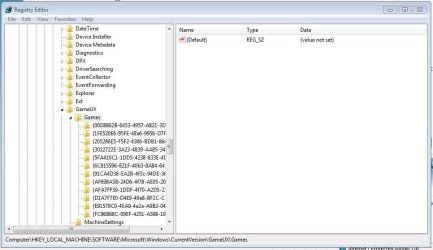
 I tried to find the registry keys of the games menu items to modify the link details from there but I coldn't find them...