Gamma & Brightness Issues...

cneuhauser

New member
Local time
1:35 PM
Messages
4
So here's the problem...I've been able to adjust gamma, contrast, and brightness via the Win7 calibration utility and via Nvidia control panel. Both do a great job...

Unfortunately those game adjustments don't carry over into games, so my gamma and brightness have to constantly be adjusted in games. With XP it forced games to use my desktop gamma which was great, then I could fine tune anything I needed inside the game. This is not the case in Win7. Win7 bails out of the gamma adjustment and lets games comtrol it completely, and this is a problem since most games have little to no color adjustment.

For instance Fallout 3 is WAY too dark, and I need a way to adjust the brightness. I've also got a Trinitron P1230 (Dell) it's probably the best CRT that you can find for gaming (just can't handle LCD ghosting), and there's no hardware way of adjusting past a certain point, it's just too dark.

Anyways, short of going out and buying a new monitor (ugh I hate LCD's), is there any way to force Win7 to carry the desktop gamma calibration into other programs?
 

My Computer

OS
7
I'm sorry for the bump, but I have the same problem.

My custom settings for gamma in the Nvidia control panel suddenly default when I enter a game.
I don't know what else there is to say, I've tried pretty much everything I can think of.

Other information:
- I don't want to set the settings in each game, I just want to use the control panel
- Monitor has no gamma settings
- Windows 7 Gamma settings don't work in games either
- I have tried multiple driver versions
- Third Party color tools don't work

It just always resets itself while playing a game.


I have confirmed that my ATI card on a totally different computer has the some problems.


Please, help.
 

My Computer

OS
Windows 7
Send a service request to Nvidia!

I sent a service request to Nvidia and outlined the details of the problem. They even had me rolling back drivers etc. with driver sweeper etc. without luck. So I think it's finally hitting home that they have to do a "work-around" for windows 7 in order to made sure gamma corrections and adjustments are translated into programs from the desktop.

I've heard this issue has been around since the "Vista" days (2yrs) so it's about time a software engineer at either Microsoft or at Nvidia straightened this out. I have a feeling it's an easy fix in the code with Windows 7, and would probably only take a brief 10 minute conversation between the two entities (Nvidia & Microsoft) to get this issue resolved.

Unfortunately I went out and bought a Samsung LX2300 LED 23" so I could jack up the back lighting just to compensate. But I hate playing games on LCD's, the ghosting annoys me. And for those non believers who say there isn't ghosting, I can give you a link to a webpage that shows refresh rate and ghosting for all monitors as a buyers comparison. I love my P1230 Trinnitron, there's nothing like it...silky smooth, I won't go to an LCD until that find some way to make the ghosting go away and they have 85mhz - 100mhz refresh rates at high resolutions.

The LCD went back to the store the next day and I bought a PS3 instead...
 
Last edited:

My Computer

OS
7
If Microsoft does not want to fix it, there has got to be a work around.

I know you can bypass it by using windowed-mode, but it's just not the same.
 

My Computer

OS
Windows 7
Exactly

Exactly right, it's already in the code, they just need to modify it slightly. Fortunately Bioshock (playing for a 2nd time) has a brightness level that I've boosted all the way up and it doesn't effect gamma correction. However, I'm worried about all of my other games. Fallout 3 is still too dark etc.

So if you get a chance, I'd ask that you please file a complaint with Nvidia so they know some people are making noise. Hopefully our letters will be enough to get someone to do something about it.
 

My Computer

OS
7
Exactly right, it's already in the code, they just need to modify it slightly. Fortunately Bioshock (playing for a 2nd time) has a brightness level that I've boosted all the way up and it doesn't effect gamma correction. However, I'm worried about all of my other games. Fallout 3 is still too dark etc.

So if you get a chance, I'd ask that you please file a complaint with Nvidia so they know some people are making noise. Hopefully our letters will be enough to get someone to do something about it.
Unfortunately, this is not a problem with Nvidia.
I have had the same problems with the stock Windows-7 Gamma controls, and with ATI cards, and with third-party color tools.
 

My Computer

OS
Windows 7
So I think it's finally hitting home that they have to do a "work-around" for windows 7 in order to made sure gamma corrections and adjustments are translated into programs from the desktop.

agreed - but his is 2010 and it stil happens - I have an nvidia GTX 260 - I set it for both monitors - the settings last for about a week, then one or both monitors suddenly gets a lot brighter upon boot up - means I have to constantly readjust the brightness

bitraker
 

My Computer

Computer Manufacturer/Model Number
Dell
OS
Win7 64
CPU
Dell 2.8 Intel Dual Core
Memory
Dell 8G
Graphics Card(s)
NVideo 260
Sound Card
Delta 2496
Monitor(s) Displays
3 flat panels
Hard Drives
many
Ive been having similar problems as well

I just got a new computer for Chirstmas, and ive been having problems with many games.

Games like warcraft 3, The elder scrolls 4 Oblivion, the Sims 3, all of those games have been having really bad gamma problems, see when I play those games, the game brightness goes up, and even when I turn down the gamma in the game down it doesn't make it go down far enough to get rid of the brightness or the hazyness.


With warcraft 3 everything is a bit too bright, and the coloration is not right because of that and even when I used the gamma slider within the game and turned it all the way down, the game still has a bright haze, also when the game start up menu comes up after you put in the disk, it says that Windoes NT is NOT supported for Warcraft 3. I have no idea what that means, and the option to view any previews is reddend out and is non-clickable.


The problem with the Elder scrolls 4 Oblivion game, is that ANY TIME you even touch the gamma bar within the game itself, then the WHOLE game world no matter where becomes considerably brighter, not even putting the gamma all the way down gets rid of the bright haze, it lessons it but its still there.


With the sims 3, well that game seems to have a bright haze like gamma issue to it, same with all the others, but unlike the other games, this game has no gamma slider at all. so I can't do anything with it.

I have no idea whats going on, because this did the same EXACT thing on vista too on my older computer.


I use an ATI Radeon HD 5770 graphics card by the way.


PLEASE HELP!! or at least re-direct me to someone who can!
 
Last edited:

My Computer

Computer Manufacturer/Model Number
Hewlett-packard/HPE-480t
OS
Windows 7 Home premium 64 bit
Memory
9.00 GB
Graphics Card(s)
ATI Radeon HD 5770
Sounds like some of you guys need to calibrate your monitors first.

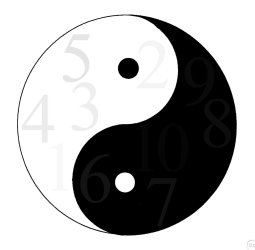
Open this image with windows Photo Viewer to calibrate your monitors brightness / contrast, and yes you should be able to see the numbers 1 to 10.

Hope this helps!
 

Attachments

  • Screen_Calibration_YinYang_1500.jpg
    Screen_Calibration_YinYang_1500.jpg
    58.2 KB · Views: 700

My Computer

Computer type
PC/Desktop
Computer Manufacturer/Model Number
Self Build
OS
MS Windows 7 Professional 64-bit SP1
CPU
AMD FX(tm)-6100 Six-Core Processor Socket AM3+ (942)
Motherboard
ASUSTeK COMPUTER INC. SABERTOOTH 990FX (AM3r2)
Memory
8.00 GB Dual-Channel DDR3 @ 802MHz (11-11-11-36) 1.5Volts
Graphics Card(s)
NVIDIA GeForce GTX 560 Ti
Sound Card
Onboard Realtek HD
Monitor(s) Displays
shimian (1920x1080@60Hz)
Screen Resolution
1920*1080
Hard Drives
OCZ-AGIL ITY3 SATA Disk Device 120GB
PSU
Corsair TX 750
Case
Corsair
Cooling
WaterCooled
Keyboard
Microsoft Wired
Mouse
Logitech USB Optical TiltWheel Mouse
Internet Speed
Realtek PCIe GBE Family Controller 20MB*1MB
Antivirus
Avast
Browser
Firefox
Other Info
150GB Internal Hard Drive for Backing Up Important Files -
Hauppauge Nova-DT Dual DVB-T Tuner Device (+IR) -
USB PC Camera with Mic (SN9C105)
Not working

I only see 1 to 5. and when I try to adjust my moniter brightness/contrast, well it makes it WORSE!!

Also what does my moniter have anything to do with the problem ive been having inside my games?

The moniter is fine, but something is wrong with these games, and the thing is that these issues ONLY show up on Vista and 7 not XP. however when I put the games into XP mode, it doesn't do squat.

I don't know if its the operation system or the video card or what. but something is wrong here.

because ive never had these problems on my older computer

ever since I upgraded to my newer PC just so I can play my video games at full graphic power without any lag or choppyness, ive been having these damn in-game gamma/contrast issues.

Do I call the game makers, about the games? or should I call microsoft and ask them about this issue, or should I call my computer manufacturerer. the last one is a real doozy, because on my last pc that one that had vista, yeah it had the EXACT SAME ISSUES! and I called the manufacturer and it took litterally all day, but nothing good was being done, just the same old crap over and over. then they say that they know whats wrong and charge me for it. and then the higher up guy tells me that its a compadibility issue,

and that there is a page on microsoft that can show which games are compadible with windows vista or windows 7. and they charged me 40 bucks that in the end didn't help jack. you guys can well imagine my anger at the time.

And now a year later, and with a brand spanking new top of the line computer the same problems are still showing up, is it going to take a bloody video recording of these issues to get people to see what I am seeing??

because obvously just talking about it is not helping at all.
 
Last edited:

My Computer

Computer Manufacturer/Model Number
Hewlett-packard/HPE-480t
OS
Windows 7 Home premium 64 bit
Memory
9.00 GB
Graphics Card(s)
ATI Radeon HD 5770
I believe Nvidia has a profile manager.
ATI definitely does in CCC.

You save your settings and create a profile, give it the name of your game if you like.
Every time you want to play your game you just select the profile.
You could have a bunch of profiles saved for your games.
It may not be a cure all, but it beats constantly changing every setting, just to play a game.
 

My Computer

Computer type
PC/Desktop
Computer Manufacturer/Model Number
Custom Build
OS
Windows 7 Home Premium 64 bit
CPU
Intel Core i7-4790
Motherboard
GA-Z87X-D3H
Memory
G.SKILL 8GB (2 x 4GB) DDR3 F3-10666CL9D-8GBNT
Graphics Card(s)
AMD Radeon R7 250
Sound Card
Realtek ALC892
Monitor(s) Displays
Samsung UN32EH5000, Dell 1703FPT
Screen Resolution
1920 x 1080, 1280 x 1024
Hard Drives
WD5003AZEX
WD10EZEX
Samsung HD103SJ
Samsung 128 GB 840 PRO
PSU
SeaSonic M12II SS-500GM
Case
Fractal Design Define R4
Cooling
Zalman CNPS9900ALED
Keyboard
Logitech K800
Mouse
Logitech M705
Internet Speed
16 Mbps
Antivirus
Avast
Browser
Firefox
Other Info
Bose Companion 2 Multimedia Speakers
What worked for me was a barely mentioned little utility named CPKeeper (short for Color Profile Keeper, also on MajorGeeks) which can watch for changes to the display's color profile and re-apply your specified profile when it sees a game meddling.

I had a buggy and unmaintained game which would black the whole screen on launch due to broken gamma setting and none of the weird workarounds others found to trick the video card into resetting the color profile after it started (eg. starting it at one resolution and letting the "Do you want to keep this resolution?" countdown change it back after the game started) helped, but CPKeeper fixed that right up.

Usage:

  1. Click the * button to save a snapshot of your current profile to a file.
  2. Click the ... button to select that snapshot was the one to apply.
  3. Check the "Lock profile(s)" checkbox
  4. Click the gear and enable the option to minimize it to the system tray
  5. Minimize it
 

My Computers

System One System Two

  • Computer type
    PC/Desktop
    Computer Manufacturer/Model Number
    HP Pavilion p7-1203
    OS
    Windows 7 Home Premium Service Pack 1 64-bit
    CPU
    Intel Core i3-2120 3.30GHz
    Motherboard
    (OEM)
    Memory
    8.00 GB
    Graphics Card(s)
    AMD Radeon HD 5870
    Sound Card
    (Realtek onboard)
    Monitor(s) Displays
    HP 2210m
    Screen Resolution
    1920x1080
    Hard Drives
    1TB WD Blue SATA SSD (SanDisk SSD G5 BICS4: 1000.2 GB)
    PSU
    Seasonic M12 II Bronze EVO Edition
    Case
    (OEM)
    Cooling
    (OEM)
    Keyboard
    Rosewill RK-9000I
    Mouse
    Logitech G203 Prodigy
    Internet Speed
    Irrelevant (blocked)
    Antivirus
    None (This gaming machine is blocked from Internet Access)
    Browser
    Firefox 115.0.2 64-bit (Used only with miniserve on LAN)
    Other Info
    Because the motherboard in this hand-me-down can't take more than 8GB of RAM, this machine is a "games console, except not a console" and is KVM-switched together with the triple-head Ryzen I daily drive.

    Also, the CPU cooler fan and chassis fan have been replaced with equivalent Noctua fans.
  • Computer type
    PC/Desktop
Back
Top