
You are using an out of date browser. It may not display this or other websites correctly.
You should upgrade or use an alternative browser.
You should upgrade or use an alternative browser.
Gateway computer can't detect router
- Thread starter lynn0218
- Start date

2Wire the dreaded word here!  Been there done that one. Are you running hard wired or the newer WiFi?
With the hard wire RJ33 phone line type you would look under Network adapters in the device manager for the PC Port item. That's with the old dsl type set up. The Home Portal hub would connect through the nic card for the host pc.
Bad news for Home Portal is the old software will not install even on the 32bit Vista let alone get anywhere on 7. The PC Port drivers will only work on the 32bit Windows being the outdated 98, 2000, XP only never having seen any Vista drivers written.
A fast change of ISP came here last year when not able to get online with the 64bit beta! Bye Bye 2Wire! The HP software simply would not install even on the 32bit making that obsolete just for the host which still runs XP! No thanks! This is what you are looking at with a look at what you are running there the 64bit Home Premium?!
Been there done that one. Are you running hard wired or the newer WiFi?With the hard wire RJ33 phone line type you would look under Network adapters in the device manager for the PC Port item. That's with the old dsl type set up. The Home Portal hub would connect through the nic card for the host pc.
Bad news for Home Portal is the old software will not install even on the 32bit Vista let alone get anywhere on 7. The PC Port drivers will only work on the 32bit Windows being the outdated 98, 2000, XP only never having seen any Vista drivers written.
A fast change of ISP came here last year when not able to get online with the 64bit beta! Bye Bye 2Wire! The HP software simply would not install even on the 32bit making that obsolete just for the host which still runs XP! No thanks! This is what you are looking at with a look at what you are running there the 64bit Home Premium?!
My Computers
-
At a glance
W7 Ultimate x64/W10 Pro x64/W11 Pro Triple Bo...AMD Phenom II X4 975 Deneb 3.6ghz - 965 2nd r...Kingston Hyper X DDR3 1600 1.5v 16gb - Hyper ...MSI HD Radeon 5750 1gb - MSI HD Radeon 6450 o...- Computer type
- PC/Desktop
- Computer Manufacturer/Model Number
- Custom builds = 2
- OS
- W7 Ultimate x64/W10 Pro x64/W11 Pro Triple Boot - Main PC W7 Remote PC Micro ATX W7 Pro x64/W11 Pro
- CPU
- AMD Phenom II X4 975 Deneb 3.6ghz - 965 2nd remote pc
- Motherboard
- Gigabyte GA-790XTA-UD4-Gigabyte GA-880GM-D2H remote pc
- Memory
- Kingston Hyper X DDR3 1600 1.5v 16gb - Hyper X Fury 8gb 2nd
- Graphics Card(s)
- MSI HD Radeon 5750 1gb - MSI HD Radeon 6450 on mini tower
- Sound Card
- Creative Labs X-Fi Xtreme Audio P - Realtek onooard 2nd case
- Monitor(s) Displays
- ASUS VW199T-P 19" HP 2082a Main-HP 2082a 20" remote pc
- Screen Resolution
- Asus 1440x900 - HP 1600x900
- Hard Drives
- WD Black 1TB HD per OS W7, W10, and pending W11 presently on 500gb OS Drive - Pending Triple 1TB HDs for Spanned Storage/backup volume
Single 2TB external USB enclosure, single 1TB System 7 Host/Boot drive, Pending 8TB external HD for system image b
- PSU
- Corsair 750TX - primary / Corsair CX600 - second
- Case
- Antec 900-2 - SSD compatible / NZXT Vulcan mini tower
- Cooling
- Zalman CNPS9900A
- Keyboard
- AZIO L70 Backlit Letters Gaming - ONN Cordless/USB
- Mouse
- MSI DS200 Programmable, Logitech Cordless
- Internet Speed
- 30mbps upgrade - primary hard wired - mini tower usb WiFi
- Antivirus
- GFI VIPRE Internet Security 2014 on W7 2016 beta on W10,
- Browser
- Cyberfox, WaterFox 64bit FF variants, FireFox x64, Pale Moon
- Other Info
- Accomdata fan cooled usb 2.0 PIDE/Sata II, III external enclosure.
Sambient usb/eSata PATA/Sata II, III external enclosure.
-
At a glance
W7 Pro x64/W11 ProAMD Deneb 3.6ghz - 965Kingston Hyper X Fury 8gbMSI HD Radeon 6450 DVI Output- Computer type
- PC/Desktop
- System Manufacturer/Model Number
- CUSTOM ASSEMBLY
- OS
- W7 Pro x64/W11 Pro
- CPU
- AMD Deneb 3.6ghz - 965
- Motherboard
- Gigabyte GA-880GM-D2H remote pc
- Memory
- Kingston Hyper X Fury 8gb
- Graphics Card(s)
- MSI HD Radeon 6450 DVI Output
- Sound Card
- Realtek onooard Creative or Other separate PENDING
- Monitor(s) Displays
- VIZIO 32" LCD TV Separate LCD Pending
- Screen Resolution
- 1600x1080
- Hard Drives
- WD 500GB OS Host/Boot WD Green 1TB Storage/Backup
- PSU
- Corsair 600W - THERMALTAKE 600W spare case
- Case
- NZXT Vulcan mini tower
- Cooling
- Twin 120mm Top Fans - 240mm Side Cover
- Keyboard
- ONN Cordless/USB Logitech Cordless
- Mouse
- ONN USB/Cordless - Logitech Cordless
- Internet Speed
- DSL 5G
- Browser
- MS Edge, FireFox, WaterFox x64, FireFox Nightly
- Other Info
- OS Testing-Remote Access to Main TeamViewer
The problem there is it may appear while you wouldn't be able to connect if you are using the phone line type to usb network adapter. The Home Portal hub connects to a host pc with a nic card on the other hand while the best chance of seeing the software the ISP provides would be seen on the 32bit 7.
You can find this as well as signing up with an updated provider where they provide a modem that connects by usb and no 64bit support found! Here I ended simply going out and buying my own that connects by ethernet through the nic card rather then not finding 64bit usb support. This is where providers have fallen well behind in the OS dept.!

You can find this as well as signing up with an updated provider where they provide a modem that connects by usb and no 64bit support found! Here I ended simply going out and buying my own that connects by ethernet through the nic card rather then not finding 64bit usb support. This is where providers have fallen well behind in the OS dept.!
My Computers
-
At a glance
W7 Ultimate x64/W10 Pro x64/W11 Pro Triple Bo...AMD Phenom II X4 975 Deneb 3.6ghz - 965 2nd r...Kingston Hyper X DDR3 1600 1.5v 16gb - Hyper ...MSI HD Radeon 5750 1gb - MSI HD Radeon 6450 o...- Computer type
- PC/Desktop
- Computer Manufacturer/Model Number
- Custom builds = 2
- OS
- W7 Ultimate x64/W10 Pro x64/W11 Pro Triple Boot - Main PC W7 Remote PC Micro ATX W7 Pro x64/W11 Pro
- CPU
- AMD Phenom II X4 975 Deneb 3.6ghz - 965 2nd remote pc
- Motherboard
- Gigabyte GA-790XTA-UD4-Gigabyte GA-880GM-D2H remote pc
- Memory
- Kingston Hyper X DDR3 1600 1.5v 16gb - Hyper X Fury 8gb 2nd
- Graphics Card(s)
- MSI HD Radeon 5750 1gb - MSI HD Radeon 6450 on mini tower
- Sound Card
- Creative Labs X-Fi Xtreme Audio P - Realtek onooard 2nd case
- Monitor(s) Displays
- ASUS VW199T-P 19" HP 2082a Main-HP 2082a 20" remote pc
- Screen Resolution
- Asus 1440x900 - HP 1600x900
- Hard Drives
- WD Black 1TB HD per OS W7, W10, and pending W11 presently on 500gb OS Drive - Pending Triple 1TB HDs for Spanned Storage/backup volume
Single 2TB external USB enclosure, single 1TB System 7 Host/Boot drive, Pending 8TB external HD for system image b
- PSU
- Corsair 750TX - primary / Corsair CX600 - second
- Case
- Antec 900-2 - SSD compatible / NZXT Vulcan mini tower
- Cooling
- Zalman CNPS9900A
- Keyboard
- AZIO L70 Backlit Letters Gaming - ONN Cordless/USB
- Mouse
- MSI DS200 Programmable, Logitech Cordless
- Internet Speed
- 30mbps upgrade - primary hard wired - mini tower usb WiFi
- Antivirus
- GFI VIPRE Internet Security 2014 on W7 2016 beta on W10,
- Browser
- Cyberfox, WaterFox 64bit FF variants, FireFox x64, Pale Moon
- Other Info
- Accomdata fan cooled usb 2.0 PIDE/Sata II, III external enclosure.
Sambient usb/eSata PATA/Sata II, III external enclosure.
-
At a glance
W7 Pro x64/W11 ProAMD Deneb 3.6ghz - 965Kingston Hyper X Fury 8gbMSI HD Radeon 6450 DVI Output- Computer type
- PC/Desktop
- System Manufacturer/Model Number
- CUSTOM ASSEMBLY
- OS
- W7 Pro x64/W11 Pro
- CPU
- AMD Deneb 3.6ghz - 965
- Motherboard
- Gigabyte GA-880GM-D2H remote pc
- Memory
- Kingston Hyper X Fury 8gb
- Graphics Card(s)
- MSI HD Radeon 6450 DVI Output
- Sound Card
- Realtek onooard Creative or Other separate PENDING
- Monitor(s) Displays
- VIZIO 32" LCD TV Separate LCD Pending
- Screen Resolution
- 1600x1080
- Hard Drives
- WD 500GB OS Host/Boot WD Green 1TB Storage/Backup
- PSU
- Corsair 600W - THERMALTAKE 600W spare case
- Case
- NZXT Vulcan mini tower
- Cooling
- Twin 120mm Top Fans - 240mm Side Cover
- Keyboard
- ONN Cordless/USB Logitech Cordless
- Mouse
- ONN USB/Cordless - Logitech Cordless
- Internet Speed
- DSL 5G
- Browser
- MS Edge, FireFox, WaterFox x64, FireFox Nightly
- Other Info
- OS Testing-Remote Access to Main TeamViewer
You never specified which router or gateway you were running as well as whether you have dsl or other. Does the router plug in by usb or a nic card or onboard Lan? Hard wired, corded, or wireless? FIOS?
That is the type of information you will need to fill in the gaps on here somewhat. For troubleshooting and other information you may find what you need on one of Verizon's support pages. For Verizon FIOS Internet you would go to FIOS Basic Questions
That is the type of information you will need to fill in the gaps on here somewhat. For troubleshooting and other information you may find what you need on one of Verizon's support pages. For Verizon FIOS Internet you would go to FIOS Basic Questions
My Computers
-
At a glance
W7 Ultimate x64/W10 Pro x64/W11 Pro Triple Bo...AMD Phenom II X4 975 Deneb 3.6ghz - 965 2nd r...Kingston Hyper X DDR3 1600 1.5v 16gb - Hyper ...MSI HD Radeon 5750 1gb - MSI HD Radeon 6450 o...- Computer type
- PC/Desktop
- Computer Manufacturer/Model Number
- Custom builds = 2
- OS
- W7 Ultimate x64/W10 Pro x64/W11 Pro Triple Boot - Main PC W7 Remote PC Micro ATX W7 Pro x64/W11 Pro
- CPU
- AMD Phenom II X4 975 Deneb 3.6ghz - 965 2nd remote pc
- Motherboard
- Gigabyte GA-790XTA-UD4-Gigabyte GA-880GM-D2H remote pc
- Memory
- Kingston Hyper X DDR3 1600 1.5v 16gb - Hyper X Fury 8gb 2nd
- Graphics Card(s)
- MSI HD Radeon 5750 1gb - MSI HD Radeon 6450 on mini tower
- Sound Card
- Creative Labs X-Fi Xtreme Audio P - Realtek onooard 2nd case
- Monitor(s) Displays
- ASUS VW199T-P 19" HP 2082a Main-HP 2082a 20" remote pc
- Screen Resolution
- Asus 1440x900 - HP 1600x900
- Hard Drives
- WD Black 1TB HD per OS W7, W10, and pending W11 presently on 500gb OS Drive - Pending Triple 1TB HDs for Spanned Storage/backup volume
Single 2TB external USB enclosure, single 1TB System 7 Host/Boot drive, Pending 8TB external HD for system image b
- PSU
- Corsair 750TX - primary / Corsair CX600 - second
- Case
- Antec 900-2 - SSD compatible / NZXT Vulcan mini tower
- Cooling
- Zalman CNPS9900A
- Keyboard
- AZIO L70 Backlit Letters Gaming - ONN Cordless/USB
- Mouse
- MSI DS200 Programmable, Logitech Cordless
- Internet Speed
- 30mbps upgrade - primary hard wired - mini tower usb WiFi
- Antivirus
- GFI VIPRE Internet Security 2014 on W7 2016 beta on W10,
- Browser
- Cyberfox, WaterFox 64bit FF variants, FireFox x64, Pale Moon
- Other Info
- Accomdata fan cooled usb 2.0 PIDE/Sata II, III external enclosure.
Sambient usb/eSata PATA/Sata II, III external enclosure.
-
At a glance
W7 Pro x64/W11 ProAMD Deneb 3.6ghz - 965Kingston Hyper X Fury 8gbMSI HD Radeon 6450 DVI Output- Computer type
- PC/Desktop
- System Manufacturer/Model Number
- CUSTOM ASSEMBLY
- OS
- W7 Pro x64/W11 Pro
- CPU
- AMD Deneb 3.6ghz - 965
- Motherboard
- Gigabyte GA-880GM-D2H remote pc
- Memory
- Kingston Hyper X Fury 8gb
- Graphics Card(s)
- MSI HD Radeon 6450 DVI Output
- Sound Card
- Realtek onooard Creative or Other separate PENDING
- Monitor(s) Displays
- VIZIO 32" LCD TV Separate LCD Pending
- Screen Resolution
- 1600x1080
- Hard Drives
- WD 500GB OS Host/Boot WD Green 1TB Storage/Backup
- PSU
- Corsair 600W - THERMALTAKE 600W spare case
- Case
- NZXT Vulcan mini tower
- Cooling
- Twin 120mm Top Fans - 240mm Side Cover
- Keyboard
- ONN Cordless/USB Logitech Cordless
- Mouse
- ONN USB/Cordless - Logitech Cordless
- Internet Speed
- DSL 5G
- Browser
- MS Edge, FireFox, WaterFox x64, FireFox Nightly
- Other Info
- OS Testing-Remote Access to Main TeamViewer
I'm going to refer you to the 2Wire support pages as well as the live tech support since I haven't had any time working with their wireless setups. Search Results: 2wire 2701HG-B
You can ask quesitons directly there as well. With 2Wire there is always a certain right way you have to follow to get things working correctly. Installing 2Wire 802.11g wireless adapter drivers for Windows 7
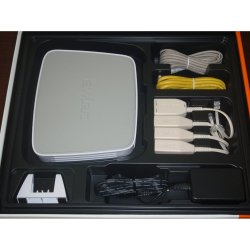
The picture attached here should be how your equipment looks. The support informaiton shows that they still provide Vista drivers for use on Windows 7. But do they have 64bit driver support? since you are running the 64bit W7. Or will the 32bit work for you? This is one question to start off with to bring up with their support staff for sure.
You will likely end up starting over from scratch in order to get things going again if something was knocked out on you. Treat it like you just saw a fresh copy of Windows go on and go back through things step by step. Getting the router detected and taking the drivers on fresh usually solves the lack of item.
This can also show if the router quit on you as well if provided by them. Here with the new ISP I simply ended buying a separate cable modem when things didn't work out at first. Since you are running the 64bit 7 you may want to look into that option as well in case you need to.
You can ask quesitons directly there as well. With 2Wire there is always a certain right way you have to follow to get things working correctly. Installing 2Wire 802.11g wireless adapter drivers for Windows 7
The picture attached here should be how your equipment looks. The support informaiton shows that they still provide Vista drivers for use on Windows 7. But do they have 64bit driver support? since you are running the 64bit W7. Or will the 32bit work for you? This is one question to start off with to bring up with their support staff for sure.
You will likely end up starting over from scratch in order to get things going again if something was knocked out on you. Treat it like you just saw a fresh copy of Windows go on and go back through things step by step. Getting the router detected and taking the drivers on fresh usually solves the lack of item.
This can also show if the router quit on you as well if provided by them. Here with the new ISP I simply ended buying a separate cable modem when things didn't work out at first. Since you are running the 64bit 7 you may want to look into that option as well in case you need to.
Attachments
My Computers
-
At a glance
W7 Ultimate x64/W10 Pro x64/W11 Pro Triple Bo...AMD Phenom II X4 975 Deneb 3.6ghz - 965 2nd r...Kingston Hyper X DDR3 1600 1.5v 16gb - Hyper ...MSI HD Radeon 5750 1gb - MSI HD Radeon 6450 o...- Computer type
- PC/Desktop
- Computer Manufacturer/Model Number
- Custom builds = 2
- OS
- W7 Ultimate x64/W10 Pro x64/W11 Pro Triple Boot - Main PC W7 Remote PC Micro ATX W7 Pro x64/W11 Pro
- CPU
- AMD Phenom II X4 975 Deneb 3.6ghz - 965 2nd remote pc
- Motherboard
- Gigabyte GA-790XTA-UD4-Gigabyte GA-880GM-D2H remote pc
- Memory
- Kingston Hyper X DDR3 1600 1.5v 16gb - Hyper X Fury 8gb 2nd
- Graphics Card(s)
- MSI HD Radeon 5750 1gb - MSI HD Radeon 6450 on mini tower
- Sound Card
- Creative Labs X-Fi Xtreme Audio P - Realtek onooard 2nd case
- Monitor(s) Displays
- ASUS VW199T-P 19" HP 2082a Main-HP 2082a 20" remote pc
- Screen Resolution
- Asus 1440x900 - HP 1600x900
- Hard Drives
- WD Black 1TB HD per OS W7, W10, and pending W11 presently on 500gb OS Drive - Pending Triple 1TB HDs for Spanned Storage/backup volume
Single 2TB external USB enclosure, single 1TB System 7 Host/Boot drive, Pending 8TB external HD for system image b
- PSU
- Corsair 750TX - primary / Corsair CX600 - second
- Case
- Antec 900-2 - SSD compatible / NZXT Vulcan mini tower
- Cooling
- Zalman CNPS9900A
- Keyboard
- AZIO L70 Backlit Letters Gaming - ONN Cordless/USB
- Mouse
- MSI DS200 Programmable, Logitech Cordless
- Internet Speed
- 30mbps upgrade - primary hard wired - mini tower usb WiFi
- Antivirus
- GFI VIPRE Internet Security 2014 on W7 2016 beta on W10,
- Browser
- Cyberfox, WaterFox 64bit FF variants, FireFox x64, Pale Moon
- Other Info
- Accomdata fan cooled usb 2.0 PIDE/Sata II, III external enclosure.
Sambient usb/eSata PATA/Sata II, III external enclosure.
-
At a glance
W7 Pro x64/W11 ProAMD Deneb 3.6ghz - 965Kingston Hyper X Fury 8gbMSI HD Radeon 6450 DVI Output- Computer type
- PC/Desktop
- System Manufacturer/Model Number
- CUSTOM ASSEMBLY
- OS
- W7 Pro x64/W11 Pro
- CPU
- AMD Deneb 3.6ghz - 965
- Motherboard
- Gigabyte GA-880GM-D2H remote pc
- Memory
- Kingston Hyper X Fury 8gb
- Graphics Card(s)
- MSI HD Radeon 6450 DVI Output
- Sound Card
- Realtek onooard Creative or Other separate PENDING
- Monitor(s) Displays
- VIZIO 32" LCD TV Separate LCD Pending
- Screen Resolution
- 1600x1080
- Hard Drives
- WD 500GB OS Host/Boot WD Green 1TB Storage/Backup
- PSU
- Corsair 600W - THERMALTAKE 600W spare case
- Case
- NZXT Vulcan mini tower
- Cooling
- Twin 120mm Top Fans - 240mm Side Cover
- Keyboard
- ONN Cordless/USB Logitech Cordless
- Mouse
- ONN USB/Cordless - Logitech Cordless
- Internet Speed
- DSL 5G
- Browser
- MS Edge, FireFox, WaterFox x64, FireFox Nightly
- Other Info
- OS Testing-Remote Access to Main TeamViewer
Yes I am trying to install my 2wire but I can't find the appropriate program or support driver on that website. I don't have a "legacy" or "current"? My adapter does not look like that.
My Computer
At a glance
Windows 7 Home 64
- OS
- Windows 7 Home 64
That is what comes up with the model number you posted. The photo was from a 3rd party site like amazon.com while the AT&T site shows a side view of the same. 2Wire DSL Gateway Model 2701HG-B No DSL filters included
I'm assuming you use a wireless usb or pci card type adapter along with the dsl router you were provided with. You have'll to go into the Control Panel>Network & Sharing Center to bring up the IE connection properties which should show an active connection between adapter to router if everything is working properly.
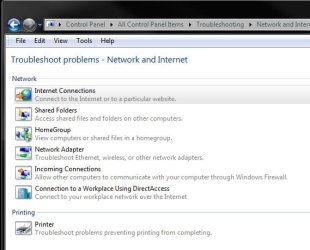
The part to pay attention to would be the Network and Internet Troubleshooting as well as the map at the top there. Typically when not connected you will see a large red X on the network icon itself showing no internet connectivity.
You may have to change the file and printer sharing settings if they reverted back to not private as well as run the troubleshooter itself. Once Windows is able to configure itself the normal view of the Network Intrastructure.
Note one method to try is to power everything down, turn off or unplug the router itself, and then replug the router and allow it to resync with Verizon. You should see any leds flicker for a minute or two while it resyncs itself to the ISP.
Once that is seen to you power everything back up and return to the N&S Center in the CP to go over everything. The recycle of the router followed by the fresh detection by Windows may re-establish the private IP address and get you back on.
Give that a try.
I'm assuming you use a wireless usb or pci card type adapter along with the dsl router you were provided with. You have'll to go into the Control Panel>Network & Sharing Center to bring up the IE connection properties which should show an active connection between adapter to router if everything is working properly.
The part to pay attention to would be the Network and Internet Troubleshooting as well as the map at the top there. Typically when not connected you will see a large red X on the network icon itself showing no internet connectivity.
You may have to change the file and printer sharing settings if they reverted back to not private as well as run the troubleshooter itself. Once Windows is able to configure itself the normal view of the Network Intrastructure.
Note one method to try is to power everything down, turn off or unplug the router itself, and then replug the router and allow it to resync with Verizon. You should see any leds flicker for a minute or two while it resyncs itself to the ISP.
Once that is seen to you power everything back up and return to the N&S Center in the CP to go over everything. The recycle of the router followed by the fresh detection by Windows may re-establish the private IP address and get you back on.
Give that a try.
Attachments
My Computers
-
At a glance
W7 Ultimate x64/W10 Pro x64/W11 Pro Triple Bo...AMD Phenom II X4 975 Deneb 3.6ghz - 965 2nd r...Kingston Hyper X DDR3 1600 1.5v 16gb - Hyper ...MSI HD Radeon 5750 1gb - MSI HD Radeon 6450 o...- Computer type
- PC/Desktop
- Computer Manufacturer/Model Number
- Custom builds = 2
- OS
- W7 Ultimate x64/W10 Pro x64/W11 Pro Triple Boot - Main PC W7 Remote PC Micro ATX W7 Pro x64/W11 Pro
- CPU
- AMD Phenom II X4 975 Deneb 3.6ghz - 965 2nd remote pc
- Motherboard
- Gigabyte GA-790XTA-UD4-Gigabyte GA-880GM-D2H remote pc
- Memory
- Kingston Hyper X DDR3 1600 1.5v 16gb - Hyper X Fury 8gb 2nd
- Graphics Card(s)
- MSI HD Radeon 5750 1gb - MSI HD Radeon 6450 on mini tower
- Sound Card
- Creative Labs X-Fi Xtreme Audio P - Realtek onooard 2nd case
- Monitor(s) Displays
- ASUS VW199T-P 19" HP 2082a Main-HP 2082a 20" remote pc
- Screen Resolution
- Asus 1440x900 - HP 1600x900
- Hard Drives
- WD Black 1TB HD per OS W7, W10, and pending W11 presently on 500gb OS Drive - Pending Triple 1TB HDs for Spanned Storage/backup volume
Single 2TB external USB enclosure, single 1TB System 7 Host/Boot drive, Pending 8TB external HD for system image b
- PSU
- Corsair 750TX - primary / Corsair CX600 - second
- Case
- Antec 900-2 - SSD compatible / NZXT Vulcan mini tower
- Cooling
- Zalman CNPS9900A
- Keyboard
- AZIO L70 Backlit Letters Gaming - ONN Cordless/USB
- Mouse
- MSI DS200 Programmable, Logitech Cordless
- Internet Speed
- 30mbps upgrade - primary hard wired - mini tower usb WiFi
- Antivirus
- GFI VIPRE Internet Security 2014 on W7 2016 beta on W10,
- Browser
- Cyberfox, WaterFox 64bit FF variants, FireFox x64, Pale Moon
- Other Info
- Accomdata fan cooled usb 2.0 PIDE/Sata II, III external enclosure.
Sambient usb/eSata PATA/Sata II, III external enclosure.
-
At a glance
W7 Pro x64/W11 ProAMD Deneb 3.6ghz - 965Kingston Hyper X Fury 8gbMSI HD Radeon 6450 DVI Output- Computer type
- PC/Desktop
- System Manufacturer/Model Number
- CUSTOM ASSEMBLY
- OS
- W7 Pro x64/W11 Pro
- CPU
- AMD Deneb 3.6ghz - 965
- Motherboard
- Gigabyte GA-880GM-D2H remote pc
- Memory
- Kingston Hyper X Fury 8gb
- Graphics Card(s)
- MSI HD Radeon 6450 DVI Output
- Sound Card
- Realtek onooard Creative or Other separate PENDING
- Monitor(s) Displays
- VIZIO 32" LCD TV Separate LCD Pending
- Screen Resolution
- 1600x1080
- Hard Drives
- WD 500GB OS Host/Boot WD Green 1TB Storage/Backup
- PSU
- Corsair 600W - THERMALTAKE 600W spare case
- Case
- NZXT Vulcan mini tower
- Cooling
- Twin 120mm Top Fans - 240mm Side Cover
- Keyboard
- ONN Cordless/USB Logitech Cordless
- Mouse
- ONN USB/Cordless - Logitech Cordless
- Internet Speed
- DSL 5G
- Browser
- MS Edge, FireFox, WaterFox x64, FireFox Nightly
- Other Info
- OS Testing-Remote Access to Main TeamViewer
What I meant there was simply using Verizon as an example. The ISP you have should also have it's own support pages.
The part on recycling the router's power and resyning with the ISP however is one common method for re-establishing your network connectivity and attaining a private IP. An alternate would be opening up an elevated command prompt to use the "ipconfig /release" and "ipconfig /renew" commands.
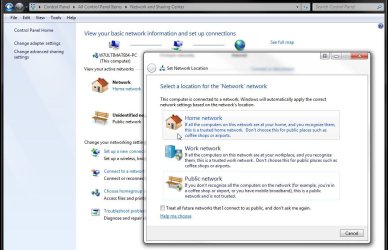
Once you have regained the internet connection you should see the Network Intrastructure item appear. When in the Control Panel>Network & Sharing Center try clicking the home network link under the Network icon. Then select the top home network option at the top of the new screen that appears.
Often as soon as you regain the internet connectivity that will appear on it's own. The previous screen shows the troubleshooting options available to go over as well. When swapping cases here to work on another and then reconnecting the main case I've ended up tinkering with each in order to get connected again.
The other option available of course would be calling your ISP directly on the phone and having them walk you through the initial set up. It's usually only one small thing you are missing that will hold everything up.
The part on recycling the router's power and resyning with the ISP however is one common method for re-establishing your network connectivity and attaining a private IP. An alternate would be opening up an elevated command prompt to use the "ipconfig /release" and "ipconfig /renew" commands.
Once you have regained the internet connection you should see the Network Intrastructure item appear. When in the Control Panel>Network & Sharing Center try clicking the home network link under the Network icon. Then select the top home network option at the top of the new screen that appears.
Often as soon as you regain the internet connectivity that will appear on it's own. The previous screen shows the troubleshooting options available to go over as well. When swapping cases here to work on another and then reconnecting the main case I've ended up tinkering with each in order to get connected again.
The other option available of course would be calling your ISP directly on the phone and having them walk you through the initial set up. It's usually only one small thing you are missing that will hold everything up.
Attachments
My Computers
-
At a glance
W7 Ultimate x64/W10 Pro x64/W11 Pro Triple Bo...AMD Phenom II X4 975 Deneb 3.6ghz - 965 2nd r...Kingston Hyper X DDR3 1600 1.5v 16gb - Hyper ...MSI HD Radeon 5750 1gb - MSI HD Radeon 6450 o...- Computer type
- PC/Desktop
- Computer Manufacturer/Model Number
- Custom builds = 2
- OS
- W7 Ultimate x64/W10 Pro x64/W11 Pro Triple Boot - Main PC W7 Remote PC Micro ATX W7 Pro x64/W11 Pro
- CPU
- AMD Phenom II X4 975 Deneb 3.6ghz - 965 2nd remote pc
- Motherboard
- Gigabyte GA-790XTA-UD4-Gigabyte GA-880GM-D2H remote pc
- Memory
- Kingston Hyper X DDR3 1600 1.5v 16gb - Hyper X Fury 8gb 2nd
- Graphics Card(s)
- MSI HD Radeon 5750 1gb - MSI HD Radeon 6450 on mini tower
- Sound Card
- Creative Labs X-Fi Xtreme Audio P - Realtek onooard 2nd case
- Monitor(s) Displays
- ASUS VW199T-P 19" HP 2082a Main-HP 2082a 20" remote pc
- Screen Resolution
- Asus 1440x900 - HP 1600x900
- Hard Drives
- WD Black 1TB HD per OS W7, W10, and pending W11 presently on 500gb OS Drive - Pending Triple 1TB HDs for Spanned Storage/backup volume
Single 2TB external USB enclosure, single 1TB System 7 Host/Boot drive, Pending 8TB external HD for system image b
- PSU
- Corsair 750TX - primary / Corsair CX600 - second
- Case
- Antec 900-2 - SSD compatible / NZXT Vulcan mini tower
- Cooling
- Zalman CNPS9900A
- Keyboard
- AZIO L70 Backlit Letters Gaming - ONN Cordless/USB
- Mouse
- MSI DS200 Programmable, Logitech Cordless
- Internet Speed
- 30mbps upgrade - primary hard wired - mini tower usb WiFi
- Antivirus
- GFI VIPRE Internet Security 2014 on W7 2016 beta on W10,
- Browser
- Cyberfox, WaterFox 64bit FF variants, FireFox x64, Pale Moon
- Other Info
- Accomdata fan cooled usb 2.0 PIDE/Sata II, III external enclosure.
Sambient usb/eSata PATA/Sata II, III external enclosure.
-
At a glance
W7 Pro x64/W11 ProAMD Deneb 3.6ghz - 965Kingston Hyper X Fury 8gbMSI HD Radeon 6450 DVI Output- Computer type
- PC/Desktop
- System Manufacturer/Model Number
- CUSTOM ASSEMBLY
- OS
- W7 Pro x64/W11 Pro
- CPU
- AMD Deneb 3.6ghz - 965
- Motherboard
- Gigabyte GA-880GM-D2H remote pc
- Memory
- Kingston Hyper X Fury 8gb
- Graphics Card(s)
- MSI HD Radeon 6450 DVI Output
- Sound Card
- Realtek onooard Creative or Other separate PENDING
- Monitor(s) Displays
- VIZIO 32" LCD TV Separate LCD Pending
- Screen Resolution
- 1600x1080
- Hard Drives
- WD 500GB OS Host/Boot WD Green 1TB Storage/Backup
- PSU
- Corsair 600W - THERMALTAKE 600W spare case
- Case
- NZXT Vulcan mini tower
- Cooling
- Twin 120mm Top Fans - 240mm Side Cover
- Keyboard
- ONN Cordless/USB Logitech Cordless
- Mouse
- ONN USB/Cordless - Logitech Cordless
- Internet Speed
- DSL 5G
- Browser
- MS Edge, FireFox, WaterFox x64, FireFox Nightly
- Other Info
- OS Testing-Remote Access to Main TeamViewer
First I would need to know which ISP you are using in order to look up their support information. Usually they will provide troubleshooting as well as initial set up instructions to go by.
My Computers
-
At a glance
W7 Ultimate x64/W10 Pro x64/W11 Pro Triple Bo...AMD Phenom II X4 975 Deneb 3.6ghz - 965 2nd r...Kingston Hyper X DDR3 1600 1.5v 16gb - Hyper ...MSI HD Radeon 5750 1gb - MSI HD Radeon 6450 o...- Computer type
- PC/Desktop
- Computer Manufacturer/Model Number
- Custom builds = 2
- OS
- W7 Ultimate x64/W10 Pro x64/W11 Pro Triple Boot - Main PC W7 Remote PC Micro ATX W7 Pro x64/W11 Pro
- CPU
- AMD Phenom II X4 975 Deneb 3.6ghz - 965 2nd remote pc
- Motherboard
- Gigabyte GA-790XTA-UD4-Gigabyte GA-880GM-D2H remote pc
- Memory
- Kingston Hyper X DDR3 1600 1.5v 16gb - Hyper X Fury 8gb 2nd
- Graphics Card(s)
- MSI HD Radeon 5750 1gb - MSI HD Radeon 6450 on mini tower
- Sound Card
- Creative Labs X-Fi Xtreme Audio P - Realtek onooard 2nd case
- Monitor(s) Displays
- ASUS VW199T-P 19" HP 2082a Main-HP 2082a 20" remote pc
- Screen Resolution
- Asus 1440x900 - HP 1600x900
- Hard Drives
- WD Black 1TB HD per OS W7, W10, and pending W11 presently on 500gb OS Drive - Pending Triple 1TB HDs for Spanned Storage/backup volume
Single 2TB external USB enclosure, single 1TB System 7 Host/Boot drive, Pending 8TB external HD for system image b
- PSU
- Corsair 750TX - primary / Corsair CX600 - second
- Case
- Antec 900-2 - SSD compatible / NZXT Vulcan mini tower
- Cooling
- Zalman CNPS9900A
- Keyboard
- AZIO L70 Backlit Letters Gaming - ONN Cordless/USB
- Mouse
- MSI DS200 Programmable, Logitech Cordless
- Internet Speed
- 30mbps upgrade - primary hard wired - mini tower usb WiFi
- Antivirus
- GFI VIPRE Internet Security 2014 on W7 2016 beta on W10,
- Browser
- Cyberfox, WaterFox 64bit FF variants, FireFox x64, Pale Moon
- Other Info
- Accomdata fan cooled usb 2.0 PIDE/Sata II, III external enclosure.
Sambient usb/eSata PATA/Sata II, III external enclosure.
-
At a glance
W7 Pro x64/W11 ProAMD Deneb 3.6ghz - 965Kingston Hyper X Fury 8gbMSI HD Radeon 6450 DVI Output- Computer type
- PC/Desktop
- System Manufacturer/Model Number
- CUSTOM ASSEMBLY
- OS
- W7 Pro x64/W11 Pro
- CPU
- AMD Deneb 3.6ghz - 965
- Motherboard
- Gigabyte GA-880GM-D2H remote pc
- Memory
- Kingston Hyper X Fury 8gb
- Graphics Card(s)
- MSI HD Radeon 6450 DVI Output
- Sound Card
- Realtek onooard Creative or Other separate PENDING
- Monitor(s) Displays
- VIZIO 32" LCD TV Separate LCD Pending
- Screen Resolution
- 1600x1080
- Hard Drives
- WD 500GB OS Host/Boot WD Green 1TB Storage/Backup
- PSU
- Corsair 600W - THERMALTAKE 600W spare case
- Case
- NZXT Vulcan mini tower
- Cooling
- Twin 120mm Top Fans - 240mm Side Cover
- Keyboard
- ONN Cordless/USB Logitech Cordless
- Mouse
- ONN USB/Cordless - Logitech Cordless
- Internet Speed
- DSL 5G
- Browser
- MS Edge, FireFox, WaterFox x64, FireFox Nightly
- Other Info
- OS Testing-Remote Access to Main TeamViewer
Is that SBC Yahoo dsl? SBC Yahoo!® DSL - Welcome Home
I'm running into problems finding a main support site for them! Yahoo Answers saw one request for a tech support phone number answered. I am looking for a US tech support phone number for sbcglobal.net? - Yahoo! Answers
Generall each ISP has their own support information available. The best information deals with email only found at Sbcglobal - eHow.com
A slight update for you. While browsing for information on how to go about setting up other types of wireless setups between 7 and even older versions I came across some information that could be a big help for you. Windows 7 Wireless Tips
The home network site there has quite a bit of useful information. The page there however deals directly with 7 and wireless. Just thought I would pass that along here.
I'm running into problems finding a main support site for them! Yahoo Answers saw one request for a tech support phone number answered. I am looking for a US tech support phone number for sbcglobal.net? - Yahoo! Answers
Generall each ISP has their own support information available. The best information deals with email only found at Sbcglobal - eHow.com
A slight update for you. While browsing for information on how to go about setting up other types of wireless setups between 7 and even older versions I came across some information that could be a big help for you. Windows 7 Wireless Tips
The home network site there has quite a bit of useful information. The page there however deals directly with 7 and wireless. Just thought I would pass that along here.
Last edited:
My Computers
-
At a glance
W7 Ultimate x64/W10 Pro x64/W11 Pro Triple Bo...AMD Phenom II X4 975 Deneb 3.6ghz - 965 2nd r...Kingston Hyper X DDR3 1600 1.5v 16gb - Hyper ...MSI HD Radeon 5750 1gb - MSI HD Radeon 6450 o...- Computer type
- PC/Desktop
- Computer Manufacturer/Model Number
- Custom builds = 2
- OS
- W7 Ultimate x64/W10 Pro x64/W11 Pro Triple Boot - Main PC W7 Remote PC Micro ATX W7 Pro x64/W11 Pro
- CPU
- AMD Phenom II X4 975 Deneb 3.6ghz - 965 2nd remote pc
- Motherboard
- Gigabyte GA-790XTA-UD4-Gigabyte GA-880GM-D2H remote pc
- Memory
- Kingston Hyper X DDR3 1600 1.5v 16gb - Hyper X Fury 8gb 2nd
- Graphics Card(s)
- MSI HD Radeon 5750 1gb - MSI HD Radeon 6450 on mini tower
- Sound Card
- Creative Labs X-Fi Xtreme Audio P - Realtek onooard 2nd case
- Monitor(s) Displays
- ASUS VW199T-P 19" HP 2082a Main-HP 2082a 20" remote pc
- Screen Resolution
- Asus 1440x900 - HP 1600x900
- Hard Drives
- WD Black 1TB HD per OS W7, W10, and pending W11 presently on 500gb OS Drive - Pending Triple 1TB HDs for Spanned Storage/backup volume
Single 2TB external USB enclosure, single 1TB System 7 Host/Boot drive, Pending 8TB external HD for system image b
- PSU
- Corsair 750TX - primary / Corsair CX600 - second
- Case
- Antec 900-2 - SSD compatible / NZXT Vulcan mini tower
- Cooling
- Zalman CNPS9900A
- Keyboard
- AZIO L70 Backlit Letters Gaming - ONN Cordless/USB
- Mouse
- MSI DS200 Programmable, Logitech Cordless
- Internet Speed
- 30mbps upgrade - primary hard wired - mini tower usb WiFi
- Antivirus
- GFI VIPRE Internet Security 2014 on W7 2016 beta on W10,
- Browser
- Cyberfox, WaterFox 64bit FF variants, FireFox x64, Pale Moon
- Other Info
- Accomdata fan cooled usb 2.0 PIDE/Sata II, III external enclosure.
Sambient usb/eSata PATA/Sata II, III external enclosure.
-
At a glance
W7 Pro x64/W11 ProAMD Deneb 3.6ghz - 965Kingston Hyper X Fury 8gbMSI HD Radeon 6450 DVI Output- Computer type
- PC/Desktop
- System Manufacturer/Model Number
- CUSTOM ASSEMBLY
- OS
- W7 Pro x64/W11 Pro
- CPU
- AMD Deneb 3.6ghz - 965
- Motherboard
- Gigabyte GA-880GM-D2H remote pc
- Memory
- Kingston Hyper X Fury 8gb
- Graphics Card(s)
- MSI HD Radeon 6450 DVI Output
- Sound Card
- Realtek onooard Creative or Other separate PENDING
- Monitor(s) Displays
- VIZIO 32" LCD TV Separate LCD Pending
- Screen Resolution
- 1600x1080
- Hard Drives
- WD 500GB OS Host/Boot WD Green 1TB Storage/Backup
- PSU
- Corsair 600W - THERMALTAKE 600W spare case
- Case
- NZXT Vulcan mini tower
- Cooling
- Twin 120mm Top Fans - 240mm Side Cover
- Keyboard
- ONN Cordless/USB Logitech Cordless
- Mouse
- ONN USB/Cordless - Logitech Cordless
- Internet Speed
- DSL 5G
- Browser
- MS Edge, FireFox, WaterFox x64, FireFox Nightly
- Other Info
- OS Testing-Remote Access to Main TeamViewer
Similar threads


- Replies
- 5
- Views
- 983

- Replies
- 3
- Views
- 6K
- Replies
- 33
- Views
- 15K
