Solved gateway not available please help

ianbrylle29

New member
Power User
Local time
2:20 PM
Messages
105
Location
Davao City
i have problems regarding my internet connection. here is the thing. I can connect to the wifi internet but the problem is that in shows limited access.

i tried to diagnose the problem but there is a warning that shows GATEWAY NOT AVAILABLE

please help guy.

I put a picture regarding my concern thanks
 

Attachments
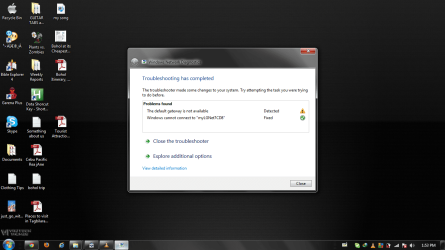
  • 1.png
    1.png
    320.3 KB · Views: 31

My Computer

OS
windows 10 64bit
CPU
Ryzen 3 2200g
Motherboard
msi a320m pro-vh plus
Memory
8.00 GB
Graphics Card(s)
Vega 8 integrated graphics

My Computer

Computer type
Laptop
Computer Manufacturer/Model Number
Employer provided Dell Latitude
OS
W7 Pro SP1 64bit
CPU
i7
Memory
8GB
Graphics Card(s)
Intel HD Graphics
Hard Drives
crappy SSD
Antivirus
Employer mandated Symantec Endpoint Protection
Browser
Pale Moon 64bit, IE11 64bit & Chrome 64bit
yes. im really sorry for putting the same issue. i was just so stressed regarding my situation right now.
 

My Computer

OS
windows 10 64bit
CPU
Ryzen 3 2200g
Motherboard
msi a320m pro-vh plus
Memory
8.00 GB
Graphics Card(s)
Vega 8 integrated graphics
I was just attempting to put the parts together. So, is everything working now?
 

My Computer

Computer type
Laptop
Computer Manufacturer/Model Number
Employer provided Dell Latitude
OS
W7 Pro SP1 64bit
CPU
i7
Memory
8GB
Graphics Card(s)
Intel HD Graphics
Hard Drives
crappy SSD
Antivirus
Employer mandated Symantec Endpoint Protection
Browser
Pale Moon 64bit, IE11 64bit & Chrome 64bit
no not yet. there are times that i can connect and there are times that i can't. connected but no internet access or limited access.
 

My Computer

OS
windows 10 64bit
CPU
Ryzen 3 2200g
Motherboard
msi a320m pro-vh plus
Memory
8.00 GB
Graphics Card(s)
Vega 8 integrated graphics
Are the "yellow marks" gone from the device manager now?
 

My Computer

Computer type
Laptop
Computer Manufacturer/Model Number
Employer provided Dell Latitude
OS
W7 Pro SP1 64bit
CPU
i7
Memory
8GB
Graphics Card(s)
Intel HD Graphics
Hard Drives
crappy SSD
Antivirus
Employer mandated Symantec Endpoint Protection
Browser
Pale Moon 64bit, IE11 64bit & Chrome 64bit
actually the devices are also gone. I mean the ASATAP and the TEREDO TUNNELING ADAPTER.

is it ok that its gone?.

I followed this instruction that i found in another forum.

"Here's what worked for me. It's in the windows knowledge base. Sorry i didn't get the number.

In the start menu search bar type in REGEDIT to open the registry editor. Navigate through the following: HKEY_LOCAL_MACHINE\SYSTEM\CURRENTCONTROLSET\SERVICES\TCPIP6\PARAMETERS. In the right pane, right click Disabled Componets and select edit. Set the DWord value to 0. Restart your computer and the teredo tunneling adapter will now start.

Iwas trying to join my exsisting homegroup and was getting a IPv6 not enabled message. I had a yellow exclamation mark in the device manager and under devices and printers in the start menu my computer icon had a yellow exclamation mark also. It all went away and I was able to join my homegroup without a problem.

Good luck to all. Try this. Its easy and it works."
 

My Computer

OS
windows 10 64bit
CPU
Ryzen 3 2200g
Motherboard
msi a320m pro-vh plus
Memory
8.00 GB
Graphics Card(s)
Vega 8 integrated graphics
actually the devices are also gone. I mean the ASATAP and the TEREDO TUNNELING ADAPTER.

is it ok that its gone?.

I followed this instruction that i found in another forum.

"Here's what worked for me. It's in the windows knowledge base. Sorry i didn't get the number.

In the start menu search bar type in REGEDIT to open the registry editor. Navigate through the following: HKEY_LOCAL_MACHINE\SYSTEM\CURRENTCONTROLSET\SERVICES\TCPIP6\PARAMETERS. In the right pane, right click Disabled Componets and select edit. Set the DWord value to 0. Restart your computer and the teredo tunneling adapter will now start.

Iwas trying to join my exsisting homegroup and was getting a IPv6 not enabled message. I had a yellow exclamation mark in the device manager and under devices and printers in the start menu my computer icon had a yellow exclamation mark also. It all went away and I was able to join my homegroup without a problem.

Good luck to all. Try this. Its easy and it works."
so the result is my ASATAP and TEREDO TUNNELING ADAPTER are gone.
 

My Computer

OS
windows 10 64bit
CPU
Ryzen 3 2200g
Motherboard
msi a320m pro-vh plus
Memory
8.00 GB
Graphics Card(s)
Vega 8 integrated graphics
I checked two W7pro computers and neither had the items that you mentioned in the device manager - so I'm not sure where they came from on your system... but I've not researched much beyond that.

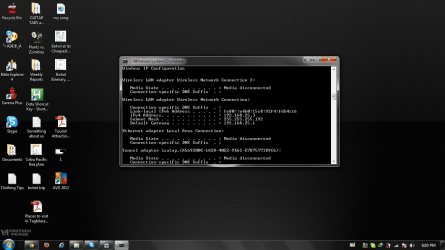
Open a command prompt window and type

ipconfig

and see if you have an IPv6 address

IP6.JPG
 

My Computer

Computer type
Laptop
Computer Manufacturer/Model Number
Employer provided Dell Latitude
OS
W7 Pro SP1 64bit
CPU
i7
Memory
8GB
Graphics Card(s)
Intel HD Graphics
Hard Drives
crappy SSD
Antivirus
Employer mandated Symantec Endpoint Protection
Browser
Pale Moon 64bit, IE11 64bit & Chrome 64bit
there was no IPv6 address on my config and I also noticed that some drivers are disconnected.

this picture might help you notice the problem. THANKS!
 

Attachments

  • 1.png
    1.png
    336.5 KB · Views: 16

My Computer

OS
windows 10 64bit
CPU
Ryzen 3 2200g
Motherboard
msi a320m pro-vh plus
Memory
8.00 GB
Graphics Card(s)
Vega 8 integrated graphics
Use Alt + Print Scrn to get a screenshot of the active window :-)

It appears that you do have an IPv6 assigned to the Wireless LAN Adapter
It is right above the IPv4 address of 192.168.25.3

You seem to have a problem that comes and goes. Have you lost your connection to the internet today?

Open a cmd prompt window and type:
ping 192.168.25.1 -t
As long as you are getting good returns in that window, you are connected to your router or modem. Move that window off to the side or minimize it - just keep it running.

Open another cmd prompt window and type:
ping google.com -t
As long as you are getting good returns in that window, you are most likely connected to the internet. Move that window off to the side too or minimize it - just keep it running.

Now use your computer the way that you normally would. If you lose your connection, check the two windows to see if you have lost the connection to the router or just to the internet. I know that there is info like that in the network and sharing center, I've just found it to be wrong at times.
 

My Computer

Computer type
Laptop
Computer Manufacturer/Model Number
Employer provided Dell Latitude
OS
W7 Pro SP1 64bit
CPU
i7
Memory
8GB
Graphics Card(s)
Intel HD Graphics
Hard Drives
crappy SSD
Antivirus
Employer mandated Symantec Endpoint Protection
Browser
Pale Moon 64bit, IE11 64bit & Chrome 64bit
thank a bunch i will try it immediately. yes I am experiencing on and off internet connection but still I am doing the best I can to follow your instructions thanks a lot sir. I will reply instantly after your instructions. ^_^
 

My Computer

OS
windows 10 64bit
CPU
Ryzen 3 2200g
Motherboard
msi a320m pro-vh plus
Memory
8.00 GB
Graphics Card(s)
Vega 8 integrated graphics
Use Alt + Print Scrn to get a screenshot of the active window :-)

It appears that you do have an IPv6 assigned to the Wireless LAN Adapter
It is right above the IPv4 address of 192.168.25.3

You seem to have a problem that comes and goes. Have you lost your connection to the internet today?

Open a cmd prompt window and type:
ping 192.168.25.1 -t
As long as you are getting good returns in that window, you are connected to your router or modem. Move that window off to the side or minimize it - just keep it running.

Open another cmd prompt window and type:
ping google.com -t
As long as you are getting good returns in that window, you are most likely connected to the internet. Move that window off to the side too or minimize it - just keep it running.

Now use your computer the way that you normally would. If you lose your connection, check the two windows to see if you have lost the connection to the router or just to the internet. I know that there is info like that in the network and sharing center, I've just found it to be wrong at times.


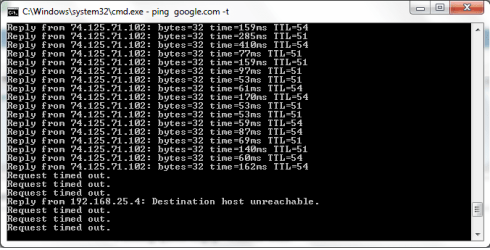
yes sir it runs but it suddenly stops and i need to reconnect again sighs!.
thanks a lot i really appreciate your help sir. but my other problem is that my ASATAP and ETEROS adapter isn't in my device manager is it ok?
 

My Computer

OS
windows 10 64bit
CPU
Ryzen 3 2200g
Motherboard
msi a320m pro-vh plus
Memory
8.00 GB
Graphics Card(s)
Vega 8 integrated graphics
this happens when the internet is timed out.
 

Attachments

  • 2.png
    2.png
    10.3 KB · Views: 10

My Computer

OS
windows 10 64bit
CPU
Ryzen 3 2200g
Motherboard
msi a320m pro-vh plus
Memory
8.00 GB
Graphics Card(s)
Vega 8 integrated graphics
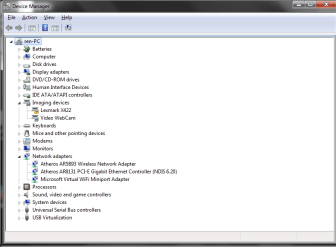
I can only say that I do not see a ISATAP and ETEROS adapter in device manager on the two W7 computers that I checked.

When the ping to google times out - did the ping to the router time out at the same time?

I'm attempting to figure out if you are losing your connection to the router or the world.
 
Last edited:

My Computer

Computer type
Laptop
Computer Manufacturer/Model Number
Employer provided Dell Latitude
OS
W7 Pro SP1 64bit
CPU
i7
Memory
8GB
Graphics Card(s)
Intel HD Graphics
Hard Drives
crappy SSD
Antivirus
Employer mandated Symantec Endpoint Protection
Browser
Pale Moon 64bit, IE11 64bit & Chrome 64bit
I can only say that I do not see a ISATAP and ETEROS adapter in device manager on the two W7 computers that I checked.

When the ping to google times out - did the ping to the router time out at the same time?

I'm attempting to figure out if you are losing your connection to the router or the world.

yes sir, they timed out at the same time. like exact time.
 

My Computer

OS
windows 10 64bit
CPU
Ryzen 3 2200g
Motherboard
msi a320m pro-vh plus
Memory
8.00 GB
Graphics Card(s)
Vega 8 integrated graphics
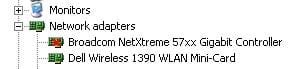
Can you please post a screenshot of the wireless adapter in the device manager - expanded like this:

nic.JPG
 

My Computer

Computer type
Laptop
Computer Manufacturer/Model Number
Employer provided Dell Latitude
OS
W7 Pro SP1 64bit
CPU
i7
Memory
8GB
Graphics Card(s)
Intel HD Graphics
Hard Drives
crappy SSD
Antivirus
Employer mandated Symantec Endpoint Protection
Browser
Pale Moon 64bit, IE11 64bit & Chrome 64bit
this is the network adapters
 

Attachments

  • 2.png
    2.png
    19.3 KB · Views: 8

My Computer

OS
windows 10 64bit
CPU
Ryzen 3 2200g
Motherboard
msi a320m pro-vh plus
Memory
8.00 GB
Graphics Card(s)
Vega 8 integrated graphics
Have you tried connecting to the router using a LAN cable (a wired connection)?

Do the ping windows time out a lot and at the same time when using a wire instead of wireless?
 

My Computer

Computer type
Laptop
Computer Manufacturer/Model Number
Employer provided Dell Latitude
OS
W7 Pro SP1 64bit
CPU
i7
Memory
8GB
Graphics Card(s)
Intel HD Graphics
Hard Drives
crappy SSD
Antivirus
Employer mandated Symantec Endpoint Protection
Browser
Pale Moon 64bit, IE11 64bit & Chrome 64bit
i haven't tried connecting it to a wired connection most of the time my laptop is connected using wireless so I don't know the difference yet between them.
 

My Computer

OS
windows 10 64bit
CPU
Ryzen 3 2200g
Motherboard
msi a320m pro-vh plus
Memory
8.00 GB
Graphics Card(s)
Vega 8 integrated graphics
Back
Top