Solved gateway not available please help

Please clarify for me: this thread started about you losing your connection to the internet sometimes. Then it comes back sometimes.

Do you take this laptop home with you?
If yes, do you use a wireless connection while at home?
If yes, do you sometimes lose the connection to the internet while at home too?

Edit: Are you allowed to you install software (like xirrus) onto this laptop?
 
Last edited:

My Computer My Computer

Computer type
Laptop
Computer Manufacturer/Model Number
Employer provided Dell Latitude
OS
W7 Pro SP1 64bit
CPU
i7
Memory
8GB
Graphics Card(s)
Intel HD Graphics
Hard Drives
crappy SSD
Antivirus
Employer mandated Symantec Endpoint Protection
Browser
Pale Moon 64bit, IE11 64bit & Chrome 64bit

By the way - the normal time that ping waits for a reply is 4000 milliseconds (equals 4 seconds). If a reply does not come in within those 4 seconds, the you see the time out line. There are other lines that can show up too; like the line in one of your screenshots that said "Destination host unreachable". If you are interested, you can Google what each return means, but for now - just know that pretty much any return that does not look like this is bad:
ping.JPG

Those two batch files increased that waiting time to 7000 milliseconds (or 7 seconds). That should help prevent the time outs while you are downloading a file. Just because you see a time out while pinging does not always mean that you have lost your connection to the internet. A time out might just mean that the Google server was too busy to reply. But again, you should not see several time outs in a row.

The ping to the router/modem (wireless access point) should be very solid - it should almost never time out. Even if lots of users are downloading large files. If you see several time outs in a row in the window that it pinging the router/modem (wireless access point), then something is very wrong. Either someone in the area is generating interference so that your wireless card cannot communicate with the router/modem (wireless access point) or there is something wrong with your computer's hardware (wireless card) and/or software (wireless card driver).
 

My Computer My Computer

Computer type
Laptop
Computer Manufacturer/Model Number
Employer provided Dell Latitude
OS
W7 Pro SP1 64bit
CPU
i7
Memory
8GB
Graphics Card(s)
Intel HD Graphics
Hard Drives
crappy SSD
Antivirus
Employer mandated Symantec Endpoint Protection
Browser
Pale Moon 64bit, IE11 64bit & Chrome 64bit
Please clarify for me: this thread started about you losing your connection to the internet sometimes. Then it comes back sometimes.

Do you take this laptop home with you?
If yes, do you use a wireless connection while at home?
If yes, do you sometimes lose the connection to the internet while at home too?

Edit: Are you allowed to you install software (like xirrus) onto this laptop?

oh sorry sir. My work place is in the house. I work in the house of my employer with wifi connection,
 

My Computer My Computer

OS
windows 10 64bit
CPU
Ryzen 3 2200g
Motherboard
msi a320m pro-vh plus
Memory
8.00 GB
Graphics Card(s)
Vega 8 integrated graphics
By the way - the normal time that ping waits for a reply is 4000 milliseconds (equals 4 seconds). If a reply does not come in within those 4 seconds, the you see the time out line. There are other lines that can show up too; like the line in one of your screenshots that said "Destination host unreachable". If you are interested, you can Google what each return means, but for now - just know that pretty much any return that does not look like this is bad:
View attachment 201670

Those two batch files increased that waiting time to 7000 milliseconds (or 7 seconds). That should help prevent the time outs while you are downloading a file. Just because you see a time out while pinging does not always mean that you have lost your connection to the internet. A time out might just mean that the Google server was too busy to reply. But again, you should not see several time outs in a row.

The ping to the router/modem (wireless access point) should be very solid - it should almost never time out. Even if lots of users are downloading large files. If you see several time outs in a row in the window that it pinging the router/modem (wireless access point), then something is very wrong. Either someone in the area is generating interference so that your wireless card cannot communicate with the router/modem (wireless access point) or there is something wrong with your computer's hardware (wireless card) and/or software (wireless card driver).

"The ping to the router/modem (wireless access point) should be very solid " do you mean this one sir ping 192.168.25.1 -t?
all connection is ok there is no disconnection
but if this one, ping Google -t the connection is most of the shows "request timed out"
 

My Computer My Computer

OS
windows 10 64bit
CPU
Ryzen 3 2200g
Motherboard
msi a320m pro-vh plus
Memory
8.00 GB
Graphics Card(s)
Vega 8 integrated graphics
Thank you for that clarification. I had it all wrong on my head.

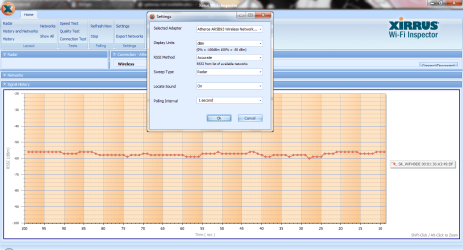
Are you allowed to install software onto this laptop - if so, please install Xirrus Wi-Fi-Inspector. That software will let you see a graph of the wireless signal strength that you laptop is sees.

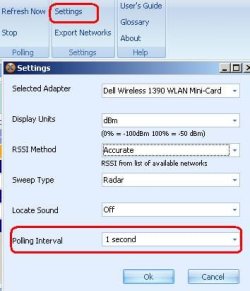
Here is my graph using a setting of one second for the polling interval:
signal.JPG


polling-rate.JPG
 

My Computer My Computer

Computer type
Laptop
Computer Manufacturer/Model Number
Employer provided Dell Latitude
OS
W7 Pro SP1 64bit
CPU
i7
Memory
8GB
Graphics Card(s)
Intel HD Graphics
Hard Drives
crappy SSD
Antivirus
Employer mandated Symantec Endpoint Protection
Browser
Pale Moon 64bit, IE11 64bit & Chrome 64bit
......"The ping to the router/modem (wireless access point) should be very solid " do you mean this one sir ping 192.168.25.1 -t?
all connection is ok there is no disconnection
but if this one, ping Google -t the connection is most of the shows "request timed out"
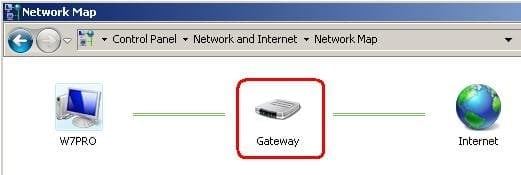
Yes - sorry that I was not clear. The IP address starting with 192 is the router that you are connected to... or it could be a modem or just a wireless access point connected to something else. It really does not matter what it is for this discussion. maybe I should just call it your gateway since that is what Microsoft called it in the error that you saw in your first post in this thread.

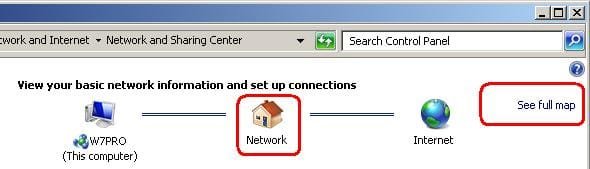
If you go to your Network and Sharing Center and then select See full map
network-map1.JPG

You might see more computers that this:
network-map2.JPG
...but the 192.168.25.1 IP address it called the gateway in those images.


You can close both of those ping windows now and use the batch files that you downloaded earlier to open two fresh ping windows. Then please post a screen shot (Alt-Print Scrn) if you see several time outs in a row.
 

My Computer My Computer

Computer type
Laptop
Computer Manufacturer/Model Number
Employer provided Dell Latitude
OS
W7 Pro SP1 64bit
CPU
i7
Memory
8GB
Graphics Card(s)
Intel HD Graphics
Hard Drives
crappy SSD
Antivirus
Employer mandated Symantec Endpoint Protection
Browser
Pale Moon 64bit, IE11 64bit & Chrome 64bit
Attachments

  • 2.png
    2.png
    57.7 KB · Views: 1

My Computer My Computer

OS
windows 10 64bit
CPU
Ryzen 3 2200g
Motherboard
msi a320m pro-vh plus
Memory
8.00 GB
Graphics Card(s)
Vega 8 integrated graphics
......"The ping to the router/modem (wireless access point) should be very solid " do you mean this one sir ping 192.168.25.1 -t?
all connection is ok there is no disconnection
but if this one, ping Google -t the connection is most of the shows "request timed out"
Yes - sorry that I was not clear. The IP address starting with 192 is the router that you are connected to... or it could be a modem or just a wireless access point connected to something else. It really does not matter what it is for this discussion. maybe I should just call it your gateway since that is what Microsoft called it in the error that you saw in your first post in this thread.

If you go to your Network and Sharing Center and then select See full map
View attachment 201680

You might see more computers that this:
View attachment 201681
...but the 192.168.25.1 IP address it called the gateway in those images.


You can close both of those ping windows now and use the batch files that you downloaded earlier to open two fresh ping windows. Then please post a screen shot (Alt-Print Scrn) if you see several time outs in a row.


there are some moments that the "request timed out" is still there but I think its ok because before its almost all the time.
 

Attachments

  • 2.png
    2.png
    112 KB · Views: 2

My Computer My Computer

OS
windows 10 64bit
CPU
Ryzen 3 2200g
Motherboard
msi a320m pro-vh plus
Memory
8.00 GB
Graphics Card(s)
Vega 8 integrated graphics
That graph in the WiFi Inspector tool looks good. You might want to let the WiFi Inspector software run for a while.

If you see the Google ping time outs several times in a row like you did here then look at the ping window for the "gateway" (router) and see if they timed out too. Then look at the WiFi Inspector software to see if there was a big dip in the WiFi signal strength you are receiving.

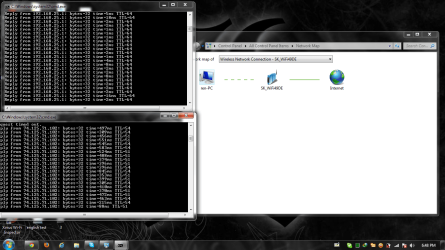
Here is what the ping windows look like on my XP laptop:
pings.JPG
The lower the ping time, the better.

I picked Google for you to ping because it is many miles from your office. That should give you a feel for how well all of the computers and connections between your office and that Google server are doing. Attached is another batch file for your desktop. Tracert shows you some of the computers/connections that you might encounter when trying to reach Google. That path might change from time to time as computers get busy. If you want, you can post a screenshot of that tracert and I can pick a computer closer to your office for you to ping.

I'm not sure why you are no longer seeing the problem that you had in your original post. Maybe someone was restarting the "gateway" equipment or whatever was interfering with your WiFi signal is gone now.

Here are some other tools that you can play with:
Speedtest.net - The Global Broadband Speed Test
Pingtest.net - The Global Broadband Quality Test
 

Attachments

My Computer My Computer

Computer type
Laptop
Computer Manufacturer/Model Number
Employer provided Dell Latitude
OS
W7 Pro SP1 64bit
CPU
i7
Memory
8GB
Graphics Card(s)
Intel HD Graphics
Hard Drives
crappy SSD
Antivirus
Employer mandated Symantec Endpoint Protection
Browser
Pale Moon 64bit, IE11 64bit & Chrome 64bit
That graph in the WiFi Inspector tool looks good. You might want to let the WiFi Inspector software run for a while.

If you see the Google ping time outs several times in a row like you did here then look at the ping window for the "gateway" (router) and see if they timed out too. Then look at the WiFi Inspector software to see if there was a big dip in the WiFi signal strength you are receiving.

Here is what the ping windows look like on my XP laptop:
View attachment 201691
The lower the ping time, the better.

I picked Google for you to ping because it is many miles from your office. That should give you a feel for how well all of the computers and connections between your office and that Google server are doing. Attached is another batch file for your desktop. Tracert shows you some of the computers/connections that you might encounter when trying to reach Google. That path might change from time to time as computers get busy. If you want, you can post a screenshot of that tracert and I can pick a computer closer to your office for you to ping.

I'm not sure why you are no longer seeing the problem that you had in your original post. Maybe someone was restarting the "gateway" equipment or whatever was interfering with your WiFi signal is gone now.

Here are some other tools that you can play with:
Speedtest.net - The Global Broadband Speed Test
Pingtest.net - The Global Broadband Quality Test

Thank you for all the help sir and I really am indebted to you. thank you.
 

My Computer My Computer

OS
windows 10 64bit
CPU
Ryzen 3 2200g
Motherboard
msi a320m pro-vh plus
Memory
8.00 GB
Graphics Card(s)
Vega 8 integrated graphics
You are welcome.

Have fun learning about how things work on your network and your connection to various places on the internet.
 

My Computer My Computer

Computer type
Laptop
Computer Manufacturer/Model Number
Employer provided Dell Latitude
OS
W7 Pro SP1 64bit
CPU
i7
Memory
8GB
Graphics Card(s)
Intel HD Graphics
Hard Drives
crappy SSD
Antivirus
Employer mandated Symantec Endpoint Protection
Browser
Pale Moon 64bit, IE11 64bit & Chrome 64bit
Back
Top