
Generate system health report error?

tommytinkroom

New member
Power User
Local time
3:17 PM
Messages
143
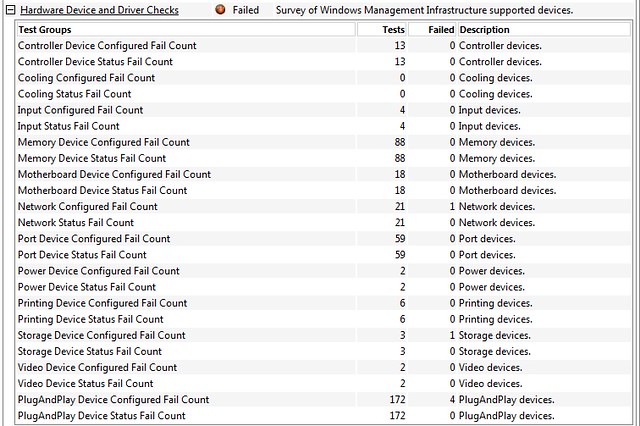
Hi,Just ran this test and i get an error on "hardware device and drivers check".
Is this something to worry about?laptop seems to be running fine.
Thanks in advance for any help.
7175694583_76cfc18090_z.jpg
 

My Computer

Computer type
Laptop
Computer Manufacturer/Model Number
Samsung NP300E5A-A02DX
OS
Windows 7 home premium 64bit sp1
CPU
Intel Core i5
Motherboard
Manufacturer SAMSUNG ELECTRONICS CO., LTD
Memory
8gb
Graphics Card(s)
Intel HD Graphics Family HD 3000
Sound Card
Realtek High Definition Audio
Monitor(s) Displays
Generic PnP Monitor on Intel HD Graphics Family
Screen Resolution
1920x1080 pixels
Hard Drives
SAMSUNG HM641JI
Keyboard
Logitech K400 wireless
Mouse
Logitech M570 trackball wireless
Internet Speed
75MB DL 16MB UL (Cooking with Gas)
Antivirus
Avast IS and MBAM Pro
Browser
Firefox
Without knowing anything about the testing program, I'd say don't worry.

You could look in device manager and see if it reports any driver issues (yellow exclamation marks).

If all of your hardware and software is running as expected, it's tough to get worried based on such a report.
 

My Computer

Computer type
PC/Desktop
Computer Manufacturer/Model Number
Ignatz Special; 4 speed manual gearbox; factory air conditioning; one of one
OS
Windows 7 Home Premium SP1, 64-bit
CPU
Intel Skylake i5-6600K, not overclocked
Motherboard
AsRock Z170M Extreme 4, micro ATX
Memory
8 GB HyperX DDR4-2666 (2 x 4 GB)
Graphics Card(s)
none; graphics are integrated on CPU
Sound Card
onboard: Realtek ALC1150; external: USB Behringer UF0-202
Monitor(s) Displays
Dell S2340M 23 inch IPS
Screen Resolution
1600 x 900
Hard Drives
System: Crucial MX100 series SSD, 128 GB;
Data: Samsung Spinpoint 103SJ, 1 TB;
Backup: WD Caviar Green WD30EZRX-00D8PB0, 3 TB
PSU
Rosewill SilentNight 500 watt fanless, semi-modular
Case
Antec Solo II
Cooling
Noctua NH-U12S; Noctua F12 intake, Noctua S12A exhaust
Keyboard
Microsoft 200 6JH-00001 USB
Mouse
Dell or Microsoft optical wired; USB
Antivirus
Microsoft Security Essentials and Malwarebytes Premium
Browser
Pale Moon
Other Info
All fans PWM; speeds at idle: CPU circa 500 rpm; intake circa 600 rpm; exhaust circa 600 rpm; CPU temps 27 idle and 47 C load in a warm room (27 C/81 F) when running Intel Extreme Tuning Utility stress test.
Without knowing anything about the testing program, I'd say don't worry.

You could look in device manager and see if it reports any driver issues (yellow exclamation marks).

If all of your hardware and software is running as expected, it's tough to get worried based on such a report.

Thanks for your reply.I checked out device manager and theres no yellow exclamation marks.It just that when i see red for failure i can't help but worry,
and i want to see it green and saying passed.
 

My Computer

Computer type
Laptop
Computer Manufacturer/Model Number
Samsung NP300E5A-A02DX
OS
Windows 7 home premium 64bit sp1
CPU
Intel Core i5
Motherboard
Manufacturer SAMSUNG ELECTRONICS CO., LTD
Memory
8gb
Graphics Card(s)
Intel HD Graphics Family HD 3000
Sound Card
Realtek High Definition Audio
Monitor(s) Displays
Generic PnP Monitor on Intel HD Graphics Family
Screen Resolution
1920x1080 pixels
Hard Drives
SAMSUNG HM641JI
Keyboard
Logitech K400 wireless
Mouse
Logitech M570 trackball wireless
Internet Speed
75MB DL 16MB UL (Cooking with Gas)
Antivirus
Avast IS and MBAM Pro
Browser
Firefox
Well, if the program found no errors, you might think it had not done its job and was useless.

If it had found twice as many errors, would you think it was doing an even better job?

It reminds me of those registry cleaning applications that always find errors that are perfectly harmless and then want to charge you to fix the errors.

Trust your own impressions and experience on the PC. If it's working OK as it always has, any "errors" can't be significant.

It's not like it's trying to point out impending hardware failures or dangerous situations, such as virus infections.
 

My Computer

Computer type
PC/Desktop
Computer Manufacturer/Model Number
Ignatz Special; 4 speed manual gearbox; factory air conditioning; one of one
OS
Windows 7 Home Premium SP1, 64-bit
CPU
Intel Skylake i5-6600K, not overclocked
Motherboard
AsRock Z170M Extreme 4, micro ATX
Memory
8 GB HyperX DDR4-2666 (2 x 4 GB)
Graphics Card(s)
none; graphics are integrated on CPU
Sound Card
onboard: Realtek ALC1150; external: USB Behringer UF0-202
Monitor(s) Displays
Dell S2340M 23 inch IPS
Screen Resolution
1600 x 900
Hard Drives
System: Crucial MX100 series SSD, 128 GB;
Data: Samsung Spinpoint 103SJ, 1 TB;
Backup: WD Caviar Green WD30EZRX-00D8PB0, 3 TB
PSU
Rosewill SilentNight 500 watt fanless, semi-modular
Case
Antec Solo II
Cooling
Noctua NH-U12S; Noctua F12 intake, Noctua S12A exhaust
Keyboard
Microsoft 200 6JH-00001 USB
Mouse
Dell or Microsoft optical wired; USB
Antivirus
Microsoft Security Essentials and Malwarebytes Premium
Browser
Pale Moon
Other Info
All fans PWM; speeds at idle: CPU circa 500 rpm; intake circa 600 rpm; exhaust circa 600 rpm; CPU temps 27 idle and 47 C load in a warm room (27 C/81 F) when running Intel Extreme Tuning Utility stress test.
Back
Top