
Generic free scanner driver for 64-bit?

450125

New member
Power User
Local time
3:16 PM
Messages
281
Okay, first, this has been asked here before, and second, I'm being incredibly cheap, as you'll see here.

I have an Acer 320U scanner. Purchased in 2000. For (not making it up) $20 after rebate. So I've certainly gotten my money's worth out of it as I used it on Windows 98, 2000, and XP systems.

Today I tried to use it for the first time on my Windows 7 64-bit installation and got the "driver not found" message when I plugged it in.

Searching these forums and google, I found Vuescan and Sliverfast recommended for people in my predicament.

Downloaded and installed Vuescan, and it worked! Not as elegantly as the scanner had with XP, but I could scan.

But unless I purchase Vuescan, it leaves ugly watermarks on my scanned documents.

I know the "right" thing to do would be to go and buy a scanner for the first time in 11 years. But I use the scanner so rarely that it doesn't seem worth the effort.

Wondering if there is a source out there for free "generic" scanner drivers, for products like mine that are not supported for Windows 7.
 

My Computer

Computer Manufacturer/Model Number
custom-built
OS
Win7 Professional 64
CPU
Intel I3 550 (3.2 GHz)
Motherboard
GIGABYTE|GA-H55M-S2V H55 1156 R
Memory
8 gig (2x4gig Kingston DDR 3)
Graphics Card(s)
Intel HD graphics (from CPU)
Sound Card
Realtek ALC888B
Monitor(s) Displays
ViewSonic
Screen Resolution
1280x1024
Hard Drives
Seagate ST3250310CS (250 gig C drive for OS and programs)
WDC WD5000AAKS-00V1A0 (2x500 gig drives, software mirrored in a RAID 1 configuration, as a D drive, for documents and data)
Internet Speed
download > 15 mbps; upload approx 1 mbps
Hello there, have you tried to add a device in "Printers and Devices"?

Connect your Scanner, go to Printers and Devices, click on Add Device, Windows will try to recognize your device, if Windows can't identify it, it'll give you a list for you to choose, i'm sure there should be Scanners there, try to find the one that match (Acer 320U or similar) and install the driver, it worked for me with an OLD ribbon printer (Citizen) :)
 

My Computer

Computer type
PC/Desktop
OS
Windows
It recognizes the device by name, but can't find a driver for it, on the machine or web. From my googling, looks like the OEM does not make a Win7 driver for this product.
 

My Computer

Computer Manufacturer/Model Number
custom-built
OS
Win7 Professional 64
CPU
Intel I3 550 (3.2 GHz)
Motherboard
GIGABYTE|GA-H55M-S2V H55 1156 R
Memory
8 gig (2x4gig Kingston DDR 3)
Graphics Card(s)
Intel HD graphics (from CPU)
Sound Card
Realtek ALC888B
Monitor(s) Displays
ViewSonic
Screen Resolution
1280x1024
Hard Drives
Seagate ST3250310CS (250 gig C drive for OS and programs)
WDC WD5000AAKS-00V1A0 (2x500 gig drives, software mirrored in a RAID 1 configuration, as a D drive, for documents and data)
Internet Speed
download > 15 mbps; upload approx 1 mbps
You could use a Vista or window XP Professional 64 bit driver in compatibility mode http://www.sevenforums.com/tutorials/316-compatibility-mode.html

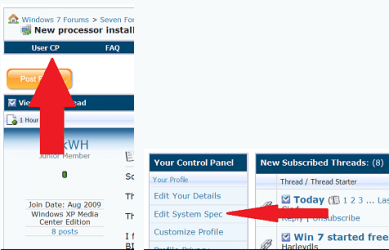
Also if you'd please take the time to fiil out your full system specs it would help us tremendously by only having to click on the My Systen Specs in the lower left hand corener of any of your posts. You can fill them in here

usercp 1.png

You can also download speccy to help you find them if you don't already know Download Speccy 1.08.218 - FileHippo.com
Thanks. Fabe
 

My Computer

Computer Manufacturer/Model Number
Self Built
OS
Windows 7 ultimate 64 bit / XP Home sp3
CPU
intel Core 2 Duo E8400 3.0ghz
Motherboard
Asus P5ND bios 1401
Memory
8 gigs 1066 OCZ Fata1ty
Graphics Card(s)
EVGA GTX 580 Call of Duty Black Ops Edition
Sound Card
Creative Soundblaster Audigy 2zs
Monitor(s) Displays
Asus 24in LCD's 2MS X2
Screen Resolution
1920x1080p @60Hz
Hard Drives
WD Caviar 500 Black/ WD Caviar 200 Blue
PSU
OCZ 700W GameXtreme
Case
NZXT Apollo
Cooling
Corsair H50 CPU/120mm x3 /60mm x2 /Corsair Dominator Ram
Keyboard
Logitech Bluetooth Wireless MX5000
Mouse
Logitech Bluetooth Wireless MX1000
Internet Speed
Download 19.83 Upload 0.97
Other Info
Logitech Z2300 Speakers/ Bose Noise Cancelling Headphones/Avermedia PCI-e Hybrid TV Bravo/Epson NX415 all in one/ 4 Port Powered USB Hub/ LG 10x Bluray Burner /TSST Corp DVDRW External
You could use a Vista or window XP Professional 64 bit driver in compatibility mode http://www.sevenforums.com/tutorials/316-compatibility-mode.html

Also if you'd please take the time to fiil out your full system specs it would help us tremendously by only having to click on the My Systen Specs in the lower left hand corener of any of your posts.
Thanks.

First, I apologize for not having my specs. Now I do.

Regarding the compatibility mode, I'd thought of that as a solution. I know how to run programs in compatibility mode, but not drivers - and the tutorial referenced didn't help me.

Could you "spoon feed" me how to do it? FWIW, I have the driver installer for XP 32, that had worked on my previous XP hardware. Do I just run the installation in compatibility mode?

Thanks.
 

My Computer

Computer Manufacturer/Model Number
custom-built
OS
Win7 Professional 64
CPU
Intel I3 550 (3.2 GHz)
Motherboard
GIGABYTE|GA-H55M-S2V H55 1156 R
Memory
8 gig (2x4gig Kingston DDR 3)
Graphics Card(s)
Intel HD graphics (from CPU)
Sound Card
Realtek ALC888B
Monitor(s) Displays
ViewSonic
Screen Resolution
1280x1024
Hard Drives
Seagate ST3250310CS (250 gig C drive for OS and programs)
WDC WD5000AAKS-00V1A0 (2x500 gig drives, software mirrored in a RAID 1 configuration, as a D drive, for documents and data)
Internet Speed
download > 15 mbps; upload approx 1 mbps
IF you could find any Vista 64-bit driver for your Scanner, that'd be AWESOME, you just run the installer in Compatibility Mode for Windows Vista SP2 and that's it, i've done it before.

The problem with the 32-bit driver is that is not compatible with 64-bit.

Here's what i found on another forum:

Acer (BenQ) offers no support for this device (Acer 320U) in Windows Vista.

So i guess that narrows the options :( try to install the driver you have in compatibility mode and see how it works out!

Right click the installer, and then "Run in Compatibility Mode", Windows will try to find the soluti9ons and it will try to install the driver, hopefully it'll work.

Report back, please :)
 

My Computer

Computer type
PC/Desktop
OS
Windows
IF you could find any Vista 64-bit driver for your Scanner, that'd be AWESOME, you just run the installer in Compatibility Mode for Windows Vista SP2 and that's it, i've done it before.

The problem with the 32-bit driver is that is not compatible with 64-bit.

Here's what i found on another forum:

Acer (BenQ) offers no support for this device (Acer 320U) in Windows Vista.
So i guess that narrows the options :( try to install the driver you have in compatibility mode and see how it works out!

Right click the installer, and then "Run in Compatibility Mode", Windows will try to find the soluti9ons and it will try to install the driver, hopefully it'll work.

Report back, please :)
Looks like it's a no-go. I have run the installer standalone, and compatibility mode for each version back to 98, and Windows continues to be unable to find the scanner.

I may just plug the scanner into one of the XP laptops I have in the house and it could run from there.

Vuescan isn't perfect or free, but at $40, it's cheaper than any scanners I saw out there. And I don't scan that often.
 

My Computer

Computer Manufacturer/Model Number
custom-built
OS
Win7 Professional 64
CPU
Intel I3 550 (3.2 GHz)
Motherboard
GIGABYTE|GA-H55M-S2V H55 1156 R
Memory
8 gig (2x4gig Kingston DDR 3)
Graphics Card(s)
Intel HD graphics (from CPU)
Sound Card
Realtek ALC888B
Monitor(s) Displays
ViewSonic
Screen Resolution
1280x1024
Hard Drives
Seagate ST3250310CS (250 gig C drive for OS and programs)
WDC WD5000AAKS-00V1A0 (2x500 gig drives, software mirrored in a RAID 1 configuration, as a D drive, for documents and data)
Internet Speed
download > 15 mbps; upload approx 1 mbps
Sorry to bring the bad news :(

Yeah, that's an option, if that software works for your scanner without any hiccups, it's cheaper than a new scanner and you don't scan too often, then i guess that'd be the most reliable solution :)

Cheers, mate.
 

My Computer

Computer type
PC/Desktop
OS
Windows
Sorry for bumping this but I had to do so because I found/extracted working drivers for the various abandoned Acer/BenQ scanners:
  • 310U/620U
  • 320U/340U/620U+/640U
  • 620UT+/640UT
  • 1240UT/5100U
  • 640BT/640BU
  • 4300U/3300U
  • 4300U/3300U

x86 / 32-bit: x86.zip
x64 / 64-bit: x64.zip

Links are dead as somehow I can't post links anymore.
The two files above are still up on Mediafire.
Append the following to the Mediafire URL:
x86: /?dw7bnsvwidqgr7a
x64: /?7gigftag3aktgio

I forgot where I got the x86 drivers from, maybe an XP installation. I extracted the x64 ones from a drivers.cab acquired from a 64-bit XP installation disc. Both x86 and x64 drivers are tested working in my system (Windows 7 x64 with the Acer 320U, at least.)

To scan in Windows 7/8 after driver installation, check this post!

EDIT: Windows 8 x64? Drivers won't install, so try signing the drivers yourself, see this post!
 
Last edited:

My Computer

OS
Windows 8 Pro x64
Thanks ynnad179!

Now I hate to be ignorant, but what do I then do, with what you've provided, to use my scanner on my 64-bit Windows 7 machine?
 

My Computer

Computer Manufacturer/Model Number
custom-built
OS
Win7 Professional 64
CPU
Intel I3 550 (3.2 GHz)
Motherboard
GIGABYTE|GA-H55M-S2V H55 1156 R
Memory
8 gig (2x4gig Kingston DDR 3)
Graphics Card(s)
Intel HD graphics (from CPU)
Sound Card
Realtek ALC888B
Monitor(s) Displays
ViewSonic
Screen Resolution
1280x1024
Hard Drives
Seagate ST3250310CS (250 gig C drive for OS and programs)
WDC WD5000AAKS-00V1A0 (2x500 gig drives, software mirrored in a RAID 1 configuration, as a D drive, for documents and data)
Internet Speed
download > 15 mbps; upload approx 1 mbps
Extract the files somewhere.

Go to Device Manager, right click on your scanner and select Update Driver Software. Select "Browse my Computer", then "Let me pick from a list", then select "Imaging", then click the "Have Disk" button at the bottom. Browse to where you have extracted the driver files. Windows will whine about the drivers being unsigned and stuff but insist and your scanner should be churning out scans again.
 

My Computer

OS
Windows 8 Pro x64
Hmm, those are the same drivers I had tried.

The system updates the drivers okay. The scanner responds - you can hear it cycling - but then
2error.jpg


I've tried jiggering the compatibility mode from Windows 7 down to Windows 98 - this scanner served me well with XP (all SP's), 2000, and Win98. No matter what I try, same errors.

Suggestions?

By the way, I used the 64-bit drivers. Windows won't let me use the 32-bit ones (nor should it).
[/CENTER]


[/LEFT]
[/CENTER]
 
Last edited:

My Computer

Computer Manufacturer/Model Number
custom-built
OS
Win7 Professional 64
CPU
Intel I3 550 (3.2 GHz)
Motherboard
GIGABYTE|GA-H55M-S2V H55 1156 R
Memory
8 gig (2x4gig Kingston DDR 3)
Graphics Card(s)
Intel HD graphics (from CPU)
Sound Card
Realtek ALC888B
Monitor(s) Displays
ViewSonic
Screen Resolution
1280x1024
Hard Drives
Seagate ST3250310CS (250 gig C drive for OS and programs)
WDC WD5000AAKS-00V1A0 (2x500 gig drives, software mirrored in a RAID 1 configuration, as a D drive, for documents and data)
Internet Speed
download > 15 mbps; upload approx 1 mbps
Is the scanner displayed under Devices and Printers? Start the scan from there. I never used any other program to scan before (though it should work...), had always been using wiaacmgr.exe.

2emhees.png
 

My Computer

OS
Windows 8 Pro x64
Is the scanner displayed under Devices and Printers? Start the scan from there. I never used any other program to scan before (though it should work...), had always been using wiaacmgr.exe.

2emhees.png

Holy cow! Yes! It works!

I have no idea at all though why I can't "acquire" images via irfanview (which I use for simple image processing and editing). Or why my mirascan software no longer works.

But at least now I can plug my scanner into my computer and use it.

Thanks!

And suggestions still appreciated though about "running the ball across the line" and having "fuller" scanning capability.
 

My Computer

Computer Manufacturer/Model Number
custom-built
OS
Win7 Professional 64
CPU
Intel I3 550 (3.2 GHz)
Motherboard
GIGABYTE|GA-H55M-S2V H55 1156 R
Memory
8 gig (2x4gig Kingston DDR 3)
Graphics Card(s)
Intel HD graphics (from CPU)
Sound Card
Realtek ALC888B
Monitor(s) Displays
ViewSonic
Screen Resolution
1280x1024
Hard Drives
Seagate ST3250310CS (250 gig C drive for OS and programs)
WDC WD5000AAKS-00V1A0 (2x500 gig drives, software mirrored in a RAID 1 configuration, as a D drive, for documents and data)
Internet Speed
download > 15 mbps; upload approx 1 mbps
I can't do anything about the capabilities sadly =\ I've never programmed drivers before, nor do I have the ability to do so... I just hope this still works when Windows 8 come out (highly unlikely :( )

What about the ball?
 

My Computer

OS
Windows 8 Pro x64
What about the ball?

Big apology for my using a colloquialism probably unique to US football and thus meaningless to those who don't follow said sport.

Simply means "to finish the job" - but, now that I can scan, anything else is, using another US colloquialism, "pure gravy" (an unnecessary but appreciated bonus!).
 

My Computer

Computer Manufacturer/Model Number
custom-built
OS
Win7 Professional 64
CPU
Intel I3 550 (3.2 GHz)
Motherboard
GIGABYTE|GA-H55M-S2V H55 1156 R
Memory
8 gig (2x4gig Kingston DDR 3)
Graphics Card(s)
Intel HD graphics (from CPU)
Sound Card
Realtek ALC888B
Monitor(s) Displays
ViewSonic
Screen Resolution
1280x1024
Hard Drives
Seagate ST3250310CS (250 gig C drive for OS and programs)
WDC WD5000AAKS-00V1A0 (2x500 gig drives, software mirrored in a RAID 1 configuration, as a D drive, for documents and data)
Internet Speed
download > 15 mbps; upload approx 1 mbps
You are an Angel for your 64 bit driver

Thank you SO MUCH ynnad179. I have scoured the internet and now my old scanner is working with my new Win7 machine, YEA :D
 

My Computer

OS
Windows 7 Home 64 bit
This answer worked perfectly for my Acer 620UT. I've googled this question and seen so many people wanting to salvage their still working Acer scanner, but this is the only forum where I've found the solution. I got my scanner in 1999 and at first I nearly gave it back because sometimes I had to keep shutting it off and turning it back on to get it to work, but after about three years it started working every time.

A few months ago I bought a program called Going Paperless for Dummies free after rebate at Frys, and I got it to install a more recent driver for another scanner--but when I reformatted my drive, I couldn't get to work again. So I'm back to this solution, which is great. I hope there's a way to point everybody with this problem here.
 

My Computer

OS
Windows 7 64 bit
The same drivers still work for Windows 8, however in x64 (which is what everyone will probably install anyway) you will either need to disable the driver signing check completely or sign the drivers yourself.

If you want to sign the drivers yourself (it's quite easy!), I recommend following this guide here. Some pointers:
- When making your own cert using makecert, add the -pe parameter so that you can export the private key of the certificate as well (useful for installing these drivers again on a different PC in the future)
- You can find the makecert, Inf2cat and signtool tools in the Windows SDK and the Windows Driver Kit. You don't need to install everything! Just check the "Tools" in both the web installers will do.
- Some changes in the INF are needed so that the Inf2cat doesn't screw you up. I've already made the necessary changes, so go grab the new INF here (x64 only sorry)

The 320U's still rocking in Win8 x64! This thing's living way too long.
 

My Computer

OS
Windows 8 Pro x64
Hi, I can't see to access the x64.zip when I click on it, help, as I need the driver for the Acer 320u.
 

My Computer

Computer type
PC/Desktop
OS
Windows 7 64
Back
Top