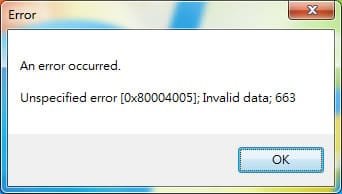
Getting an 'Unspecified Error' - 0x80004005 for

superbanana

New member
Local time
8:37 PM
Messages
9
Hi everyone,

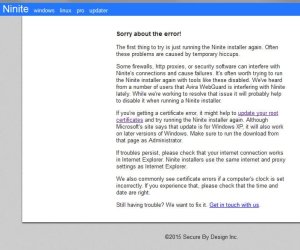
I was just helping a friend update their newly installed system running a Windows 7 Ultimate x64bit OS and have completed all Windows Updates. The Windows installation was from an image which I used to reimage the hard drive with the OS. When checking for software updates using Ninite it resulted in an error.

Untitled-1.jpg
Untitled-3.jpg
Untitled-4.jpg

I honestly don't know if this could be a Windows problem, a Windows Update problem (something that could have gone wrong during/after) or could it be due to software?

Not sure if this is a normal error occurance. I've never encountered this kind of problem from a newly installed and updated system before. Any help and advise would be greatly appreciated. :)
 

My Computer My Computer

Computer type
PC/Desktop
OS
Windows 7 Professional x64
Do you mean that attempting to install Ninite, it threw this error, or do you mean that it's installed already, and throws this error when attempting to install an update?
I don't see WU being in the list of offered 'clients' - although .NET 4.5.2 is, as are some other things possibly probably best left to WU.
 

My Computer My Computer

Computer type
Laptop
Computer Manufacturer/Model Number
Asus K52F or Lenovo B51-80
OS
Win 7 x64 Home Premium (and x86 VirtualBox VM)/Win10
CPU
i3 370M/i7 6500U
Motherboard
Asus/Lenovo
Memory
8GB - finally :)/8GB
Graphics Card(s)
it's an i3, dude!/dual Intel&nVidia
Sound Card
onboard
Monitor(s) Displays
15.6" built-in
Screen Resolution
1366x768/1920x1080
Hard Drives
750GB Seagate internal
Sundry external drives attached to other computers on the local network
1TB SSD on the Lenovo
PSU
n/a
Internet Speed
as much as I can get - usually on a dongle/phone, so <1MB/s
Antivirus
MSE/Defender
Browser
IE11/12/Edge/Chrome/FF(if I must)
Hi NoelDP,

I ran the automatic installer/updater for the different programs Ninite supports (eg. Adobe Reader, Google Drive, Foobar) and it resulted in the error shown. From my understanding, this auto installer is standalone. It doesn't actually install Ninite, but rather just downloads and installs the latest versions of the programs you select from the main page on Ninite.com.

So far, I don't think there is an issue my friend's system. He said it's very functional, so I'm confused, but would like to know if we're able to fix this in case we encounter the same thing in the future. I left Windows Updates to itself. :)
 
Last edited:

My Computer My Computer

Computer type
PC/Desktop
OS
Windows 7 Professional x64
What security software is installed? It could very well be interfering.
 

My Computer My Computer

Computer type
Laptop
Computer Manufacturer/Model Number
Asus K52F or Lenovo B51-80
OS
Win 7 x64 Home Premium (and x86 VirtualBox VM)/Win10
CPU
i3 370M/i7 6500U
Motherboard
Asus/Lenovo
Memory
8GB - finally :)/8GB
Graphics Card(s)
it's an i3, dude!/dual Intel&nVidia
Sound Card
onboard
Monitor(s) Displays
15.6" built-in
Screen Resolution
1366x768/1920x1080
Hard Drives
750GB Seagate internal
Sundry external drives attached to other computers on the local network
1TB SSD on the Lenovo
PSU
n/a
Internet Speed
as much as I can get - usually on a dongle/phone, so <1MB/s
Antivirus
MSE/Defender
Browser
IE11/12/Edge/Chrome/FF(if I must)
He's using Bitdefender Antivirus Free edition on the system right now. It's one of those install and forget that it's running type of antivirus software. It's easy to use, that's for sure. It's perfect as it can keep things simple for my buddy. Could this be the culprit? :)
 

My Computer My Computer

Computer type
PC/Desktop
OS
Windows 7 Professional x64
I'm not a fan of BitDefender - but then I've never used it on any kind of serious way. As far as I know, the free version is a time-limited trial, and stops updating (and/or working) at the end of the trial period.
It has been associated with the occasional problem in Win7, so it may be worth uninstalling it AND running their cleanup tool - then installing MSE at least on a temporary basis.
Uninstall Consumer Trial
 

My Computer My Computer

Computer type
Laptop
Computer Manufacturer/Model Number
Asus K52F or Lenovo B51-80
OS
Win 7 x64 Home Premium (and x86 VirtualBox VM)/Win10
CPU
i3 370M/i7 6500U
Motherboard
Asus/Lenovo
Memory
8GB - finally :)/8GB
Graphics Card(s)
it's an i3, dude!/dual Intel&nVidia
Sound Card
onboard
Monitor(s) Displays
15.6" built-in
Screen Resolution
1366x768/1920x1080
Hard Drives
750GB Seagate internal
Sundry external drives attached to other computers on the local network
1TB SSD on the Lenovo
PSU
n/a
Internet Speed
as much as I can get - usually on a dongle/phone, so <1MB/s
Antivirus
MSE/Defender
Browser
IE11/12/Edge/Chrome/FF(if I must)
Hi NoelDP,

Thank you for the heads up. I wouldn't have known. Many friends have said they liked it and was easy to use so I tried it out on my buddy's system. He wants something simple to use.

Are there any highly recommended ones you'd personally suggest? I should probably jump ship as well since my own system uses Norton, and I'm not liking it one bit. It bogs down my system to a crawl mostly. :D
 

My Computer My Computer

Computer type
PC/Desktop
OS
Windows 7 Professional x64
Back
Top