Getting error code 0x8007042c when trying to start windows firewall

rbisawa

New member
Member
Local time
4:24 PM
Messages
44
Hi guys,

It seems windows won't let me breath easy for long :cry:.

Problem description :
==================
I am unable to connect to wired or wireless internet, reason being, I think, is because windows firewall is not starting.
Not sure why this happened but I think its because of a false flash update which might have been a rogue program, ( rootkit kindof though NOT sure ). Also let me tell you that, I frequently use utorrent to download movies, just in case if that might be the root cause.

After going through tons of posts I thought of starting this thread which, I hope turns out to be of genuine help to others as well.

System Specifications :
===================
Dell Inspiron N4010
Windows 7 Home Premium ( 64 bit ) SP1
Antivirus : Microsoft Security Essentials ( nothing else )
Dual boot system along with Ubuntu ( which comes to my rescue time and again :p )


Tried the following solutions in the given order,
=======================================================================
Solution 1 :
==========
Tried starting the BFE and Windows firewall service manually using admin rights.

Result : Gave error code 0x8007042c

=======================================================================
Solution 2 :
==========
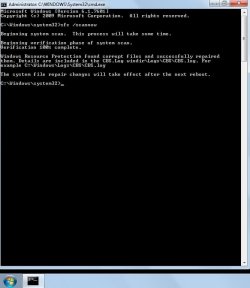
Tried running sfc scannow using admin rights.

Result : Please find attached the screenshot showing the output of sfc scannow & CBS.log file

=======================================================================
Solution 3 :
==========
Tried scanning the entire system using Microsoft Security Essentials.

Result : Didn't detect any viruses/malwares/worms/etc and said PC is protected.

=======================================================================
Solution 4 :
==========
Tried Balon's solution mentioned in this thread >> http://www.sevenforums.com/system-security/202166-unable-start-windows-firewall-2.html

Result : Still couldn't start BFE and firewall services.

=======================================================================
Solution 5 :
==========
Tried TDSSKiller

Result : It did not detect anything

========================================================================
Solution 6 :
==========
Tried running McAfee's RootkitRemover utility

Result : It did not detect anything

========================================================================
Solution 7 :
==========
Tried scanning it using Microsoft Safety Scanner

Result : No issues found

========================================================================
Solution 8 :
==========
Tried scanning using Malwarebytes' Anti-Malware

Result : Please find attached the mbam logs

========================================================================

Please note : I dont have internet access so I can't scan my PC with any tool/utility available online.
But I can download exe files and then install and scan my PC.

After the above failed attempts to resolve the issue I decided to finally seek expert help, since I don't want to format my PC once again. Also please bear with me if this turns out to be one of the dumbest of the issues.

But as of now looking forward to a quick and crisp solution.

Cheers!
RB
 

Attachments
My Computer

OS
Windows 7 Home Basic
Download these programs from a PC with Internet Access use a USB Flash Drive to move the programs over

*
2j4a9si.png
Farbar Recovery Scan Tool


64-Bit Version OS Farbar Recovery Scan Tool x64 <===== Download Link

Drag the FRST64.exe from the Downloads folder to your Desktop

Right click on FRST64.exe and choose
mawket.jpg


When the tool opens click Yes on the disclaimer window .

Press Scan button.

FRST will let you know when the scan is complete and has written the FRST.txt to file

   Note
The first time Farbar Recovery Scan Tool is run, it makes also another log Addition.txt


Please upload both logs in your reply.(FRST.txt and Addition.txt)

:note: FRST.txt and Addition.txt will be on the Desktop :note:

* RogueKiller

RogueKiller for 32bit <==== Download Link

RogueKiller for 64bit <==== Download Link

:ar: Click on one of the links above that goes with your Windows 7 bit versions

:ar: Save to the Desktop.

:ar: Close all windows and browsers

:ar: Right click on
332trud.png
and choose
mawket.jpg


:ar: Press: SCAN

:ar: provide the RKreport.txt (Mode: Scan) in your reply.

*
2ytpm5u.png
Farbar Service Scanner

Click here :ar: Farbar Service Scanner to DOWNLOAD

Place file into your desktop

Place a check mark next to the following options

  • Internet Services
  • Windows Firewall
  • System Restore
  • Security Center
  • Windows Update
  • Windows Defender
Press the Scan button

Farbar Service Scanner will create a log, called FSS.txt, on the Desktop. Upload the FSS.txt with your reply
 

My Computer

Computer Manufacturer/Model Number
Custom Built
OS
Windows 7 Ultimate 32-Bit & Windows 7 Ultimate 64-Bit
CPU
Intel Core i7 CPU 950 @ 3.07GHz
Motherboard
ASUS P6T DELUXE V2
Memory
OCZ 6GB (3 x 2GB) 240-Pin DDR3 SDRAM DDR3 1600 OCZ3X1600R2
Graphics Card(s)
ATI Radeon HD 5700 Series
Sound Card
OnBoard
Hard Drives
WD6400AACS-00M3B0 (640GB SATA )
PSU
CORSAIR 850w
Case
NZXT LEXA
Cooling
Intel Stock Heatsink Fan
Keyboard
Microsoft Wireless Laser Keyboard 7000
Mouse
Microsoft Wireless Laser Mouse 7000
Update on error code 0x8007042c problem

Hi VistaKing,

Appreciate your quick reply.

Following are the attached logs as requested by you :
=========================================
1. Addition.txt
2. FRST.txt
3. Rkreport.txt
4. FSS.txt

I think there is some problem detected at the registry level, just guessing :geek:

Please suggest the way forward.

Cheers!!
RB
 

Attachments

My Computer

OS
Windows 7 Home Basic
Run RogueKiller again then click on the Proxy tab and click on the Fix Proxy button

Then run AdwCleaner

s1lva1.png
AdwCleaner

Click here AdwCleaner

:ar: Click on Download Now button

:ar: Save to the Desktop

:ar: Right-click on AdwCleaner.exe and choose
mawket.jpg


:ar: Click on Delete and confirm the prompt.

axcoj5.jpg


:ar: Your computer will be rebooted automatically. A text file will open after the restart.

Upload the log : The log file is at C:\AdwCleaner[Sn].txt

Download Junkware Removal Toolkit

Click here Junkware Removal Tool to download

Drag the JRT.exe from the Downloads folder to your Desktop

Right click JRT.exe and choose
mawket.jpg


Once done upload the JRT.txt file
 

My Computer

Computer Manufacturer/Model Number
Custom Built
OS
Windows 7 Ultimate 32-Bit & Windows 7 Ultimate 64-Bit
CPU
Intel Core i7 CPU 950 @ 3.07GHz
Motherboard
ASUS P6T DELUXE V2
Memory
OCZ 6GB (3 x 2GB) 240-Pin DDR3 SDRAM DDR3 1600 OCZ3X1600R2
Graphics Card(s)
ATI Radeon HD 5700 Series
Sound Card
OnBoard
Hard Drives
WD6400AACS-00M3B0 (640GB SATA )
PSU
CORSAIR 850w
Case
NZXT LEXA
Cooling
Intel Stock Heatsink Fan
Keyboard
Microsoft Wireless Laser Keyboard 7000
Mouse
Microsoft Wireless Laser Mouse 7000
Hi VistaKing,

Please find attached the log files as suggested by you :
===========================================
1. AdwCleaner[S1].txt
2. JRT.txt

Hope this helps.

Cheers!!
RB
 

Attachments

My Computer

OS
Windows 7 Home Basic
Did you rerun RogueKiller and choose Fix Proxy to fix this ?

[PROXY IE] HKCU\[...]\Internet Settings : ProxyServer (172.16.1.10:8002) -> FOUND
 

My Computer

Computer Manufacturer/Model Number
Custom Built
OS
Windows 7 Ultimate 32-Bit & Windows 7 Ultimate 64-Bit
CPU
Intel Core i7 CPU 950 @ 3.07GHz
Motherboard
ASUS P6T DELUXE V2
Memory
OCZ 6GB (3 x 2GB) 240-Pin DDR3 SDRAM DDR3 1600 OCZ3X1600R2
Graphics Card(s)
ATI Radeon HD 5700 Series
Sound Card
OnBoard
Hard Drives
WD6400AACS-00M3B0 (640GB SATA )
PSU
CORSAIR 850w
Case
NZXT LEXA
Cooling
Intel Stock Heatsink Fan
Keyboard
Microsoft Wireless Laser Keyboard 7000
Mouse
Microsoft Wireless Laser Mouse 7000
Hi VistaKing,

Yes I did a re-scan using RogueKiller and clicked on Fix Proxy Button as suggested by you.

Do you want me to re-do it?

Did it not remove the malicious element which it identified pointed out by the logs?

Please let me know.

Cheers!!
RB
 

My Computer

OS
Windows 7 Home Basic
Can you start Windows Firewall ? I don't see any issues looking at the FSS.txt file .
 

My Computer

Computer Manufacturer/Model Number
Custom Built
OS
Windows 7 Ultimate 32-Bit & Windows 7 Ultimate 64-Bit
CPU
Intel Core i7 CPU 950 @ 3.07GHz
Motherboard
ASUS P6T DELUXE V2
Memory
OCZ 6GB (3 x 2GB) 240-Pin DDR3 SDRAM DDR3 1600 OCZ3X1600R2
Graphics Card(s)
ATI Radeon HD 5700 Series
Sound Card
OnBoard
Hard Drives
WD6400AACS-00M3B0 (640GB SATA )
PSU
CORSAIR 850w
Case
NZXT LEXA
Cooling
Intel Stock Heatsink Fan
Keyboard
Microsoft Wireless Laser Keyboard 7000
Mouse
Microsoft Wireless Laser Mouse 7000
Open notepad . Inside notepad paste the highlighted text below


@echo off
sc config MpsSvc start= auto
sc start MpsSvc
exit


Click on File select Save As
Location to save to : Desktop
File name: RestoreWindowsFirewallWindows7.bat
Save as type : All Files

Click on Save button

On the desktop right click on RestoreWindowsFirewallWindows7.bat select
mawket.jpg
once its done restart the PC .

   Note
the command prompt will close on its own
 

My Computer

Computer Manufacturer/Model Number
Custom Built
OS
Windows 7 Ultimate 32-Bit & Windows 7 Ultimate 64-Bit
CPU
Intel Core i7 CPU 950 @ 3.07GHz
Motherboard
ASUS P6T DELUXE V2
Memory
OCZ 6GB (3 x 2GB) 240-Pin DDR3 SDRAM DDR3 1600 OCZ3X1600R2
Graphics Card(s)
ATI Radeon HD 5700 Series
Sound Card
OnBoard
Hard Drives
WD6400AACS-00M3B0 (640GB SATA )
PSU
CORSAIR 850w
Case
NZXT LEXA
Cooling
Intel Stock Heatsink Fan
Keyboard
Microsoft Wireless Laser Keyboard 7000
Mouse
Microsoft Wireless Laser Mouse 7000
Hi VistaKing,

I did try to start windows firewall but its giving the same "error 1068: The dependency service or group failed to start"

Also I tried running the bat file & did a restart but still no luck.

What next?...Is the virus so stubborn?

I am losing hope. Don't want to format my laptop again. :cry:

Looking forward to something positive.

Cheers!!
RB
 

My Computer

OS
Windows 7 Home Basic
Make sure the BFE service is running.

Open notepad . Inside notepad paste the highlighted text below


@echo off
sc config BFE start= auto
sc start BFE
exit


Click on File select Save As
Location to save to : Desktop
File name: RestoreBFE.bat
Save as type : All Files

Click on Save button

On the desktop right click on RestoreBFE.bat select
mawket.jpg
once its done restart the PC .
 

My Computer

Computer Manufacturer/Model Number
Custom Built
OS
Windows 7 Ultimate 32-Bit & Windows 7 Ultimate 64-Bit
CPU
Intel Core i7 CPU 950 @ 3.07GHz
Motherboard
ASUS P6T DELUXE V2
Memory
OCZ 6GB (3 x 2GB) 240-Pin DDR3 SDRAM DDR3 1600 OCZ3X1600R2
Graphics Card(s)
ATI Radeon HD 5700 Series
Sound Card
OnBoard
Hard Drives
WD6400AACS-00M3B0 (640GB SATA )
PSU
CORSAIR 850w
Case
NZXT LEXA
Cooling
Intel Stock Heatsink Fan
Keyboard
Microsoft Wireless Laser Keyboard 7000
Mouse
Microsoft Wireless Laser Mouse 7000
Hi VistaKing,

Tried starting the BFE using the bat file, still no success :cry:

Also tried to start the service manually but its not starting.

Is the driver corrupted in some way due to virus?

Awaiting the next action item.

Cheers!!
RB
 

My Computer

OS
Windows 7 Home Basic
Try this to get the Internet Connection working


Copy and paste the code below into Notepad. To open Notepad, click on :orb: . Inside
2nqbqes.png
type notepad and then press <ENTER> button .

Code:
@Echo off
pushd\windows\system32\drivers\etc
attrib -h -s -r hosts
echo 127.0.0.1 localhost>HOSTS
attrib +r +h +s hosts
popd
ipconfig /release
ipconfig /renew
ipconfig /flushdns
netsh winsock reset all
netsh int ip reset all
cls
echo Script finished.
pause
del %0

In Notepad, click File and then Save. Type reset.bat inside file name section . Change Save as Type to All Files, and then save the file to your desktop. After the file is saved, right click on the RESET.bat choose
mawket.jpg
. Once it's finished running, restart your computer. Check to see if your Internet connection is restored.
 

My Computer

Computer Manufacturer/Model Number
Custom Built
OS
Windows 7 Ultimate 32-Bit & Windows 7 Ultimate 64-Bit
CPU
Intel Core i7 CPU 950 @ 3.07GHz
Motherboard
ASUS P6T DELUXE V2
Memory
OCZ 6GB (3 x 2GB) 240-Pin DDR3 SDRAM DDR3 1600 OCZ3X1600R2
Graphics Card(s)
ATI Radeon HD 5700 Series
Sound Card
OnBoard
Hard Drives
WD6400AACS-00M3B0 (640GB SATA )
PSU
CORSAIR 850w
Case
NZXT LEXA
Cooling
Intel Stock Heatsink Fan
Keyboard
Microsoft Wireless Laser Keyboard 7000
Mouse
Microsoft Wireless Laser Mouse 7000
Hi VistaKing,

Tried restoring Internet connection again no success :cry:

Its just not detecting any wireless connections and also not starting firewall.

Anything else you want me to try?

Cheers!!
RB
 

My Computer

OS
Windows 7 Home Basic
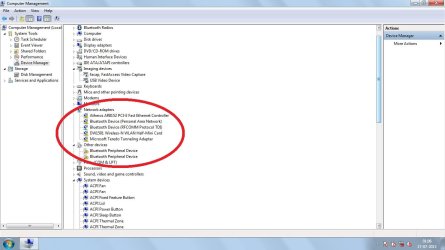
Open up the Device Manager .

click on :orb: right click on Computer select Manage. If you get a User Access Control window click on the Yes button . Once Computer Management opens up click on Device Manager on the left hand side.

Do you have any :warn: symbols ?
 

My Computer

Computer Manufacturer/Model Number
Custom Built
OS
Windows 7 Ultimate 32-Bit & Windows 7 Ultimate 64-Bit
CPU
Intel Core i7 CPU 950 @ 3.07GHz
Motherboard
ASUS P6T DELUXE V2
Memory
OCZ 6GB (3 x 2GB) 240-Pin DDR3 SDRAM DDR3 1600 OCZ3X1600R2
Graphics Card(s)
ATI Radeon HD 5700 Series
Sound Card
OnBoard
Hard Drives
WD6400AACS-00M3B0 (640GB SATA )
PSU
CORSAIR 850w
Case
NZXT LEXA
Cooling
Intel Stock Heatsink Fan
Keyboard
Microsoft Wireless Laser Keyboard 7000
Mouse
Microsoft Wireless Laser Mouse 7000
Hi VistaKing,

Yes there are a lot of "!" symbols under Network Adapters.

Please find attached the screenshot showing the same.


Cheers!!
RB
 

Attachments

  • NetworkAdaptersScreenshot.jpg
    NetworkAdaptersScreenshot.jpg
    188 KB · Views: 9

My Computer

OS
Windows 7 Home Basic
There is your reason why you have no Internet . You would need to download the drivers for those items .
 

My Computer

Computer Manufacturer/Model Number
Custom Built
OS
Windows 7 Ultimate 32-Bit & Windows 7 Ultimate 64-Bit
CPU
Intel Core i7 CPU 950 @ 3.07GHz
Motherboard
ASUS P6T DELUXE V2
Memory
OCZ 6GB (3 x 2GB) 240-Pin DDR3 SDRAM DDR3 1600 OCZ3X1600R2
Graphics Card(s)
ATI Radeon HD 5700 Series
Sound Card
OnBoard
Hard Drives
WD6400AACS-00M3B0 (640GB SATA )
PSU
CORSAIR 850w
Case
NZXT LEXA
Cooling
Intel Stock Heatsink Fan
Keyboard
Microsoft Wireless Laser Keyboard 7000
Mouse
Microsoft Wireless Laser Mouse 7000
Hi VistaKing,

How and from where do I download the drivers?

How were they lost? Did it happen due to some virus?

Feeling slightly better.

Cheers!!!
RB
 

My Computer

OS
Windows 7 Home Basic
What is the model of your laptop ?
 

My Computer

Computer Manufacturer/Model Number
Custom Built
OS
Windows 7 Ultimate 32-Bit & Windows 7 Ultimate 64-Bit
CPU
Intel Core i7 CPU 950 @ 3.07GHz
Motherboard
ASUS P6T DELUXE V2
Memory
OCZ 6GB (3 x 2GB) 240-Pin DDR3 SDRAM DDR3 1600 OCZ3X1600R2
Graphics Card(s)
ATI Radeon HD 5700 Series
Sound Card
OnBoard
Hard Drives
WD6400AACS-00M3B0 (640GB SATA )
PSU
CORSAIR 850w
Case
NZXT LEXA
Cooling
Intel Stock Heatsink Fan
Keyboard
Microsoft Wireless Laser Keyboard 7000
Mouse
Microsoft Wireless Laser Mouse 7000
Hi VistaKing,

System Specifications :
===================
Dell Inspiron N4010
Windows 7 Home Premium ( 64 bit ) SP1
Antivirus : Microsoft Security Essentials ( nothing else )
Dual boot system along with Ubuntu

Cheers!!
RB
 

My Computer

OS
Windows 7 Home Basic
Back
Top