Getting "Undo Copy" on right click menu at start up

gulls777

New member
Member
Local time
5:02 AM
Messages
48
Hi

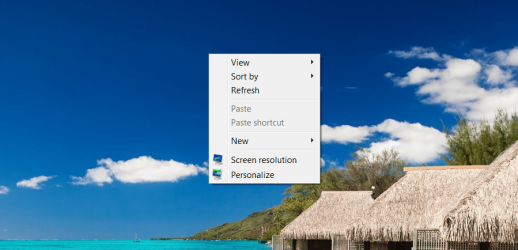
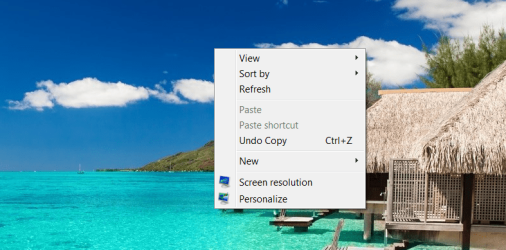
I am getting "Undo Copy" on right click menu in windows 7 right after fresh boot. No copy done whatsoever.

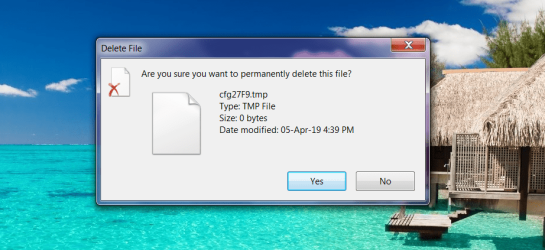
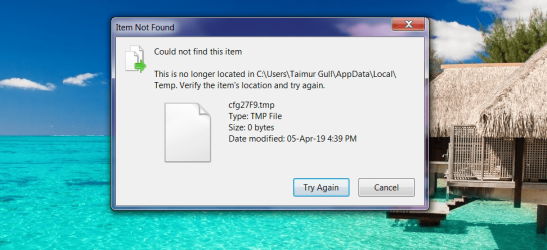
And if i click on it then it tries to permanently delete some .tmp file and fails to find it, and menu goes back to normal.

Happens at every boot.
Any tip to get rid of it.
 

Attachments
  • 1.png
    1.png
    116.4 KB · Views: 0
  • 2.png
    2.png
    117.1 KB · Views: 0
  • 3.png
    3.png
    124.7 KB · Views: 0
  • 4.png
    4.png
    126.3 KB · Views: 0

My Computer My Computer

Computer type
Laptop
Computer Manufacturer/Model Number
Dell XPS L702X
OS
Windows 7 Ultimate SP1 X64
CPU
Intel Core i7-2760QM
Motherboard
Intel HM67
Memory
Samsung 16GB DDR3 1333MHz
Graphics Card(s)
Nvidia Geforce GT 555M
Screen Resolution
1920x1080
Hard Drives
Samsung 860 EVO 500GB
Toshiba 1TB 5400RPM
I do not think this is a problem, if you are able to ignore it. The Undo Copy context menu entry is normal behavior for windows. Like right now, copy a file from your desktop to your desktop. Then right-click on your desktop - your explorer right-click menu will now have an Undo Copy option, whereas a minute ago it did not.

But if you are wanting to dig deeper here, there is the question of why are you getting this at boot up. The folder:

C:\Users\USERNAME\AppData\Local\Temp\

gets written to a lot in windows, and .tmp files are just temporary files of no lasting import, but in my own case I do not have an Undo Copy in my explorer menu at bootup.

If a file is copied on your hard disk that means there must be now at least two copies of it on your disk. I suggest you do a file search of cfg27F9.tmp on your hard disk after the next boot up (the filename may be different). We know there will be a copy of that file in C:\Users\USERNAME\AppData\Local\Temp\, but maybe the search will show a second copy of it in a folder that is a subfolder of the program that is doing this copying at your bootup. You can also look at your start > run > msconfig > startup folder to see what you have loading at bootup, as one of those programs may be your culprit. I recommend the freeware program Everything for file searches. Its incredibly fast. I have disabled the Windows Search service on my machine by going into start > run > services.msc > press enter. (random fyi)

voidtools

You can also do start > run > appwiz.cpl and sort by date to see what programs have been recently installed, maybe its one of those. And run your antivirus program. But its always possible that windows itself is doing the copying and its normal behavior but for some reason it does not happen on my machine.
 

My Computer My Computer

Computer type
PC/Desktop
Computer Manufacturer/Model Number
diy
OS
Win7 pro x64
CPU
stock i7 7700k
Motherboard
Gigabyte Z270N-WIFI mini-ITX
Memory
Corsair Vengeance LPX 16GB (2x8GB) DDR4 @ 3200MHz
Graphics Card(s)
integrated Intel HD 630
Sound Card
onboard Realtek ALC1220
Monitor(s) Displays
two vertically mounted samsung 55" 4k un55mu8000
Screen Resolution
1920x1280
Hard Drives
256GB Samsung EVO 960 M.2 pci-e NVMe SSD
PSU
SilverStone Nightjar ST45NF 450Watt Fanless
Case
No case. Motherboard is mounted directly onto power supply
Cooling
Evercool low profile 815EP with Panaflow 12L fan at 7v
Keyboard
Ortek MCK-86 mini
Mouse
Belkin 5-button USB
Internet Speed
spectrum 400mbps
Back
Top