Getting your Nikon Coolscan to work on W7 x64

Hi,

I used your last scanner.inf with the LS-40.
The reason I tried the solution I described first was that it was easier (the driver can be installed without the nikonscan 4.03 in place and with no additional file) and it proved itself on my wifes PC.
No idea why it did not on mine...

Yabbytail
 

My Computer My Computer

At a glance

windows 7 64bitsI5-7608 GBMSI Geforce 460
Computer Manufacturer/Model Number
home made
OS
windows 7 64bits
CPU
I5-760
Motherboard
ASUS P7P55DE Pro
Memory
8 GB
Graphics Card(s)
MSI Geforce 460
Hard Drives
samsung F1 1T
PSU
be quiet 480 W
Cooling
black
(the driver can be installed without the nikonscan 4.03 in place and with no additional file)

It didn't work like that on mine either, nor a lot of other people. What version of Windows does your wife have - 32 or 64-bit?

BTW the driver for the scanner is actually in the nikonscan software, so it's really strange that the driver would install without the software installed.

Did your wife happen to have a copy of vuescan installed by chance?

I used your last scanner.inf with the LS-40.

That's good, so I know that file works. Will have to upload it to my site.

Thanks.
 

My Computer My Computer

At a glance

Windows 10 ProIntel Core i7-4770K (3.5Ghz)32 gig Corsair Dominator Platinum (4x8Gig)Sapphire Tri-X R9 Fury
Computer type
PC/Desktop
Computer Manufacturer/Model Number
Custom built by me.
OS
Windows 10 Pro
CPU
Intel Core i7-4770K (3.5Ghz)
Motherboard
Gigabyte G1 Sniper 5 (F10 Bios)
Memory
32 gig Corsair Dominator Platinum (4x8Gig)
Graphics Card(s)
Sapphire Tri-X R9 Fury
Sound Card
Soundblaster ZXR
Monitor(s) Displays
NEC PA242W 24" LCD Monitor
Screen Resolution
1920 x 1200
Hard Drives
Primary - Samsung 850 Pro (512gig), Samsung 840 Pro (256gig), 2TB WD Caviar Black.
PSU
EVGA Supernova 1000 G2
Case
Cooler Master HAF X
Cooling
Corsair H100i with Corsair Air Series SP120 Quiet Fans
Keyboard
Logitech Wireless Wave
Mouse
Logitech Performance MX
Internet Speed
High Speed Cable
Antivirus
Norton Security
Browser
IE11
Other Info
Memory Timings - 1866MHz @ 9-9-9-27-1T @ 1.5 volts
She has 64 bits and the software was not installed.
Axels instructions were to install the driver first and than the 4.03 with both options (to install LS-40 or LS-4000) UNchecked during the installation.

It works (sometimes), but not for my desktop.

Regards
 

My Computer My Computer

At a glance

windows 7 64bitsI5-7608 GBMSI Geforce 460
Computer Manufacturer/Model Number
home made
OS
windows 7 64bits
CPU
I5-760
Motherboard
ASUS P7P55DE Pro
Memory
8 GB
Graphics Card(s)
MSI Geforce 460
Hard Drives
samsung F1 1T
PSU
be quiet 480 W
Cooling
black
I'm not familiar with "Axels instructions" ??? Can you give me a link. I'm just curious.

Thanks, and good luck.
 

My Computer My Computer

At a glance

Windows 10 ProIntel Core i7-4770K (3.5Ghz)32 gig Corsair Dominator Platinum (4x8Gig)Sapphire Tri-X R9 Fury
Computer type
PC/Desktop
Computer Manufacturer/Model Number
Custom built by me.
OS
Windows 10 Pro
CPU
Intel Core i7-4770K (3.5Ghz)
Motherboard
Gigabyte G1 Sniper 5 (F10 Bios)
Memory
32 gig Corsair Dominator Platinum (4x8Gig)
Graphics Card(s)
Sapphire Tri-X R9 Fury
Sound Card
Soundblaster ZXR
Monitor(s) Displays
NEC PA242W 24" LCD Monitor
Screen Resolution
1920 x 1200
Hard Drives
Primary - Samsung 850 Pro (512gig), Samsung 840 Pro (256gig), 2TB WD Caviar Black.
PSU
EVGA Supernova 1000 G2
Case
Cooler Master HAF X
Cooling
Corsair H100i with Corsair Air Series SP120 Quiet Fans
Keyboard
Logitech Wireless Wave
Mouse
Logitech Performance MX
Internet Speed
High Speed Cable
Antivirus
Norton Security
Browser
IE11
Other Info
Memory Timings - 1866MHz @ 9-9-9-27-1T @ 1.5 volts
Sygnus21

Can you tell me your web address. I am trying to use your Nikon Coolscan fix.
 

My Computer My Computer

At a glance

Windows 7
OS
Windows 7
Please read the first page of this thread.

Thanks
 

My Computer My Computer

At a glance

Windows 10 ProIntel Core i7-4770K (3.5Ghz)32 gig Corsair Dominator Platinum (4x8Gig)Sapphire Tri-X R9 Fury
Computer type
PC/Desktop
Computer Manufacturer/Model Number
Custom built by me.
OS
Windows 10 Pro
CPU
Intel Core i7-4770K (3.5Ghz)
Motherboard
Gigabyte G1 Sniper 5 (F10 Bios)
Memory
32 gig Corsair Dominator Platinum (4x8Gig)
Graphics Card(s)
Sapphire Tri-X R9 Fury
Sound Card
Soundblaster ZXR
Monitor(s) Displays
NEC PA242W 24" LCD Monitor
Screen Resolution
1920 x 1200
Hard Drives
Primary - Samsung 850 Pro (512gig), Samsung 840 Pro (256gig), 2TB WD Caviar Black.
PSU
EVGA Supernova 1000 G2
Case
Cooler Master HAF X
Cooling
Corsair H100i with Corsair Air Series SP120 Quiet Fans
Keyboard
Logitech Wireless Wave
Mouse
Logitech Performance MX
Internet Speed
High Speed Cable
Antivirus
Norton Security
Browser
IE11
Other Info
Memory Timings - 1866MHz @ 9-9-9-27-1T @ 1.5 volts
I use Vista x64 and hope my post belongs here.

I have a Nikon Super Coolscan 9000ED that does not work with my Vista x64 computer. I followed your instructions carefully and installed the Nikon 4.0.3 drivers for Vista 32-bit, then made the folder with the two files. The Device Manager tells me that the IEEE 1394 Bus Host Controller and the Imaging Device is installed.

Unfortunately when I start Nikon Scan.exe I get a blue screen crash.

I have tried using the driver that follows VueScan. When I start VueScan it tells me that no device is attached. This leads me to the possible conclusion that it is a hardware problem. The scanner and Nikon Scan works fine on my Windows 2000 computer, so it's not the scanner itself that is the problem. Rather, the problem may be my FireWire card. I use the PCI card that followed the scanner when I bought it.

My question is therefore this: can you give details about what kind of FireWire card you use when it works? Does the card have to be Vista compatible in any special way? Is the FireWire card of the old 600-type (IEEE 1394) or the new 800-type (IEEE1394b)?
 

My Computer My Computer

At a glance

Vista x64
OS
Vista x64
Hi Rhett,

First off, yes this is the place to post your issue since this is the only place to voice your issues/concerns.

To answer the FireWire (1394) question.... I use the 1394 connection that's built into my motherboard; prior to that I had an Adaptec USB/FireWire card that I used under XP. In short, I've never used the FireWire card that came with my scanner.

Now.... I've never tried these procedures under Vista 64-bit so I can't tell you what issues may arise. However since I do have Vista 64-bit on one of my drives I'll have to test out the procedures there to see if there are any issues.

In the mean time you should consider checking to make sure the 1394 port is working and/or checking that there's nothing wrong with the cable.

Also do note that the scan software does work under Vista 32-bit. I know this because I used it under Vista 32; I just haven't tried it under 64.

I'll let you know what I find out later on this evening, or sometime tomorrow.

Until then.
 

My Computer My Computer

At a glance

Windows 10 ProIntel Core i7-4770K (3.5Ghz)32 gig Corsair Dominator Platinum (4x8Gig)Sapphire Tri-X R9 Fury
Computer type
PC/Desktop
Computer Manufacturer/Model Number
Custom built by me.
OS
Windows 10 Pro
CPU
Intel Core i7-4770K (3.5Ghz)
Motherboard
Gigabyte G1 Sniper 5 (F10 Bios)
Memory
32 gig Corsair Dominator Platinum (4x8Gig)
Graphics Card(s)
Sapphire Tri-X R9 Fury
Sound Card
Soundblaster ZXR
Monitor(s) Displays
NEC PA242W 24" LCD Monitor
Screen Resolution
1920 x 1200
Hard Drives
Primary - Samsung 850 Pro (512gig), Samsung 840 Pro (256gig), 2TB WD Caviar Black.
PSU
EVGA Supernova 1000 G2
Case
Cooler Master HAF X
Cooling
Corsair H100i with Corsair Air Series SP120 Quiet Fans
Keyboard
Logitech Wireless Wave
Mouse
Logitech Performance MX
Internet Speed
High Speed Cable
Antivirus
Norton Security
Browser
IE11
Other Info
Memory Timings - 1866MHz @ 9-9-9-27-1T @ 1.5 volts
Ok I'm on Vista now and unfortunately these procedures won't work for Vista x64. It won't accept the hacked driver :(

Here's a couple of images....

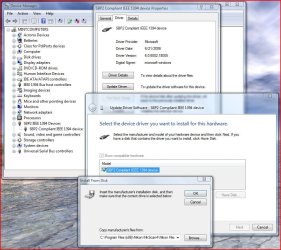
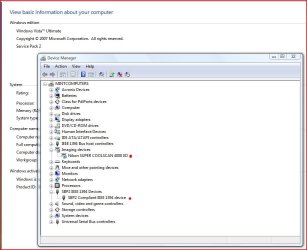
Under Vista your scanner will show up as SBP2 IEEE 1394 Devices under Device Manager......

Vista Nikon Scan driver install.JPG

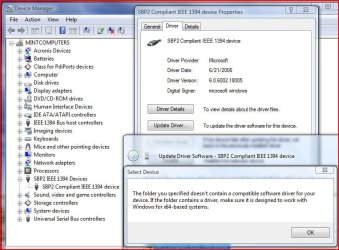
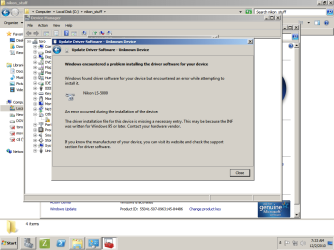
Trying to install the scanners.inf file will result in a message basically stating an incompatibility issue. It want's a 64-bit version :confused:

Vista Nikon Scan driver install fail.JPG

You could try it with your scanner, but honestly I'd be surprised if you got better results than I did. Sorry :(

Here's the procedures anyway.... Under Device Manager in Vista....

- Look for SBP2 IEEE 1394 Devices
Double click that and click Update Driver and choose
- Browse my computer for driver software then click
- Let me pick from a list of device drivers on my computer then click
- Have Disk and click
- Browse and look for the folder where you extracted the scanners.inf file
- Click on the file and hit OK. If it works the driver will install, if it doens't you'll get the message in the second.

Again it doens't work for me, and I have a Nikon Coolscan 4000 with a FireWire connection.

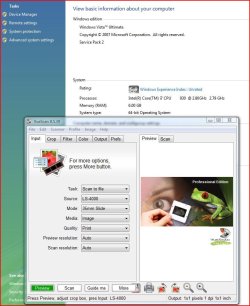
The only other option I can offer is to go with Vuescan which does work under Vista x64.

Vuescan under Vista 64.JPG

I'll also state that if Vuescan isn't picking up the scanner, then there is an issue, and it may be hardware related.

Let me know.
 

My Computer My Computer

At a glance

Windows 10 ProIntel Core i7-4770K (3.5Ghz)32 gig Corsair Dominator Platinum (4x8Gig)Sapphire Tri-X R9 Fury
Computer type
PC/Desktop
Computer Manufacturer/Model Number
Custom built by me.
OS
Windows 10 Pro
CPU
Intel Core i7-4770K (3.5Ghz)
Motherboard
Gigabyte G1 Sniper 5 (F10 Bios)
Memory
32 gig Corsair Dominator Platinum (4x8Gig)
Graphics Card(s)
Sapphire Tri-X R9 Fury
Sound Card
Soundblaster ZXR
Monitor(s) Displays
NEC PA242W 24" LCD Monitor
Screen Resolution
1920 x 1200
Hard Drives
Primary - Samsung 850 Pro (512gig), Samsung 840 Pro (256gig), 2TB WD Caviar Black.
PSU
EVGA Supernova 1000 G2
Case
Cooler Master HAF X
Cooling
Corsair H100i with Corsair Air Series SP120 Quiet Fans
Keyboard
Logitech Wireless Wave
Mouse
Logitech Performance MX
Internet Speed
High Speed Cable
Antivirus
Norton Security
Browser
IE11
Other Info
Memory Timings - 1866MHz @ 9-9-9-27-1T @ 1.5 volts
Thank you for your reply.

I have now

1) Scanned film on my Windows 2000 computer and checked
that everything works. I use the FireWire card that followed
the scanner, PCI FW4 (Rev.2) made by Ratoc, which I
suppose is a 600 card. I use the Nikon Scan 4.0.2 driver here.

2) Moved the FireWire card to my Windows Vista computer and
tried to install the Nikon Scan 4.0.3 driver as you descibed above
and got the same message as you did about an incompatible driver.

3) Installed VueScan again on my Windows Vista computer, but
get the message (unlike you) in VueScan that 'No scanners were
found connected to your computer...'


Well, then it's likely a software issue after all. The 4.0.3 will
likely work when I upgrade to Windows 7. Perhaps scanners.inf
need some kind of modification to work on Vista?
 

My Computer My Computer

At a glance

Vista x64
OS
Vista x64
SEE POST BELOW FIRST....

Installed VueScan again on my Windows Vista computer, but get the message (unlike you) in VueScan that 'No scanners were found connected to your computer...'

I don't know why you have an issue with Vuescan not recognizing the scanner. As you see, Vuescan works just fine on mines.

Try this for Vuescan....

1- Completely removed the Nikonscan software through Programs and Features

2- Reboot the computer with the scanner connected and turned on and see if that helps.

Perhaps scanners.inf need some kind of modification to work on Vista?

Probably, but I'm not the one who created the file so I can't say what it would take to get it to work with Vista x64. I just know it works on Windows 7. I'll have to do some further research as to why it's not working for you or me.

For you, it might be an issue with the 9000.

In the meantime you might want to check this post to see what they have to say. That's the post I'll be looking through as well so....

Thanks, and sorry.
 
Last edited:

My Computer My Computer

At a glance

Windows 10 ProIntel Core i7-4770K (3.5Ghz)32 gig Corsair Dominator Platinum (4x8Gig)Sapphire Tri-X R9 Fury
Computer type
PC/Desktop
Computer Manufacturer/Model Number
Custom built by me.
OS
Windows 10 Pro
CPU
Intel Core i7-4770K (3.5Ghz)
Motherboard
Gigabyte G1 Sniper 5 (F10 Bios)
Memory
32 gig Corsair Dominator Platinum (4x8Gig)
Graphics Card(s)
Sapphire Tri-X R9 Fury
Sound Card
Soundblaster ZXR
Monitor(s) Displays
NEC PA242W 24" LCD Monitor
Screen Resolution
1920 x 1200
Hard Drives
Primary - Samsung 850 Pro (512gig), Samsung 840 Pro (256gig), 2TB WD Caviar Black.
PSU
EVGA Supernova 1000 G2
Case
Cooler Master HAF X
Cooling
Corsair H100i with Corsair Air Series SP120 Quiet Fans
Keyboard
Logitech Wireless Wave
Mouse
Logitech Performance MX
Internet Speed
High Speed Cable
Antivirus
Norton Security
Browser
IE11
Other Info
Memory Timings - 1866MHz @ 9-9-9-27-1T @ 1.5 volts
OK, I got it installed on Vista :)

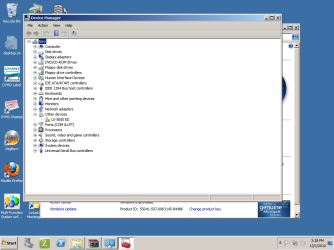
Follow these procedures here, http://www.sevenforums.com/drivers/44994-getting-your-nikon-coolscan-work-w7-x64-19.html#post1068979 but instead of looking under SBP2 IEEE 1394 Devices in Device Manager look under Imageing whatever is there update the driver per the instructions.

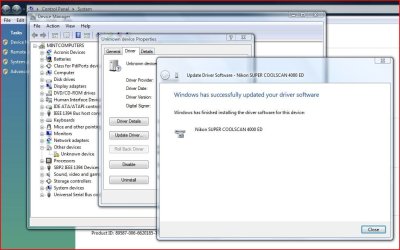
NOTE: If you have Vuescan installed, turn on the scanner then remove Vuescan. If it works like I think it might, you'll be presented with an item with a question mark under Other devices and below it an Unknown device with a yellow exclamation mark.... that's the item you update with the scanner.inf file.

Scansoftware install.JPG

Once the driver is installed Device Manager should have these

Scansoftware installed.JPG

However, since you're having an issue with the scanner recognizing any scan software, these procedures may not work as you have another issue going on.

BTW do you have drivers installed for that 1394 card? You should. If not, you need to do that. That will probably explain why the scanner isn't recognized!!!

Also, does the motherboard have a 1394 FireWire port? If so use it! You don't have to use the FireWire card if the computer has one of it's own.

Let me know.
 

My Computer My Computer

At a glance

Windows 10 ProIntel Core i7-4770K (3.5Ghz)32 gig Corsair Dominator Platinum (4x8Gig)Sapphire Tri-X R9 Fury
Computer type
PC/Desktop
Computer Manufacturer/Model Number
Custom built by me.
OS
Windows 10 Pro
CPU
Intel Core i7-4770K (3.5Ghz)
Motherboard
Gigabyte G1 Sniper 5 (F10 Bios)
Memory
32 gig Corsair Dominator Platinum (4x8Gig)
Graphics Card(s)
Sapphire Tri-X R9 Fury
Sound Card
Soundblaster ZXR
Monitor(s) Displays
NEC PA242W 24" LCD Monitor
Screen Resolution
1920 x 1200
Hard Drives
Primary - Samsung 850 Pro (512gig), Samsung 840 Pro (256gig), 2TB WD Caviar Black.
PSU
EVGA Supernova 1000 G2
Case
Cooler Master HAF X
Cooling
Corsair H100i with Corsair Air Series SP120 Quiet Fans
Keyboard
Logitech Wireless Wave
Mouse
Logitech Performance MX
Internet Speed
High Speed Cable
Antivirus
Norton Security
Browser
IE11
Other Info
Memory Timings - 1866MHz @ 9-9-9-27-1T @ 1.5 volts
plz help Nikon LS-5000 no workie :)

Having a bit of trouble with this, keep getting "Windows found driver software for your device but encountered an error while attempting to install it" ... anyone else with that problem?
Redid steps after taking a break to make sure I didn't forget something,.... if anyone has any ideas please please let me know,

thanks!


For those wishing to get their Nikon Coolscan film scanners working under either Vista or Windows 7 64-bit editions here’s a solution….

Note - This fix applies to the 4000, 5000, 8000, and 9000 series scanners. I can't guarantee older scanners will work but it's worth a try. If not, check this post for help or tips for older scanners. And credit Steel Chn for the inf file. I'm just providing an already built modified file that includes the Nikon 5000. Now...

Before you get started: Remove Vuescan if installed. You can re-install it after these procedures.

1- Download this file Nikon Scan 4.0.3 from Nikon's site drivers for Windows Vista 32-bit. Yes, Vista 32-bit.

2- Then go my website and download this zip file - scanners.zip (includes 5000 fix)

3- Extract and save the scanners.inf file to a location or folder of your choosing...

Example: I created a folder called Nikon Files. After I install the Nikon Scan software, I'll then place the Nikon Files folder inside the NKScan4 folder located at...

C:\Program Files (x86)\Nikon\NkScan4 - Thus the NKScan4 folder now contains the Nikon Files folder and will look like this... C:\Program Files (x86)\Nikon\NkScan4\Nikon Files

4- Now install the Nikon Scan software you downloaded and after the installation, go to....

C:\Program Files (x86)\Common Files\Nikon\Driver\Scan1394 (see note) and copy this file NKScnUSD.dll to the same folder (Example: Nikon Files) that the scanners.inf file is in.

Thus the Nikon Files folder should now contain these two files... NKScnUSD.dll and scanners.inf

NOTE: If your scanner is USB than the folder will be ScanUSB instead of Scan1394.

Once that’s done….

5- Power up the scanner and make sure the Firewire or USB cable is connected to the computer.

6- Cancel any dialogue boxes looking for drivers if they appear.

7- Go to Device Manager – Control Panel, Device Manager and look for the "Unknown Device" (your scanner) with the yellow triangle.

8- Right click on it and choose "Update Driver Software" then choose "Browse my computer for driver software"

9- Click "Browse" and find the location or folder where you put the scanners.inf file. Example: C:\Program Files (x86)\Nikon\NkScan4\Nikon Files and click "Next" This will/should install the driver (scanners.inf) you extracted from the zip file for your scanner.

10- That’s it – Your Nikon Scan software should now be fully functional.


Good luck :)
 

My Computer My Computer

At a glance

x64 ultimate
OS
x64 ultimate
- Is this a USB or FireWire connection?
- Is it possible to post a screen shot of your Device Manager?

Thanks
 

My Computer My Computer

At a glance

Windows 10 ProIntel Core i7-4770K (3.5Ghz)32 gig Corsair Dominator Platinum (4x8Gig)Sapphire Tri-X R9 Fury
Computer type
PC/Desktop
Computer Manufacturer/Model Number
Custom built by me.
OS
Windows 10 Pro
CPU
Intel Core i7-4770K (3.5Ghz)
Motherboard
Gigabyte G1 Sniper 5 (F10 Bios)
Memory
32 gig Corsair Dominator Platinum (4x8Gig)
Graphics Card(s)
Sapphire Tri-X R9 Fury
Sound Card
Soundblaster ZXR
Monitor(s) Displays
NEC PA242W 24" LCD Monitor
Screen Resolution
1920 x 1200
Hard Drives
Primary - Samsung 850 Pro (512gig), Samsung 840 Pro (256gig), 2TB WD Caviar Black.
PSU
EVGA Supernova 1000 G2
Case
Cooler Master HAF X
Cooling
Corsair H100i with Corsair Air Series SP120 Quiet Fans
Keyboard
Logitech Wireless Wave
Mouse
Logitech Performance MX
Internet Speed
High Speed Cable
Antivirus
Norton Security
Browser
IE11
Other Info
Memory Timings - 1866MHz @ 9-9-9-27-1T @ 1.5 volts
Sorry about that, its USB.

The screenshot is attached.

Thanks! mucho!


- Is this a USB or FireWire connection?
- Is it possible to post a screen shot of your Device Manager?

Thanks
 

Attachments

  • devmgr.png
    devmgr.png
    40.9 KB · Views: 9

My Computer My Computer

At a glance

x64 ultimate
OS
x64 ultimate
When you installed the scan software, did you re-boot? If not, try re-booting and try again. Aslo make sure you're trying to install the driver I supplied.
 

My Computer My Computer

At a glance

Windows 10 ProIntel Core i7-4770K (3.5Ghz)32 gig Corsair Dominator Platinum (4x8Gig)Sapphire Tri-X R9 Fury
Computer type
PC/Desktop
Computer Manufacturer/Model Number
Custom built by me.
OS
Windows 10 Pro
CPU
Intel Core i7-4770K (3.5Ghz)
Motherboard
Gigabyte G1 Sniper 5 (F10 Bios)
Memory
32 gig Corsair Dominator Platinum (4x8Gig)
Graphics Card(s)
Sapphire Tri-X R9 Fury
Sound Card
Soundblaster ZXR
Monitor(s) Displays
NEC PA242W 24" LCD Monitor
Screen Resolution
1920 x 1200
Hard Drives
Primary - Samsung 850 Pro (512gig), Samsung 840 Pro (256gig), 2TB WD Caviar Black.
PSU
EVGA Supernova 1000 G2
Case
Cooler Master HAF X
Cooling
Corsair H100i with Corsair Air Series SP120 Quiet Fans
Keyboard
Logitech Wireless Wave
Mouse
Logitech Performance MX
Internet Speed
High Speed Cable
Antivirus
Norton Security
Browser
IE11
Other Info
Memory Timings - 1866MHz @ 9-9-9-27-1T @ 1.5 volts
Thanks for the reply and suggestion!!
Unfortunately I still get the same error, put in this thread as reference...

Any ideas?


When you installed the scan software, did you re-boot? If not, try re-booting and try again. Aslo make sure you're trying to install the driver I supplied.
 

Attachments

  • devmgrhatesme.png
    devmgrhatesme.png
    43.3 KB · Views: 12

My Computer My Computer

At a glance

x64 ultimate
OS
x64 ultimate
- I have to ask.... What version of Windows are you installing the software on?

- Where did you get the inf file from??? - If you didn't get it from my website, that may be a problem.

Give this file a try - scanners.zip I ask that you let me know the results.
 

My Computer My Computer

At a glance

Windows 10 ProIntel Core i7-4770K (3.5Ghz)32 gig Corsair Dominator Platinum (4x8Gig)Sapphire Tri-X R9 Fury
Computer type
PC/Desktop
Computer Manufacturer/Model Number
Custom built by me.
OS
Windows 10 Pro
CPU
Intel Core i7-4770K (3.5Ghz)
Motherboard
Gigabyte G1 Sniper 5 (F10 Bios)
Memory
32 gig Corsair Dominator Platinum (4x8Gig)
Graphics Card(s)
Sapphire Tri-X R9 Fury
Sound Card
Soundblaster ZXR
Monitor(s) Displays
NEC PA242W 24" LCD Monitor
Screen Resolution
1920 x 1200
Hard Drives
Primary - Samsung 850 Pro (512gig), Samsung 840 Pro (256gig), 2TB WD Caviar Black.
PSU
EVGA Supernova 1000 G2
Case
Cooler Master HAF X
Cooling
Corsair H100i with Corsair Air Series SP120 Quiet Fans
Keyboard
Logitech Wireless Wave
Mouse
Logitech Performance MX
Internet Speed
High Speed Cable
Antivirus
Norton Security
Browser
IE11
Other Info
Memory Timings - 1866MHz @ 9-9-9-27-1T @ 1.5 volts
Nikon Ls 4000 ED

Let me 1st say thanks for all your time! and I hope I'm not wasting it? I've tried your fix twice with no success, but my problem seems to be different than these other posts. The software opens fine then errors "no active device" ? I can't get windows to even recognize that my scanner is plugged in , so I can't update driver - no unkown device and no Yellow triangle. I will tell that It's been a couple of years since I used it on my old Dell xp, but I went back to my xp and same problem, both computers have ieee1394 cards that I bought and installed, both recognize the cards drivers are working properly? Maybe I need a new firewire cable or maybe my scanner is not working properly?

Any help would be greatly appreciated!
Thanks in advance!
 

My Computer My Computer

At a glance

Windows Home Premium x646 MBATI 4200
Computer Manufacturer/Model Number
Dell 570
OS
Windows Home Premium x64
Memory
6 MB
Graphics Card(s)
ATI 4200
Hard Drives
1TB
Back
Top