
Getting your Nikon Coolscan to work on W7 x64

Sorry romke, I've not seen or heard that issue. I also run Windows 7 Ultimate x64 and haven't had any problems. Do/did you have Vuescan installed? Did you remove it first?

Hmmm.... I don't know what to think at the moment. I did a OS reinstall a couple of weeks ago and haven't installed the scanner software yet. I'll install it now and see If I find anything and let you know.

Later.
 

My Computer My Computer

At a glance

Windows 10 ProIntel Core i7-4770K (3.5Ghz)32 gig Corsair Dominator Platinum (4x8Gig)Sapphire Tri-X R9 Fury
Computer type
PC/Desktop
Computer Manufacturer/Model Number
Custom built by me.
OS
Windows 10 Pro
CPU
Intel Core i7-4770K (3.5Ghz)
Motherboard
Gigabyte G1 Sniper 5 (F10 Bios)
Memory
32 gig Corsair Dominator Platinum (4x8Gig)
Graphics Card(s)
Sapphire Tri-X R9 Fury
Sound Card
Soundblaster ZXR
Monitor(s) Displays
NEC PA242W 24" LCD Monitor
Screen Resolution
1920 x 1200
Hard Drives
Primary - Samsung 850 Pro (512gig), Samsung 840 Pro (256gig), 2TB WD Caviar Black.
PSU
EVGA Supernova 1000 G2
Case
Cooler Master HAF X
Cooling
Corsair H100i with Corsair Air Series SP120 Quiet Fans
Keyboard
Logitech Wireless Wave
Mouse
Logitech Performance MX
Internet Speed
High Speed Cable
Antivirus
Norton Security
Browser
IE11
Other Info
Memory Timings - 1866MHz @ 9-9-9-27-1T @ 1.5 volts
Hi romke, So I just installed the Scanner software following my own instructions as written and everything is working. In fact I did a scan and without issue.

Did you re-boot when asked to do so after the Nikon Scan software was installed?

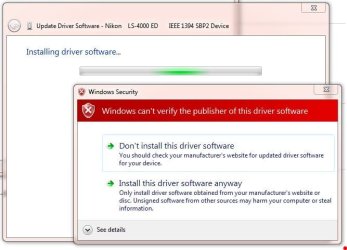
Did you get this dialogue box when you installed the driver per the instructions?

Scanner Driver Dialogue box.JPG

Did you choose Install this driver software anyway? You should have.

Let me know.
 

My Computer My Computer

At a glance

Windows 10 ProIntel Core i7-4770K (3.5Ghz)32 gig Corsair Dominator Platinum (4x8Gig)Sapphire Tri-X R9 Fury
Computer type
PC/Desktop
Computer Manufacturer/Model Number
Custom built by me.
OS
Windows 10 Pro
CPU
Intel Core i7-4770K (3.5Ghz)
Motherboard
Gigabyte G1 Sniper 5 (F10 Bios)
Memory
32 gig Corsair Dominator Platinum (4x8Gig)
Graphics Card(s)
Sapphire Tri-X R9 Fury
Sound Card
Soundblaster ZXR
Monitor(s) Displays
NEC PA242W 24" LCD Monitor
Screen Resolution
1920 x 1200
Hard Drives
Primary - Samsung 850 Pro (512gig), Samsung 840 Pro (256gig), 2TB WD Caviar Black.
PSU
EVGA Supernova 1000 G2
Case
Cooler Master HAF X
Cooling
Corsair H100i with Corsair Air Series SP120 Quiet Fans
Keyboard
Logitech Wireless Wave
Mouse
Logitech Performance MX
Internet Speed
High Speed Cable
Antivirus
Norton Security
Browser
IE11
Other Info
Memory Timings - 1866MHz @ 9-9-9-27-1T @ 1.5 volts
sygnus21,

my apologies for this late reply.

i also tried to get the scanner to work on a windows 2000 system. after installing the software and starting up Nikon Scan the software reported a hardware failure and told me to shut down and restart the scanner. i then got another error message telling me there was no active scanner.

i contacted the local Nikon service department and they told me that a hardware fault was the most likely cause and that problems can be caused by transport - these things seem to be very sensitive to drops and impact blows during transport. i shipped the scanner to them and indeed they found some parts that need repair/changing.

it will take some time before i get back the scanner and will proceed then. it might well be that a hardware fault was the only cause for the reported problems. when i get the scanner back i will first try it on a windows 2000 system, when that is ok, i will see whether it will also work on a windows 7 64 bit system as per your instructions. if not, i will reinstall the software and files as per your suggestions.

thanks sofar for the instructions given.
 

My Computer My Computer

At a glance

Win 7 Ultimate 64 bits
OS
Win 7 Ultimate 64 bits
Well at least you know the unit is bad. So as you say, we'll see what happens when you get it back. BTW, may I ask how much Nikon is charging? This of course is assuming it's out of warranty.

I ask becaue mine sits on my computer desk and after some failed gaming sessions, followed by some frustrated desk pounding, I can only wonder about the impact felt by the scanner :) I'm sure at least a calibration is in order :)

Thanks
 

My Computer My Computer

At a glance

Windows 10 ProIntel Core i7-4770K (3.5Ghz)32 gig Corsair Dominator Platinum (4x8Gig)Sapphire Tri-X R9 Fury
Computer type
PC/Desktop
Computer Manufacturer/Model Number
Custom built by me.
OS
Windows 10 Pro
CPU
Intel Core i7-4770K (3.5Ghz)
Motherboard
Gigabyte G1 Sniper 5 (F10 Bios)
Memory
32 gig Corsair Dominator Platinum (4x8Gig)
Graphics Card(s)
Sapphire Tri-X R9 Fury
Sound Card
Soundblaster ZXR
Monitor(s) Displays
NEC PA242W 24" LCD Monitor
Screen Resolution
1920 x 1200
Hard Drives
Primary - Samsung 850 Pro (512gig), Samsung 840 Pro (256gig), 2TB WD Caviar Black.
PSU
EVGA Supernova 1000 G2
Case
Cooler Master HAF X
Cooling
Corsair H100i with Corsair Air Series SP120 Quiet Fans
Keyboard
Logitech Wireless Wave
Mouse
Logitech Performance MX
Internet Speed
High Speed Cable
Antivirus
Norton Security
Browser
IE11
Other Info
Memory Timings - 1866MHz @ 9-9-9-27-1T @ 1.5 volts
re V ed not work

I tried to follow the above instruction, but it was still not work!:confused:
 

My Computer My Computer

At a glance

win 7
OS
win 7
A bit more information might be helpful.

Thanks.
 

My Computer My Computer

At a glance

Windows 10 ProIntel Core i7-4770K (3.5Ghz)32 gig Corsair Dominator Platinum (4x8Gig)Sapphire Tri-X R9 Fury
Computer type
PC/Desktop
Computer Manufacturer/Model Number
Custom built by me.
OS
Windows 10 Pro
CPU
Intel Core i7-4770K (3.5Ghz)
Motherboard
Gigabyte G1 Sniper 5 (F10 Bios)
Memory
32 gig Corsair Dominator Platinum (4x8Gig)
Graphics Card(s)
Sapphire Tri-X R9 Fury
Sound Card
Soundblaster ZXR
Monitor(s) Displays
NEC PA242W 24" LCD Monitor
Screen Resolution
1920 x 1200
Hard Drives
Primary - Samsung 850 Pro (512gig), Samsung 840 Pro (256gig), 2TB WD Caviar Black.
PSU
EVGA Supernova 1000 G2
Case
Cooler Master HAF X
Cooling
Corsair H100i with Corsair Air Series SP120 Quiet Fans
Keyboard
Logitech Wireless Wave
Mouse
Logitech Performance MX
Internet Speed
High Speed Cable
Antivirus
Norton Security
Browser
IE11
Other Info
Memory Timings - 1866MHz @ 9-9-9-27-1T @ 1.5 volts
I have no vuescan in my win7, so I just installed nikon scan vista 32 bit and got the scanners.inf file from your link. First, I put scanners.inf file into the folder in name of Nikon Files, while I also copied the file in name of NKScnUSD.dll on the same folder in name of Nikon Files. Final, I turned on the power of my coolscan and tried to use manual install the driver under window device manager. However, it did not find any driver in the Nikon Files folder.
 

My Computer My Computer

At a glance

win 7
OS
win 7
I have finished to install my V ED, but it don't need to do the complex copy and paste file folder procedure.
It only need to download nikon scan from Nikon Official web site and do the normal install.
Then, download this driver folder : http://www.fastpictureviewer.com/bin/NikonUsbScanners64.zip
Final, open window device manager and select the above driver folder and finish
 

My Computer My Computer

At a glance

win 7
OS
win 7
Glad you got it sorted.

Later.
 

My Computer My Computer

At a glance

Windows 10 ProIntel Core i7-4770K (3.5Ghz)32 gig Corsair Dominator Platinum (4x8Gig)Sapphire Tri-X R9 Fury
Computer type
PC/Desktop
Computer Manufacturer/Model Number
Custom built by me.
OS
Windows 10 Pro
CPU
Intel Core i7-4770K (3.5Ghz)
Motherboard
Gigabyte G1 Sniper 5 (F10 Bios)
Memory
32 gig Corsair Dominator Platinum (4x8Gig)
Graphics Card(s)
Sapphire Tri-X R9 Fury
Sound Card
Soundblaster ZXR
Monitor(s) Displays
NEC PA242W 24" LCD Monitor
Screen Resolution
1920 x 1200
Hard Drives
Primary - Samsung 850 Pro (512gig), Samsung 840 Pro (256gig), 2TB WD Caviar Black.
PSU
EVGA Supernova 1000 G2
Case
Cooler Master HAF X
Cooling
Corsair H100i with Corsair Air Series SP120 Quiet Fans
Keyboard
Logitech Wireless Wave
Mouse
Logitech Performance MX
Internet Speed
High Speed Cable
Antivirus
Norton Security
Browser
IE11
Other Info
Memory Timings - 1866MHz @ 9-9-9-27-1T @ 1.5 volts
sygnus21,

so far the Nikon service department was most helpful.

they do charge a standard fee of Euro 40 for checking what is wrong. If you accept their findings and want the repair you will not have to pay that amount.

they also have a standard fee for repairs: Euro 150 for this scanner plus the cost of parts. In my case the latter will be around 130 Euro.

that all ends up to a significant amount, but given the price of the scanner does not seem excessive.

i must say i was pretty amazed by their standard of service, knowledge and the way they treated me so far. after all, we are talking about a scanner that is out of production for about five years and was recently acquired by me in another country.
 

My Computer My Computer

At a glance

Win 7 Ultimate 64 bits
OS
Win 7 Ultimate 64 bits
Thanks for the info but $155.5 USD!!! :shock:

Hopefully they get it repaired. As for customer service, I'll be more impressed when their company releases official drivers for the scanners.

Can I use my Nikon Scanner with Windows 7, Leopard, Snow Leopard, or a 64-bit operating system?

The use of Nikon Scan software with Windows 7 (any version), or Mac OS 10.5.x or later, or any 64- bit operating system (including 64-bit, 32-bit or Compatibility mode) is not supported.

We suggest trying a third party software option such as Vuescan from Hamrick.com or Silverfast software.

Source - Using Nikon scanners with new operating systems. Humph.... :rolleyes:

...but given the price of the scanner ...
Agree, which is why we should have official drivers!!!

At any rate good luck and let me know if I can be of further assistance.


Peace :cool:
 

My Computer My Computer

At a glance

Windows 10 ProIntel Core i7-4770K (3.5Ghz)32 gig Corsair Dominator Platinum (4x8Gig)Sapphire Tri-X R9 Fury
Computer type
PC/Desktop
Computer Manufacturer/Model Number
Custom built by me.
OS
Windows 10 Pro
CPU
Intel Core i7-4770K (3.5Ghz)
Motherboard
Gigabyte G1 Sniper 5 (F10 Bios)
Memory
32 gig Corsair Dominator Platinum (4x8Gig)
Graphics Card(s)
Sapphire Tri-X R9 Fury
Sound Card
Soundblaster ZXR
Monitor(s) Displays
NEC PA242W 24" LCD Monitor
Screen Resolution
1920 x 1200
Hard Drives
Primary - Samsung 850 Pro (512gig), Samsung 840 Pro (256gig), 2TB WD Caviar Black.
PSU
EVGA Supernova 1000 G2
Case
Cooler Master HAF X
Cooling
Corsair H100i with Corsair Air Series SP120 Quiet Fans
Keyboard
Logitech Wireless Wave
Mouse
Logitech Performance MX
Internet Speed
High Speed Cable
Antivirus
Norton Security
Browser
IE11
Other Info
Memory Timings - 1866MHz @ 9-9-9-27-1T @ 1.5 volts
@sygnus21

i got my Coolscan 9000 ED back and it works like a charm now- also under Windows 7 64 bit following your instructions. the problems i encountered were really due to a mechanical fault. repairing it did cost quite a sum, but given the fact that used scanners of this type sell for around Euro 2500 in europe that seems not disproportional - taking into consideration that transport was included. i was informed that they are rather critical to transport - and therefore the nikon service over here uses a particular courier service where staff is informed about the care to be taken when moving this type of equipment around. and indeed, it was handled very carefully to me.

i was very pleased with the service overall: the people i spoke to over the phone did know what they were talking about and i got a email with what they found and what it would cost to repair within 8 hours. i got the scanner back within a week!

ok, it should be nice to have suitable drivers. i assume nikon stopped production 5 years ago because they found that there was no market for this equipment anymore. they did not stop servicing them however, parts are readily available - only new things like drivers will no longer be produced. unfortunately, nikon is not alone in this respect - it can be very difficult to get devices to work under Windows 7 64 bit

anyway, thanks very much for supplying the solution for the software problems i had.
 

My Computer My Computer

At a glance

Win 7 Ultimate 64 bits
OS
Win 7 Ultimate 64 bits
Happy to hear everything worked out for you.

Happy scanning.

Later.
 

My Computer My Computer

At a glance

Windows 10 ProIntel Core i7-4770K (3.5Ghz)32 gig Corsair Dominator Platinum (4x8Gig)Sapphire Tri-X R9 Fury
Computer type
PC/Desktop
Computer Manufacturer/Model Number
Custom built by me.
OS
Windows 10 Pro
CPU
Intel Core i7-4770K (3.5Ghz)
Motherboard
Gigabyte G1 Sniper 5 (F10 Bios)
Memory
32 gig Corsair Dominator Platinum (4x8Gig)
Graphics Card(s)
Sapphire Tri-X R9 Fury
Sound Card
Soundblaster ZXR
Monitor(s) Displays
NEC PA242W 24" LCD Monitor
Screen Resolution
1920 x 1200
Hard Drives
Primary - Samsung 850 Pro (512gig), Samsung 840 Pro (256gig), 2TB WD Caviar Black.
PSU
EVGA Supernova 1000 G2
Case
Cooler Master HAF X
Cooling
Corsair H100i with Corsair Air Series SP120 Quiet Fans
Keyboard
Logitech Wireless Wave
Mouse
Logitech Performance MX
Internet Speed
High Speed Cable
Antivirus
Norton Security
Browser
IE11
Other Info
Memory Timings - 1866MHz @ 9-9-9-27-1T @ 1.5 volts
Thank you

Sygnus21,

I have a Nikon Super Coolscan 5000 ED on Windows 7 Pro 64bit. Since this scanner is a usb device it modifed your instruction slightly. Instead of copying file NKScnUSD.dll from

C:\Program Files (x86)\Common Files\Nikon\Driver\scan1394

I copied the file from

C:\Program Files (x86)\Common Files\Nikon\Driver\scanUSB

I made a few scans this morning and it seemed to work even using digital ice and multipass scanning. :party: These are the only features that I typically use. There were a few minor quirks, but things seemed to work for the most part. I will play with it again tonight. Thank you for posting this highly useful information. Shame on Nikon for not supporting the scanner. I was able to download updated drivers for my ancient Epson 4870 flatbed with no trouble.
 

My Computer My Computer

At a glance

Windows 7 Pro 64 bitIntel iCore 7 9306 GB DDR3 1600NVidia
OS
Windows 7 Pro 64 bit
CPU
Intel iCore 7 930
Motherboard
MSI X58 Pro-E
Memory
6 GB DDR3 1600
Graphics Card(s)
NVidia
That's fine; you got the general gist of it. That's the point. You could make the same argument for the "Nikon Files" folder... you can name it anything you want and put anywhere you want.

Care to elaborate on those "quirks" you’re talking about??? I haven't run into any so... :confused:

Thanks

And thank you :)
 

My Computer My Computer

At a glance

Windows 10 ProIntel Core i7-4770K (3.5Ghz)32 gig Corsair Dominator Platinum (4x8Gig)Sapphire Tri-X R9 Fury
Computer type
PC/Desktop
Computer Manufacturer/Model Number
Custom built by me.
OS
Windows 10 Pro
CPU
Intel Core i7-4770K (3.5Ghz)
Motherboard
Gigabyte G1 Sniper 5 (F10 Bios)
Memory
32 gig Corsair Dominator Platinum (4x8Gig)
Graphics Card(s)
Sapphire Tri-X R9 Fury
Sound Card
Soundblaster ZXR
Monitor(s) Displays
NEC PA242W 24" LCD Monitor
Screen Resolution
1920 x 1200
Hard Drives
Primary - Samsung 850 Pro (512gig), Samsung 840 Pro (256gig), 2TB WD Caviar Black.
PSU
EVGA Supernova 1000 G2
Case
Cooler Master HAF X
Cooling
Corsair H100i with Corsair Air Series SP120 Quiet Fans
Keyboard
Logitech Wireless Wave
Mouse
Logitech Performance MX
Internet Speed
High Speed Cable
Antivirus
Norton Security
Browser
IE11
Other Info
Memory Timings - 1866MHz @ 9-9-9-27-1T @ 1.5 volts
Quirks with 5000 ED installation

@sygnus21, Thank you for your continued interest in this topic. I wouldn't have gotten the thing to work at all if not for the info that you posted. The quirks that I was referring to are:
1. When I insert a 6 frame strip the scanner used to automatically do the preview scan. Now I have to force a preview scan, but it does it and it is not difficult to force the preview scan.
2. The scanning status dialog used to show a list of frame numbers in the scan queue. Now it just states that it is scanning. Not quite as informative, but it is scanning and that is the important thing. :party:
 

My Computer My Computer

At a glance

Windows 7 Pro 64 bitIntel iCore 7 9306 GB DDR3 1600NVidia
OS
Windows 7 Pro 64 bit
CPU
Intel iCore 7 930
Motherboard
MSI X58 Pro-E
Memory
6 GB DDR3 1600
Graphics Card(s)
NVidia
Hmmm....

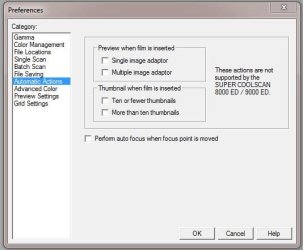
Have you checked the Nikon Scan settings... Edit, Preferences?

Nikon Scan Preferences.JPG

I don't normally have mine to do the auto thing as I find it annoying from a speed perspective, but I'll give it a try later to see if it works for me.

As to this one...

2. The scanning status dialog used to show a list of frame numbers in the scan queue. Now it just states that it is scanning. Not quite as informative, but it is scanning and that is the important thing. :party:

Honestly I can't remember this one, but that again I have a 4000ED so... :confused:
 

My Computer My Computer

At a glance

Windows 10 ProIntel Core i7-4770K (3.5Ghz)32 gig Corsair Dominator Platinum (4x8Gig)Sapphire Tri-X R9 Fury
Computer type
PC/Desktop
Computer Manufacturer/Model Number
Custom built by me.
OS
Windows 10 Pro
CPU
Intel Core i7-4770K (3.5Ghz)
Motherboard
Gigabyte G1 Sniper 5 (F10 Bios)
Memory
32 gig Corsair Dominator Platinum (4x8Gig)
Graphics Card(s)
Sapphire Tri-X R9 Fury
Sound Card
Soundblaster ZXR
Monitor(s) Displays
NEC PA242W 24" LCD Monitor
Screen Resolution
1920 x 1200
Hard Drives
Primary - Samsung 850 Pro (512gig), Samsung 840 Pro (256gig), 2TB WD Caviar Black.
PSU
EVGA Supernova 1000 G2
Case
Cooler Master HAF X
Cooling
Corsair H100i with Corsair Air Series SP120 Quiet Fans
Keyboard
Logitech Wireless Wave
Mouse
Logitech Performance MX
Internet Speed
High Speed Cable
Antivirus
Norton Security
Browser
IE11
Other Info
Memory Timings - 1866MHz @ 9-9-9-27-1T @ 1.5 volts
@ sygnus21,
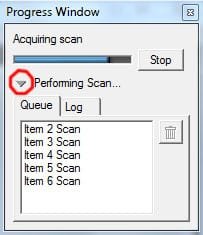
I had already set the automatic scan preferences, but the automation did not work until I reboot the machine with the scanner disconected. When I reinserted the usb connector Windows reaquired the driver. When I subsequently fired up the 5000 ED and inserted a 6 frame strip it worked as it did before. The other issue with the progress window turned out to be a classical user error. I did not click on the drop down graphic as show circled in red in the attached screen capture. Everything now seems to work every bit as good at it did before. Thank you again!
 

Attachments

  • progress window.jpg
    progress window.jpg
    32.1 KB · Views: 928

My Computer My Computer

At a glance

Windows 7 Pro 64 bitIntel iCore 7 9306 GB DDR3 1600NVidia
OS
Windows 7 Pro 64 bit
CPU
Intel iCore 7 930
Motherboard
MSI X58 Pro-E
Memory
6 GB DDR3 1600
Graphics Card(s)
NVidia
Thanks for the feedback and glad to hear everything is working properly.

Happy scanning :)

Peace :cool:
 

My Computer My Computer

At a glance

Windows 10 ProIntel Core i7-4770K (3.5Ghz)32 gig Corsair Dominator Platinum (4x8Gig)Sapphire Tri-X R9 Fury
Computer type
PC/Desktop
Computer Manufacturer/Model Number
Custom built by me.
OS
Windows 10 Pro
CPU
Intel Core i7-4770K (3.5Ghz)
Motherboard
Gigabyte G1 Sniper 5 (F10 Bios)
Memory
32 gig Corsair Dominator Platinum (4x8Gig)
Graphics Card(s)
Sapphire Tri-X R9 Fury
Sound Card
Soundblaster ZXR
Monitor(s) Displays
NEC PA242W 24" LCD Monitor
Screen Resolution
1920 x 1200
Hard Drives
Primary - Samsung 850 Pro (512gig), Samsung 840 Pro (256gig), 2TB WD Caviar Black.
PSU
EVGA Supernova 1000 G2
Case
Cooler Master HAF X
Cooling
Corsair H100i with Corsair Air Series SP120 Quiet Fans
Keyboard
Logitech Wireless Wave
Mouse
Logitech Performance MX
Internet Speed
High Speed Cable
Antivirus
Norton Security
Browser
IE11
Other Info
Memory Timings - 1866MHz @ 9-9-9-27-1T @ 1.5 volts
For those wishing to get their Nikon Coolscan film scanners working under either Vista or Windows 7 64-bit editions here’s a solution….

Worked perfectly for me with Win7 Pro 64-bit and a Nikon Super Coolscan 5000 ED.

One typo in your directions: C:\Program Files (x86)\Common Files\Nikon\Driver\Scan1394 should be C:\Program Files (x86)\Common Files\Nikon\Driver\ScanUSB.
 

My Computer My Computer

At a glance

Windows 7 Pro x64
OS
Windows 7 Pro x64
Back
Top