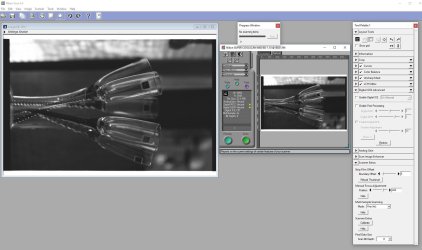
Getting your Nikon Coolscan to work on W7 x64

The Nikon Scan 4.0.3 link is still good.

Here is the link to the Nikon Asia Support portal. Searching LS-5000 or LS-8000 brings up several related hits. I'm pretty sure those came up blank yesterday, and many of the page hits show recent update timestamps, so maybe they are still sorting things out. The search function is plainly whack. If you check out some simple variants of search terms you get inconsistent results.

So far, searching "Coolscan" seems to do the best job of bringing up firmware updates for different models (you have to look through a few pages of hits). Searching the model name itself didn't do it, nor did the general "Available Nikon Firmware" link.
 
Last edited:

My Computer My Computer

At a glance

Windows 7 Pro x64Intel i7 6th Gen16GB
Computer type
PC/Desktop
Computer Manufacturer/Model Number
custom
OS
Windows 7 Pro x64
CPU
Intel i7 6th Gen
Motherboard
Asus Z170e
Memory
16GB
Antivirus
Eset NOD32
Browser
Firefox
First off I'm talking about the firmware, not the Nikon Scan software which you linked to, and is the wrong version which is not what the instructions call for. Please remove it.

BTW you're talking to the author of the tutorial so I know what files, procedures, and links are needed. I was just hoping you had a direct page where the firmware link is since Nikon changed their download pages again. This link (latest Nikon firmware) used to take me directly to the firmware page but now it just goes to a search page.

Anyway I'll figure it out. Thanks.
 

My Computer My Computer

At a glance

Windows 10 ProIntel Core i7-4770K (3.5Ghz)32 gig Corsair Dominator Platinum (4x8Gig)Sapphire Tri-X R9 Fury
Computer type
PC/Desktop
Computer Manufacturer/Model Number
Custom built by me.
OS
Windows 10 Pro
CPU
Intel Core i7-4770K (3.5Ghz)
Motherboard
Gigabyte G1 Sniper 5 (F10 Bios)
Memory
32 gig Corsair Dominator Platinum (4x8Gig)
Graphics Card(s)
Sapphire Tri-X R9 Fury
Sound Card
Soundblaster ZXR
Monitor(s) Displays
NEC PA242W 24" LCD Monitor
Screen Resolution
1920 x 1200
Hard Drives
Primary - Samsung 850 Pro (512gig), Samsung 840 Pro (256gig), 2TB WD Caviar Black.
PSU
EVGA Supernova 1000 G2
Case
Cooler Master HAF X
Cooling
Corsair H100i with Corsair Air Series SP120 Quiet Fans
Keyboard
Logitech Wireless Wave
Mouse
Logitech Performance MX
Internet Speed
High Speed Cable
Antivirus
Norton Security
Browser
IE11
Other Info
Memory Timings - 1866MHz @ 9-9-9-27-1T @ 1.5 volts
Sorry for the confusion, I linked to the earlier version of Nikon Scan because I thought someone might want to test their scanner on the same XP box they were using for the firmware update. I can remove it if you think it invites confusion.

I didn't provide a direct link because the firmware for different models was located on different pages. The one page that appeared to offer firmware links for all Nikon products didn't have functional links for the Coolscan line. [FONT=&quot]At the moment, that search page is not working for me the way it did just a few hours ago. [/FONT] I'll try again in the morning, from the computer I was using. This is strange.
 

My Computer My Computer

At a glance

Windows 7 Pro x64Intel i7 6th Gen16GB
Computer type
PC/Desktop
Computer Manufacturer/Model Number
custom
OS
Windows 7 Pro x64
CPU
Intel i7 6th Gen
Motherboard
Asus Z170e
Memory
16GB
Antivirus
Eset NOD32
Browser
Firefox
Sorry for the confusion, I linked to the earlier version of Nikon Scan because I thought someone might want to test their scanner on the same XP box they were using for the firmware update. I can remove it if you think it invites confusion.

Yes, it would.

I didn't provide a direct link because the firmware for different models was located on different pages. The one page that appeared to offer firmware links for all Nikon products didn't have functional links for the Coolscan line. [FONT=&quot]At the moment, that search page is not working for me the way it did just a few hours ago. [/FONT] I'll try again in the morning, from the computer I was using. This is strange.

Thanks.
 

My Computer My Computer

At a glance

Windows 10 ProIntel Core i7-4770K (3.5Ghz)32 gig Corsair Dominator Platinum (4x8Gig)Sapphire Tri-X R9 Fury
Computer type
PC/Desktop
Computer Manufacturer/Model Number
Custom built by me.
OS
Windows 10 Pro
CPU
Intel Core i7-4770K (3.5Ghz)
Motherboard
Gigabyte G1 Sniper 5 (F10 Bios)
Memory
32 gig Corsair Dominator Platinum (4x8Gig)
Graphics Card(s)
Sapphire Tri-X R9 Fury
Sound Card
Soundblaster ZXR
Monitor(s) Displays
NEC PA242W 24" LCD Monitor
Screen Resolution
1920 x 1200
Hard Drives
Primary - Samsung 850 Pro (512gig), Samsung 840 Pro (256gig), 2TB WD Caviar Black.
PSU
EVGA Supernova 1000 G2
Case
Cooler Master HAF X
Cooling
Corsair H100i with Corsair Air Series SP120 Quiet Fans
Keyboard
Logitech Wireless Wave
Mouse
Logitech Performance MX
Internet Speed
High Speed Cable
Antivirus
Norton Security
Browser
IE11
Other Info
Memory Timings - 1866MHz @ 9-9-9-27-1T @ 1.5 volts
Removed the link. The search portal link above is again working for me. Search for Coolscan and you will find firmware update links for LS-8000, LS-4000, and the LS-40, as well as the Nikon Scan versions. Searching on the model name (e.g LS-8000) is also working for me.

Here is a link to a single page the purports to show update links for all Nikon products, but there're currently no active links. Maybe they'll get fixed.
 

My Computer My Computer

At a glance

Windows 7 Pro x64Intel i7 6th Gen16GB
Computer type
PC/Desktop
Computer Manufacturer/Model Number
custom
OS
Windows 7 Pro x64
CPU
Intel i7 6th Gen
Motherboard
Asus Z170e
Memory
16GB
Antivirus
Eset NOD32
Browser
Firefox
Success

I just finished using this to install a Nikon Super Coolscan 5000 on a Windows 7 Pro 64 bit computer. It worked perfectly and took less than a hour, including downloading the software, reading instructions, installing software, getting out the scanner, finding a slide to test it with, and testing. Thanks for making me look good.
 

My Computer My Computer

At a glance

windows 7 pro 64
Computer type
Laptop
Computer Manufacturer/Model Number
dell
OS
windows 7 pro 64
Glad to hear it worked for you.

Happy scanning :)
 

My Computer My Computer

At a glance

Windows 10 ProIntel Core i7-4770K (3.5Ghz)32 gig Corsair Dominator Platinum (4x8Gig)Sapphire Tri-X R9 Fury
Computer type
PC/Desktop
Computer Manufacturer/Model Number
Custom built by me.
OS
Windows 10 Pro
CPU
Intel Core i7-4770K (3.5Ghz)
Motherboard
Gigabyte G1 Sniper 5 (F10 Bios)
Memory
32 gig Corsair Dominator Platinum (4x8Gig)
Graphics Card(s)
Sapphire Tri-X R9 Fury
Sound Card
Soundblaster ZXR
Monitor(s) Displays
NEC PA242W 24" LCD Monitor
Screen Resolution
1920 x 1200
Hard Drives
Primary - Samsung 850 Pro (512gig), Samsung 840 Pro (256gig), 2TB WD Caviar Black.
PSU
EVGA Supernova 1000 G2
Case
Cooler Master HAF X
Cooling
Corsair H100i with Corsair Air Series SP120 Quiet Fans
Keyboard
Logitech Wireless Wave
Mouse
Logitech Performance MX
Internet Speed
High Speed Cable
Antivirus
Norton Security
Browser
IE11
Other Info
Memory Timings - 1866MHz @ 9-9-9-27-1T @ 1.5 volts
it was working the other day and now when I open nikon scan it shows greyed out buttons and the scanner won't accept film :( im so confused
 

Attachments

  • nikongonewrong.png
    nikongonewrong.png
    36.9 KB · Views: 0

My Computer My Computer

At a glance

windows 7
Computer type
PC/Desktop
OS
windows 7
Sorry but I stopped using the scanner in 2012, and no longer run Windows 7. Stopped using it in 2013.

Anyway I don't know why your issue popped up as I never had that issue back when I was running the scanner. With that, all I can offer is try reinstalling the software and making sure the scanner is in good working order.

Sorry.
 

My Computer My Computer

At a glance

Windows 10 ProIntel Core i7-4770K (3.5Ghz)32 gig Corsair Dominator Platinum (4x8Gig)Sapphire Tri-X R9 Fury
Computer type
PC/Desktop
Computer Manufacturer/Model Number
Custom built by me.
OS
Windows 10 Pro
CPU
Intel Core i7-4770K (3.5Ghz)
Motherboard
Gigabyte G1 Sniper 5 (F10 Bios)
Memory
32 gig Corsair Dominator Platinum (4x8Gig)
Graphics Card(s)
Sapphire Tri-X R9 Fury
Sound Card
Soundblaster ZXR
Monitor(s) Displays
NEC PA242W 24" LCD Monitor
Screen Resolution
1920 x 1200
Hard Drives
Primary - Samsung 850 Pro (512gig), Samsung 840 Pro (256gig), 2TB WD Caviar Black.
PSU
EVGA Supernova 1000 G2
Case
Cooler Master HAF X
Cooling
Corsair H100i with Corsair Air Series SP120 Quiet Fans
Keyboard
Logitech Wireless Wave
Mouse
Logitech Performance MX
Internet Speed
High Speed Cable
Antivirus
Norton Security
Browser
IE11
Other Info
Memory Timings - 1866MHz @ 9-9-9-27-1T @ 1.5 volts
Is that the latest firmware for that model? I've just started using several 8000 ED models with Windows 7 and saw the warning that they needed the latest firmware (1.11) to work with Win7 x64. When I first started acquiring these, a couple worked on Win7 with FW 1.05 (AMD cpu with VIA PCI firewire card). Then I changed PCs (AMD to Intel) and firewire card busses (PCI to PCIe), and the ones with 1.05 stopped working (got the "unrecognized film carrier" error message). I haven't sorted this all out, but when I did the FW upgrade on one of the machines, it started working OK again. I also have the situation where using one firewire card, the scanner works OK, using another it is recognized but does not work - looks like the symptoms you see).

I'd recommend starting over with Nikon Scan on a Windows XP machine (or maybe Vista) with a PCI firewire card (might have to try more than one chip maker), since those were the last supported configurations. Then you can troubleshoot your Windows 7 knowing the scanner (and FW card) work OK. At this point I'd suspect that virtually every component might make a difference when used in some combinations: motherboard, CPU, firewire bus (PCI vs PCIe), firewire card chip (VIA vs TI), Nikon firmware, and drivers for all of those.

I'm far from expert in understanding what goes on here, but my impression so far is that it will be easier to fit the PC hardware components to the scanner than it will be to "tune" the scanner to work with any particular set of PC hardware.

You could also try VueScan as they claim to provide their own drivers.
 

My Computer My Computer

At a glance

Windows 7 Pro x64Intel i7 6th Gen16GB
Computer type
PC/Desktop
Computer Manufacturer/Model Number
custom
OS
Windows 7 Pro x64
CPU
Intel i7 6th Gen
Motherboard
Asus Z170e
Memory
16GB
Antivirus
Eset NOD32
Browser
Firefox
Is that the latest firmware for that model? I've just started using several 8000 ED models with Windows 7 and saw the warning that they needed the latest firmware (1.11) to work with Win7 x64. When I first started acquiring these, a couple worked on Win7 with FW 1.05 (AMD cpu with VIA PCI firewire card). Then I changed PCs (AMD to Intel) and firewire card busses (PCI to PCIe), and the ones with 1.05 stopped working (got the "unrecognized film carrier" error message). I haven't sorted this all out, but when I did the FW upgrade on one of the machines, it started working OK again. I also have the situation where using one firewire card, the scanner works OK, using another it is recognized but does not work - looks like the symptoms you see).

I'd recommend starting over with Nikon Scan on a Windows XP machine (or maybe Vista) with a PCI firewire card (might have to try more than one chip maker), since those were the last supported configurations. Then you can troubleshoot your Windows 7 knowing the scanner (and FW card) work OK. At this point I'd suspect that virtually every component might make a difference when used in some combinations: motherboard, CPU, firewire bus (PCI vs PCIe), firewire card chip (VIA vs TI), Nikon firmware, and drivers for all of those.

I'm far from expert in understanding what goes on here, but my impression so far is that it will be easier to fit the PC hardware components to the scanner than it will be to "tune" the scanner to work with any particular set of PC hardware.

You could also try VueScan as they claim to provide their own drivers.

I just installed Nikon Scan via the "Getting Nikon Coolscan LS-40, etc to work with w7" it worked 2 weeks ago, then I guess my firewire card wasn't played in correctly and it stopped working. Now it's perfectly lodged in there and tied up, but my scanner is still "recognized" but won't recognize the film adapter/carrier and accept film. Actually now that I think of it I batch-scanned something and when I come back I guess I didn't see the preview images? So I restarted Nikon Scan and all of a sudden it's greyed out, I can't click any functions or click preview/scan. Do you think the issue is my scanner not recognizing the film adapter/carrier? how would it stop working in a matter of an hour and it's fully recognized by my computer via device manager. I'm so confused! :cry:
 

My Computer My Computer

At a glance

windows 7
Computer type
PC/Desktop
OS
windows 7
I don't have sufficient insight into either the scanner or PC side of this to know what is going on, other than that my brief experience with several of the 8000 ED models suggests the they are very hardware-finicky, due to the drivers no doubt. A simple test might be to uninstall the drivers and software, and try over. The more certain approach to diagnosing whether it's a hardware problem with your scanner, or a system configuration issue, would be to go back to a supported configuration - XP or Vista, and even an originally recommended firewire card.

With the 8000ED, I get an error message that the film holder is not recognized.
 

My Computer My Computer

At a glance

Windows 7 Pro x64Intel i7 6th Gen16GB
Computer type
PC/Desktop
Computer Manufacturer/Model Number
custom
OS
Windows 7 Pro x64
CPU
Intel i7 6th Gen
Motherboard
Asus Z170e
Memory
16GB
Antivirus
Eset NOD32
Browser
Firefox
I don't have sufficient insight into either the scanner or PC side of this to know what is going on, other than that my brief experience with several of the 8000 ED models suggests the they are very hardware-finicky, due to the drivers no doubt. A simple test might be to uninstall the drivers and software, and try over. The more certain approach to diagnosing whether it's a hardware problem with your scanner, or a system configuration issue, would be to go back to a supported configuration - XP or Vista, and even an originally recommended firewire card.

With the 8000ED, I get an error message that the film holder is not recognized.

Thank you! I think you're right, before getting any repairs i'll try getting a better firewire card/proper XP setup even though it worked with the initial setup there could be a lot of factors rather than simply saying its the scanner itself.
 

My Computer My Computer

At a glance

windows 7
Computer type
PC/Desktop
OS
windows 7
Hi,

The first thing you should do is make sure the scanner has the latest firmware for the machine. It's also mentioned in the guide. Nikon seems to have moved things around so you'll have to search to find if there is one for the 8000ED. I know the 4000ED because I used it for my 4000ED.

Outside of that, not sure why the scanner doesn't recognize the filmstrip as it should. I've never had any issues when I was running my 4000ED under Windows 7 using the posted guide.

Anyway let us know if you solved the issue.

Thanks.
 

My Computer My Computer

At a glance

Windows 10 ProIntel Core i7-4770K (3.5Ghz)32 gig Corsair Dominator Platinum (4x8Gig)Sapphire Tri-X R9 Fury
Computer type
PC/Desktop
Computer Manufacturer/Model Number
Custom built by me.
OS
Windows 10 Pro
CPU
Intel Core i7-4770K (3.5Ghz)
Motherboard
Gigabyte G1 Sniper 5 (F10 Bios)
Memory
32 gig Corsair Dominator Platinum (4x8Gig)
Graphics Card(s)
Sapphire Tri-X R9 Fury
Sound Card
Soundblaster ZXR
Monitor(s) Displays
NEC PA242W 24" LCD Monitor
Screen Resolution
1920 x 1200
Hard Drives
Primary - Samsung 850 Pro (512gig), Samsung 840 Pro (256gig), 2TB WD Caviar Black.
PSU
EVGA Supernova 1000 G2
Case
Cooler Master HAF X
Cooling
Corsair H100i with Corsair Air Series SP120 Quiet Fans
Keyboard
Logitech Wireless Wave
Mouse
Logitech Performance MX
Internet Speed
High Speed Cable
Antivirus
Norton Security
Browser
IE11
Other Info
Memory Timings - 1866MHz @ 9-9-9-27-1T @ 1.5 volts
Trying to get my Coolscan 4000 ED to work on win7 64-bit. The instructions by sygnus21 seem straight-forward, but when I try to install the downloaded "nikon scan 4.0.3" it says "can't install on this operating system. How can I get it to install so I can complete the procedures you suggested?
GORDON
 

My Computer My Computer

At a glance

WIN 7 64-BIT
OS
WIN 7 64-BIT
Hi Gordon,

I don't know why the driver isn't installing and can't check it as I no longer use Windows 7 nor the scanner. As far as I know nothing has changed with the driver and it should install. My only other guess would be if the scanner hasn't been firmware updated as stated in the instructions.

Regardless I no longer use the scanner and only maintain this thread for instruction clarity.

Peace.

EDIT: I just updated the Nikon Scan 4.0.3 Link since Nikon seems to be moving files around. And YES, the scan software should be the "Vista 32-bit" file.

Let me know.
 
Last edited:

My Computer My Computer

At a glance

Windows 10 ProIntel Core i7-4770K (3.5Ghz)32 gig Corsair Dominator Platinum (4x8Gig)Sapphire Tri-X R9 Fury
Computer type
PC/Desktop
Computer Manufacturer/Model Number
Custom built by me.
OS
Windows 10 Pro
CPU
Intel Core i7-4770K (3.5Ghz)
Motherboard
Gigabyte G1 Sniper 5 (F10 Bios)
Memory
32 gig Corsair Dominator Platinum (4x8Gig)
Graphics Card(s)
Sapphire Tri-X R9 Fury
Sound Card
Soundblaster ZXR
Monitor(s) Displays
NEC PA242W 24" LCD Monitor
Screen Resolution
1920 x 1200
Hard Drives
Primary - Samsung 850 Pro (512gig), Samsung 840 Pro (256gig), 2TB WD Caviar Black.
PSU
EVGA Supernova 1000 G2
Case
Cooler Master HAF X
Cooling
Corsair H100i with Corsair Air Series SP120 Quiet Fans
Keyboard
Logitech Wireless Wave
Mouse
Logitech Performance MX
Internet Speed
High Speed Cable
Antivirus
Norton Security
Browser
IE11
Other Info
Memory Timings - 1866MHz @ 9-9-9-27-1T @ 1.5 volts
OK, I understand. I tried again, and checked to make sure the firmware was updated...but when I ran the firmware upodater is says "No Nikon 4000 scanner connected." So it seems it's a vicious circle -- can't run the scanner on my win7 64bit PC, and can't do the fix needed until it's running... weird.

Gordon
 

My Computer My Computer

At a glance

WIN 7 64-BIT
OS
WIN 7 64-BIT
Make sure the FireWire card is working, as well as the cable. And did you download the scanners driver listed in the instructions?
 

My Computer My Computer

At a glance

Windows 10 ProIntel Core i7-4770K (3.5Ghz)32 gig Corsair Dominator Platinum (4x8Gig)Sapphire Tri-X R9 Fury
Computer type
PC/Desktop
Computer Manufacturer/Model Number
Custom built by me.
OS
Windows 10 Pro
CPU
Intel Core i7-4770K (3.5Ghz)
Motherboard
Gigabyte G1 Sniper 5 (F10 Bios)
Memory
32 gig Corsair Dominator Platinum (4x8Gig)
Graphics Card(s)
Sapphire Tri-X R9 Fury
Sound Card
Soundblaster ZXR
Monitor(s) Displays
NEC PA242W 24" LCD Monitor
Screen Resolution
1920 x 1200
Hard Drives
Primary - Samsung 850 Pro (512gig), Samsung 840 Pro (256gig), 2TB WD Caviar Black.
PSU
EVGA Supernova 1000 G2
Case
Cooler Master HAF X
Cooling
Corsair H100i with Corsair Air Series SP120 Quiet Fans
Keyboard
Logitech Wireless Wave
Mouse
Logitech Performance MX
Internet Speed
High Speed Cable
Antivirus
Norton Security
Browser
IE11
Other Info
Memory Timings - 1866MHz @ 9-9-9-27-1T @ 1.5 volts
FireWire Card (IEEE 1394)

OK folks...

I've been asked numerous times about running under Windows 8 & 10 and really didn't have an answer until now. So the first thing I had to do was purchase a FireWire (IEEE 1394) card since the Nikon Super Coolscan LS 4000ED requires one and my PC didn't have one. No problem - this ShineStar card works like a champ, and it has a VIA chipset (which works best with older 1394 devices)...

FireWire-Card.jpg

Device Manager....

scanners inf driver installed.JPG

After that, following my procedures up to step 6, I had to temporarily disable Windows' Driver Signature Enforcement policy before proceeding to steps 7-9. Not doing so won't allow the scanners.inf file (driver) to install and the scanner won't work.

Once the Driver Signature Enforcement policy is disabled and the machine restarts, proceed with steps 7-9. That it. Works like a champ...

Nikon Scan Software.JPG

Some basic scans using a color negative, B&W negative, and a color slide...

Color-Neg-scan-LS4000ED.jpg

B&W-Neg-scan-LS4000ED.jpg

Slide-scan-LS4000ED.jpg

These are test images to show the scanner works. They've not been cleaned or tweaked photo posting value :)

Questions/suggestions?
 
Last edited:

My Computer My Computer

At a glance

Windows 10 ProIntel Core i7-4770K (3.5Ghz)32 gig Corsair Dominator Platinum (4x8Gig)Sapphire Tri-X R9 Fury
Computer type
PC/Desktop
Computer Manufacturer/Model Number
Custom built by me.
OS
Windows 10 Pro
CPU
Intel Core i7-4770K (3.5Ghz)
Motherboard
Gigabyte G1 Sniper 5 (F10 Bios)
Memory
32 gig Corsair Dominator Platinum (4x8Gig)
Graphics Card(s)
Sapphire Tri-X R9 Fury
Sound Card
Soundblaster ZXR
Monitor(s) Displays
NEC PA242W 24" LCD Monitor
Screen Resolution
1920 x 1200
Hard Drives
Primary - Samsung 850 Pro (512gig), Samsung 840 Pro (256gig), 2TB WD Caviar Black.
PSU
EVGA Supernova 1000 G2
Case
Cooler Master HAF X
Cooling
Corsair H100i with Corsair Air Series SP120 Quiet Fans
Keyboard
Logitech Wireless Wave
Mouse
Logitech Performance MX
Internet Speed
High Speed Cable
Antivirus
Norton Security
Browser
IE11
Other Info
Memory Timings - 1866MHz @ 9-9-9-27-1T @ 1.5 volts
Dear sygnus21,

During dowloading process of ns403en_vista in particular on the drivers page, do I need to select or deselect drivers? I have Nikon Coolscan 8000ED

Many thanks,
Alexander
 

My Computer My Computer

At a glance

Windows 7 Ultimate x64
Computer type
PC/Desktop
OS
Windows 7 Ultimate x64
Back
Top