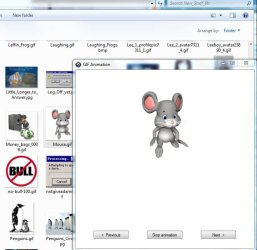
Gif preview.

Hatashi

New member
Member
VIP
Local time
4:37 PM
Messages
153
Location
The Netherlands
Is it possible in Windows 7 to have a Gif preview?

Like in Windows XP
If you had a couple of gifs in a folder, you could highlight a gif and it would show you a preview beneath of it..
 

My Computer

Computer type
PC/Desktop
Computer Manufacturer/Model Number
Custom
OS
Windows 7 Ultimate 64-bit.
CPU
Intel Core i5 4460 / 3.2 Ghz
Motherboard
Gigabyte G1.Sniper B5
Memory
Crucial Ballistix Sport 8GB
Graphics Card(s)
Club3D Radeon R9 280 royalKing 3GB - GDDR5
Monitor(s) Displays
Philips 237EQPH IPS LED
Screen Resolution
1920x1080
Hard Drives
Crucial M500 - SSD - 120 GB
Seagate 500GB External Hard Drive
PSU
Sea Sonic S12II-520 Bronze
Case
Cooler Master N300
Cooling
Titan Fenrir TTC-NK85TZ
Antivirus
Malwarebytes Anti-Malware.
Browser
Chromium.

My Computer

Computer type
PC/Desktop
Computer Manufacturer/Model Number
Bruce ... somewhere in his 40's
OS
Windows 7 Ultimate 32bit SP1
CPU
Intel(R) Core(TM)2 Quad CPU @ 2.40GHz, 2400 MHz
Motherboard
INTEL/D975XBX2
Memory
4 GB
Graphics Card(s)
ATI Radeon HD 2600 Pro
Monitor(s) Displays
Samsung SyncMaster 914v
Screen Resolution
1280 x 1024
Hard Drives
2/500GB each ... ST3500630AS ATA Device.
One is not connected
PSU
Rocketfish 700 W
Case
G.Skill Gigabyte Chassis
Keyboard
Standard PS/2 Keyboard
Mouse
Microsoft PS/2 Mouse
Internet Speed
DSL
Antivirus
Avira Internet Security
Browser
IE 11
Other Info
ATI HDMI Audio
I know I can use third-party programs to preview the gif.

What I meant was, is it possible to have the preview like Windows XP had?

Like you have a folder with gifs, you highlight a gif, and it plays the gif in the folder.
 

My Computer

Computer type
PC/Desktop
Computer Manufacturer/Model Number
Custom
OS
Windows 7 Ultimate 64-bit.
CPU
Intel Core i5 4460 / 3.2 Ghz
Motherboard
Gigabyte G1.Sniper B5
Memory
Crucial Ballistix Sport 8GB
Graphics Card(s)
Club3D Radeon R9 280 royalKing 3GB - GDDR5
Monitor(s) Displays
Philips 237EQPH IPS LED
Screen Resolution
1920x1080
Hard Drives
Crucial M500 - SSD - 120 GB
Seagate 500GB External Hard Drive
PSU
Sea Sonic S12II-520 Bronze
Case
Cooler Master N300
Cooling
Titan Fenrir TTC-NK85TZ
Antivirus
Malwarebytes Anti-Malware.
Browser
Chromium.
I've tried to open a .gif with all other MS programs and there is no animation ...
Headscratch2.gif
 

My Computer

Computer type
PC/Desktop
Computer Manufacturer/Model Number
Bruce ... somewhere in his 40's
OS
Windows 7 Ultimate 32bit SP1
CPU
Intel(R) Core(TM)2 Quad CPU @ 2.40GHz, 2400 MHz
Motherboard
INTEL/D975XBX2
Memory
4 GB
Graphics Card(s)
ATI Radeon HD 2600 Pro
Monitor(s) Displays
Samsung SyncMaster 914v
Screen Resolution
1280 x 1024
Hard Drives
2/500GB each ... ST3500630AS ATA Device.
One is not connected
PSU
Rocketfish 700 W
Case
G.Skill Gigabyte Chassis
Keyboard
Standard PS/2 Keyboard
Mouse
Microsoft PS/2 Mouse
Internet Speed
DSL
Antivirus
Avira Internet Security
Browser
IE 11
Other Info
ATI HDMI Audio
The only way I can get gifs to work is to open them with Windows Media Player.
 

My Computer

Computer type
Laptop
Computer Manufacturer/Model Number
Toshiba P775-S7100
OS
Windows 7 Professional SP1 64-bit
CPU
Intel Core i5-2450M @2.5 GHz
Memory
6 GB DDR3 1333MHz
Graphics Card(s)
Intel HD 3000
Monitor(s) Displays
Built-in 17.3" LED; 22" Insignia NS-L22Q-10A
Screen Resolution
1600x900; 1360x768
Hard Drives
750 GB Hitachi
1TB Seagate FreeAgent External
Internet Speed
Verizon DSL Speed(Down/Up): 3360 Kbps / 800 Kbps
Antivirus
MSE and MBAM Pro
Browser
IE10

My Computer

Computer type
PC/Desktop
Computer Manufacturer/Model Number
Bruce ... somewhere in his 40's
OS
Windows 7 Ultimate 32bit SP1
CPU
Intel(R) Core(TM)2 Quad CPU @ 2.40GHz, 2400 MHz
Motherboard
INTEL/D975XBX2
Memory
4 GB
Graphics Card(s)
ATI Radeon HD 2600 Pro
Monitor(s) Displays
Samsung SyncMaster 914v
Screen Resolution
1280 x 1024
Hard Drives
2/500GB each ... ST3500630AS ATA Device.
One is not connected
PSU
Rocketfish 700 W
Case
G.Skill Gigabyte Chassis
Keyboard
Standard PS/2 Keyboard
Mouse
Microsoft PS/2 Mouse
Internet Speed
DSL
Antivirus
Avira Internet Security
Browser
IE 11
Other Info
ATI HDMI Audio
My .gif open with IE - and they are animated.
 

My Computer

Computer Manufacturer/Model Number
HP, Dell, Gateway, Toshiba - 4 laptops and 2 desktops
OS
Vista, Windows7, Mint Mate, Zorin, Windows 8
CPU
from 1.6GHz Duo to i7
Monitor(s) Displays
2x HP w2207
Hard Drives
5x HDD, 7x SSD, 12x Externals
Keyboard
with trackball - no mices
Mouse
Trackball mice
Internet Speed
DSL 6000
This is not what I mean lol.

I know programs that can play gifs.
But in Windows XP, when you highlight a gif, it plays it in the folder itself :S.
 

My Computer

Computer type
PC/Desktop
Computer Manufacturer/Model Number
Custom
OS
Windows 7 Ultimate 64-bit.
CPU
Intel Core i5 4460 / 3.2 Ghz
Motherboard
Gigabyte G1.Sniper B5
Memory
Crucial Ballistix Sport 8GB
Graphics Card(s)
Club3D Radeon R9 280 royalKing 3GB - GDDR5
Monitor(s) Displays
Philips 237EQPH IPS LED
Screen Resolution
1920x1080
Hard Drives
Crucial M500 - SSD - 120 GB
Seagate 500GB External Hard Drive
PSU
Sea Sonic S12II-520 Bronze
Case
Cooler Master N300
Cooling
Titan Fenrir TTC-NK85TZ
Antivirus
Malwarebytes Anti-Malware.
Browser
Chromium.
Unfortunately Windows 7 Windows explorer does not show animated gifs. This is a known issue and there are many referebces to it on this Forum. Please do a search and you will find entries like this posted only yesterday:
"What I have found is that Windows 7 does not render a number of image formats as well as XP did. One instance is that it does not show animated gifs. There is a long thread on this subject here on this Forum.
The same is true for some of the PSP formats of which there are many."
 

My Computer

Computer type
PC/Desktop
OS
Microsoft Windows 7 Home Premium 64-bit 7601 Multiprocessor Free Service Pack 1
CPU
Intel(R) Core(TM) i7-3770 CPU @ 3.40GHz
Motherboard
ASUSTeK COMPUTER INC. P8H77-M
Memory
8.00 GB
Graphics Card(s)
Intel(R) HD Graphics 4000
Sound Card
On Board
Monitor(s) Displays
Dell 24"
Screen Resolution
1920 x 1080
Hard Drives
(1) INTEL SSDSC2CT180A3 ATA Device (2) ST500DM002-1BD142 ATA Device (3) WDC WD3200AAKS-75L9A0 ATA Device (4) Generic- Compact Flash USB Device (5) Generic- MS/MS-Pro USB Device (6) Generic- SD/MMC USB Device (7) Generic- SM/xD-Picture USB
PSU
500w Corsair
Case
Cooler Master
Cooling
3 Fans
Keyboard
Logitech MK300
Mouse
Logitech WOM
Internet Speed
75Mb
Antivirus
Norton 360
Browser
Firefox, Opera, IE
How can it be that people couldn't understand the OP's request? He was specific in what he wanted.

I can just see how this feature got cut for Windows 7:

Sinofsky: "Ohh, this feature is only used by 18% of users! Get rid of it!"
Programmer: "but..."
Sinofsky: "shut up and do as I say, or I'll have you moved to Alaska tech support."


There's a software named "Sagethumbs" which fixes Microsoft's arbitrary removal of features with their so-called "upgrades" of windows. Its third party, but it enables viewing inside Windows Explorer, instead of having to start some other unwanted software.

(I know its a necro thread, but since I found something of a solution for it, I figured I'd post anyway)
 

My Computer

Computer Manufacturer/Model Number
homegrown
OS
Ubuntu, Windoze8pro64
CPU
Lentil Core i7-3770
Motherboard
Asus P8Z77-i Deluxe (OC AI on auto)
Memory
2x4GB Crucial DDR3-1600 CL8
Graphics Card(s)
Gigabyte GTX 670 OC Windforce
Sound Card
integrated Atheros
Monitor(s) Displays
Asus VG278HE
Screen Resolution
1080p
Hard Drives
OCZ Vertex 4 - 256 GB
Samsung Spinpoint Eco 2TB
Sony Optiarc BD-5850H
PSU
OCZ ModExtreme Pro 650 Watt
Case
Silverstone SG08
Cooling
Noctua NH-L12, NoiseBlocker Fans
Keyboard
Logitech illu
Mouse
Logitech G700
Internet Speed
64 kb/s with V.54 support
Other Info
System keeps running out of 'resources', something that never happened on my old E4500 slogger... Sometimes, I just wanna copy a file, and it says "not enough resources available" gonna have to figure that one out one of these days...
How can it be that people couldn't understand the OP's request? He was specific in what he wanted.

I can just see how this feature got cut for Windows 7:

Sinofsky: "Ohh, this feature is only used by 18% of users! Get rid of it!"
Programmer: "but..."
Sinofsky: "shut up and do as I say, or I'll have you moved to Alaska tech support."


There's a software named "Sagethumbs" which fixes Microsoft's arbitrary removal of features with their so-called "upgrades" of windows. Its third party, but it enables viewing inside Windows Explorer, instead of having to start some other unwanted software.

(I know its a necro thread, but since I found something of a solution for it, I figured I'd post anyway)


They offered advice based on windows 7 capabilities. You too offered a third part alternative I find your opening line rude.
 

My Computer

Computer type
PC/Desktop
Computer Manufacturer/Model Number
Dude Build
OS
Windows 10 Pro X64
CPU
Intel(R) Core(TM) i5-3570K CPU OC@ 4.5GHZ Turbo
Motherboard
MSI Z77A-G45 Gaming
Memory
8.00 GB DDR3 1600Mhz
Graphics Card(s)
MSI Gaming X GTX 1070
Sound Card
Realtek High Definition
Monitor(s) Displays
Dell S23O9W, HP L1710
Screen Resolution
DELL-1920 x 1080 HP-1280 x1024
Hard Drives
Crucial m4 256 SSD, WD 7200RPM 500GB WD 1TB
PSU
Seasonic X650 GOLD
Case
Zalman Z12
Cooling
Antec Kuhler 920
Keyboard
Logitech
Mouse
MSI DS100 Interceptor
Internet Speed
50 down and 5 up
Antivirus
MSE
Browser
Chrome, IE 11
Other Info
Logitech X-620 Speakers
He said he wanted to preview gifs inside Windows Explorer. All suggestions were for software you have to open separately. SageThumbs shows previews inside Windows Explorer without having to start a separate program.

The difference becomes very important if you have a lot of files to go through. Its entirely too tedious to start a separate program for each one, it disturbs the work flow. Computers are supposed to eliminate manual repetition, waiting and needless mouse clicks.


There was no intent to be rude, but I feel its important to point out, because on so many forums, you find so many who write answers without having comprehended the aim of the question, and often, the answers are almost insulting, as if the person asking was inept.
 

My Computer

Computer Manufacturer/Model Number
homegrown
OS
Ubuntu, Windoze8pro64
CPU
Lentil Core i7-3770
Motherboard
Asus P8Z77-i Deluxe (OC AI on auto)
Memory
2x4GB Crucial DDR3-1600 CL8
Graphics Card(s)
Gigabyte GTX 670 OC Windforce
Sound Card
integrated Atheros
Monitor(s) Displays
Asus VG278HE
Screen Resolution
1080p
Hard Drives
OCZ Vertex 4 - 256 GB
Samsung Spinpoint Eco 2TB
Sony Optiarc BD-5850H
PSU
OCZ ModExtreme Pro 650 Watt
Case
Silverstone SG08
Cooling
Noctua NH-L12, NoiseBlocker Fans
Keyboard
Logitech illu
Mouse
Logitech G700
Internet Speed
64 kb/s with V.54 support
Other Info
System keeps running out of 'resources', something that never happened on my old E4500 slogger... Sometimes, I just wanna copy a file, and it says "not enough resources available" gonna have to figure that one out one of these days...
He said he wanted to preview gifs inside Windows Explorer. All suggestions were for software you have to open separately. SageThumbs shows previews inside Windows Explorer without having to start a separate program.

Very good suggestion


The difference becomes very important if you have a lot of files to go through. Its entirely too tedious to start a separate program for each one, it disturbs the work flow. Computers are supposed to eliminate manual repetition, waiting and needless mouse clicks.

great explanation


There was no intent to be rude, but I feel its important to point out, because on so many forums, you find so many who write answers without having comprehended the aim of the question, and often, the answers are almost insulting, as if the person asking was inept.

I don't think they meant it that what, this isn't any other forum.

Thank you for responding, and for helping the op. It's just my opinion on your response. Bottom line the op has some options, that's what is important.
 

My Computer

Computer type
PC/Desktop
Computer Manufacturer/Model Number
Dude Build
OS
Windows 10 Pro X64
CPU
Intel(R) Core(TM) i5-3570K CPU OC@ 4.5GHZ Turbo
Motherboard
MSI Z77A-G45 Gaming
Memory
8.00 GB DDR3 1600Mhz
Graphics Card(s)
MSI Gaming X GTX 1070
Sound Card
Realtek High Definition
Monitor(s) Displays
Dell S23O9W, HP L1710
Screen Resolution
DELL-1920 x 1080 HP-1280 x1024
Hard Drives
Crucial m4 256 SSD, WD 7200RPM 500GB WD 1TB
PSU
Seasonic X650 GOLD
Case
Zalman Z12
Cooling
Antec Kuhler 920
Keyboard
Logitech
Mouse
MSI DS100 Interceptor
Internet Speed
50 down and 5 up
Antivirus
MSE
Browser
Chrome, IE 11
Other Info
Logitech X-620 Speakers
How can it be that people couldn't understand the OP's request? He was specific in what he wanted.

I can just see how this feature got cut for Windows 7:

Sinofsky: "Ohh, this feature is only used by 18% of users! Get rid of it!"
Programmer: "but..."
Sinofsky: "shut up and do as I say, or I'll have you moved to Alaska tech support."


There's a software named "Sagethumbs" which fixes Microsoft's arbitrary removal of features with their so-called "upgrades" of windows. Its third party, but it enables viewing inside Windows Explorer, instead of having to start some other unwanted software.

(I know its a necro thread, but since I found something of a solution for it, I figured I'd post anyway)

Thanks. This is just what I needed.
 

My Computer

Computer type
Laptop
Computer Manufacturer/Model Number
Hewlett-Packard/G62-107SA Notebook
OS
Microsoft Windows 7 Home Premium 64-bit Service Pack 1
CPU
Intel(R) Core(TM) i3 CPU M 330 @ 2.13GHz
Motherboard
Hewlett-Packard 1425
Memory
8 GB DDR3
Graphics Card(s)
Intel(R) HD Graphics
Sound Card
Realtek High Definition Audio
Monitor(s) Displays
Builtin
Screen Resolution
1366 x 768 x 32 bits (4294967296 colors) @ 60 Hz
Hard Drives
250 GB SATA Hard Disk Drive 7200 rpm
2TB Seagate GoFlex USB 2 Drive
1TB Iomega Prestige USB 2 Drive
1.5TB Iomega Prestige USB 2 Drive (Samsung)
2TB WD MyBook Live NAS.
Mouse
Logitech Anywhere MX
Internet Speed
152 Mbs download 10 Mbs upload
Antivirus
Norton 360
Browser
Chrome
Well, I tried Sage Thumbs and it froze the PC and caused explorer.exe to stop working. Ditching it now. :mad:
 

My Computer

Computer type
PC/Desktop
Computer Manufacturer/Model Number
Home Built Desktop By DataTech
OS
Windows 7 Ultimate X64 SP1
CPU
Intel i5-2550K, Differing ~4.4-4.8GHz No built in GPU
Motherboard
ASUS P8Z68-V PRO/GEN3
Memory
16GB G.Skill Sniper 1866MHz @ 2133MHz 2x8GB
Graphics Card(s)
ASUS GTX650TIB-DC2OC-2GD5, (650TI Boost)
Sound Card
Onboard Realtek 5-1
Monitor(s) Displays
Samsung P2570HD
Screen Resolution
1920x1080
Hard Drives
Samsung 840 Pro 256GB SSD for OS, 500GB Seagate Constellation (Enterprise drive) for Data
PSU
Corsair HX650W
Case
Inwin Dragon Rider
Cooling
Hyper 212 EVO w/two Noctua fans, push-pull, @1300 RPM
Keyboard
E-Z Eyes, bright yellow keys with large characters
Mouse
steelseries SENSEI Laser Pro Gaming
Internet Speed
48-51Mbs Mbs down, 11 Mbs up Xfinity Cable
Antivirus
Norton Internet Security 2013
Browser
IE 10, Opera, Pale Moon if needed
Other Info
4 case fans, LG BluRay-RE, ASUS DVD-RW, Mr. Fusion power supply, 1.21 gigawatts.
I use GifView.exe set as my default .gif file viewer in Windows Explorer
 

Attachments

  • GifView_animation_snip.JPG
    GifView_animation_snip.JPG
    54.4 KB · Views: 8

My Computer

Computer type
PC/Desktop
Computer Manufacturer/Model Number
Built them myself, Science Experiments !
OS
Win7 Enterprise, Win7 x86 (Ult 7600), Win7 x64 Ult 7600, TechNet RTM on AMD x64 (2.8Ghz)
CPU
AMD fx8350 4ghz, AMD-32 2400mhz, AMD-64 3200mhz, AMDx64 2.8G
Motherboard
SIS 755, ECS-K8M890M-M (Ult 7600), GigaByte & others
Memory
2gb, 4gb on the Ult 7600, 4gb on Technet RTM, 32gb on FX8350
Graphics Card(s)
Draw my own Graphics, several nVidia cards
Sound Card
on motherboard
Monitor(s) Displays
19" flat scr, 28" I-Inc widescr,22" Emprex Widescr, 23" Acer
Screen Resolution
1280 x 1024, 1440 x 900, 1920 x 1080
Hard Drives
6 pata Ide HD's & 2 Sata HD's
added 80gb external on Ult 7600 computer,
numerous extra 1tb, 2TB, 3Tb SATA HD's
A collection of ext HD Docks w/ HDs
PSU
430w, 550w, 600w, 700, 800, etc
Case
All Generic Full Towers
Cooling
Open Air & a few fans, some w/ colored LEDs
Keyboard
Compaq & Dell recycled from GoodWill
Mouse
Made in China Optical Wired Mouse
Internet Speed
Fast Cable InterNet
Antivirus
AVG Free on 24 different Desktops, NO Problems!
Browser
IE 8 is preferred, but use FireFox sometimes
Other Info
Linksys Routers, switches, & Hubs
Too Many USB Flash Drives to count, Biggest is 64GB !
Eight computers in my home network.
Sixteen computers at my business network.
Linked via TeamViewer !
Lots of old used spare computer parts everywhere!
Well, I tried Sage Thumbs and it froze the PC and caused explorer.exe to stop working. Ditching it now. :mad:

I'm using it on Windows 8 Pro, and mine works fine...

What version of windows are you on?
 

My Computer

Computer Manufacturer/Model Number
homegrown
OS
Ubuntu, Windoze8pro64
CPU
Lentil Core i7-3770
Motherboard
Asus P8Z77-i Deluxe (OC AI on auto)
Memory
2x4GB Crucial DDR3-1600 CL8
Graphics Card(s)
Gigabyte GTX 670 OC Windforce
Sound Card
integrated Atheros
Monitor(s) Displays
Asus VG278HE
Screen Resolution
1080p
Hard Drives
OCZ Vertex 4 - 256 GB
Samsung Spinpoint Eco 2TB
Sony Optiarc BD-5850H
PSU
OCZ ModExtreme Pro 650 Watt
Case
Silverstone SG08
Cooling
Noctua NH-L12, NoiseBlocker Fans
Keyboard
Logitech illu
Mouse
Logitech G700
Internet Speed
64 kb/s with V.54 support
Other Info
System keeps running out of 'resources', something that never happened on my old E4500 slogger... Sometimes, I just wanna copy a file, and it says "not enough resources available" gonna have to figure that one out one of these days...
I use GifView.exe set as my default .gif file viewer in Windows Explorer

That fails the point of being able to preview inside windows explorer without having to start another program each time. In a production environment, that gets annoying fast...
 

My Computer

Computer Manufacturer/Model Number
homegrown
OS
Ubuntu, Windoze8pro64
CPU
Lentil Core i7-3770
Motherboard
Asus P8Z77-i Deluxe (OC AI on auto)
Memory
2x4GB Crucial DDR3-1600 CL8
Graphics Card(s)
Gigabyte GTX 670 OC Windforce
Sound Card
integrated Atheros
Monitor(s) Displays
Asus VG278HE
Screen Resolution
1080p
Hard Drives
OCZ Vertex 4 - 256 GB
Samsung Spinpoint Eco 2TB
Sony Optiarc BD-5850H
PSU
OCZ ModExtreme Pro 650 Watt
Case
Silverstone SG08
Cooling
Noctua NH-L12, NoiseBlocker Fans
Keyboard
Logitech illu
Mouse
Logitech G700
Internet Speed
64 kb/s with V.54 support
Other Info
System keeps running out of 'resources', something that never happened on my old E4500 slogger... Sometimes, I just wanna copy a file, and it says "not enough resources available" gonna have to figure that one out one of these days...

My Computer

Computer type
PC/Desktop
Computer Manufacturer/Model Number
Home Built Desktop By DataTech
OS
Windows 7 Ultimate X64 SP1
CPU
Intel i5-2550K, Differing ~4.4-4.8GHz No built in GPU
Motherboard
ASUS P8Z68-V PRO/GEN3
Memory
16GB G.Skill Sniper 1866MHz @ 2133MHz 2x8GB
Graphics Card(s)
ASUS GTX650TIB-DC2OC-2GD5, (650TI Boost)
Sound Card
Onboard Realtek 5-1
Monitor(s) Displays
Samsung P2570HD
Screen Resolution
1920x1080
Hard Drives
Samsung 840 Pro 256GB SSD for OS, 500GB Seagate Constellation (Enterprise drive) for Data
PSU
Corsair HX650W
Case
Inwin Dragon Rider
Cooling
Hyper 212 EVO w/two Noctua fans, push-pull, @1300 RPM
Keyboard
E-Z Eyes, bright yellow keys with large characters
Mouse
steelseries SENSEI Laser Pro Gaming
Internet Speed
48-51Mbs Mbs down, 11 Mbs up Xfinity Cable
Antivirus
Norton Internet Security 2013
Browser
IE 10, Opera, Pale Moon if needed
Other Info
4 case fans, LG BluRay-RE, ASUS DVD-RW, Mr. Fusion power supply, 1.21 gigawatts.
I will install it on my old laptop that has windows 7 and see if it causes any problem...

Then we'll know if its a windows 7 issue or something with your installation, maybe some other software that's incompatible or who knows.
 

My Computer

Computer Manufacturer/Model Number
homegrown
OS
Ubuntu, Windoze8pro64
CPU
Lentil Core i7-3770
Motherboard
Asus P8Z77-i Deluxe (OC AI on auto)
Memory
2x4GB Crucial DDR3-1600 CL8
Graphics Card(s)
Gigabyte GTX 670 OC Windforce
Sound Card
integrated Atheros
Monitor(s) Displays
Asus VG278HE
Screen Resolution
1080p
Hard Drives
OCZ Vertex 4 - 256 GB
Samsung Spinpoint Eco 2TB
Sony Optiarc BD-5850H
PSU
OCZ ModExtreme Pro 650 Watt
Case
Silverstone SG08
Cooling
Noctua NH-L12, NoiseBlocker Fans
Keyboard
Logitech illu
Mouse
Logitech G700
Internet Speed
64 kb/s with V.54 support
Other Info
System keeps running out of 'resources', something that never happened on my old E4500 slogger... Sometimes, I just wanna copy a file, and it says "not enough resources available" gonna have to figure that one out one of these days...
Back
Top