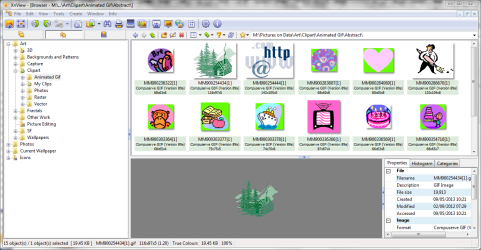
Gif preview.

I have it on W7 x64 SP1. It seems OK for me.
 

My Computer

Computer type
Laptop
Computer Manufacturer/Model Number
Hewlett-Packard/G62-107SA Notebook
OS
Microsoft Windows 7 Home Premium 64-bit Service Pack 1
CPU
Intel(R) Core(TM) i3 CPU M 330 @ 2.13GHz
Motherboard
Hewlett-Packard 1425
Memory
8 GB DDR3
Graphics Card(s)
Intel(R) HD Graphics
Sound Card
Realtek High Definition Audio
Monitor(s) Displays
Builtin
Screen Resolution
1366 x 768 x 32 bits (4294967296 colors) @ 60 Hz
Hard Drives
250 GB SATA Hard Disk Drive 7200 rpm
2TB Seagate GoFlex USB 2 Drive
1TB Iomega Prestige USB 2 Drive
1.5TB Iomega Prestige USB 2 Drive (Samsung)
2TB WD MyBook Live NAS.
Mouse
Logitech Anywhere MX
Internet Speed
152 Mbs download 10 Mbs upload
Antivirus
Norton 360
Browser
Chrome
Well, I tried Sage Thumbs and it froze the PC and caused explorer.exe to stop working. Ditching it now. :mad:


ok, it runs fine on my laptop with windows 7 pro too...

So your windows install is either corrupt or you have some software installed that prevents it from working.
 

My Computer

Computer Manufacturer/Model Number
homegrown
OS
Ubuntu, Windoze8pro64
CPU
Lentil Core i7-3770
Motherboard
Asus P8Z77-i Deluxe (OC AI on auto)
Memory
2x4GB Crucial DDR3-1600 CL8
Graphics Card(s)
Gigabyte GTX 670 OC Windforce
Sound Card
integrated Atheros
Monitor(s) Displays
Asus VG278HE
Screen Resolution
1080p
Hard Drives
OCZ Vertex 4 - 256 GB
Samsung Spinpoint Eco 2TB
Sony Optiarc BD-5850H
PSU
OCZ ModExtreme Pro 650 Watt
Case
Silverstone SG08
Cooling
Noctua NH-L12, NoiseBlocker Fans
Keyboard
Logitech illu
Mouse
Logitech G700
Internet Speed
64 kb/s with V.54 support
Other Info
System keeps running out of 'resources', something that never happened on my old E4500 slogger... Sometimes, I just wanna copy a file, and it says "not enough resources available" gonna have to figure that one out one of these days...
My install is fine, I just fixed some corrupt files and Win updates. Which program may be causing the problem?
Untitled.jpg
 

My Computer

Computer type
PC/Desktop
Computer Manufacturer/Model Number
Home Built Desktop By DataTech
OS
Windows 7 Ultimate X64 SP1
CPU
Intel i5-2550K, Differing ~4.4-4.8GHz No built in GPU
Motherboard
ASUS P8Z68-V PRO/GEN3
Memory
16GB G.Skill Sniper 1866MHz @ 2133MHz 2x8GB
Graphics Card(s)
ASUS GTX650TIB-DC2OC-2GD5, (650TI Boost)
Sound Card
Onboard Realtek 5-1
Monitor(s) Displays
Samsung P2570HD
Screen Resolution
1920x1080
Hard Drives
Samsung 840 Pro 256GB SSD for OS, 500GB Seagate Constellation (Enterprise drive) for Data
PSU
Corsair HX650W
Case
Inwin Dragon Rider
Cooling
Hyper 212 EVO w/two Noctua fans, push-pull, @1300 RPM
Keyboard
E-Z Eyes, bright yellow keys with large characters
Mouse
steelseries SENSEI Laser Pro Gaming
Internet Speed
48-51Mbs Mbs down, 11 Mbs up Xfinity Cable
Antivirus
Norton Internet Security 2013
Browser
IE 10, Opera, Pale Moon if needed
Other Info
4 case fans, LG BluRay-RE, ASUS DVD-RW, Mr. Fusion power supply, 1.21 gigawatts.
My install is fine, I just fixed some corrupt files and Win updates. Which program may be causing the problem?

Umm, my first guess would be Norton Internet Security...

After that, it could be related to any image viewing / editing software, which might have conflicting DLLs / DLL versions installed.

But you know how vague a remote guess at someone's software list is...

I do commend you for your restraint on software installs, I think my installed list goes to 5 times that... but I'm terrible anyway, my machine doesn't get rebooted for months on end...

(The one and only thing in favor of Windows 8 I can think of: it puts up with that pretty well)
 

My Computer

Computer Manufacturer/Model Number
homegrown
OS
Ubuntu, Windoze8pro64
CPU
Lentil Core i7-3770
Motherboard
Asus P8Z77-i Deluxe (OC AI on auto)
Memory
2x4GB Crucial DDR3-1600 CL8
Graphics Card(s)
Gigabyte GTX 670 OC Windforce
Sound Card
integrated Atheros
Monitor(s) Displays
Asus VG278HE
Screen Resolution
1080p
Hard Drives
OCZ Vertex 4 - 256 GB
Samsung Spinpoint Eco 2TB
Sony Optiarc BD-5850H
PSU
OCZ ModExtreme Pro 650 Watt
Case
Silverstone SG08
Cooling
Noctua NH-L12, NoiseBlocker Fans
Keyboard
Logitech illu
Mouse
Logitech G700
Internet Speed
64 kb/s with V.54 support
Other Info
System keeps running out of 'resources', something that never happened on my old E4500 slogger... Sometimes, I just wanna copy a file, and it says "not enough resources available" gonna have to figure that one out one of these days...
I installed SageThumbs again. I can see a preview in the explorer context menu, but not animated. I see no preview in Explorer unless I turn on the Preview pane, but still no animation. :huh:
 

My Computer

Computer type
PC/Desktop
Computer Manufacturer/Model Number
Home Built Desktop By DataTech
OS
Windows 7 Ultimate X64 SP1
CPU
Intel i5-2550K, Differing ~4.4-4.8GHz No built in GPU
Motherboard
ASUS P8Z68-V PRO/GEN3
Memory
16GB G.Skill Sniper 1866MHz @ 2133MHz 2x8GB
Graphics Card(s)
ASUS GTX650TIB-DC2OC-2GD5, (650TI Boost)
Sound Card
Onboard Realtek 5-1
Monitor(s) Displays
Samsung P2570HD
Screen Resolution
1920x1080
Hard Drives
Samsung 840 Pro 256GB SSD for OS, 500GB Seagate Constellation (Enterprise drive) for Data
PSU
Corsair HX650W
Case
Inwin Dragon Rider
Cooling
Hyper 212 EVO w/two Noctua fans, push-pull, @1300 RPM
Keyboard
E-Z Eyes, bright yellow keys with large characters
Mouse
steelseries SENSEI Laser Pro Gaming
Internet Speed
48-51Mbs Mbs down, 11 Mbs up Xfinity Cable
Antivirus
Norton Internet Security 2013
Browser
IE 10, Opera, Pale Moon if needed
Other Info
4 case fans, LG BluRay-RE, ASUS DVD-RW, Mr. Fusion power supply, 1.21 gigawatts.
I don't get an animated preview either.
 

My Computer

Computer type
Laptop
Computer Manufacturer/Model Number
Hewlett-Packard/G62-107SA Notebook
OS
Microsoft Windows 7 Home Premium 64-bit Service Pack 1
CPU
Intel(R) Core(TM) i3 CPU M 330 @ 2.13GHz
Motherboard
Hewlett-Packard 1425
Memory
8 GB DDR3
Graphics Card(s)
Intel(R) HD Graphics
Sound Card
Realtek High Definition Audio
Monitor(s) Displays
Builtin
Screen Resolution
1366 x 768 x 32 bits (4294967296 colors) @ 60 Hz
Hard Drives
250 GB SATA Hard Disk Drive 7200 rpm
2TB Seagate GoFlex USB 2 Drive
1TB Iomega Prestige USB 2 Drive
1.5TB Iomega Prestige USB 2 Drive (Samsung)
2TB WD MyBook Live NAS.
Mouse
Logitech Anywhere MX
Internet Speed
152 Mbs download 10 Mbs upload
Antivirus
Norton 360
Browser
Chrome

My Computer

Computer type
PC/Desktop
Computer Manufacturer/Model Number
Home Built Desktop By DataTech
OS
Windows 7 Ultimate X64 SP1
CPU
Intel i5-2550K, Differing ~4.4-4.8GHz No built in GPU
Motherboard
ASUS P8Z68-V PRO/GEN3
Memory
16GB G.Skill Sniper 1866MHz @ 2133MHz 2x8GB
Graphics Card(s)
ASUS GTX650TIB-DC2OC-2GD5, (650TI Boost)
Sound Card
Onboard Realtek 5-1
Monitor(s) Displays
Samsung P2570HD
Screen Resolution
1920x1080
Hard Drives
Samsung 840 Pro 256GB SSD for OS, 500GB Seagate Constellation (Enterprise drive) for Data
PSU
Corsair HX650W
Case
Inwin Dragon Rider
Cooling
Hyper 212 EVO w/two Noctua fans, push-pull, @1300 RPM
Keyboard
E-Z Eyes, bright yellow keys with large characters
Mouse
steelseries SENSEI Laser Pro Gaming
Internet Speed
48-51Mbs Mbs down, 11 Mbs up Xfinity Cable
Antivirus
Norton Internet Security 2013
Browser
IE 10, Opera, Pale Moon if needed
Other Info
4 case fans, LG BluRay-RE, ASUS DVD-RW, Mr. Fusion power supply, 1.21 gigawatts.
I noticed. I don't have many animated gifs (In fact only one, my avatar). I installed it primarily to get thumbnails of things like wmf, psd, xcf and pdn files.
 

My Computer

Computer type
Laptop
Computer Manufacturer/Model Number
Hewlett-Packard/G62-107SA Notebook
OS
Microsoft Windows 7 Home Premium 64-bit Service Pack 1
CPU
Intel(R) Core(TM) i3 CPU M 330 @ 2.13GHz
Motherboard
Hewlett-Packard 1425
Memory
8 GB DDR3
Graphics Card(s)
Intel(R) HD Graphics
Sound Card
Realtek High Definition Audio
Monitor(s) Displays
Builtin
Screen Resolution
1366 x 768 x 32 bits (4294967296 colors) @ 60 Hz
Hard Drives
250 GB SATA Hard Disk Drive 7200 rpm
2TB Seagate GoFlex USB 2 Drive
1TB Iomega Prestige USB 2 Drive
1.5TB Iomega Prestige USB 2 Drive (Samsung)
2TB WD MyBook Live NAS.
Mouse
Logitech Anywhere MX
Internet Speed
152 Mbs download 10 Mbs upload
Antivirus
Norton 360
Browser
Chrome
Yeah I was all happy that I finally found someone who answered the thread properly, and tried Sagethumbs, but it doesn't work. My windows already previewed the files fine, they just stopped animating in win7 like they did in XP. Sagethumbs does not solve this then?
 

My Computer

Computer type
PC/Desktop
OS
Windows 7 SP2 Enterprise Pro 64bit
Welcome to Seven Forums kneel23. I don't think we have found a solution to this problem yet. As stated above Sage thumbs doesn't work.
 

My Computer

Computer type
Laptop
Computer Manufacturer/Model Number
Hewlett-Packard/G62-107SA Notebook
OS
Microsoft Windows 7 Home Premium 64-bit Service Pack 1
CPU
Intel(R) Core(TM) i3 CPU M 330 @ 2.13GHz
Motherboard
Hewlett-Packard 1425
Memory
8 GB DDR3
Graphics Card(s)
Intel(R) HD Graphics
Sound Card
Realtek High Definition Audio
Monitor(s) Displays
Builtin
Screen Resolution
1366 x 768 x 32 bits (4294967296 colors) @ 60 Hz
Hard Drives
250 GB SATA Hard Disk Drive 7200 rpm
2TB Seagate GoFlex USB 2 Drive
1TB Iomega Prestige USB 2 Drive
1.5TB Iomega Prestige USB 2 Drive (Samsung)
2TB WD MyBook Live NAS.
Mouse
Logitech Anywhere MX
Internet Speed
152 Mbs download 10 Mbs upload
Antivirus
Norton 360
Browser
Chrome
Unless I'm not understanding the above posts, have you looked at this thread: 'Windows 7 Gif Viewer works perfectly' ?
 

My Computer

Computer type
PC/Desktop
Computer Manufacturer/Model Number
emachines
OS
Microsoft Windows 7 Home Premium 64-bit 7601 Multiprocessor Free Service Pack 1
CPU
AMD Athlon(tm) II X2 220 Processor
Motherboard
eMachines EL1358G
Memory
3.00 GB
Graphics Card(s)
NVIDIA GeForce 6150SE nForce 430
Sound Card
Realtek High Definition Audio
Screen Resolution
1280 x 1024 x 32 bits (4294967296 colors) @ 60 Hz
Hard Drives
(1) WDC WD10 EADX-22TDHB0 SCSI Disk Device (2) Generic- Multi-Card USB Device
Keyboard
came with PC
Mouse
came with PC
Antivirus
Avast
Browser
IE 9
Other Info
don't know how to get info for the other 5 areas
Windows photo viewer will handle GIFs with no problem. It is the preview in Explorer that is the problem.
 

My Computer

Computer type
Laptop
Computer Manufacturer/Model Number
Hewlett-Packard/G62-107SA Notebook
OS
Microsoft Windows 7 Home Premium 64-bit Service Pack 1
CPU
Intel(R) Core(TM) i3 CPU M 330 @ 2.13GHz
Motherboard
Hewlett-Packard 1425
Memory
8 GB DDR3
Graphics Card(s)
Intel(R) HD Graphics
Sound Card
Realtek High Definition Audio
Monitor(s) Displays
Builtin
Screen Resolution
1366 x 768 x 32 bits (4294967296 colors) @ 60 Hz
Hard Drives
250 GB SATA Hard Disk Drive 7200 rpm
2TB Seagate GoFlex USB 2 Drive
1TB Iomega Prestige USB 2 Drive
1.5TB Iomega Prestige USB 2 Drive (Samsung)
2TB WD MyBook Live NAS.
Mouse
Logitech Anywhere MX
Internet Speed
152 Mbs download 10 Mbs upload
Antivirus
Norton 360
Browser
Chrome
Thanks, I did mis-understand then. I'm just kinda excited about the work those guys are doing to enable the old XP Viewer & didn't want anyone to miss it if it would be any help to them. :o
 

My Computer

Computer type
PC/Desktop
Computer Manufacturer/Model Number
emachines
OS
Microsoft Windows 7 Home Premium 64-bit 7601 Multiprocessor Free Service Pack 1
CPU
AMD Athlon(tm) II X2 220 Processor
Motherboard
eMachines EL1358G
Memory
3.00 GB
Graphics Card(s)
NVIDIA GeForce 6150SE nForce 430
Sound Card
Realtek High Definition Audio
Screen Resolution
1280 x 1024 x 32 bits (4294967296 colors) @ 60 Hz
Hard Drives
(1) WDC WD10 EADX-22TDHB0 SCSI Disk Device (2) Generic- Multi-Card USB Device
Keyboard
came with PC
Mouse
came with PC
Antivirus
Avast
Browser
IE 9
Other Info
don't know how to get info for the other 5 areas
I can think of one other solution: Run Virtual Box with a Windows XP install on it.

I know that seems kind of cumbersome, but if instant preview of many gifs without the mind numbing clickeritis of opening every single file in an application first is important for every day work, it does at least allow you to do it without reverting to XP for that feature.
 

My Computer

Computer Manufacturer/Model Number
homegrown
OS
Ubuntu, Windoze8pro64
CPU
Lentil Core i7-3770
Motherboard
Asus P8Z77-i Deluxe (OC AI on auto)
Memory
2x4GB Crucial DDR3-1600 CL8
Graphics Card(s)
Gigabyte GTX 670 OC Windforce
Sound Card
integrated Atheros
Monitor(s) Displays
Asus VG278HE
Screen Resolution
1080p
Hard Drives
OCZ Vertex 4 - 256 GB
Samsung Spinpoint Eco 2TB
Sony Optiarc BD-5850H
PSU
OCZ ModExtreme Pro 650 Watt
Case
Silverstone SG08
Cooling
Noctua NH-L12, NoiseBlocker Fans
Keyboard
Logitech illu
Mouse
Logitech G700
Internet Speed
64 kb/s with V.54 support
Other Info
System keeps running out of 'resources', something that never happened on my old E4500 slogger... Sometimes, I just wanna copy a file, and it says "not enough resources available" gonna have to figure that one out one of these days...

My Computer

Computer type
Laptop
Computer Manufacturer/Model Number
Hewlett-Packard/G62-107SA Notebook
OS
Microsoft Windows 7 Home Premium 64-bit Service Pack 1
CPU
Intel(R) Core(TM) i3 CPU M 330 @ 2.13GHz
Motherboard
Hewlett-Packard 1425
Memory
8 GB DDR3
Graphics Card(s)
Intel(R) HD Graphics
Sound Card
Realtek High Definition Audio
Monitor(s) Displays
Builtin
Screen Resolution
1366 x 768 x 32 bits (4294967296 colors) @ 60 Hz
Hard Drives
250 GB SATA Hard Disk Drive 7200 rpm
2TB Seagate GoFlex USB 2 Drive
1TB Iomega Prestige USB 2 Drive
1.5TB Iomega Prestige USB 2 Drive (Samsung)
2TB WD MyBook Live NAS.
Mouse
Logitech Anywhere MX
Internet Speed
152 Mbs download 10 Mbs upload
Antivirus
Norton 360
Browser
Chrome
Back
Top