Gigabit NIC operating at 100Mbps

1fzj80

New member
Local time
2:24 PM
Messages
17
I have a Abit AX78 w/ integrated Marvell gigabit NIC. I downloaded and installed the lasted Win7 drivers directly from Marvell, but NIC is operating at 100Mbps. Other Win7 machine are working fine at gigabit speeds.

Is there any configuration settings that would affect the nic speed.
 

My Computer My Computer

At a glance

win7
OS
win7
What makes you say the NIC is "operating at 100mbps"? Where are you seeing that number displayed?

Is the NIC plugged into the same switch/router as the other Win7 machine which you believe to be working as desired?
 

My Computer My Computer

At a glance

Win7x64
Computer Manufacturer/Model Number
Multiple machines in various stages of decomposition.
OS
Win7x64
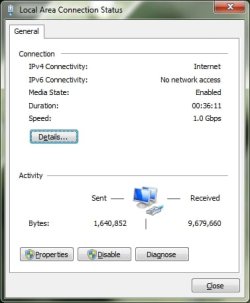
When I look at the 'Local Area Conn Status' window it shows speed as 100Mbps. Also, the switch (Netgear) is showing 100Mbps with its LEDs. Yes, the same switch and other Win7 and Vista computers are all on the same network and are working at gigabit speed.
 

My Computer My Computer

At a glance

win7
OS
win7
Some suggestions:


  • Try a different port on the switch
  • Try a different cable (Cat 5e...not Cat 5)
  • Open the Local Area Connection dialog, click on the "Properties" button, click on the "Configure" button for your adapter, select the "Advanced" tab, and check the "Speed & Duplex" option. Make sure that it is set to "Auto Negotiation"

BTW, this is where I usually check for proper speed (as the OP also references):
 

Attachments

  • Untitled.jpg
    Untitled.jpg
    19.5 KB · Views: 119

My Computer My Computer

At a glance

Win 7 Pro 64 BitQ66004GB8800GT
Computer Manufacturer/Model Number
Shuttle (SFF) / SP35P2 Pro
OS
Win 7 Pro 64 Bit
CPU
Q6600
Motherboard
Shuttle
Memory
4GB
Graphics Card(s)
8800GT
Sound Card
On Board
Monitor(s) Displays
Samsung 22"
Screen Resolution
1680x1050
Hard Drives
WD 640 Boot
WD 640 Data
WD 500 external backup
PSU
Shuttle 450 Watt
Case
Shuttle
Cooling
Fans...lots of them
Keyboard
Creative Fatal1ty
Mouse
Logitech MX518
Internet Speed
Wicked Fast
Other Info
Capricorn
My abit system does the same with the newest driver. If I stick with the issued driver from the box it works properly.
 

My Computer My Computer

At a glance

7264x64/7260x86
OS
7264x64/7260x86
One time we had this issue. Solved it but getting the lastest and correct driver for the card (vendor site).
 

My Computer My Computer

At a glance

Windows 7 Ultimate 64BitGenuineIntel Intel(R) Core(TM) DuoCore T2400 ...2.00 GBMobile Intel(R) 945 Express Chipset
Computer Manufacturer/Model Number
Lenovo ThinkPad T60
OS
Windows 7 Ultimate 64Bit
CPU
GenuineIntel Intel(R) Core(TM) DuoCore T2400 @ 1.83GHz
Motherboard
Intel(R) 82801G (ICH7 Family)
Memory
2.00 GB
Graphics Card(s)
Mobile Intel(R) 945 Express Chipset
Sound Card
SoundMAX Integrated Digital HD Audio
Monitor(s) Displays
ThinkPad Display
Screen Resolution
1400x1050
Hard Drives
100Gb SATA
Keyboard
Standard Keyboard
Mouse
HID-compliant Mouse
Internet Speed
Cable Broadband - 54Mbps
Other Info
Intel(R) PRO/1000 PL Network Connection
11a/b/g Wireless LAN Mini PCI Express Adapter
The cables are all 5e. I tried different ports on the switch and check that config is auto negotiate, which it was. I tried to install the original driver, but they do not work with Win7. So, the options are the windows driver or the latest Marvell driver, neither of which seem to provide gigabit speed. The windows driver was installed during installation and then I upgraded to the Marvell.

Not sure what else to try?
 

My Computer My Computer

At a glance

win7
OS
win7
Any other suggestions?
 

My Computer My Computer

At a glance

win7
OS
win7
What kind of switch is it? Is it manageable? If so nail down that port to Gig and see what happens.
 

My Computer My Computer

At a glance

Windows 7
OS
Windows 7
Not manageable. It is a Netgear 8-port desktop switch, GS108v3. Just a inexpensive basic switch. Unforturnately, I don't have another giga-switch or nic to try. I might have to get one, or both to solve this issue. The switch is new and is working at giga speeds with other computers, so I don't think it is the problem. So, maybe I will buy a new nic and try it out. I can't think of anything else to try?
 

My Computer My Computer

At a glance

win7
OS
win7
Got it!!!!!!!!!!

Bad cable. Bingo, 1.0Gbps.

Thanks for input.
 

My Computer My Computer

At a glance

win7
OS
win7
Back
Top